Earth Camera Online
- 668.00
- 3.1
- Installs
- 10.00M
- Price
- Free
Screenshots

Analysis by Reviewed
I tend to open a world-viewing app for a simple reason: I want a quick sense of a place without planning a trip or searching through a stack of videos. Earth Camera Online is aimed at that casual curiosity. It sits in the maps and navigation space, but its appeal is less about getting me from one street to another and more about looking outward at scenes around the globe. The idea is inviting; the useful question is whether the experience fits the way you like to explore.
From a quick curiosity to a place to watch
A realistic use is checking a city you hope to visit while you are having breakfast, or taking a few minutes to see what the weather and street activity look like somewhere you have family. I would treat a camera view as a visual window, not as a dependable travel update: a feed can give you atmosphere, but it does not replace directions, local advice, or a forecast. That distinction matters if you are deciding whether to head out or trying to coordinate a real journey.
The app is free to install and is developed by Easy Language Translator. It has reached over 10 million installs, with an average rating of 3.1 from around 27,000 ratings and 668 written reviews. Those figures suggest a widely tried app with mixed reactions, so I would go in with modest expectations rather than assume every camera will be available or equally useful. It is rated for Everyone, and the current version is 5.0.9.0, which requires Android 8.0 or later.
How I would use it in an everyday routine
I would start with a specific question, such as “What does this waterfront look like right now?” and then browse or search for a relevant place. If I found a view worth keeping, I could take a snapshot for later; if I had no destination in mind, the random-camera option offers a low-effort way to stumble into somewhere unfamiliar. That small choice between purposeful browsing and chance discovery is a useful way to make a short session feel less aimless.
There is also a practical handoff to keep in mind: a camera view can inspire a destination, but the next step should be a dedicated navigation app for routes, arrival times, and turn-by-turn directions. I would not rely on a live camera as proof that a road, attraction, or public space is open. For trip planning, the strongest use is getting a visual impression before switching to a map or an official local source to make decisions.
Explore the World One Camera at a Time
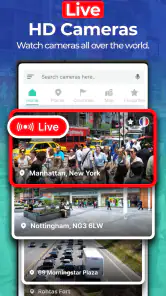
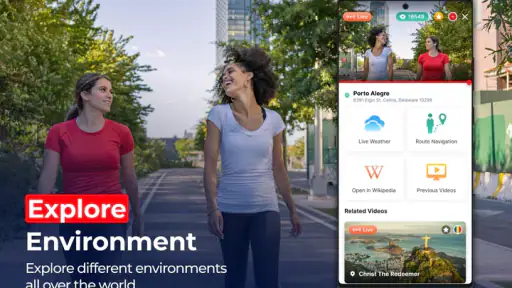
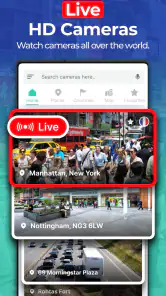
With Earth Camera Online, the journey begins with just a tap. The app packs a plethora of live feeds from cameras set up in diverse locations worldwide. From the bustling streets of New York City to the serene landscapes of the Swiss Alps, there's a feed for every mood and curiosity. What I find particularly fascinating is the ability to watch local life unfold in real-time, offering an authentic experience that's both educational and entertaining.
Features that Keep You Hooked
Beyond the mesmerizing live streams, the app boasts a user-friendly interface that makes navigation a breeze. You can easily search for specific locations or browse through categories such as nature, urban, or events. One of the standout features is the app’s ability to offer high-definition streams, ensuring that every detail is as crisp as if you were there in person. Plus, the interactive map feature allows you to pinpoint and access camera feeds from virtually anywhere on the globe.
More From Our News Desk

Weather by Xiaomi Review: Clear at a Glance, Less Clear Up Close

X Under Pressure: Can It Recover When Posting Goes Wrong?

Clash of Clans Is Won Between the Battles

Android Auto Makes the Case for Quieter Car Software

MobiOffice: Transforming Mobile Productivity with Seamless Integration

EA SPORTS FC™ Mobile Soccer: Redefining Mobile Sports Gaming
For a better result, I would use search when I have a particular place in mind and browse categories when I want a broader mood or scene. The map can help connect a camera to its location, but I would still check the place name carefully before treating a view as representative of a whole neighborhood. A fixed camera shows one angle, often a small slice of public life; it cannot tell you what conditions are like a few blocks away. That makes it more useful for curiosity and context than for making a high-stakes decision.
If you're a fan of capturing moments, the app lets you take snapshots of the live feeds, which is perfect for sharing those breathtaking views with friends or keeping them as digital souvenirs. And for those who love a bit of mystery, the random camera option is a fun way to explore unexpected places you might never have thought to visit.
Choosing a camera with a purpose
For a more useful session, I would decide what I want from the view before opening the app: a landmark to recognize, a sense of a distant place, or simply a few minutes of visual wandering. That choice helps me judge what counts as a good result. A landmark view can help me orient myself to a destination, while an unplanned camera is better treated like a tiny travel detour than a research tool.
When I am comparing two possible places to visit, I would not try to make the cameras answer a question they cannot answer. A single angle may show whether a plaza feels open and busy at that moment, but it cannot establish how crowded the rest of the area is or whether conditions will stay the same. I find the app more valuable as a prompt for follow-up research: it can help me notice a setting I would like to learn about, then I can check a conventional map and local sources for details.
There is a small but helpful distinction between browsing by category and using the map. Categories suit a mood-led session: I can look for city scenes or nature without already knowing a specific destination. The map is more useful once I have a place in mind and want to connect a camera to its location. Switching between the two approaches is more productive than repeatedly opening random feeds when I am trying to find one particular view.
Where the experience can fall short
One non-obvious trade-off is that a snapshot preserves a moment, not the context around it. If you save a view to remember a location, I would note the place name alongside it, since an image alone may not help you identify the camera later. Random discovery has the opposite trade-off: it is entertaining, but less efficient when you have a specific destination to research. Picking the right route through the app can save time and make the viewing session more satisfying.
Compared with a conventional navigation app, this is for looking rather than getting somewhere. Compared with searching for travel videos, the appeal is immediacy: a live camera can show a scene as it is being broadcast, while recorded clips are easier to browse for a polished overview. Neither approach guarantees a complete picture, so I would use this app for a quick visual check or a relaxed virtual wander, not as my sole source for travel decisions.
While the app is a fantastic tool for virtual exploration, it's worth mentioning that not all cameras offer 24/7 streaming. Some feeds might be offline due to time zone differences or technical issues, which can be a bit of a bummer if you had your heart set on viewing a particular scene. However, with the vast selection available, there’s always something new to discover.
A practical handoff from viewing to planning
Imagine I am planning a first visit to a waterfront district and want to make the area feel less unfamiliar before I go. I could search for a nearby camera over breakfast, look at the place label, and take a snapshot if the view gives me a useful visual reference. From there, I would switch to my regular map app to locate the exact meeting point and work out how to get there. The camera contributes atmosphere; the map contributes the actionable route.
If I am sharing plans with someone else, I would send the confirmed location from the navigation app rather than assume a camera image is enough to identify the spot. A camera could be pointed toward a landmark but not show the entrance or the side of the street where we need to meet. That extra check is a little friction, but it prevents a visually interesting feed from being mistaken for precise directions.
For someone deciding whether the app deserves space on their phone, I would test it against a few places they already care about rather than browse indefinitely. Search for a familiar destination, try a category for a broader view, and see whether the available cameras actually answer the questions that prompted the download. If the experience is mainly enjoyable as a spontaneous window onto somewhere else, that is a perfectly reasonable use; if the goal is dependable trip preparation, the test may show that a map or guide is the better everyday tool.
For example, before meeting a friend in an unfamiliar area, I might check a nearby camera for a general sense of the surroundings, then send the location to them through the map app we already use. I would still confirm the meeting point in that navigation app rather than assume the camera angle covers the entrance or the exact street corner. This two-step workflow is where the app makes sense: it helps me picture a place, while a dedicated map handles the practical handoff.
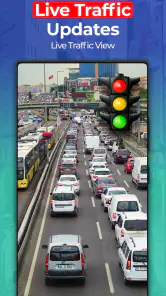
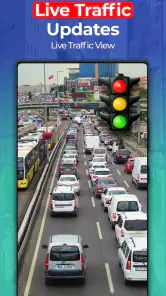
It is a better fit for curious viewers, armchair travelers, and people who enjoy checking in on distant places for a few minutes. I would skip it if I needed reliable live traffic, precise directions, or guaranteed access to a particular camera at a set time. A standard navigation tool is the better choice for those jobs, while a recorded travel guide may suit someone who wants a planned, narrated overview instead of an unpredictable live view.
Additionally, while most of the app’s features are free, there are premium options available for those who wish to enhance their experience with ad-free streams and additional camera access. It's a small price to pay for such a rich tapestry of global views, but totally optional for the casual user.
The app is free, though in-app purchases range from $9.99 to $39.99 per item, so I would explore the free experience first and consider paying only if the available extra access solves a specific need. That is especially sensible given the uneven availability of individual feeds: paying makes less sense if the camera you care about is not consistently online. If you are deciding whether to keep it, try a few searches for places you genuinely want to see before committing to a purchase.
Who will get the most from it
I would recommend trying it if you enjoy the small pleasure of looking in on a distant place without turning that moment into a full research project. It can suit a curious traveler choosing what to read about next, someone who likes checking familiar cities from afar, or anyone who finds a brief live view more engaging than scrolling through edited clips. The payoff is modest but distinctive: a scene can feel immediate, even when it is only one fixed camera’s view.
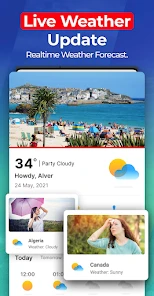
It is less suitable for users who need a dependable answer at a particular time. If a camera is offline, pointed elsewhere, or simply not close enough to the place that matters, another search may not solve the problem. In that situation I would use a map for location and transport details, a forecast for weather, and local information for opening or access decisions. This app can complement those tools, but it should not be asked to replace them.
One question I would ask before paying is whether the extra access applies to the kinds of locations I actually want to see. I would first try the free viewing and search flow, then consider an in-app purchase only if I encounter a clear limit that matters to me. The listed purchases span from $9.99 to $39.99 per item, which makes a casual trial the sensible first step rather than treating an upgrade as necessary to understand the app.
Another practical question is what to do when a feed does not load. I would try a different camera or return later instead of repeatedly treating one unavailable view as representative of the whole service. The app works best when I keep a backup destination in mind; that simple habit turns a dead end into a chance to discover another place, though it does not make a specific camera dependable.
In summary, Earth Camera Online is a captivating app that offers a unique window to the world. Whether you're looking to explore new places, indulge in a bit of escapism, or simply enjoy watching life from a different perspective, this app delivers on all fronts. So why not give it a try and see where in the world it takes you today?
My recommendation is more measured: I would keep it as a lightweight companion for visual discovery, not as my main map or a source of guaranteed, up-to-date local conditions. Its best moments come when I arrive with curiosity, accept that some feeds may not cooperate, and use another tool for anything that needs to be accurate. If that is the kind of small, spontaneous window onto the world you want, it is worth trying without expecting it to replace the practical apps already on your phone.
Earth Camera Online Frequently Asked Questions
What does Earth Camera Online offer for navigation and exploration?
Earth Camera Online is an app in the Maps & Navigation category, with a focus on GPS navigation and Earth camera views. Its short description is “Earth Camera,” while the store summary describes GPS Earth Map as being used for GPS Navigation and Live Street View. That makes it worth considering if you want a map-oriented app with camera-view features.
Who develops Earth Camera Online, and what is its age rating?
Earth Camera Online is developed by Easy Language Translator and is rated Everyone. That rating makes it suitable for a broad audience, including people looking for a general-purpose Maps & Navigation app. As with any app, it is sensible to review the permissions and choices shown during installation and use, particularly if you are setting it up for someone else.
Is Earth Camera Online free to download, and what should I know about optional purchases?
Earth Camera Online is free to download, so you can try its Maps & Navigation features without paying upfront. The app also offers in-app purchases, with items priced from $9.99 to $39.99. If you are considering any optional purchase, review its details in the app before confirming so you understand what it includes and whether it suits your needs.
What Android version does Earth Camera Online require?
On Android, Earth Camera Online requires Android 8.0 or later. Checking your device’s operating system before downloading can help you avoid compatibility problems and make it easier to decide whether the app is suitable for your phone or tablet. The app is categorized under Maps & Navigation and is intended for users interested in GPS navigation and Earth camera views.
What is Earth Camera Online and how does it work?
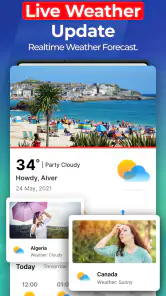
Earth Camera Online is a unique application that allows users to view live camera feeds from around the world. By leveraging publicly accessible cameras, the app provides real-time footage from various locations, including famous landmarks and bustling cityscapes. Users can explore different regions, enjoy scenic views, and even check weather conditions in real-time, all from the comfort of their devices.
Pros
- High-quality live streams
- Wide global coverage
- User-friendly interface
- Regular updates
- No ads in premium
Cons
- Limited free access
- Occasional streaming lags
- Requires strong internet
- Subscription needed for HD
- Some cameras are offline
- Category
- Maps & Navigation
- Version
- 5.0.9.0











