DMSS
- 3.06K
- 4.3
- Installs
- 10.00M
- Price
- Free

Screenshots
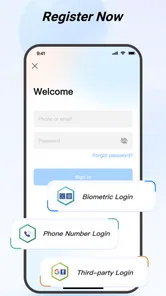
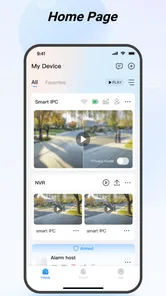
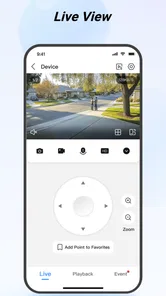
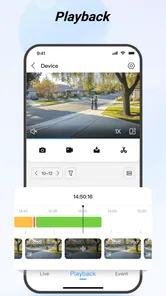
Analysis by Reviewed
Managing cameras from several separate apps can make a simple check feel like a chore. DMSS is designed to bring individual security into one mobile experience, and its biggest appeal to me is how quickly it puts monitoring tasks within reach. That convenience depends on having compatible equipment and a working connection, though, so I’d think of it as a practical companion to a security setup rather than a replacement for one.
When a connection is part of the job
Live viewing, alerts and reviewing recorded footage all involve moving between the app and your security system, so network quality shapes how useful the experience feels. A strong connection makes it easier to check a camera promptly; a weak one can make a live view slower or less dependable at the moment you want it. I wouldn’t treat a phone notification as a guarantee that every event will arrive instantly.
That’s worth considering before relying on remote monitoring as your only way to stay informed. If you’re choosing a setup, think about where the cameras will be installed and whether your home connection reaches those areas reliably. The app can make camera access more convenient, but it can’t solve a network problem at the camera or phone end.
A useful habit is to test the route you’ll actually use, not just the camera beside your router. Check from the room where the equipment will sit and from the places you expect to use your phone. That quick rehearsal can reveal whether the weak link is the camera’s connection, your home network, or reception where you’re standing. It also helps set realistic expectations before you depend on a remote check during a busy moment.
A quick check while you’re away
DMSS makes the most sense for someone who already uses supported security equipment and wants a straightforward way to check in from a phone. A realistic routine might be glancing at the entrance while you’re away, then looking back at footage if an alert gives you a reason to investigate. That’s more useful than repeatedly opening a live view without a specific question in mind.
On mobile data, I’d keep checks purposeful, especially when watching video for longer. Image quality and responsiveness can vary with the connection, and streaming uses data; a short look may be all you need to decide whether to keep watching. At home, using a reliable Wi-Fi connection is a sensible choice for longer viewing or reviewing several moments.
For instance, if I’m on the way home and get a notification, I’d first open the relevant camera for a brief look rather than leave a stream running in the background. If the scene is ordinary, I can close it; if something needs a closer look, I can spend the extra time then. This small change makes remote viewing feel more like a deliberate check than a habit of keeping video open, which is easier on both attention and mobile data.
More From Our News Desk

Weather by Xiaomi Review: Clear at a Glance, Less Clear Up Close

X Under Pressure: Can It Recover When Posting Goes Wrong?

Clash of Clans Is Won Between the Battles

Android Auto Makes the Case for Quieter Car Software

MobiOffice: Transforming Mobile Productivity with Seamless Integration

EA SPORTS FC™ Mobile Soccer: Redefining Mobile Sports Gaming
How it fits among security options
Compared with a camera maker’s single-device app, a dedicated monitoring app can be a better fit when you want a central place to check a security setup. Compared with a general smart-home app, DMSS is more specifically aimed at camera monitoring and related security tasks. That focus is useful if camera access is your priority, but it is not a reason to expect it to manage every connected device in your home.
If you only need occasional viewing from one camera, the simplest app bundled with that camera may be enough. I’d also look elsewhere if your main goal is broad smart-home control rather than security monitoring. Before committing to a workflow, confirm that your equipment works with the app and try the tasks you expect to use most, such as opening a live view and finding a relevant recording.
There’s also a practical difference between choosing a central monitoring app and choosing a complete security service. DMSS is the phone-side place to access a compatible setup; the usefulness of that access still depends on the cameras, recording arrangement and network behind it. If you want a provider to handle installation, monitoring response and support as one package, comparing service options may matter more than comparing app screens.
For a household with several people checking the same cameras, I’d think about the routine before deciding that one shared phone is enough. A clear agreement about who checks alerts and who responds can prevent duplicate checks or crossed assumptions. The app can make access convenient, but it doesn’t decide what an alert means or who should act on it.
First Impressions
When I first downloaded DMSS, I wasn’t expecting much more than the basic features. But, boy, was I in for a surprise! The app is available for both Android and iOS, so that’s already a plus for all of us juggling different devices. It’s like finding out your favorite dessert has zero calories. Sweet! Installing it was a breeze, and I was up and running in no time.
Features That Stand Out
One of the first things I noticed was the app's user-friendly interface. It’s clean, intuitive, and doesn’t overwhelm you with too many buttons or options. That’s a huge win for someone like me who isn’t exactly a tech wizard. You know those apps where you spend more time figuring them out than actually using them? Yeah, this isn’t one of them.
Another feature that caught my eye was the live streaming capability. I could view all my security cameras in real-time with minimal lag. It’s like having a personal security team right in your pocket. And, for those moments when you need a closer look, the zoom function doesn’t disappoint. It’s crisp, clear, and definitely handy.
My practical tip is to decide in advance which views answer the questions you actually care about. An entrance camera and a view of a delivery area may serve different purposes, and switching between them with a reason is easier than scanning every feed. When something looks unclear, zoom can help inspect a detail, but it can’t create detail that the camera image or connection didn’t capture in the first place.
Notifications and Alerts
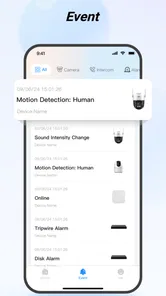
Let's talk notifications. The motion detection alerts are super helpful. I got notified instantly whenever there was any activity around my home. This part of the app works like a charm and gives you peace of mind, knowing you’re always in the loop, even when you’re miles away. Plus, you can customize the sensitivity of these alerts, so you’re not waking up at 3 AM because a leaf blew across your yard.
Alerts are most useful when they prompt a sensible next step, not when they turn the phone into a running commentary on every movement. If a camera faces an area with regular passers-by, I’d review how often it draws attention before deciding whether the notification routine is helping. That’s a personal trade-off: more sensitivity may catch more motion, while fewer interruptions can make the alerts that do arrive easier to notice.
I’d also treat an alert as a reason to look, rather than proof of a particular event. A quick live check can add context, and playback can help when the moment has already passed. That two-step approach is more grounded than assuming the notification explains exactly what happened.
Playback and Recording
One of the features that I found especially useful was the playback and recording function. You can easily scroll through recorded footage, which is perfect for those times when you need to review what happened at a specific time. It’s like having a rewind button for life’s little mysteries!
And, if you’re worried about storage, you don’t have to be. The app supports cloud storage options, which is a lifesaver for those of us who have way too many apps and not enough space.
When I’m looking for a particular moment, I’d narrow the search to the approximate time first, then check the relevant camera instead of browsing every view. Keeping a rough note of when an alert arrived can make that search less frustrating. It’s a simple workflow, but it matters when you’re trying to answer a specific question rather than watch a long stretch of footage.
Cloud storage can make access more convenient, but it is worth understanding the arrangement you choose: where the footage is kept, how you reach it, and what happens if connectivity is poor. I wouldn’t assume that a phone app alone determines how long recordings remain available. For an important clip, checking that it can be found and played when you need it is a better safeguard than discovering the limits of the setup later.
Alerts, footage and everyday trade-offs
For a calmer notification routine, I’d tune motion sensitivity around the camera’s actual view rather than simply turning alerts down everywhere. A busy walkway may create more interruptions than a quiet side entrance, so adjusting each camera to its surroundings can make alerts more useful. The trade-off is that reducing sensitivity too far may mean missing activity you hoped to notice.
When checking playback, I find it helps to start with a time window and a clear question: was someone at the door, or did a motion alert correspond to anything visible? That keeps reviewing footage focused instead of turning into a long search. If the recording is important, I’d also make sure I understand how my chosen storage arrangement works rather than assuming the app itself keeps every clip indefinitely.
Cloud storage can be convenient when phone space is tight, but it shifts the question from local capacity to the service and connection involved. For important coverage, I’d weigh convenience against the recurring dependence on access to that storage and the network needed to reach it. I wouldn’t base a security plan on a single viewing method; the camera system and its recording arrangement matter just as much as the phone interface.
What happens when access is unreliable
If a live view stalls or an alert seems delayed, I’d first check whether the phone has a stable connection, then try again before treating the camera as unavailable. It’s a simple distinction, but useful: a problem reaching the app is not automatically evidence that the camera has stopped working. If the issue continues, checking the camera’s own connection and the wider setup is more productive than repeatedly tapping refresh.
When the connection comes back, I’d verify the particular thing I needed to know rather than assuming a failed attempt resolved itself. If a live view was the goal, reopen it; if I was investigating an alert, look for the relevant recording as well. Recovery is less about pressing the same control repeatedly and more about separating a temporary access problem from a camera or recording issue.
This is also why I wouldn’t use a remote view as the only response in a time-sensitive situation. A phone is convenient when it works, but reception, home connectivity and the camera’s own connection are all part of the chain. For anything that calls for immediate action, a person nearby or another appropriate response is a better backup than waiting on a video stream.
Who will get the most from it
The app is a stronger fit for people who want camera monitoring on their phone, value motion alerts, and are comfortable depending on their network for remote checks. It is less compelling if you don’t have compatible security equipment, rarely need to view cameras, or want one app to control a broad collection of unrelated smart-home products. I’d settle that compatibility question before spending time building a routine around it.
It is especially practical for someone who travels, checks an entrance between errands, or wants to review a motion alert without being physically near the equipment. Someone who mainly wants a general-purpose home dashboard may prefer a broader smart-home app, while a person with one camera and occasional viewing needs may be perfectly happy with the camera’s own basic app. The right choice depends less on how many options an app appears to offer and more on which routine it makes simpler.
DMSS is a free lifestyle app from Hangzhou CE-soft Technology Co., Ltd. It has a 4.4 average from around 388,000 ratings, with more than 10 million installs, and its age rating is Everyone. Version 2.3.2 is listed for devices running Android 7.0 or later. Those figures suggest that it has reached a sizeable audience, but my decision would still come down to whether it works with my equipment and suits the way I actually monitor my home.
Before making it part of a daily routine, I’d test a few ordinary tasks: open the camera I use most, check whether a motion alert leads to useful context, and find a recording from a known time. That trial answers the questions that matter more than a quick first launch. If those steps feel clear and the connection behaves well in the places I use the phone, the app is much easier to trust as a convenient viewing tool.
Final Thoughts
In a nutshell, DMSS is that friend who simplifies your life without asking for much in return. It’s reliable, efficient, and just makes managing home security a lot less of a hassle. So, if you’re looking for an app that won’t let you down when it comes to keeping an eye on things, give DMSS a whirl. Trust me, you won’t regret it!
For me, the deciding question is whether mobile access removes friction from an existing camera setup. If checking a view or tracing an alert is something you genuinely do, having those tasks on your phone can be worthwhile. If the cameras rarely need attention, or you expect the app to replace dependable connectivity and a sound recording plan, it is probably not the right answer on its own.
So, what are you waiting for? Go check it out and let me know how it changes your security game!
DMSS Frequently Asked Questions
Can I view my security cameras remotely with DMSS?
DMSS is designed for remote security monitoring from a mobile device, so you can use it to view live video streams from compatible cameras. You can also access recorded video and manage alarms through the app. To use these features, you need compatible security equipment and a working setup; DMSS is the mobile interface for monitoring, not a replacement for the cameras themselves.
Does DMSS support live viewing and recorded video playback?
Yes. DMSS supports live video viewing and playback of recorded footage from compatible security devices. It also includes alarm management and PTZ controls, which let users adjust supported pan, tilt, and zoom functions. The features available in practice depend on the connected equipment and its compatibility, so it is worth checking that your camera setup supports the functions you want to use.
Can DMSS send notifications about security events?
DMSS supports customizable notifications as part of its security management features, allowing users to tailor alerts to their monitoring needs. It can also be used to manage alarms and check camera footage. For notifications to be useful, the relevant connected security equipment must support the events you want to follow, and you will need to configure the app and device settings to suit your setup.
Can I use DMSS without owning compatible security equipment?
DMSS is intended to work with compatible security devices, including cameras, rather than operate as a standalone camera or general video app. Without suitable equipment connected and configured, its main functions—such as live monitoring, recording playback, and alarm management—will not have a security system to access. If you are considering the app, first make sure you have equipment that works with it.
What devices and operating systems can I use DMSS on?
DMSS is a mobile app for Android and iOS, intended for viewing and managing compatible security devices from a phone or tablet. On Android, it requires version 7.0 or later. Before installing, check that your device runs a supported operating system and has enough room for the app. The app is free to download and is rated for Everyone.
Pros
- User-friendly interface enhances navigation.
- High-quality video streaming support.
- Customizable notifications for alerts.
- Supports multiple camera brands.
- Secure remote access to devices.
Cons
- Occasional connectivity issues reported.
- Limited customer support availability.
- In-app purchases for advanced features.
- Complex setup for non-tech users.
- Battery drainage on prolonged use.











