Diary with Fingerprint Lock
- 2.05K
- 4.7
- Installs
- 5.00M
- Price
- Free

Screenshots
Analysis by Reviewed
I find a locked diary most useful when it makes writing feel easy without making privacy an afterthought. Diary with Fingerprint Lock is a lifestyle app from Outthinking Pvt Ltd for keeping personal notes behind a fingerprint lock. It is free to install, rated for Everyone, and has a 4.7 average from around 44,000 ratings, so it has clearly found an audience among people who want a private place to write. I’d consider it for everyday reflection, but I would first check that its lock and recovery options fit how I actually use a phone.
Where setup and access can trip you up
A fingerprint lock sounds effortless, but it depends on the phone’s own fingerprint setup and on being able to authenticate when you open the diary. If access suddenly feels unreliable, I would first check whether the phone can read the same registered fingerprint in other apps or at the device lock screen. That helps separate a diary issue from a smudged sensor, a changed finger, or a phone-level authentication problem.
I also wouldn’t treat biometric access as a substitute for thinking about recovery. Before writing anything I would be upset to lose, I’d look through the app’s available security and backup settings and make sure I understand how I can get back in if fingerprint recognition fails. This is a useful habit for any locked journal: test the ordinary way in, then understand the fallback before relying on it.
A calmer writing routine
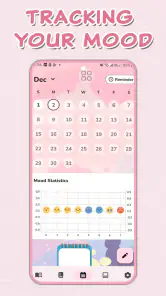
For a practical routine, I’d keep entries short and tied to a moment: a note after a difficult conversation, a few lines before bed, or a plan I want to revisit later. Photos can help preserve context, while the mood tracker can make a quick check-in more useful than a vague “good” or “bad.” I’d use reminders as gentle prompts rather than a daily obligation; if I miss a day, the journal should still feel welcoming, not like another streak to maintain.
One small workflow choice makes a difference: write the main thought first, then add a photo or mood detail only when it genuinely helps. That keeps a quick entry quick. If I’m documenting something sensitive, I’d also avoid assuming that a fingerprint lock automatically means every copy or backup has identical privacy protections. I’d review the backup destination and settings before syncing personal material.
Making entries useful later
I’d give entries a little context that will still make sense weeks later. Instead of writing only “rough day,” I might add what made it difficult and one thing I want to remember about how I handled it. That turns a diary from a stream of feelings into something I can revisit without needing to reconstruct the whole day. Photos are best when they answer a question—where I was, what I saw, or what I was celebrating—rather than becoming decoration in every entry.
The mood tracker can also be more useful as a pattern-finding aid than as a verdict on a single day. I would choose a mood honestly and avoid changing it just to make the record look consistent. If I later look back, the value is in seeing recurring links between events and feelings, not in treating a label as a diagnosis. For that reason, I’d keep the written note as the main record and use mood details as supporting context.
More From Our News Desk

Clash of Clans Is Won Between the Battles

Android Auto Makes the Case for Quieter Car Software

MobiOffice: Transforming Mobile Productivity with Seamless Integration

EA SPORTS FC™ Mobile Soccer: Redefining Mobile Sports Gaming

How Microsoft OneDrive Became a Mobile Productivity Giant

How Google Translate Breaks Language Barriers Effortlessly
When another kind of journal fits better
Compared with a notes app, a dedicated diary gives the act of journaling a clearer home and makes the lock central to the experience. Compared with a paper notebook, it is easier to carry and can combine text with photos and mood check-ins, though paper does not depend on a phone battery or fingerprint sensor. For someone who wants a structured, private-feeling daily habit, those differences may be worthwhile.
It is less suited to someone who needs a fully searchable research archive, detailed project management, or a journal that must move seamlessly across several platforms. In those cases, a general notes service or a cross-platform writing tool may be a better match. The app is free, with optional in-app purchases priced from $2.99 to $9.99 per item, so I’d also check which options matter to me before paying for anything.
A realistic day with a pocket diary
Imagine getting home after a tense meeting and wanting to remember what was said before the details blur. I’d open the diary, write a few sentences while the memory is fresh, and add a mood check-in only if it helps explain my reaction. If there is a photo that genuinely anchors the moment, I can include it; otherwise, a short text entry is enough. Later, a reminder might nudge me to write, but I would not force a journal session when I have nothing useful to record.
That kind of use suits someone who values a private-feeling place for personal reflection but does not need a sophisticated writing system. It also shows why I would keep the app’s role modest: it can help capture thoughts, but it cannot decide what is worth remembering or replace professional support when someone needs it. For younger users, the Everyone age rating is reassuring as a content classification, while personal-device privacy still depends on sensible habits and the phone’s own security.
Keeping Secrets Safe
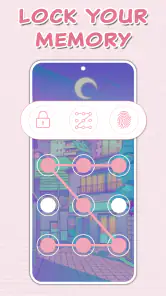
In today’s age, privacy is a big deal, and Diary with Fingerprint Lock takes this to heart. The app’s standout feature is its biometric security. Say goodbye to the days of forgetting your password or someone sneaking a peek at your diary. With fingerprint authentication, your private thoughts are for your eyes only. It’s as easy as a simple tap, and voilà, you’re in!
User-Friendly Interface
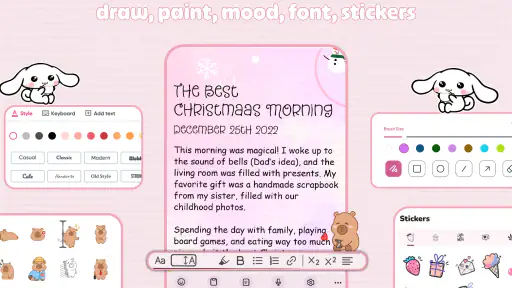
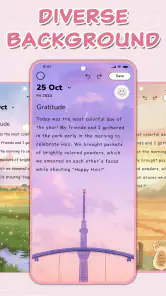
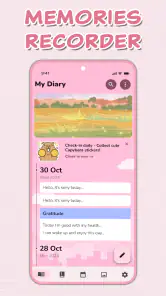
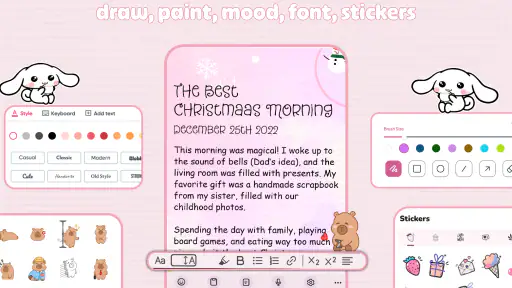
One of the things I love about this app is its intuitive design. From the moment you open it, everything just makes sense. The layout is clean, and navigation is smooth, making it easy even for those who aren’t tech-savvy. Adding new entries is a breeze, and you can customize your diary with different themes and colors to suit your mood. It’s like having a personal sanctuary right in your pocket.
Features to Fall in Love With
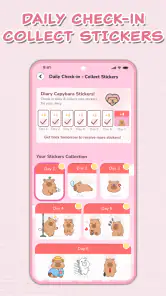
Besides the robust security, the app offers a plethora of features that enhance your journaling experience. You can add photos to your entries, making it more than just text on a screen. There’s also a mood tracker that lets you document how you’re feeling each day, which can be incredibly helpful for self-reflection. Not to mention, you can set reminders to ensure you never miss a day of journaling.
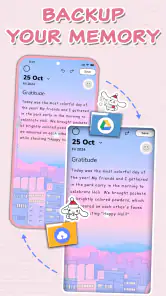
And let’s not forget about the backup options. You can sync your diary with Google Drive, ensuring that your entries are safe even if you switch devices. This kind of flexibility is something I really appreciate in a digital diary.
What to check before relying on it
If an entry seems missing after changing phones or adjusting backup settings, I’d avoid reinstalling or deleting anything in a hurry. First, check that I’m using the same Google account associated with the diary’s Drive sync, then look at the app’s backup controls and the phone’s network connection. That sequence is more useful than assuming the writing itself has vanished, and it reduces the chance of making a recoverable situation harder to sort out.
The app is currently at version 7.7 and supports Android 8.0 or later. Its 5 million-plus installs suggest it is widely used, but I’d still test my own setup with a harmless sample entry before trusting it with a long history. Add a note, confirm the lock works as expected, and check how the backup behaves on your device. A small trial can reveal whether the routine feels comfortable before the diary becomes important.
When a problem may be elsewhere
Not every interruption points to a fault in the diary. If fingerprint access fails across the phone, I’d look at the sensor and device-level authentication first. If a backup does not appear, I’d check the chosen Google account and connection before repeatedly changing settings. These simple checks help avoid turning a temporary access or sync hiccup into a larger recovery problem.
I would also be careful about treating a successful lock screen as proof that every possible copy of an entry is protected in the same way. A lock is a practical barrier to someone casually opening the app; it is not a reason to ignore the phone’s security, account access, or backup choices. For especially sensitive writing, I’d decide what I am comfortable storing digitally before making the diary my only record.
Final Thoughts
In a world where privacy is often compromised, Diary with Fingerprint Lock offers a slice of peace of mind. It’s more than just an app; it’s a trusty companion that keeps your secrets safe and sound. Whether you’re a casual journaler or someone who writes daily, this app is designed to cater to your needs without any fuss.
So, if you’re on the lookout for a secure, user-friendly diary app, I’d highly recommend giving this one a go. It’s a solid blend of functionality and security, wrapped up in a sleek, easy-to-use package. Happy journaling!
Who I’d recommend it to
I’d point this app toward someone who wants a low-friction place to keep personal reflections, appreciates opening a journal with a fingerprint, and likes the option to pair writing with a photo or mood note. It can fit a small evening routine, a record of meaningful moments, or quick notes about a personal goal. The combination of a lock, reminders, and visual context gives those uses a more diary-like feel than a plain text file.
I’d suggest looking elsewhere if your priority is long-form drafting, complex tagging and retrieval, collaborative notes, or moving a writing archive between different platforms. A paper journal may also be the better fit if you prefer keeping sensitive thoughts off a phone, while a general notes tool can be more practical when entries need to connect to work, tasks, and documents. Diary Lock is free to start, but optional purchases range from $2.99 to $9.99 per item, so I’d decide whether the available extras are useful rather than buying on impulse.
A low-risk way to begin
My practical recommendation is to start with a few ordinary entries rather than moving an entire journal into the app at once. Try the fingerprint access in the situations where you normally use your phone, explore the reminder routine, and make a small test of the Google Drive backup before treating it as your only copy. If that process feels clear and reliable on your device, you can gradually make the diary part of your routine.
Outthinking Pvt Ltd has built a focused lifestyle tool, and its 5 million-plus installs show that many people are willing to use it for private writing. I see the appeal, especially for someone who wants a simple, approachable diary rather than a full personal-knowledge system. My main advice is to value the writing features while staying thoughtful about access and recovery: a fingerprint makes entry convenient, but a calm backup habit is what helps make a digital journal dependable over time.
Diary with Fingerprint Lock Frequently Asked Questions
Can I use Diary with Fingerprint Lock without creating an account?
Diary with Fingerprint Lock is designed around personal journaling and a lock, so it may suit users who want a private place to write. Before downloading, consider whether you are comfortable setting up and using the app’s available access protection. The key appeal is having a diary on your device rather than relying on a paper journal, while keeping the writing experience focused on personal entries.
Who develops Diary with Fingerprint Lock, and what kind of app is it?
Diary with Fingerprint Lock is a Lifestyle app developed by Outthinking Pvt Ltd. Its short description is “Diary Lock,” and it is presented as a personal diary with a lock, including a cute journal style and fingerprint protection. That makes it most relevant to people looking for a dedicated journaling app rather than a general notes or productivity tool.
Is Diary with Fingerprint Lock suitable for children and families?
Diary with Fingerprint Lock is a lifestyle app for keeping a personal journal, and its content rating is Everyone. The fingerprint-lock feature may appeal to anyone who wants a private space for writing, while the app’s diary focus makes it straightforward to understand. Families can consider whether its privacy tools and journaling approach suit each person’s needs before installing.
What does Diary with Fingerprint Lock offer, and is it free to download?
Diary with Fingerprint Lock is a personal diary app with a lock, presented as a cute journal with fingerprint protection. It is free to download, so you can try its basic journaling experience without an upfront purchase. The app also offers in-app purchases, which may be relevant if you want to explore paid options while using it.
How secure is the Diary with Fingerprint Lock app?
The Diary with Fingerprint Lock app utilizes biometric authentication to secure your entries, offering a high level of security. Your diary is protected by your unique fingerprint, ensuring that only you have access. Additionally, the app employs advanced encryption methods to safeguard your data from unauthorized access, making it a reliable choice for privacy-conscious users.
Pros
- Secure fingerprint lock for privacy
- Easy-to-use interface
- Customizable themes
- Backup & restore feature
- No ads in premium version
Cons
- Fingerprint lock may fail sometimes
- Limited free version features
- Occasional sync issues
- No cloud storage option
- Minor bugs in older devices

- Category
- Lifestyle
- Version
- 7.7