Design Space: DIY with Cricut
- 25.68K
- 3.9
- Installs
- 5.00M
- Price
- Free

Screenshots

Analysis by Reviewed
I find the most useful thing about Design Space: DIY with Cricut is how it connects a digital design to the practical work of making something with a Cricut machine. The app is not trying to be a do-everything art studio; its value is in helping you prepare a project for a physical craft. That distinction matters. If you already have a compatible machine, it gives your ideas a route from screen to material. If you mainly want to draw or edit photos, it is a much narrower tool than you need.
That machine-focused approach also shapes how I would use it day to day. I would treat the app as a project-planning workspace, not just a catalogue of decorations. Before starting, I’d decide what I want to make, choose a suitable design, and check that the result makes sense for the material and the space available. Thinking through those steps early helps avoid the common craft mistake of making a lovely screen design that is awkward to produce in real life.
One workflow, from idea to craft project
The capability that sets the app apart is bringing design preparation and Cricut making into one workflow. I can browse or work on a design, adjust it, and then use that project with a Cricut machine instead of having to invent a separate handoff between unrelated apps. For machine owners, that continuity is more useful than a general-purpose canvas: the point is not simply to make an attractive image, but to get a design ready for a physical result.
It also helps to set expectations about what this focus means. This is a crafting companion for Cricut owners, not a substitute for every creative tool. A drawing app may give you more freedom for detailed illustration, while a photo editor is better for retouching pictures. Design Space makes most sense when the next step after planning is to create something with a Cricut machine.
Getting Started with a Bang
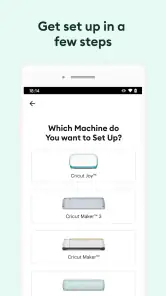
From the moment you open Design Space: DIY with Cricut, you’re greeted with a user-friendly interface that makes navigating through the app a breeze. You don’t have to be tech-savvy to get started. The app walks you through the setup process, ensuring even the least tech-inclined users can set up their new Cricut machine with ease. One of the first things I noticed was how intuitive the design was, making it easy to jump right into my first project.
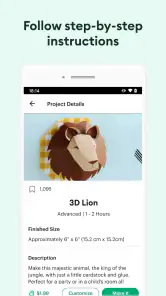
For a first project, I’d start with a simple design and a small amount of material rather than trying to make a complicated gift straight away. That gives you a chance to check the layout and understand how the design will translate into a physical cut before committing more supplies. I also find it useful to save a project before changing its layout; keeping a dependable version makes experimenting less stressful.
Endless Possibilities
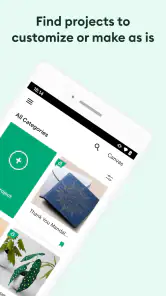
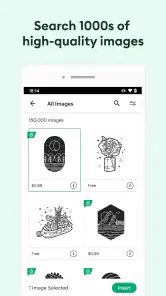
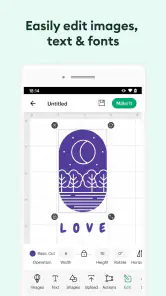
The app offers a vast library of designs, fonts, and images. You can either choose from thousands of pre-made designs or create your own from scratch. The flexibility is unbeatable. I particularly enjoyed the way the app allows you to customize and personalize projects. The ability to upload your own images and tweak them to your heart’s content is a big plus. It’s like having a mini design studio right on your phone or tablet!
More From Our News Desk

Clash of Clans Is Won Between the Battles

Android Auto Makes the Case for Quieter Car Software

MobiOffice: Transforming Mobile Productivity with Seamless Integration

EA SPORTS FC™ Mobile Soccer: Redefining Mobile Sports Gaming

How Microsoft OneDrive Became a Mobile Productivity Giant

How Google Translate Breaks Language Barriers Effortlessly
A practical trade-off is that the design library and the option to bring in your own artwork serve different needs. Ready-made designs can help when you want a quick starting point, while an uploaded image gives you more personal control but may take extra adjustment before it is suitable for a craft project. I would not assume that every image will work perfectly just because it looks clear on a screen; keeping the first test modest can save material and frustration.
Making a design usable in practice
For custom artwork, I would start by asking what needs to survive when the design becomes a physical craft. Very fine details and crowded shapes can be hard to work with, even if they look crisp on a phone. Simplifying an image before committing to the full project is a useful habit: remove details that do not matter to the finished look, and test a small version first. That is not a flaw unique to the app; it is part of translating screen art into a material-based project.
There is a similar choice between speed and control when using prepared designs. A ready-made starting point is handy when a deadline is close, but adjusting it to suit the recipient, material, or available space can make the finished item feel more personal. I would avoid changing several things at once during a first attempt. Altering the size, layout, and artwork together makes it harder to spot which decision caused a disappointing result.
Seamless Integration
One of the standout features of the app is its seamless integration with Cricut machines. The Bluetooth connectivity means you can work from anywhere in your home without being tethered to your machine. Imagine sitting on your couch, sipping your favorite drink, while your Cricut machine brings your design to life in the next room. It’s crafting made easy and convenient!
That freedom is most useful when the machine is set up in a separate work area: I can plan from a more comfortable spot, then move over when it is time to make the project. Bluetooth does not remove the need to be attentive during the physical crafting step, though. I would still stay nearby to check the material and machine rather than treating a connected project as something to leave entirely unattended.
The app also keeps up with your creative journey by saving your projects and designs in the cloud. This means you can start a project on your phone and finish it on your tablet or computer without missing a beat. It’s all about making crafting as flexible and enjoyable as possible.
For a realistic everyday use, imagine preparing a personalized label or a small decoration in the evening, then returning to the saved design when you have time to make it. Cloud saving makes switching devices convenient, but it is still sensible to check that you have opened the intended project before continuing, especially if you have made several versions. That small habit helps prevent a quick edit from becoming an accidental change to a design you wanted to keep.
A practical project routine
For a small home project, I would use a three-step routine: plan the finished object first, prepare the design in the app, and review it once more before sending it to the machine. For example, if I were making a label for a storage box, I’d check the wording, proportions, and placement against the box rather than judging the design only on the phone screen. That quick real-world check can catch a layout that feels too large or too busy before material is involved.
This is also where a phone and a larger screen serve different roles. A phone is convenient for browsing, saving an idea, or making a quick adjustment; a tablet or computer can be more comfortable when I want to inspect a layout carefully. The ability to continue a saved project across devices is useful, but I would still review the final version on whichever device I plan to use for the next step. It is easy to overlook a small change when moving between screens.
Community and Support
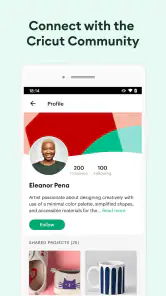
Another aspect worth mentioning is the vibrant community that comes with using the app. There’s a whole network of fellow crafters ready to share tips, tricks, and inspiration. Plus, the app provides a robust help section and tutorials for those times when you might need a little extra guidance. It’s like having a crafting buddy available 24/7!
Compared with the usual alternatives, such as drawing in a general design app and then figuring out a separate route to produce the result, Design Space keeps the Cricut project workflow in one place. That is a real advantage for machine owners who want to turn a design into a craft item without piecing together unrelated tools. If you only want to sketch, edit photos, or make graphics with no plan to use a Cricut machine, a conventional drawing or image-editing app is likely the simpler choice.
Where it fits among creative apps
The comparison is not simply about which app has the most drawing tools. A general design app can be a better place to make complex artwork, but it may leave you with extra steps before you can use that artwork in a Cricut project. Design Space is appealing when you value a direct path from project idea to machine-ready work more than unrestricted illustration. I would use another app for the part it does best, then bring in suitable artwork when that makes sense, rather than expecting one tool to excel at every stage.
That trade-off is especially important for someone who has not bought a Cricut machine. The app’s central workflow is tied to using one, so downloading it alone does not turn a phone into a complete crafting setup. If you are still deciding whether machine-based crafting suits you, I would first consider the kinds of projects you actually want to make and whether you are comfortable with the physical materials and equipment involved. For casual digital creativity, a standard drawing app is a more natural starting point.
Cost, access, and expectations
The app is free to download, and its lifestyle focus suits people who enjoy making personalized items at home. Cricut is the developer, and the app has an average rating of 3.9 from around 83,000 ratings, with more than 5 million installs. It is rated for Everyone and was released on November 16, 2016; version 6.35.0 requires Android 9 or later. In-app purchases range from $0.99 to $399.99 per item, so I would check what a particular design or option costs before building a project around it.
That purchase range is worth keeping in mind if you are trying to make crafts on a tight budget. You can begin by exploring the free app and deciding whether its workflow suits the way you like to create, rather than assuming every design or resource will be included at no cost. I’d also choose a project based on materials I already have, then look at any paid option only if it genuinely adds something I want.
In practice, the free download makes it possible to get a feel for the interface before deciding what resources to use, but it does not mean every project choice is cost-free. I would look at the specific item or option I intend to use before planning around it, then compare that cost with the value it adds to the finished craft. This is a sensible way to avoid discovering late in the process that a design choice does not fit the budget.
Who will get the most from it
I think the app is at its best for people who already own a Cricut machine and like making useful, personal things: labels, small decorations, customized gifts, or other projects where a tailored design matters. It is also a reasonable fit for beginners who want guidance and are willing to learn through modest test projects. The design library gives them a starting point, while the ability to adjust a project leaves room to develop their own style.
It is less suited to someone who wants a purely digital hobby, needs advanced freeform illustration, or expects to make physical crafts without a Cricut machine. It may also frustrate a person who wants every resource to be included at no extra cost. In those cases, a drawing app, photo editor, or a different craft-planning approach will be a better match than trying to bend Design Space into something it is not.
In conclusion, Design Space: DIY with Cricut is an essential tool for anyone looking to explore their creative side. It’s packed with features that make crafting accessible, fun, and highly personalized. Whether you're looking to make a custom t-shirt, a unique home decor piece, or a personalized gift, this app will be your go-to tool. So, what are you waiting for? Dive into the world of DIY crafting and let your creativity soar!
My recommendation depends on what you want from it: if you own a Cricut machine and enjoy making customized gifts, labels, or decorations, the app gives you a useful place to prepare and manage those projects. If you do not have a Cricut machine, or your main goal is freeform digital drawing, I would choose a different tool that matches that need. For a beginner with the right equipment, starting small and checking the design before making it is the easiest way to find out whether this crafting workflow feels right.
Design Space: DIY with Cricut Frequently Asked Questions
Does Design Space work without a Cricut cutting machine?
You can open Design Space and work on designs without connecting a Cricut machine, which is useful for exploring the tools or preparing a project in advance. However, the app is designed to work with Cricut cutting machines, and you will need compatible hardware to cut your design. You may also need project materials and accessories depending on what you plan to make.
What should I check before installing Design Space on my Android phone or tablet?
Check that your device runs Android 9 or later before downloading, and consider whether its screen is comfortable for the kind of design work you want to do. Design Space is also available for iOS and desktop computers, so a phone is not your only option. The app is free to download, though some content and features involve in-app purchases.
Is Design Space: DIY with Cricut suitable for beginners?
Yes. The app includes templates and ready-to-make projects that can give new crafters a starting point, while its design tools also let you customize ideas or create your own. You can use it to plan projects such as cards, decor, gifts, and apparel. The app is most useful when paired with a Cricut cutting machine and the materials needed for your chosen project.
What devices and operating systems can I use to run Design Space?
Design Space is available on Android and iOS, and it can also be accessed from desktop computers. The Android version requires Android 9 or later. On mobile devices, the app lets you design on a phone or tablet, so you can choose the screen size and workflow that suit you. It connects to Cricut machines through Bluetooth or USB.
What is Design Space: DIY with Cricut and how does it work?
Design Space: DIY with Cricut is a companion app for Cricut cutting machines. It allows users to create and customize their own craft projects on their mobile devices or computers. With a wide range of design tools, templates, and fonts, users can craft everything from vinyl decals to custom cards. The app connects to Cricut machines via Bluetooth or USB, enabling seamless cutting and crafting experiences.
Pros
- User-friendly interface for beginners.
- Wide variety of design templates.
- Seamless integration with Cricut machines.
- Regular updates with new features.
- Offline design capability.
Cons
- Some features require a subscription.
- Occasional app crashes reported.
- Limited free template options.
- Large file size takes up storage.
- In-app purchases can be costly.
- Category
- Lifestyle
- Version
- 6.35.0