CVS Health
- 144.03K
- 3.3
- Installs
- 10.00M
- Price
- Free

Screenshots

Analysis by Reviewed
I find pharmacy apps most useful when they reduce the number of small errands I have to remember, not when they promise to replace a conversation with a professional. The CVS Health app is built around that practical mix: prescription-related tasks, health care scheduling, and shopping connected to CVS. If you already use the pharmacy, it can help keep those jobs together on your phone. If you rarely shop there, its appeal is naturally narrower.
What feels quick—and what takes planning
For routine tasks, the main time-saving idea is having a place to start before you leave home. I can check a prescription-related task or browse health products without first making a separate trip just to ask what is available. That convenience is most meaningful when I already know what I need. It does not mean every request is immediate: pharmacy and care services still involve real-world steps, and choosing the right location or appointment matters.
I would use the app to prepare, rather than assume a tap completes the whole errand. Before setting out, I’d review the information shown for the task and make sure I’m looking at the intended store or service. If timing is important, I’d avoid waiting until the last possible moment to begin. That simple buffer is a more dependable way to use a pharmacy app than treating it like an on-demand delivery guarantee.
Busy moments call for a small routine
The app is especially relevant when several ordinary needs land at once: a prescription to check, a health item to buy, and a clinic visit to arrange. I’d handle the time-sensitive health task first, then browse shopping offers, so a discount does not distract me from confirming the details that matter. Keeping those steps in that order makes the app feel like a practical organizer rather than a reason to linger over promotions.
For example, if I notice after work that a family member’s regular prescription needs attention and we are also low on basic first-aid supplies, I can check the pharmacy task and shop in one session. I would confirm the prescription information and store choice before heading out, then decide whether the shopping option shown suits the evening. If the health task is unclear, I’d call or speak with the pharmacy instead of repeatedly tapping through the same request.
Who benefits most from having it installed
I’d recommend considering it if CVS is already part of your routine, especially if you manage recurring pharmacy errands or sometimes use its health care services. It can also make sense for someone who prefers checking options privately on a phone before asking a question in person. The central benefit is not that it covers every health need; it is that several CVS-related tasks can begin from the same account and app.
On the other hand, I would skip it if I only make an occasional, unrelated purchase and have no reason to use CVS pharmacy or care services. A general retailer may be more useful for comparing products across sellers, while a direct conversation with a pharmacist is better when a medication question needs interpretation. Installing a dedicated app has little value if it adds another place to check without replacing any errands you actually do.
You May Like

Clash of Clans Is Won Between the Battles

Android Auto Makes the Case for Quieter Car Software

MobiOffice: Transforming Mobile Productivity with Seamless Integration

EA SPORTS FC™ Mobile Soccer: Redefining Mobile Sports Gaming

How Microsoft OneDrive Became a Mobile Productivity Giant

How Google Translate Breaks Language Barriers Effortlessly
CVS Pharmacy develops this free shopping app, and its health focus sets it apart from a standard store app. Its audience rating is Everyone. Those details make it approachable for a broad range of users, but the practical question is still whether the CVS-specific workflow matches your habits. I would judge it by how often I use those connected services, not by how many sections appear on the screen.
Using CVS Health for pharmacy, care, and shopping
Have you ever found yourself juggling multiple prescriptions, trying to remember when to take each one, or simply needing to schedule a flu shot with ease? Well, let me introduce you to the CVS Health app – a one-stop solution for all your pharmacy needs.
Getting Started with CVS Health
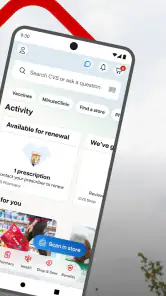
When I first downloaded the CVS Health app, I was immediately impressed by its user-friendly interface. Whether you're a tech-savvy millennial or someone who's more comfortable flipping through a newspaper than swiping on a smartphone, this app makes it incredibly easy to navigate.
Features Galore
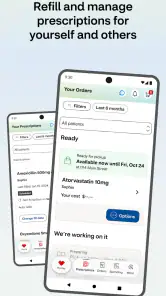
One of the standout features of the app is its prescription management system. You can quickly refill prescriptions, set reminders to take your meds, and even check drug interactions. It's like having a personal pharmacist right at your fingertips!
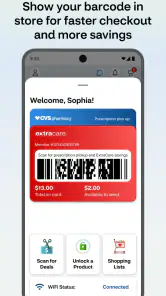
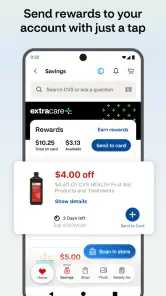
But that's not all. The app also allows you to schedule appointments for vaccinations or COVID-19 tests without the hassle of calling in or waiting in line. And if you're someone who loves a good deal, the ExtraCare rewards section is a treasure trove of discounts and offers.
Planning Around Pharmacy Visits
For me, the biggest practical benefit is having pharmacy tasks and shopping in one place. If I realize during an ordinary grocery run that a prescription needs refilling, I can handle that task while also checking ExtraCare savings rather than switching between separate services. The app is free, and CVS Pharmacy is its developer; it suits people who already use CVS for prescriptions or everyday health purchases far better than someone who rarely visits its stores.
A useful habit is to check the prescription details before setting out, then keep the app handy if a question comes up at the counter. That makes it easier to spot a mismatch between what I expected to collect and what is shown in my account before the trip becomes inconvenient. I would still treat reminders and app information as prompts, not a replacement for advice from a pharmacist or clinician.
Shopping Made Simple
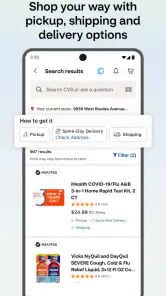
Shopping for health and wellness products has never been easier. The app provides a seamless shopping experience, allowing you to browse through a wide range of products, read reviews, and even find the best prices. Plus, with the option for curbside pickup or home delivery, you can choose the convenience that suits your lifestyle.
And let's not forget about the MinuteClinic services. If you're feeling under the weather, you can find nearby clinics, check wait times, and even hold your place in line – all through the app!
Where It Fits Among Shopping Apps
Compared with a general shopping app, CVS Health is more useful when the purchase is tied to pharmacy needs, clinic visits, or ExtraCare offers. A broad retailer may be a better choice if I want to compare a much wider range of sellers or buy unrelated household items in one order. Here, the advantage is keeping CVS-specific tasks together; the trade-off is that the experience is most valuable when CVS is already part of my routine.
For a realistic example, imagine noticing on the way home that a regular prescription is due for a refill, while also needing a few basic health products. I can check the pharmacy task and look at savings in the same app, then decide whether to make a store visit or use an available shopping option. I would avoid leaving these checks until the last minute: an app can make a request more convenient, but it does not make every pharmacy or clinic task instantaneous.
Speed, Reliability, and Device Fit
The app’s purpose is to shorten the steps involved in routine CVS errands, but I would not judge it only by how quickly a screen opens. Pharmacy requests, shopping choices, and clinic scheduling each involve different decisions, and a smooth experience still depends on having the right account information and selecting the correct store or service. If something seems off, I would verify the details in the app and contact the pharmacy rather than repeatedly submitting the same request.
CVS Health has a 3.3 average from around 396,000 ratings, which suggests that experiences vary. I’d go in expecting a useful convenience, not a flawless substitute for speaking with staff. It has been available since June 15, 2011, and version 25.11.51 requires iOS or Android 10 or later. It is rated for everyone, has over 10 million installs, and is free to use. If an older phone cannot run it, or if you only need a one-off purchase, the CVS website or an in-person visit may be simpler than installing another app.
Making the app dependable in your routine
I would keep the app’s role clear: it is a convenient way to manage CVS errands, not a medical record that should be trusted without checking or a substitute for professional guidance. Before relying on a reminder, request, or appointment detail, I’d review what the app actually shows. If I am helping another person, I would be particularly careful to confirm whose prescription or visit I am viewing before taking action.
That habit also helps when plans change. If a shopping choice or pharmacy detail no longer fits, I would pause and check the current information rather than assume the earlier screen is still accurate. For an urgent concern, a phone call or direct visit is a better route than hoping a mobile workflow resolves it quickly. The app is most useful when there is enough time to verify what I am doing.
Final Thoughts
In a world where health is paramount, the CVS Health app is a game-changer. It's intuitive, comprehensive, and truly makes managing your health simpler than ever before. Whether you're refilling a prescription, shopping for vitamins, or scheduling a clinic visit, this app has got you covered.
If you haven't tried it yet, I highly recommend giving it a go. It's not just an app; it's like having a health assistant in your pocket. So go ahead, download it today and take a step towards smarter health management!
My performance verdict
I see this as a practical companion for people who already have a reason to visit CVS, rather than an app everyone needs. Its strongest case is the overlap: pharmacy tasks, health care scheduling, and shopping can sit within one CVS-focused experience. The limitations follow from that same focus. It is less compelling for broad price comparisons, one-off purchases, or situations that need immediate human help.
The app has an average rating of 3.3 from around 396,000 ratings, alongside roughly 144,000 written reviews. That mix is a reminder to keep expectations measured: some users will value the convenience, while others may encounter friction in a task that depends on account details, store selection, or coordination with a real pharmacy. It has more than 10 million installs, but popularity alone does not tell me whether it fits an individual routine.
My practical advice is to start with one recurring task rather than trying to move every health errand into the app at once. Check how the prescription workflow fits your usual pharmacy visit, then decide whether the shopping and care options are useful additions. If that first task saves you a phone call or an unnecessary trip, keeping the app may make sense. If it adds steps or you rarely use CVS, the website, a direct call, or an in-person visit can be the better choice.
CVS Health Frequently Asked Questions
What should I know about CVS Health before downloading it?
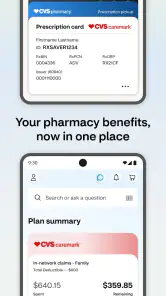
CVS Health is a free shopping app from CVS Pharmacy that brings pharmacy tasks, health-care scheduling, and ExtraCare savings together on a mobile device. Its store summary highlights getting prescriptions quickly at the pharmacy, scheduling health care, and shopping savings. It is rated for Everyone, and its current version is 25.11.51.
Can I use CVS Health on an older phone or tablet?
The app requires Android 10 or later, so check your device’s operating system before downloading. This requirement is especially useful to keep in mind if you use an older phone or tablet. CVS Health is intended to bring pharmacy, care-scheduling, and shopping tasks together, but a compatible operating system is needed to install and use it.
Is CVS Health only for managing prescriptions, or can I use it for shopping too?
CVS Health is a shopping app as well as a place to handle pharmacy and health-care tasks. Its store summary describes prescription access, health-care scheduling, and ExtraCare savings, making it relevant if you want more than a digital pharmacy tool. The app is free to download, though purchases and healthcare services may have their own costs.
Can I use the CVS Health app to shop for products and access ExtraCare savings?
Yes. The CVS Health app is a shopping app that lets you browse CVS offerings and access ExtraCare savings. It can be useful if you want to handle pharmacy tasks and shopping from one place on your phone. The app is free to download, though purchases and healthcare services may have their own costs.
What is CVS Health app and what features does it offer?
The CVS Health app is a comprehensive healthcare application that allows users to manage their prescriptions, schedule vaccinations, and access a digital pharmacy. Users can also find nearby CVS locations, manage their ExtraCare rewards, and receive personalized health alerts. It serves as a one-stop solution for managing your healthcare needs conveniently from your smartphone.
Pros
- User-friendly interface suitable for all ages.
- Comprehensive health tracking features.
- Access to prescription refill services.
- In-app appointment scheduling available.
- Integrates seamlessly with other health apps.
Cons
- Requires stable internet connection.
- Limited features without a CVS account.
- Occasional app crashes reported.
- Not available in all regions.
- No offline mode for health data entry.

- Category
- Shopping
- Version
- 25.11.51