Crypto.com - Buy BTC, CRO, XRP
- 55.82K
- 4.4
- Installs
- 10.00M
- Price
- Free

Screenshots

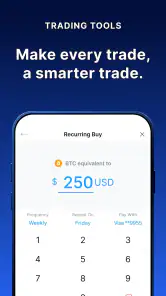

Analysis by Reviewed
I approach Crypto.com - Buy BTC, CRO, XRP as a finance app for people who want to manage crypto from a phone, rather than juggle a separate exchange, wallet, and market-tracking tool. That all-in-one idea is appealing, but it also makes it worth checking which parts of the experience you actually need before moving money. Crypto can rise or fall sharply, so convenience should never replace a plan for what you can afford to risk.
Deciding whether an all-in-one app fits
I think the clearest reason to try this app is wanting one place to check a crypto balance, make a purchase, and explore services connected to that account. That can be more convenient than switching among a trading app, a separate wallet, and a price tracker. The flip side is that one interface can make distinct decisions feel like parts of a single routine. Buying, holding, transferring, and spending are not interchangeable actions, so I would pause and understand each one before using it.
It is a better fit for someone who wants to learn through small, deliberate steps than for someone looking for a hands-off route to guaranteed growth. If I were new to crypto, I would first decide whether I want to own an asset, track its price, or simply understand how the market works. Those goals call for different tools. A market tracker can be enough for observation, while this app is aimed at people who want transaction options alongside account features.
How I would make a first transaction
In a realistic everyday scenario, I might check a coin’s price during a lunch break, decide whether a planned small purchase still fits my budget, and review the order details before confirming it. I would not buy just because the price had moved or because an asset appeared prominently in the app. I would also save the transaction record and return later to make sure I understood what happened. That simple routine is less exciting than reacting to every market change, but it makes it easier to keep decisions intentional.
Before confirming a purchase or transfer, I would read the full screen rather than relying on a quick glance at the amount. Check which asset is involved, the destination where relevant, and any costs or conditions displayed. If a feature is unfamiliar, I would look for its current explanation and terms in the app before committing funds. This is especially useful when moving from browsing to an action that may be difficult or impossible to reverse.
I would also decide in advance how often I want to check the app. Frequent price checks can turn an ordinary investment decision into a source of distraction, particularly for someone who is not actively trading. A short review schedule—such as checking after a planned purchase or during a regular account review—can keep the app useful without making every market fluctuation feel urgent.
How it fits into a crypto routine
The app is developed by Crypto Technology Holdings Limited and has been available since Aug 30, 2017. Its current version is 3.221.11, and it runs on Android 8.0 or later. It is free to download, rated Everyone, and has reached over 10 million installs. Those figures show that it has a broad audience, though popularity by itself cannot tell you whether its approach suits your needs. Its 4.4 average from around 672,000 ratings is useful context, not a promise that every transaction or support interaction will go smoothly.
More From Our News Desk

Weather by Xiaomi Review: Clear at a Glance, Less Clear Up Close

X Under Pressure: Can It Recover When Posting Goes Wrong?

Clash of Clans Is Won Between the Battles

Android Auto Makes the Case for Quieter Car Software

MobiOffice: Transforming Mobile Productivity with Seamless Integration

EA SPORTS FC™ Mobile Soccer: Redefining Mobile Sports Gaming
Starting out without rushing
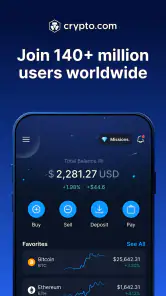
The first thing that struck me was just how user-friendly the interface is. Whether you're a seasoned trader or a newbie, navigating through the app feels like a breeze. Setting up an account takes just a few minutes, and you’re not bombarded with a ton of jargon. It’s all pretty straightforward, which is a breath of fresh air in the often convoluted world of crypto.
For a first purchase, I would treat that approachable layout as a reason to go slowly, not as a reason to buy immediately. Decide what you want to learn, check the transaction details shown in the app, and begin with an amount you can comfortably leave exposed to market swings. Before relying on any service for a particular payment or transfer, read the current terms in the app; availability and conditions can vary by feature and location.
Security and the habits that matter
Now, security is a biggie, right? With Crypto.com, I felt like my assets were in good hands. They’ve got this neat feature where you can set up two-factor authentication. Plus, they store most of the funds in offline cold storage, which is a fancy way of saying your coins are super safe from online threats. It’s like Fort Knox for your digital dough!
I would still treat account protection as a shared responsibility. Use a unique password, enable two-factor authentication, and be cautious with messages that ask you to sign in or reveal a code. A secure platform cannot prevent every mistake, such as approving a transfer to the wrong destination or sharing credentials with someone posing as support. If you plan to hold crypto for a long time, think carefully about whether keeping everything in a trading account matches your own risk tolerance and custody preferences.
Choosing assets and making decisions
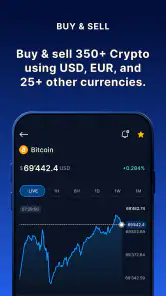
The app doesn’t just stop at Bitcoin and DOGE; it’s like a candy store for crypto enthusiasts. With over 200 cryptocurrencies to choose from, there's plenty of room to diversify your portfolio. And, if you're into trading, the app provides real-time data and charts that are as detailed as they come. You can make informed decisions without breaking a sweat.
A wide choice can help when you already know what you want to research, but it can also make impulsive browsing easier. I find it more useful to keep a short watchlist and compare an asset’s purpose, volatility, and role in my overall plan than to treat a long catalog as a shopping list. Charts can show price movement; they cannot tell you whether a token is suitable or predict what happens next. If you mainly want occasional Bitcoin purchases, a simpler service with fewer choices may be easier to manage.
Rewards, spending, and the trade-offs
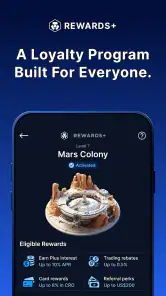
One of the coolest things I found was their reward system. By staking CRO, the native token, you can earn benefits like cashback on purchases, better interest rates, and even rebates on streaming services. It's pretty neat how they integrate these perks, making it more than just a trading platform.
I would compare any reward with the commitment it asks of you. Holding or staking a particular token to qualify for benefits ties your decision to that token’s value, which can move independently of the perks. Read the current eligibility rules and withdrawal conditions before committing, and do the math using benefits you would genuinely use rather than assuming a headline reward makes the arrangement worthwhile. If you prefer not to hold CRO, this part of the app may simply have little appeal.
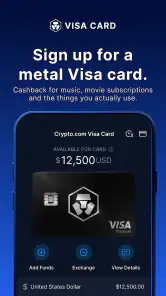
Another highlight is the Crypto.com Visa card. It’s a slick way to spend your crypto in the real world. I’ve used it for groceries, and it feels pretty awesome to say you’re buying bread with Bitcoin!
For an everyday routine, I would separate spending money from long-term holdings and check how a card transaction is funded before using it. A quick grocery purchase is convenient only if the conversion and applicable conditions are clear to you. Someone who wants a conventional bank card and does not want crypto involved in day-to-day spending may be better served by keeping those activities separate.
Support, alternatives, and who should look elsewhere
Whenever I had questions or hit a snag, the customer service was top-notch. They offer live chat support, which is responsive and actually helpful. No more waiting in line or getting stuck with generic answers. They really seem to care about resolving your issues.
Compared with a dedicated exchange, a multi-purpose app can feel easier because buying, viewing holdings, and exploring related services sit together. The trade-off is that an experienced trader may prefer a specialist platform’s workflow and tools, while someone who only wants to follow prices may be better off with a tracker that does not invite transactions. I would also not choose a crypto app as a substitute for a savings account: digital assets carry a different kind of risk, and rewards are not the same as guaranteed returns.
If a payment is delayed or an account needs attention, I would keep a record of the relevant transaction details and contact support through the app rather than responding to an unsolicited message. Live chat is helpful when available, but it does not remove the need to check status and terms yourself. That is a practical distinction from a simple price-tracking app, where there may be no account or transfer to resolve.
What to watch as the app evolves
Its version history has brought the app to 3.221.11, but a version number alone does not tell me which specific changes affect a user’s daily routine. I would judge future changes by whether they make balances, costs, security controls, and transaction status easier to understand—not simply by a longer feature list. Existing users should review the screens and terms after updates, especially before using a feature they have not tried before.
For an existing user, the useful question after an update is not just what looks different, but whether a familiar action still works the way they expect. I would revisit saved routines, review transaction confirmations, and check account security settings rather than assuming the interface or terms are unchanged. The app’s release history shows ongoing development, but I would treat any expected improvement as a possibility until it is visible in the version I am using.
One practical trade-off with an integrated service is that convenience can encourage keeping more activity in one account than you intended. I would periodically ask whether each feature still serves a purpose: perhaps I use the app to make occasional purchases but do not need its reward options, or I like checking balances but prefer another method for long-term custody. Removing unnecessary steps from a routine can be as valuable as adopting another feature.
My practical approach would be to keep notifications and account security in good order, review transactions regularly, and avoid treating CRO rewards or market charts as a reason to take on more risk. If you are deciding whether to try the app, start by asking whether you want an integrated crypto account or a narrower tool for one task. That answer matters more than the number of coins on offer.
All in all, Crypto.com - Buy BTC, CRO, XRP is packed with features that cater to both beginners and seasoned traders. It’s like having a Swiss Army knife for crypto in your pocket. So, if you're looking to dip your toes into the crypto market or expand your existing portfolio, give this app a whirl. Trust me; you won’t be disappointed. Happy trading!
Crypto.com - Buy BTC, CRO, XRP Frequently Asked Questions
Can I use Crypto.com without buying cryptocurrency right away?
You can download Crypto.com and explore the app before deciding whether to make a purchase. Its main purpose is to help users buy, trade, and store cryptocurrencies, so some features are most relevant once you choose to use those services. If you are new to crypto, take time to understand the app and the risks before putting money into a transaction.
Which cryptocurrencies can I find on Crypto.com?
The app’s store summary highlights Bitcoin, CRO, ETH, XRP, and other cryptocurrencies. The published app description also refers to DOGE and a wider range of cryptocurrencies. Available assets and services can differ, so check what is currently shown in the app before planning a particular trade or purchase. Cryptocurrency prices can change, and buying or trading involves risk.
Is Crypto.com free to download, and which devices can run it?
Crypto.com is a free finance app for Android and iOS, so you can install it without paying an upfront download fee. It requires Android 8.0 or later, and the app is rated for Everyone. Keep in mind that free installation does not mean every transaction or service inside the app is free; check applicable costs before making a trade or withdrawal.
Who develops Crypto.com, and what can I expect from the app?
Crypto.com is developed by Crypto Technology Holdings Limited. It is a finance app built around cryptocurrency, with a store summary focused on trading, buying, and storing Bitcoin, CRO, ETH, XRP, and other cryptocurrencies. The app is presented as Crypto.com, so users looking for a dedicated crypto platform can assess whether its core purpose fits what they want before downloading.
What is Crypto.com and how does it work?
Crypto.com is a comprehensive cryptocurrency platform that allows users to buy, sell, and trade a wide range of cryptocurrencies including Bitcoin, DOGE, and many others. The app offers various features such as a crypto wallet, a Visa card for spending crypto, and the ability to earn interest on crypto holdings. Users can easily track their portfolio and conduct transactions with secure and user-friendly interfaces.
Pros
- User-friendly interface for beginners
- Wide range of cryptocurrencies available
- Competitive trading fees
- Robust security measures
- 24/7 customer support
Cons
- Limited support for some altcoins
- Occasional app performance issues
- Verification process can be lengthy
- High withdrawal fees for certain cryptos
- Limited educational resources
- Category
- Finance
- Version
- 3.221.11











