ComicScreen - PDF, ComicReader
- 1.57K
- 4.7
- Installs
- 1.00M
- Price
- Free

Screenshots
Analysis by Reviewed
I’d start by treating ComicScreen - PDF, ComicReader as a reader for files you already have, rather than a place to discover or buy comics. That distinction matters: its appeal is having comics and documents in one on-device reading workflow, while the first hurdle is usually getting the right file into a place the app can see. It’s a free comics app from InstSoft, and its focus on compressed comic files and PDFs makes it most useful when you want to read a personal collection without switching between several file viewers.
Who this file-first reader suits
I’d recommend it most readily to someone who already downloads or keeps digital comics and wants a straightforward way to open them on a phone or tablet. It is also useful for readers who receive a PDF or comic archive from a friend, a school, or a personal collection and simply want to read that file rather than join another content service. The key question is not whether you read comics often, but whether you are comfortable managing the files yourself.
That distinction shapes the whole experience. A storefront reader usually puts browsing, recommendations, purchases, and a library in one place; a file reader such as this one starts with material you bring. If you like choosing a particular issue from your own folders, that directness is a strength. If you want the app to suggest what to read next or keep a cloud-based collection in sync automatically, a dedicated catalogue or publisher service will likely feel more convenient.
Where setup can feel less obvious
If a comic doesn’t appear when you open the app, I wouldn’t assume it is broken straight away. Check whether the file is actually stored on the device and whether you are looking in the folder where it was saved. A file attached to an email or still sitting in a cloud service may need to be downloaded or opened from that service first. File names can also be misleading: check the ending, such as CBR or PDF, before spending time troubleshooting the reader.
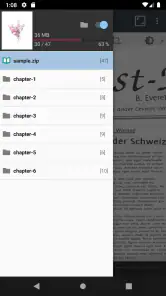
Compressed comic files are convenient because a whole issue can be kept together, but they are not the same thing as a folder of page images. If an archive will not open, verify that it is a complete file and try opening another known-good comic. That simple comparison helps separate a damaged or incomplete download from a problem with the app. For a collection you plan to keep, a consistent folder structure by series and issue also saves time later when you browse from the file manager.
Checks that make reading easier
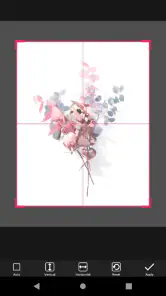
Before settling in, check the display orientation and zoom on a sample page. A full-page view can be comfortable for artwork with large panels, while dense pages may need a closer look; the trade-off is that zooming can mean more movement across the page. I’d test a few pages before a long session rather than adjusting repeatedly once I’m absorbed in a story. If text seems too small, changing the device’s orientation or zooming in is a practical first step.
For a PDF, the document’s own page layout can shape the experience. A page designed for a larger screen may require more zooming on a phone, whereas a tablet gives artwork more room without changing the file. That is not necessarily a fault in the reader. If the same PDF feels cramped in another viewer too, the page dimensions are probably the bigger issue.
More From Our News Desk

Clash of Clans Is Won Between the Battles

Android Auto Makes the Case for Quieter Car Software

MobiOffice: Transforming Mobile Productivity with Seamless Integration

EA SPORTS FC™ Mobile Soccer: Redefining Mobile Sports Gaming

How Microsoft OneDrive Became a Mobile Productivity Giant

How Google Translate Breaks Language Barriers Effortlessly
Reading, organizing, and recovering your place
First things first, downloading and installing ComicScreen is a breeze. Available on both Android and iOS, it takes just a few taps to get the app up and running on your device. Once installed, the app greets you with a neat and user-friendly interface, making it simple even for those who aren't tech-savvy.
Features Galore
One of the standout features of ComicScreen is its versatility in handling different file formats. Whether you're dealing with PDF, CBZ, or CBR files, this app has got you covered. I was particularly impressed with how seamlessly it handled large files without any noticeable lag or delay.
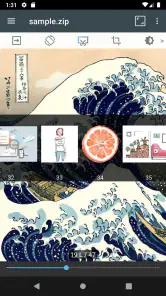
Navigation within the app is intuitive. You can easily swipe through pages, and the zoom function is smooth, allowing you to focus on those intricate comic panels. Bookmarking your favorite pages is just a tap away, ensuring you can quickly return to your preferred scenes.
A routine for reading between errands
For a realistic day-to-day example, imagine downloading an issue at home before a commute, then opening it during a short wait. I’d check the file while still connected, make sure it opens, and place it where I can find it without searching through unrelated downloads. That small bit of preparation matters more with a file-based reader than with a streaming-style library: the reader can only help once the comic is accessible as a file.
This setup also suits someone who reads in short bursts. A bookmark can mark the stopping point when a train arrives or an appointment begins, while the folder structure helps distinguish the next issue from an older one. If several family members share a device, clear filenames and folders are especially helpful; otherwise, it is easy to reopen the wrong volume and assume the reading position has disappeared.
Practical ways to keep a collection tidy
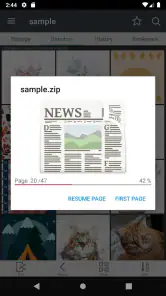
Bookmarks have a useful role beyond saving a favorite illustration. I’d use one to mark where I stopped in a volume, especially if I’m moving between a phone and a larger screen or reading several issues at once. If you are not sure whether a reading position has been saved, add a bookmark before closing the file; it is a simple fallback that avoids having to hunt through pages later.
For a commute, I’d put the current issue and the next one in an easy-to-find folder before leaving home. That reduces the chance of opening an unrelated download while you have only a few minutes to read. It also makes it easier to notice whether an issue is missing or incomplete before you are away from a reliable connection. ComicScreen is a better fit for this prepared, local-file routine than for someone expecting a built-in catalogue of titles.
Customization at Your Fingertips
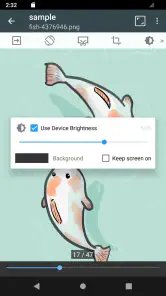
Customizing your reading experience is where ComicScreen really shines. You can adjust the brightness, switch between day and night modes, and even change the background color to suit your reading preferences. It's these little touches that make a big difference, allowing you to tailor the app's interface to your liking.
For those who love to multitask, the app supports split-screen mode, letting you read comics while browsing the web or checking your email. It's a small feature, but one that adds a lot of value.
Small adjustments that can prevent a frustrating session
I’d avoid changing several settings at once when a page feels awkward. Try orientation first, then adjust zoom, and only then decide whether the file’s layout is the real limitation. Changing one thing at a time makes it easier to return to a comfortable view, particularly if a PDF is designed as a two-page spread and a phone screen is simply too narrow to show it legibly at once.
Brightness and background choices are personal, but they are worth checking before a long reading session rather than treating them as cosmetic extras. A bright screen may be fine in daylight and tiring in a dim room; a darker appearance can feel gentler, but it cannot make small lettering larger. For fine print, zoom remains the practical answer, with the cost of more panning around the artwork.
Performance and Reliability
During my time using ComicScreen, I didn't encounter any crashes or glitches, which speaks volumes about its stability. The app runs smoothly, even when handling large comic libraries. It's clear that the developers have put a lot of effort into ensuring a seamless user experience.
When a file will not open
If one comic fails while another opens normally, I’d first look at the file rather than changing app settings. Confirm that the download finished, check its extension, and try the file again from its saved location. If it came from an email or cloud folder, make sure it has been fully downloaded to the device instead of being only a preview. These basic checks are useful because an incomplete archive and an unsupported or mislabeled file can look like the same problem at first.
If the issue affects several files, a quick comparison can narrow things down: try a different PDF or comic archive that you already know opens correctly. If only one source or one file type is troublesome, the source file is a more plausible cause than the whole reader. I would also avoid deleting the original while troubleshooting; keeping a separate copy means you can retry or inspect it without risking your only version.
When another tool is the better choice
The main trade-off is that a file-focused reader depends on your own organization. If you prefer a service that supplies a browsable comic catalogue, tracks a reading list across devices, or handles purchases in one place, a subscription or publisher app will suit that habit better. If you already keep CBR, CBZ, or PDF files, a general document viewer may open some of them, but a comic-oriented reader is more natural for turning pages and inspecting artwork.
It is also worth separating the reading app from the device and the source file when something feels wrong. A page that is blurry may have been scanned at low quality; a page that looks tiny may have been laid out for paper or a larger display. If a file behaves the same way in another viewer, that points toward the file or its layout rather than a setting in ComicScreen. Conversely, if a known-good file opens elsewhere but not here, checking the saved copy and trying the app again is a sensible next step before rebuilding your library.
Readers who want automatic collection syncing should be especially careful about expectations. A bookmark is a handy way to keep a place within a file, but it should not be treated as a substitute for a service that manages a cross-device account and reading history. If you switch devices often, keep the comic files organized and make a habit of using bookmarks, while choosing a separate cloud-based platform if automatic continuity is essential to you.
ComicScreen is therefore a sensible option for readers who value direct access to their files and want to keep the reading setup straightforward. I’d skip it if your priority is discovering new series inside the app or managing a collection without handling files yourself. Its Everyone age rating and free price make it easy to try, though in-app purchases are offered at $1.99 to $2.99 per item. The app has a 4.7 average from around 86,000 ratings and over one million installs; those figures suggest a substantial audience, but your file formats and reading habits are still the deciding factors.
Final Thoughts
In conclusion, ComicScreen - PDF, ComicReader is a fantastic choice for anyone looking to elevate their comic reading experience. With its wide range of features, customization options, and rock-solid performance, it's a must-have app for comic fans. Whether you're a casual reader or a die-hard comic aficionado, this app has something to offer to everyone. So go ahead, give it a try, and immerse yourself in the vibrant world of comics!
ComicScreen - PDF, ComicReader Frequently Asked Questions
Can ComicScreen organize comics and PDFs already saved on my device?
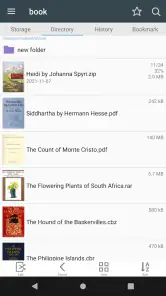
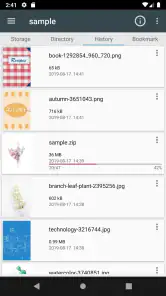
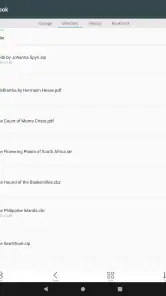
Yes. ComicScreen is designed for file management as well as viewing, so it can help you browse and open images, comics, and PDF files stored on your device. It is a reader for your own files rather than a catalog of comics to choose from. That makes it a practical option if you already keep a personal collection and want to access it through one app.
Does ComicScreen provide comics to read, or do I need my own files?
ComicScreen focuses on showing images, comics, and PDF files, including files in compressed formats. It is best approached as a reader and file manager for material you already have, rather than as a source of comic titles. If you are deciding whether to install it, consider whether you want an app for opening and browsing your personal collection on your device.
What devices can I use ComicScreen on?
ComicScreen is a comics app for Android, and it requires Android 8.0 or later. Before downloading, check your device’s operating system to make sure it meets that requirement. The app is free to install, and it is intended for viewing and managing images, comics, and PDF files, including files stored in compressed formats.
Who makes ComicScreen, and is it suitable for all ages?
ComicScreen is developed by InstSoft and has an Everyone content rating, so it is presented as suitable for a general audience. It focuses on viewing and managing comics, pictures, and PDF files rather than providing a catalog of titles. You can use it to read files you already have on your device, making it useful for readers who want one app for their personal collection.
What is ComicScreen and how does it work?
ComicScreen is a versatile app designed to help users view and manage comic books, manga, and PDF files on their Android or iOS devices. It supports a variety of file formats, including CBZ, CBR, PDF, and more, allowing users to easily open and read their favorite comics on the go. The app offers an intuitive interface with features like zoom, bookmarks, and a library management system to enhance the reading experience.
Pros
- Supports multiple file formats.
- Fast rendering of large files.
- User-friendly interface.
- Customizable reading settings.
- Offline reading available.
Cons
- Limited annotation features.
- Ads in free version.
- No cloud sync support.
- Occasional crashes reported.
- Requires frequent updates.
- Category
- Comics
- Version
- 2291