CoinMarketCap: Crypto Tracker
- 4.98K
- 4.7
- Installs
- 10.00M
- Price
- Free

Screenshots






Analysis by Reviewed
When I want a quick read on what the crypto market is doing, I find CoinMarketCap: Crypto Tracker most useful as a research and monitoring companion, not as a reason to trade. It puts coin information, a watchlist, alerts, news and portfolio tracking in one finance app. That combination can help me stay organized, but it does not remove the need to check details carefully or make my own decisions.
A practical place to keep an eye on crypto
The app makes the most sense when I treat it as a shared workspace for market awareness: a place to check an asset, save it for later, and notice developments that might deserve a closer look. It is not a substitute for an exchange, a wallet, or a personal investment plan. Keeping that boundary clear makes its mix of tools more useful and helps prevent a convenient dashboard from feeling like a recommendation engine.
For example, if I am comparing a few coins before reading more about them, I can use the tracker to gather basic market context and keep the candidates together in a watchlist. I would then move to more detailed research before making any financial decision. This small separation between browsing and acting is valuable: it lets the app support a process without pretending that quick access to market information is the same as understanding the risks.
Using the market tracker day to day
The app is developed by CoinMarketCap.com and is free, which makes it easy to try without turning the decision into a purchase. It has a 4.7 average from around 502,000 ratings and over 10 million installs, so it is a familiar choice for people following digital assets. Its Everyone age rating is also worth knowing if you are considering it for a shared device, though the subject matter itself is better suited to someone who understands that crypto prices can move sharply.
Checking prices without losing the bigger picture
Installing CoinMarketCap is a breeze. Available on both Android and iOS, the app is lightweight, ensuring it won't take up much space on your device. Once you've got it installed, you're greeted with a clean and intuitive interface. The home screen is a dashboard of sorts, giving you a quick glance at the market's top performers and any significant changes in your portfolio.
One practical way I use a market tracker is to separate “coins I already follow” from “coins I am only curious about.” A watchlist can do that job without making every interesting name feel like a holding. When a token catches my eye in the news, I can add it for observation and compare its movement over time before deciding whether I need to research it further. This is more useful than repeatedly searching for the same asset, and it helps curb impulsive decisions driven by a sudden price move.
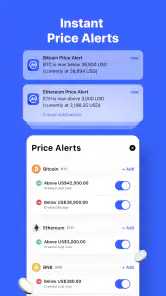
For a realistic everyday routine, imagine checking the app during a commute, then setting it aside until an alert brings a meaningful change to your attention. That is a calmer use than refreshing prices all day. Alerts are reminders to review the situation, not instructions to buy or sell: a price threshold says nothing by itself about liquidity, project quality, or whether a move fits your plans. I would decide in advance what an alert should prompt me to investigate, so notifications do not become trading signals by default.
More From Our News Desk

Weather by Xiaomi Review: Clear at a Glance, Less Clear Up Close

X Under Pressure: Can It Recover When Posting Goes Wrong?

Clash of Clans Is Won Between the Battles

Android Auto Makes the Case for Quieter Car Software

MobiOffice: Transforming Mobile Productivity with Seamless Integration

EA SPORTS FC™ Mobile Soccer: Redefining Mobile Sports Gaming
Useful detail, with a need for context
One of the standout features of CoinMarketCap: Crypto Tracker is its detailed market data. With just a few taps, you can access information on thousands of cryptocurrencies. This includes everything from price changes and market cap to historical data and trading volumes. If you're someone who loves to dive deep into the numbers, this app is a treasure trove.
The figures are most helpful when I compare them rather than treat any one number as a verdict. A large market cap does not tell me whether an asset suits my risk tolerance, while a recent price gain does not establish that the trend will continue. Historical views can add perspective, but they cannot predict the next move. I use the app to form better questions—what changed, over what period, and how does this coin compare with others I follow—then look for context before acting.
There is also a practical trade-off in how much information a tracker makes readily available. A broad catalog is convenient when researching unfamiliar coins, but it can make speculative assets feel as routine as established ones. I would not use a prominent position in a list, a sharp movement, or community enthusiasm as a quality screen. For beginners especially, taking a moment to distinguish market visibility from credibility is an important habit.
Watchlists, alerts and portfolio habits
Another feature worth mentioning is the watchlist. You can customize it to track your favorite coins, ensuring you're always in the loop. The app even allows for setting up price alerts, so you never miss out on the perfect buying or selling opportunity.
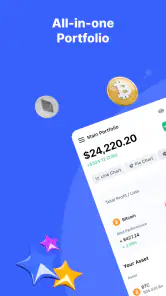
Portfolio tracking is most valuable when the entries reflect what you actually want to monitor. I would keep a simple record of holdings and use it to check the overall picture rather than letting individual daily changes dominate my attention. If you are comparing a portfolio tracker with a spreadsheet, the app is more convenient for quick checks; a spreadsheet may be better if you need a custom record, detailed calculations, or a process you can inspect and adapt yourself. Neither approach guarantees that the figures match every exchange or wallet without careful entry and reconciliation.
One useful workflow is to keep the watchlist broader than the portfolio: the first can hold assets under consideration, while the second should represent positions you intend to track. That separation makes it easier to revisit an idea without confusing interest with ownership. I would also review alerts occasionally and remove thresholds that no longer serve a purpose. Otherwise, a growing set of notifications can create noise instead of focus.
News and community: helpful, not a substitute for judgment
What sets CoinMarketCap apart is its community-driven approach. The app integrates a news section that aggregates content from various crypto news outlets. This keeps you informed about the latest developments and trends in the crypto world. Additionally, the app hosts a vibrant community where users can share insights and predictions, making it a great place to learn and grow your crypto knowledge.
I see news aggregation as a starting point for discovering what people are discussing, not as a complete account of an event. When a headline affects a coin I follow, I would check the original reporting and distinguish confirmed information from commentary. Community predictions can reveal different arguments, but confident posts are not evidence and should never replace independent research. If you prefer a tightly curated feed with little discussion, a dedicated news reader may feel more comfortable; if you want market information beside community conversation, this app keeps those activities closer together.
This is also where the app may not suit everyone. A person who wants only occasional price checks may find the mix of market data, news and social activity more than they need. Someone who expects a broker, exchange or wallet to execute trades should treat this as a different kind of tool: it helps monitor and research, while buying, selling and securely holding assets require separate services and decisions. I would choose a specialist platform for those tasks rather than assume a tracker covers them.
Choosing it over narrower tools
Compared with a basic price widget, this app is more useful when I want to move from a quick quote to a little research without changing tools. Compared with an exchange app, it is better approached as a broader market reference rather than the place to carry out a transaction. That distinction matters because exchange screens are designed around a particular service, while a tracker’s strength is keeping an eye on a wider set of assets and related discussion.
A dedicated portfolio app can be a better choice if detailed accounting is the main job, and a spreadsheet can win when I need a record built around my own categories or calculations. On the other hand, both require more deliberate upkeep than a quick glance at a consolidated tracker. I would choose based on the task I repeat most often: if it is checking and comparing, this app is convenient; if it is producing precise personal records, I would favor a tool designed for that workflow.
One trade-off of an all-in-one finance app is that it can encourage me to browse longer than intended. I find it helps to open with a question—such as whether a watched coin moved enough to warrant further reading—and close the app when that question is answered. That is a simple way to get value from the breadth without turning every spare moment into another market check.
Navigation, version history and what to watch
Ease of use is crucial for any app, and CoinMarketCap nails it. The navigation is straightforward, with no clutter to confuse users. Transitioning between tabs is smooth, and the app's response time is impressive. Whether you're checking the latest news or analyzing a specific coin, everything feels seamless.
The current version is 5.4.0, and the app was released on April 15, 2019. Those facts establish that it has a continuing product history, but they do not tell me which particular screens or tools changed between releases. For someone already using it, the sensible approach is to judge an update by the workflow that matters: whether watchlists remain easy to manage, alerts still fit your routine, and portfolio figures are understandable. I would not assume a version number alone means a specific feature has been added or improved.
On Android, the listed minimum operating system is 6.0. Before relying on any finance app as part of a routine, I would also check that the installed version behaves well on my own device and that notifications are configured the way I want. If an alert arrives too often or at an unhelpful time, changing the setup is more useful than letting every ping pull attention back to the market.
What existing users should keep an eye on
If I already rely on the app, I would focus on whether its current organization still suits the way I follow the market rather than assuming that a newer version necessarily changes my routine. After an update, a quick check of saved assets, alert thresholds, and portfolio entries is a sensible habit. Those are the parts most likely to matter in day-to-day use, because even a smooth interface is only helpful when the information I expect to see is still easy to find.
I would also periodically review what I have saved. Old watchlist entries can make a current list harder to scan, and outdated alerts can draw attention to price levels that no longer matter to me. Pruning them is a small maintenance task that makes the app more focused. It is especially worthwhile for someone who follows many assets but wants notifications only for a few.
The version number is a useful marker for identifying the software currently in use, but I would separate that fact from any expectation about future changes. What I would watch for over time is practical: whether navigation remains clear, whether monitoring still fits my habits, and whether the information is presented in a way that helps me ask better questions. That is a more grounded way to judge ongoing development than guessing at features that may or may not arrive.
Who will get the most from it
In conclusion, CoinMarketCap: Crypto Tracker is more than just a tool for tracking crypto prices. It's a full-fledged platform that offers insights, community interaction, and a robust set of features. For anyone serious about staying on top of the crypto market, this app is a must-have. Its user-friendly design combined with rich features makes it an indispensable asset for crypto enthusiasts.
I would recommend it most to people who follow several cryptocurrencies and want a convenient place to check prices, maintain a watchlist, and notice news or movement without opening a series of separate tools. It is also a reasonable starting point for a curious beginner who is willing to treat the numbers as information rather than advice. The app is less compelling for someone who wants only one asset’s price, dislikes frequent market coverage, or needs a highly tailored financial record; a simpler price widget or a customizable spreadsheet could be a better fit.
So, if you're ready to take your crypto game to the next level, give CoinMarketCap a try. It's like having the pulse of the crypto world right in your pocket!
CoinMarketCap: Crypto Tracker Frequently Asked Questions
Is CoinMarketCap: Crypto Tracker free to download, and what should I know about its app details?
CoinMarketCap: Crypto Tracker is free to download and is listed for everyone. It is a finance app from CoinMarketCap.com, with a current version of 5.4.0 and an initial release date of April 15, 2019. The app’s short description is simply “CoinMarketCap,” while its summary highlights crypto tracking, Bitcoin portfolios, news, prices, and coin statistics.
What is CoinMarketCap: Crypto Tracker and what does it offer?
CoinMarketCap: Crypto Tracker is a comprehensive app designed for cryptocurrency enthusiasts and investors. It provides up-to-date market data, price charts, and historical data for thousands of cryptocurrencies. Users can track their portfolios, analyze market trends, and set alerts for price changes. The app also offers news updates and insights to help users stay informed about the crypto market.
Is CoinMarketCap: Crypto Tracker suitable for monitoring cryptocurrency news as well as prices?
Yes. The app brings together crypto prices and market information with news updates, so you can follow developments alongside changes in the market. This can be useful if you prefer checking both in one place rather than switching between separate apps. News and price tracking are informational tools; they do not replace your own research when considering cryptocurrency decisions.
What devices and operating systems can run CoinMarketCap: Crypto Tracker?
CoinMarketCap: Crypto Tracker is available for Android and iOS devices. On Android, the minimum supported operating system is version 6.0, so it is worth checking your device settings before downloading. The app is categorized as a finance app, and its content rating is Everyone. This makes it broadly accessible, while compatibility still depends on your device meeting the relevant platform requirements.
Is CoinMarketCap: Crypto Tracker free to use, or does it have a premium version?
CoinMarketCap: Crypto Tracker is free to download and use, offering a wide range of features without any cost. However, it also offers a premium subscription called 'CoinMarketCap PRO' for users who want advanced features such as more detailed analytics, ad-free experience, and additional customization options. The subscription is optional and provides enhanced tools for serious investors.
Pros
- Comprehensive market data coverage.
- User-friendly interface for all levels.
- Real-time price updates.
- Customizable watchlists.
- Extensive news and insights section.
Cons
- Can be overwhelming for beginners.
- Requires internet for updates.
- Some features are premium.
- Ads can be intrusive.
- Limited customer support options.
- Category
- Finance
- Version
- 5.4.0











