Netspend
- 22.17K
- 4.6
- Installs
- 10.00M
- Price
- Free

Screenshots
Analysis by Reviewed
I judge a money app less by how polished it looks than by what happens when I need it at an awkward moment: standing in a checkout line, checking whether a deposit arrived, or trying to sort out a transaction while away from home. Classic Netspend is a finance app from NetSpend, and its appeal is straightforward: it brings everyday account tasks to a phone. The practical question is whether that convenience fits the way you handle money, especially when your connection is slow or unavailable.
Using it when timing and signal matter
I find that a finance app is easiest to judge when a routine is interrupted: the signal weakens just as I want to check an account, or a screen takes longer than expected to update. In this section, I focus on how I would make those moments less stressful and avoid turning a brief delay into a mistaken money decision. That leads naturally to the more ordinary question of where a phone-based account check fits into a busy day.
Quick checks depend on a working connection
The app is most useful when I can get online and want to check account information without sitting down at a computer. A fast balance check before buying groceries, followed by a look at recent activity later, is a realistic rhythm for using a mobile finance app. I would treat those moments as convenient access, not as a guarantee that every screen will refresh instantly: a weak signal can turn a quick check into a wait, so I would avoid relying on a last-second refresh as my only way to confirm available funds.
That dependence also shapes how I would plan around deposits and bills. If I am expecting money before an important payment, I would check the account ahead of the payment deadline and leave room for timing uncertainty rather than making a commitment based on an assumed update. This is a small habit, but it matters more than having a beautifully arranged dashboard. Financial information is useful only when it is current enough for the decision I am making.
Useful on the move, with sensible boundaries
For someone who manages spending in short gaps throughout the day, a phone-based account view can be more practical than opening a banking website on a laptop. I can imagine checking activity after a fuel stop or reviewing purchases at the end of a shift, while the details are still easy to recognize. That can make it simpler to spot a transaction I do not remember and follow up while the context is fresh.
But I would not choose a mobile app as my only plan for handling urgent money tasks. If I am travelling through an area with unreliable reception, I would check what I need before leaving a dependable connection and keep another way to access essential account support in mind. That is not a criticism unique to this app; it is a sensible boundary for any service that puts account activity on a phone.
When something does not load
If a balance or transaction list seems stale, my first move would be to check the connection and try again before assuming the account itself is wrong. I would also avoid repeating a money-related action simply because the screen has not changed yet: first confirm whether the original attempt went through. That pause can prevent confusion when a slow connection makes an action appear unfinished.
More From Our News Desk

Weather by Xiaomi Review: Clear at a Glance, Less Clear Up Close

X Under Pressure: Can It Recover When Posting Goes Wrong?

Clash of Clans Is Won Between the Battles

Android Auto Makes the Case for Quieter Car Software

MobiOffice: Transforming Mobile Productivity with Seamless Integration

EA SPORTS FC™ Mobile Soccer: Redefining Mobile Sports Gaming
For a problem that remains after reconnecting, I would gather the useful details—what I was trying to do and what appeared on screen—before contacting support. It is easier to explain a specific issue than to say only that the app failed. I would also keep the app current where possible; the current release is version 7.0.2, and using a recent version is a sensible first troubleshooting step, though it cannot fix every network or account issue.
Keeping mobile use deliberate
Finance apps are not the place where I want to burn mobile data refreshing the same screen again and again. When I am on a limited connection, I would open the app for a clear task, check what I need, and leave rather than repeatedly pulling up account pages. If I have access to a trusted Wi-Fi connection, that can be a better time for a longer review of spending or account activity. I would still be careful about using shared networks for private financial tasks.
A helpful routine is to separate quick checks from deeper money reviews. A quick check answers one immediate question; a longer session is where I can compare several transactions and think through a budget. Keeping those purposes distinct makes the app less of a distraction and reduces the temptation to treat every notification or account change as something that needs an instant reaction.
Who will get the most from it
I see the strongest fit for someone who already uses Netspend and wants a convenient mobile way to stay aware of account activity. A person who checks money between errands, keeps an eye on spending, or prefers a phone to a desktop for routine tasks may appreciate having those checks close at hand. The app is free, carries an Everyone age rating, and has a 4.6 average from around 166,000 ratings; that gives a prospective user a sense of its broad reception, but it does not guarantee that its workflow will suit every account holder.
Someone who wants all their accounts from several institutions in one independent budgeting dashboard may prefer a dedicated multi-account finance tool instead. Likewise, if I needed reliable access in places where I often have no service, I would not make any connection-dependent app the sole way I manage urgent transactions. The right choice depends less on a feature checklist than on whether Netspend is already part of your financial routine.
Compared with a traditional bank app, the main distinction is practical: this is Netspend’s own account-management option, rather than a neutral overview of finances held across different providers. That can be an advantage if I want to focus on a Netspend account without switching contexts. It is a trade-off if my goal is to compare balances across multiple banks or build a broad household budget in one place.
NetSpend released the app on May 23, 2011, and it has passed 5 million installs. Those figures point to an established mobile service, but I would still judge it by the tasks I need to complete and how it behaves on my own device and connection. It is free to download, yet the value for me comes from whether the mobile access makes routine account management simpler—not from install counts alone.
Choosing it for a particular money routine
A useful way to decide is to look at what you reach for most often. If your main question is whether your Netspend account has enough for today’s planned spending, quick mobile access may be more relevant than a full budgeting suite. If you regularly reconcile several cards, bank accounts, and household bills together, a broader finance tool is likely to save more effort. I would avoid choosing based on the promise of “doing everything” and instead match the app to the account you actually need to manage.
For example, imagine finishing a work shift and stopping for groceries before heading home. I would check the account before shopping if I needed a current picture, then review the purchase later when I had time to recognize it in the activity list. If the connection were unreliable, I would not keep retrying at the register; I would use a more dependable way to make the immediate decision and check the app once service returned. That is a practical workflow, not a substitute for keeping a sensible spending cushion.
Questions worth settling before relying on it
People often ask whether the app is useful without constant checking. In my view, yes: it makes more sense as a place to answer specific account questions than as a screen to monitor all day. Pick a routine—perhaps a brief check before a planned purchase and a calmer review later—so a delayed update does not push you into repeated refreshes or unnecessary worry.
Another reasonable question is whether it can replace a separate budgeting app. I would not assume so. Its clearest role is access to Netspend account activity, while a dedicated budget product may be better for organizing money across providers, setting household-wide categories, or reviewing long-term patterns. If those broader tools are central to your routine, compare the actual workflows rather than expecting one account app to cover them all.
It is also worth thinking through what you will do if a screen looks wrong. A delayed display does not by itself tell you whether a transaction failed or completed, so I would pause before trying the same action again and look for a clear account update once the connection is stable. For anything urgent or unresolved, having the details of the attempt ready makes the next support conversation more focused.
Getting Started with Ease
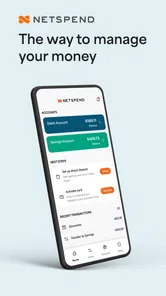
First things first, the setup process with Classic Netspend is as smooth as butter. After downloading the app, which is available for both Android and iOS, I found the registration process pretty straightforward. You simply enter your basic details, link your bank account, and you're good to go. The app does a great job of guiding you through each step, making sure you don't get lost in the process. It's like having a financial advisor right in your pocket.
User-Friendly Interface
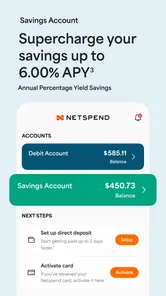
One of the standout features of the app is its user-friendly interface. Everything is laid out in a manner that makes navigation intuitive. Whether you're checking your balance, reviewing recent transactions, or managing your savings goals, everything is just a tap away. The design is clean and uncluttered, which is perfect for those who, like me, prefer a minimalist approach to app interfaces.
Features that Make a Difference
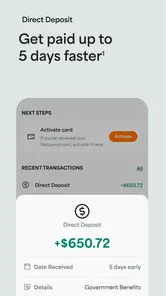
The app is loaded with features that cater to a variety of financial needs. One of my favorites has to be the ability to receive direct deposits up to two days earlier than most banks. It's a game-changer, especially when it comes to managing monthly budgets and bills. Additionally, the budgeting tools are robust, allowing you to set limits and track your spending in real-time. It's like having a financial assistant who keeps you in check without being too intrusive.
If you're someone who frequently travels, the app also supports international transactions, making it easier to manage your finances on the go. Plus, with the option to send money to family and friends, it's not just a tool for personal finance but also a way to stay connected financially with loved ones.
Security at Its Best
When it comes to handling money, security is paramount, and Classic Netspend doesn't skimp on this aspect. The app employs top-notch security measures, including biometric login options and instant alerts for any suspicious activity. It's reassuring to know that your financial information is protected by cutting-edge technology.
Moreover, the customer service is responsive and helpful. In case you encounter any issues, you can expect prompt assistance, which is always a big plus in my book.
In conclusion, if you're looking for a reliable and comprehensive financial management tool, Classic Netspend might just be the perfect fit for you. Its combination of user-friendly design, robust features, and strong security measures make it a standout choice in the crowded field of financial apps. So why not give it a try and see how it can transform your financial management experience?
Netspend Frequently Asked Questions
Does Classic Netspend require a Netspend card or account?
Classic Netspend is designed to help users manage a Netspend prepaid card, so its usefulness depends on having access to Netspend card services. It is not a general-purpose finance app that independently handles money without an associated card account. If you are considering downloading it, first decide whether a Netspend card fits the way you want to manage your money.
Who develops Classic Netspend, and what is the app’s focus?
Classic Netspend is a finance app developed by NetSpend. Its store summary, “Your Money, Your Way,” points to its focus on managing a Netspend prepaid card. The app is intended for people who want to keep track of their card-related finances, rather than for users looking for a broad collection of financial products or a standalone budgeting tool.
Is Classic Netspend suitable for someone who does not use traditional banking?
Classic Netspend may appeal to people seeking an alternative to conventional banking, since the associated prepaid card can be used without the need for a traditional bank account. Users can load funds onto the card and use it for purchases, bill payments, and ATM withdrawals. Consider the card’s account terms and fees before deciding whether this arrangement suits your everyday needs.
Is Classic Netspend free to download, and which devices can run it?
Classic Netspend is a finance app from NetSpend, and it is free to download. It is listed for users of all ages and has a current version of 7.0.2. Before installing, check that your device runs iOS 9 or later, since that is the stated minimum operating-system requirement. The app’s free download does not mean that every card service or transaction is free.
What is Classic Netspend and how does it work?
Classic Netspend is a prepaid debit card service that allows users to manage their finances without the need for a traditional bank account. Users can load funds onto their Netspend card and use it for purchases, bill payments, and ATM withdrawals. The app offers features such as balance tracking, transaction alerts, and direct deposit options, making it a versatile financial tool for those seeking an alternative to conventional banking.
Pros
- User-friendly interface for easy navigation.
- Instant notifications for transactions.
- Customizable budgeting tools.
- Secure login with biometric options.
- No hidden fees or charges.
Cons
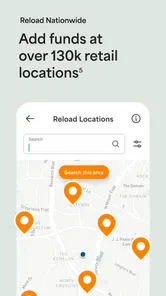
- Limited ATM access locations.
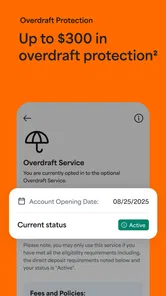
- Monthly maintenance fee applies.
- Slow customer service response.
- Limited integration with other apps.
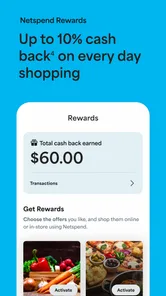
- No cash-back rewards program.











