Cittamobi: Ônibus e Trilhos
- 153.00
- 4.6
- Installs
- 10.00M
- Price
- Free

Screenshots
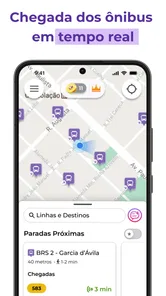
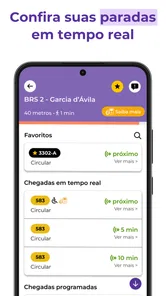
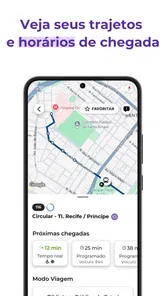
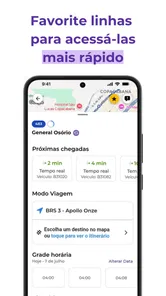

Analysis by Reviewed
My first impression of Cittamobi: Ônibus e Trilhos is that it solves a very familiar transit problem: standing at a stop without a clear sense of what is coming or how to plan the next leg. It brings bus, subway, and ferry information together, which is useful when a trip depends on more than one kind of public transport. The real test, though, is not whether it feels helpful on day one, but whether checking it becomes an easy, worthwhile habit.
Why the first week feels useful
The appeal is easy to understand: when I’m in an unfamiliar part of town, having bus, subway, and ferry information in one place can spare me the stop-side guesswork. Cittamobi is a free Maps & Navigation app from Cittamobi, and its focus on public transport makes it more relevant than a general map when my main question is which transit option to take. It has a 4.6 average from around 521,000 ratings, but I’d still judge it by how well it covers the routes I actually use.
A practical way to try it is to check a route before leaving, then compare the live information with the timetable rather than treating either as a guarantee. If I’m changing lines or catching a ferry, I’d leave a little slack: live transit estimates help with planning, but traffic, service changes, and missed connections can still disrupt a trip. That small habit makes the app more useful without asking me to trust a screen blindly.
During the first few days, I’d test more than my front-door commute. I’d look up a trip that involves a transfer, a stop I don’t know, or a return journey at a different time. Those checks show whether the app answers the questions I actually have: where to board, which direction to take, and whether the route still makes sense after a change of plan. A single successful journey is encouraging; repeated checks across different kinds of trips are a better reason to keep it.
Getting Around with Ease
One of the first things I noticed about Cittamobi: Ônibus e Trilhos is its incredibly user-friendly interface. From the moment you open the app, you’re greeted with a clean design that makes navigation a breeze. Whether you’re tech-savvy or a bit of a technophobe, you’ll find it straightforward to use. The app provides real-time updates, so you know exactly when your bus or train is arriving. No more guessing games or endless waiting times.
Features That Make a Difference
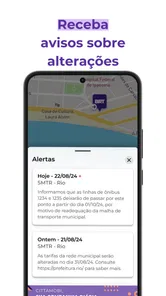
The app isn’t just about showing bus and train schedules. Oh no, it offers much more. One feature I particularly loved is the ability to track your journey. You can see exactly where your bus or train is on the map, allowing you to plan your time efficiently. Another handy feature is the notification system. You can set alerts for your specific routes, so even if you’re busy chatting with a friend or engrossed in a book, you won’t miss your stop.
For a routine commute, I’d use alerts as a backup, not as the whole plan. Before boarding, I’d confirm the route and direction, especially if several services use nearby stops; after boarding, I’d keep an eye on the journey rather than assume an alert will solve every transfer. That workflow is particularly useful when I’m travelling somewhere new, because it combines advance planning with a quick check on the way.
More From Our News Desk

Weather by Xiaomi Review: Clear at a Glance, Less Clear Up Close

X Under Pressure: Can It Recover When Posting Goes Wrong?

Clash of Clans Is Won Between the Battles

Android Auto Makes the Case for Quieter Car Software

MobiOffice: Transforming Mobile Productivity with Seamless Integration

EA SPORTS FC™ Mobile Soccer: Redefining Mobile Sports Gaming
A less obvious use is planning the return before I start the outbound trip. When I’m visiting an unfamiliar area, I’d check both directions while I have time to compare options, rather than waiting until I’m ready to leave and then rushing through a route search. If the return depends on a connection, I’d note a second reasonable option too. That is not a guarantee against disruption, but it reduces the chance that I’m making my first decision under pressure.
Moreover, the app provides information about routes and nearby points of interest. If you’re new to a city or just exploring a different neighborhood, this feature can be incredibly helpful. It’s like having a local guide in your pocket!
How it fits into a monthly routine
Transit apps earn a lasting place when they help with ordinary trips, not just the first exciting outing. If your week involves buses, subways, or ferries, checking a familiar route can become a quick part of leaving home: look at the service, note the likely arrival, and decide whether you have time for a short errand or should head straight to the stop. Cittamobi’s coverage of different transit modes is a practical advantage over relying only on a bus timetable, while a general navigation app may be more convenient when walking directions or driving are the main concern.
For example, on a rainy weekday I might check whether my usual bus is moving before walking to the stop, then use the route view to follow the trip if I need to change vehicles. On a weekend in a less familiar area, nearby points of interest can help me orient myself after getting off. The useful detail is not just seeing a route; it’s being able to check the trip at the moments when a small delay or wrong turn would matter.
For someone who commutes at changing hours, the recurring value is different from a fixed daily journey. I’d compare the route close to departure rather than assume yesterday’s timing applies today, and I’d treat any planned connection as a point to recheck. If I take the same trip every day and already know the stops, Cittamobi may become a quick confirmation tool rather than something I need open throughout the ride. That lighter role can still justify keeping it installed, provided those checks regularly save me uncertainty.
It is especially suited to people whose journeys mix transit modes or who are still learning a city’s network. A visitor can use it to get oriented, while a regular rider can check a route when a normal routine changes. On the other hand, if my travel is mostly by car, or I mainly need detailed walking guidance, a broad mapping app is likely the better everyday default. I see Cittamobi as a focused companion, not a replacement for every kind of navigation.
Why You’ll Love It
What sets Cittamobi: Ônibus e Trilhos apart from other transit apps is its commitment to user satisfaction. The developers have clearly put a lot of thought into creating an app that caters to the needs of the everyday commuter. Whether you’re a student, a professional, or a tourist, this app has something for everyone.
Additionally, I was pleasantly surprised by the app’s performance. It’s fast, responsive, and doesn’t drain your battery. Plus, it’s available for both Android and iOS, so no one is left out. With its reliable data and seamless performance, it’s no wonder this app is a favorite among many.
There is a practical trade-off between a specialist transit tool and a general map. A general map is often the more natural choice when I need to combine driving, walking, and several kinds of errands in one plan. Cittamobi’s appeal is narrower but more useful when the question is specifically about public transport across buses, subways, and ferries. I would keep both kinds of app available if my trips regularly switch between those needs, rather than expecting one to be best at everything.
What to expect from regular use
There is a maintenance burden to consider: any transit companion is only useful if I keep the relevant route and stop in view and check it when plans change. I’d make a habit of verifying the trip before setting out, especially for a connection or a time-sensitive arrival, instead of relying on a remembered estimate from earlier. The app is free, though it includes optional in-app purchases ranging from $0.99 to $6.99 per item; I would treat those as optional rather than necessary for deciding whether the core transit information suits me.
Some friction can remain even with a clean interface. An arrival estimate is not a promise, and a notification is not a substitute for watching where I am when a stop is approaching. Frequent travellers who already know their route may find repeated checking unnecessary, while someone who mostly drives or needs broad navigation beyond public transport may prefer a general maps app. Cittamobi makes the strongest case for itself when transit is a recurring part of the day.
A realistic weekday illustrates both the benefit and the limitation. If I’m leaving for an appointment, I can check the route before walking out, use the live view to decide whether to wait or move on, and keep the journey visible if I need to transfer. But I would still allow time for a delay and pay attention to the actual stop announcements and surroundings. The app helps me make better-informed choices; it cannot remove the uncertainty built into public transport or make a tight connection safe to assume.
For Android users, the minimum operating system is 7.0, and the current version is 7.2.122. It is also available on iOS, so the choice is not limited to one mobile platform. I would check device compatibility before relying on it for a trip, then test the routes I use while I have a backup way to plan. That is a sensible first step for anyone who depends on transit and does not want to discover a coverage mismatch on the way to an important destination.
The app is rated for Everyone, has been available since February 17, 2014, and its current version is 7.2.122, with Android 7.0 or later required. Its scale—over 10 million installs—suggests that it has found a substantial audience, but what matters to me is local usefulness: I’d test my regular stops and routes first, then decide whether it earns a place in my daily routine. That is a better test than downloading it once for a trip and expecting every city or journey to feel equally well served.
When I would leave it off my home screen
Even a well-made transit app can become one more thing to check. If my travel is infrequent, my route is already familiar, and I rarely need to compare options, opening it out of habit may not add much. I’d also avoid treating it as my only plan for a time-critical journey: checking a second route or allowing a buffer is more prudent than assuming a live estimate settles every question. Its value is strongest when it reduces a real decision, not when it creates another routine without a payoff.
Coverage is the first practical question I’d answer before building a habit around it. Since the app is intended for public transport, I would search for the stops and lines I use most, including the connection that tends to complicate my trip. If those routes are useful to me, the app can earn a regular place; if not, a local operator’s timetable or a general navigation alternative may fit better. That simple trial is more informative than judging it by its broad feature set alone.
Its audience size is substantial, with around 521,000 ratings and over 10 million installs, but popularity cannot tell me whether a particular stop or route suits my routine. For that reason, I’d make my own small test: use it for a familiar commute, then for one unfamiliar journey, and see whether its information is clear at the moments I need it. I would not keep checking simply because the app is installed; the recurring value has to show up in my own trips.
Final Thoughts
In a world where time is of the essence, Cittamobi: Ônibus e Trilhos proves to be an invaluable tool for anyone using public transportation in Brazil. It’s not just an app; it’s your go-to travel companion. Whether you’re commuting to work, heading to school, or exploring new areas, this app ensures you get there on time and with minimal hassle. So, if you haven’t tried it yet, I highly suggest you give it a go. Happy travels!
My more measured recommendation is to keep it if its local transit information repeatedly answers questions I face during the week. Try it on a normal commute and on a trip with a transfer, use alerts as a backup, and leave room for real-world delays. If that routine makes travel less uncertain, the app earns its space beyond the first week; if I rarely need its transit focus, a broader map or a simpler timetable may be enough.
Cittamobi: Ônibus e Trilhos Frequently Asked Questions
What types of public transport can I check with Cittamobi?
Cittamobi focuses on public transport, with information for buses, subways and ferries. Its store summary highlights timetables and routes alongside real-time updates, making it useful for checking different transit options in one place. The services you can look up depend on coverage in your area, so the app’s usefulness will vary with where you travel.
Do I need an internet connection to use Cittamobi while traveling?
An internet connection is useful for Cittamobi’s real-time transit information, since live updates need to be retrieved while you are using the app. You can also use it to look up routes and timetables as part of planning a journey. If you expect to travel with limited connectivity, it is sensible to check the information you need before setting off.
Who makes Cittamobi, and is it a widely used app?
Cittamobi is developed by Cittamobi and is a maps and navigation app centered on public transport. It has been available since 2014 and has a 4.6 average rating from around 521,000 ratings, reflecting a substantial audience. Those figures can offer a broad sense of its reach, although whether it suits you depends most on the transit information available for your journeys.
Can I use Cittamobi to check routes before leaving home?
Yes. Cittamobi is designed to help you look up public transport routes and timetables before starting a trip, as well as check real-time information while you are on the move. Its coverage includes buses, subways and ferries, so it can be useful for comparing transit options as you plan. The information available depends on the service coverage in your area.
Is Cittamobi free to download, and are there any optional purchases?
Cittamobi is free to download, so you can install it and explore its public-transport features without an upfront purchase. The app also offers in-app purchases priced from $0.99 to $6.99 per item. Those purchases are separate from the free download, and you can consider them based on whether the options offered inside the app are useful to you.
Pros
- Real-time bus tracking.
- User-friendly interface.
- Reliable transit schedules.
- Customizable notifications.
- Wide city coverage.
Cons
- Occasional GPS inaccuracies.
- Limited offline features.
- Infrequent app updates.
- Ads can be intrusive.
- Some cities not supported.











