Circuit Route Planner
- 3.31K
- 4.5
- Installs
- 10.00M
- Price
- Free

Screenshots
Analysis by Reviewed
I find multi-stop navigation most useful when my destination list is settled but the order is not. A map app can get me from one address to the next; a route planner tackles the more time-consuming question of what order makes sense across the whole day. That distinction is the reason I’d consider Circuit Route Planner for delivery rounds, service visits, or errands that send me across town.
What the stop ordering changes
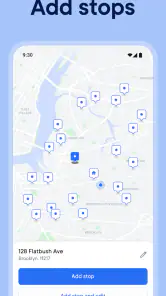
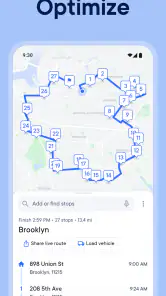
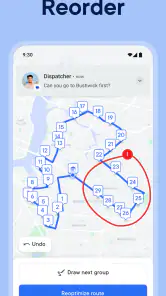
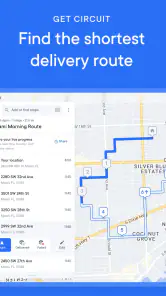
The app’s core idea is straightforward: enter several stops and let it work out a route through them. The practical benefit is less mental juggling. Instead of repeatedly checking a map, guessing which neighborhood to visit next, and correcting a route after the fact, I can start with one planned sequence and focus on the next address. It is a focused use of multi-stop route planning, rather than just another map with a destination box.
That works best when I can list most of my stops before setting off. For a delivery driver with a batch of addresses, or someone fitting appointments and pickups into an afternoon, the ordering step can make the day feel more manageable. If plans change, I would still treat the route as a useful guide rather than a promise: a new stop, a missed appointment window, or a road closure can change what makes sense.
When I’d reach for it
A realistic example is a day with a parcel drop, a grocery pickup, a return, and a visit on the other side of town. With a basic navigation app, I might enter each address as I go and make the sequencing decisions myself. Here, the appeal is having the stops considered together, which can reduce backtracking and make the plan easier to follow. I’d still check the route against any fixed-time commitments before leaving; the shortest-looking sequence is not automatically the best one if a particular stop has a narrow arrival window.
This is also where Circuit differs from using a general-purpose maps app alone. Traditional navigation is convenient for turn-by-turn directions to one place at a time, while this app is designed around arranging several destinations. That makes it a more natural fit for work rounds and packed errand lists. If I only have one destination, or want to explore a place without a set list of stops, my regular maps app is likely the simpler choice.
Who gets the most from it
The app is free to download, is rated for Everyone, and is made by Circuit Routing Limited. It has a 4.5 average from around 174,000 ratings, with over 10 million installs. Those figures suggest it has found a substantial audience, though they don’t tell me whether its workflow suits my particular job. The current version is 3.60.1, and it runs on Android 8.0 or later. In-app purchases range from $1.49 to $209.99 per item, so I’d check the options in the app before relying on any paid capability for regular work.
I’d recommend trying it if I regularly handle several stops and want help deciding their order. It is less compelling for occasional single-destination trips, where the extra planning step may not be worth it. I’d also avoid assuming that route optimization can account for every personal constraint: loading time, appointment windows, parking, or a recipient who is only available at a certain hour may need my own judgement.
More From Our News Desk

Weather by Xiaomi Review: Clear at a Glance, Less Clear Up Close

X Under Pressure: Can It Recover When Posting Goes Wrong?

Clash of Clans Is Won Between the Battles

Android Auto Makes the Case for Quieter Car Software

MobiOffice: Transforming Mobile Productivity with Seamless Integration

EA SPORTS FC™ Mobile Soccer: Redefining Mobile Sports Gaming
Why Circuit Route Planner Stands Out
Let’s focus on the practical question behind route optimization: what should I do with the order the app suggests? I would treat it as a starting sequence, then check it against the commitments that a map cannot judge for me. For example, if one customer is only available in the morning, I would keep that constraint in mind before accepting a route that places the stop later. This small check can prevent an efficient-looking plan from creating an avoidable missed visit.
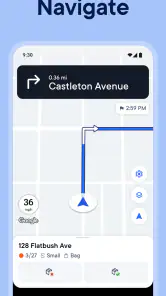
There is also a useful distinction between planning and navigating. The route planner helps organize a group of destinations; when I’m on the road, I still need to pay attention to the directions and local conditions. I wouldn’t assume that a planned sequence guarantees the fastest arrival under every circumstance. Traffic, access to a building, parking, and time spent at each stop all affect the actual day, so I’d leave room for those realities rather than schedule every minute around an ideal route.
Let's dive into the nitty-gritty of what makes this app a must-have. First off, the app is available on both Android and iOS, making it accessible to a broad audience. The interface is super intuitive, so you won’t need a degree in rocket science to figure it out. Ease of use is definitely one of its strong suits.
Features that Wow
Now, onto the features. The app allows you to input multiple stops and then calculates the most efficient route for you. Whether you're delivering packages, running errands, or planning a road trip, this feature saves you a ton of time and fuel. Plus, it’s got real-time traffic updates, which means it can reroute you on the fly if there’s a jam ahead. Talk about staying ahead of the game!
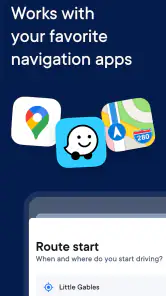
Another cool feature is the ability to integrate with other apps. For instance, if you're an Amazon Flex driver, you can easily sync your deliveries with the app. This seamless integration is a game-changer for those in the delivery business.
Putting a route into the day
For a work round, I would prepare the destination list before starting to drive rather than trying to build the whole plan at the curb. That gives me a chance to spot an address that looks out of place, group any stops with fixed commitments mentally, and make sure I have not forgotten a pickup or return. The optimization can handle the order of the stops, but I remain responsible for the quality of the list and the practical limits around each visit.
On a mixed errand day, the same approach helps without turning a simple outing into a project. I might add the places I already know I need to visit, review the proposed sequence, then decide whether a time-sensitive pickup should take priority. If I add another errand halfway through, I would reconsider the route rather than blindly follow the original plan. That is a modest habit, but it makes the app’s central strength more useful: it can reduce route-planning guesswork while leaving the final decision with me.
One trade-off is that route order is only one part of a successful round. A delivery route with many stops may benefit more than a day with two nearby appointments, but a driver still has to allow for unloading, finding entrances, and waiting for someone to answer. I would avoid judging the planner by whether the whole day takes exactly as long as hoped. Its job is to make the sequence easier to manage, not to control every source of delay.
Personal Experience
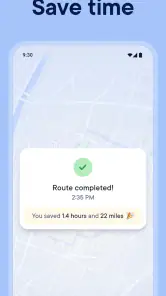
Using the app feels like having a personal navigator in your pocket. I remember the first time I used it for a day full of errands. I was skeptical at first, but by the end of the day, I was amazed at how much time I saved. It was like magic watching the app rearrange my stops in seconds, optimizing my route with precision.
There was this one time I was stuck in traffic, and boom! The app rerouted me through a scenic route, avoiding the jam and giving me a mini city tour. It’s these small, thoughtful touches that make using Circuit Route Planner a delightful experience.
For someone deciding whether to keep it installed, the key question is frequency. If I have several destinations every working day, the time spent organizing them can be worth having a dedicated planner instead of manually bouncing between map searches. If I need help only once in a while, my normal navigation app may already be enough, especially when I can choose the order myself. The dedicated tool makes most sense when the repeated task is the stop sequence, not simply finding directions.
I would also think about how predictable my route is. A planned round suits a batch of addresses I can enter in advance. A day built around spontaneous requests or uncertain availability demands more intervention, because the best sequence can change as circumstances do. In that situation, I’d use the suggested order as a reference and reassess it after a meaningful change, rather than treating optimization as an automatic answer to every new decision.
Where the trade-offs matter
The cost deserves a practical look if I’m considering it for regular work. The download is free, but in-app purchases range from $1.49 to $209.99 per item. I would check what an available purchase covers and whether it matches my own workload before spending money; the existence of a price range alone does not tell me which option I need. Someone testing the idea for occasional errands can begin with the free download and decide whether the workflow earns a place in their routine.
There is a learning curve even when an app feels approachable. The first route is a chance to learn how I prefer to prepare addresses and review an order before leaving. For a busy delivery shift, I would not make my first attempt with a complicated, time-critical round. Trying it on a less demanding set of stops lets me see whether the planning process fits my habits and whether I’m comfortable checking the suggested sequence.
Compared with entering each destination separately in a standard maps app, a dedicated multi-stop planner can save me from making every ordering decision myself. But the general map remains more convenient for a single destination, browsing nearby places, or a trip whose stops are already in the right order. Neither approach wins in every case. I’d choose the route planner when sequence is the problem, and regular navigation when I mainly need directions to one place or want the freedom to decide as I go.
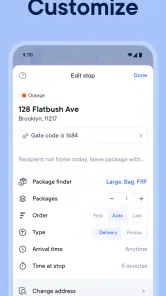
Another limitation is the gap between an optimized route and a personally sensible one. A route can be geographically tidy and still clash with a lunch break, a customer’s availability, or the time I need to load the vehicle. I would make those constraints explicit in my own planning, even if they are not part of the route calculation. That extra judgement is not a flaw unique to this app; it is simply why a driver should review a proposed route rather than outsource the whole day to it.
The Final Word
So, is this app worth downloading? In my humble opinion, absolutely! Whether you're a delivery driver looking to cut down on your route time or just someone who loves efficiency, this app is a golden find. It's user-friendly, packed with features, and frankly, a lifesaver when you're in a pinch.
In a world where time is money, having a tool like the Circuit Route Planner app at your disposal is invaluable. Give it a whirl, and watch how it transforms your daily commute or delivery route into a smooth, efficient journey.
My recommendation is strongest for couriers, field workers, and anyone who routinely has to visit several places in one outing. The app’s planning focus can make a list of addresses feel less chaotic, especially when I have enough information to decide which stops matter most. For a short trip, a flexible day of wandering, or a route where I already know the order, the simpler option is often better.
Ultimately, I see this as a specialist tool rather than a replacement for every map app on my phone. Its value comes from organizing multiple destinations, while my own knowledge still handles timing, access, and priorities. If that is the part of the day that slows you down, I think it is worth trying; if not, there is little reason to add another step to your routine.
Circuit Route Planner Frequently Asked Questions
Can Circuit Route Planner help me organize several stops into one trip?
Yes. Circuit Route Planner is built around multi-stop route planning, letting you organize several destinations into a route rather than working through each stop separately. This is especially useful when you have a number of deliveries or other errands to complete in one outing. The app’s main purpose is to optimize routes and help you finish work faster.
Who develops Circuit Route Planner, and is it an established app?
Circuit Route Planner is developed by Circuit Routing Limited and has been available since October 26, 2016. It has more than 10 million installs, with an average rating of 4.5 from around 174,000 ratings. Those figures suggest that it is widely used, particularly by people looking for a dedicated way to arrange routes with multiple stops.
What should I check before installing Circuit Route Planner on Android?
The Android version requires Android 8.0 or later, so check your phone’s operating system before downloading. Circuit Route Planner is a maps and navigation app intended to help organize multi-stop routes. If your device meets the requirement, you can install it and decide whether its route-planning tools fit the way you travel or work.
Is Circuit Route Planner free to download, and what might cost extra?
Circuit Route Planner is free to download, so you can try the app before deciding whether its paid options suit your needs. It includes in-app purchases, with prices ranging from $1.49 to $209.99 per item. The right choice depends on how you plan to use the app, so check the purchase details shown in your app store before buying.
What is Circuit Route Planner and how does it work?
Circuit Route Planner is a powerful app designed to optimize your delivery routes, saving you time and fuel. It works by allowing you to input multiple destinations and then calculating the most efficient route to take. This app considers factors such as traffic conditions and distance to help you reach your destinations in less time. Ideal for delivery drivers, it helps enhance productivity and reduce operational costs.
Pros
- Efficiently optimizes delivery routes.
- User-friendly interface for easy navigation.
- Integrates with various map services.
- Real-time traffic updates included.
- Supports multiple stops per route.
Cons
- Occasional bugs during route optimization.
- Premium features locked behind paywall.
- Limited offline functionality.
- Initial setup can be time-consuming.
- High battery usage during operation.
- Category
- Maps & Navigation
- Version
- 3.60.1











