Chordify: Song Chords & Tuner
- 2.55K
- 4.1
- Installs
- 5.00M
- Price
- Free

Screenshots
Analysis by Reviewed
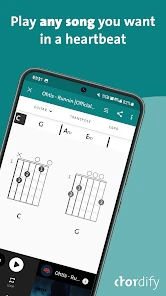
When I want to learn a song without stopping to work out every chord by ear, I want a clear starting point, not a music theory lesson. Chordify: Song Chords & Tuner is built around that practical need: it helps me find chord progressions for songs and gives me a way to play along. For a first-time user, the reassuring part is that the first useful step is simple: look up a song you know, pick up your instrument, and follow the chords as the music moves.
What to expect from a song-to-chord app
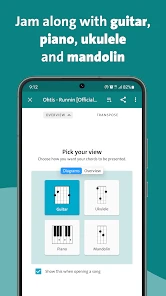
Chordify is a free music and audio app from Chordify B.V. Its appeal is the connection between a familiar recording and a playable chord sequence, rather than a course that starts with scales and theory. The catalog is presented as covering guitar, ukulele and piano, so the same song can be a useful starting point for different instruments. It has an average rating of 4.1 from around 40,000 ratings and more than 5 million installs, which suggests that many players use it as a practical companion rather than a specialist training tool.
I would approach its chord display as a guide to playing along, not a promise that every transcription will match every recording perfectly. Songs can have unusual voicings, quick changes or layers that are difficult to reduce to a basic chord sequence. That distinction matters: if your goal is to join in, a workable progression can be enough; if you need a precise arrangement for a performance, you may want to check the chords against the recording or use sheet music made for that version.
Who benefits most from the first session
The strongest fit is someone who already knows a handful of basic chords and wants to spend less time hunting for a starting chart. A beginner can still use the app, but the display is more useful once chord names mean something and changing between shapes is possible. If you are brand new to an instrument, I would pair it with a simple lesson on finger placement rather than expect a chord sequence to teach technique on its own.
It is also handy for a player who has not practised in a while. Instead of planning a formal session, I can pick a song I remember, tune up and see whether my hands still know the changes. That low-pressure use is different from structured training: the app can get me playing quickly, while a teacher or course is better for correcting posture, building technique and explaining why a progression works.
Unleashing the Musician Within
From the moment I installed Chordify: Song Chords & Tuner, I was hooked. The app is super user-friendly and doesn’t require you to be a tech genius to navigate. What I love about it is how it takes any song from my playlist and effortlessly transforms it into chords. It's like magic! Whether you're a beginner or a seasoned musician, you'll find this app incredibly useful.
Getting set up and finding a first song
My advice for a new user is to start with a song whose rhythm and structure you already recognise. Search for it, choose the result that matches the recording you have in mind, and keep the music playing while you follow the chord changes. Knowing where the chorus begins makes it easier to notice whether the sequence feels right. If several versions appear, compare the artist or recording details rather than choosing the first result automatically; covers and live performances can use different keys or arrangements.
More From Our News Desk

Weather by Xiaomi Review: Clear at a Glance, Less Clear Up Close

X Under Pressure: Can It Recover When Posting Goes Wrong?

Clash of Clans Is Won Between the Battles

Android Auto Makes the Case for Quieter Car Software

MobiOffice: Transforming Mobile Productivity with Seamless Integration

EA SPORTS FC™ Mobile Soccer: Redefining Mobile Sports Gaming
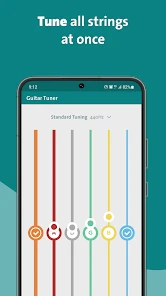
Before trying a complicated song, check that your instrument is in tune. The built-in tuner gives guitar and ukulele players a convenient first stop, so there is less app-hopping before practice. I would still listen carefully after tuning: a tuner can help with pitch, but it cannot make worn strings, a noisy room or a poorly set-up instrument sound ideal. For a first success, choose a slow, familiar song and concentrate on changing chords in time instead of trying to copy every embellishment.
Features That Strum the Right Chords
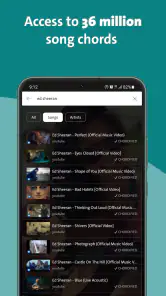
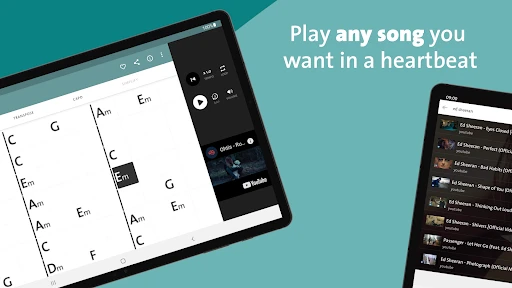
One of the standout features of Chordify is its vast library. Seriously, it covers almost any song you can think of. All you need to do is search for a song, and voilà, you're presented with the chords in an instant. It’s perfect for those spontaneous jam sessions with friends.
Another cool feature is the built-in tuner. You don’t have to switch between apps to make sure your instrument sounds just right. The tuner is precise and straightforward, making it a breeze to fine-tune your guitar or ukulele.
Making practice manageable
Chordify isn’t just about chords; it’s about enhancing your playing experience. The app provides you with the option to slow down the tempo, which is especially handy when you’re trying to nail those tricky chord progressions. And if you're like me, who sometimes struggles with transitioning between chords, this feature is a game-changer.
The app also allows you to loop sections of a song. This means you can practice that solo or chorus until it's perfect without having to rewind manually. It’s these little details that make Chordify a must-have for any musician.
A useful way to combine these tools is to slow a song down, loop only the part where you lose the beat, and practise the chord change before playing along at full speed. That is often more productive than restarting the whole track after every mistake. For a casual evening with friends, I would do the reverse: use the chord sequence as a shared roadmap and keep the song moving, rather than stopping to perfect each transition. Those two workflows suit different goals, and the app is more helpful when I treat practice and performance as separate tasks.
Getting more from a chord display
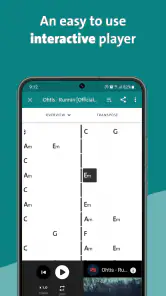
One small habit makes the screen easier to use: listen for the change before looking down to confirm it. If I stare at the chord names continuously, I can lose the rhythm and end up reacting late. Once I recognise the order, I glance at the display only around the transitions that still feel uncertain. That turns the app into a prompt rather than a substitute for listening, which is a better way to build confidence over time.
For piano, the same progression can be a quick harmonic outline, but it is not the same thing as a complete piano arrangement. I can use the chord names to choose a basic accompaniment and decide where to place the changes, then add a suitable rhythm myself. Guitar and ukulele players face a similar trade-off: the chord may be right while the recording uses a different voicing or a more intricate strum. The app gets me to a playable framework; musical details still come from listening and experimenting.
Where it fits among music tools
Compared with searching for chord charts on separate websites, Chordify’s main advantage is keeping the song and its chord progression together, with a tuner available in the same app. That can make it easier to start playing quickly. A traditional chord chart or printed sheet music may be better when I need a carefully arranged part, fingerings or notation; a general music player is better when I simply want to listen without practising. Chordify is most appealing in the middle: I know the song, want to join in, and need a practical guide rather than a full lesson.
There are trade-offs. A chord label does not teach finger placement or explain why a progression works, so a beginner who has never changed between basic shapes may still need a separate lesson. And a familiar song can be a poor first test if it contains fast changes or an arrangement that differs from the recording in the app. I get a better sense of what the tool can do by testing a straightforward song first, then moving on to more demanding material once I can follow the display comfortably.
When another tool is the better choice
If I need to prepare a part for a rehearsal where everyone expects the same voicings, I would not rely on a basic chord sequence alone. Sheet music or a chart prepared for that arrangement gives more control over exact notes and structure. Likewise, a dedicated instrument lesson is a better investment when my main problem is clean chord changes, strumming technique or reading notation. Chordify is strongest when speed and convenience matter more than a fully worked-out part.
For a quick comparison, a plain chart can be easier to print or scan at a glance, while a music player is simpler if I only want background listening. The benefit here is the connection between a song and its changing chords, with the tuner close at hand. That convenience is meaningful for informal practice, but it does not remove the need to check a progression by ear when the arrangement sounds off.
Engaging with the Community
What makes Chordify even more interesting is its community aspect. You can connect with other users, share your chord progressions, and discover new music. It’s like being part of a global jam session, and who wouldn’t want that?
The app is free to download, is rated for Everyone, and has in-app purchases ranging from about seven to fifty-four dollars per item. I would try the free experience before paying, then decide whether the options available to me justify the cost for the way I actually practise. It runs on Android 8.0 or later, and its current version is 1990. Those details make it worth checking compatibility and purchase choices before relying on it as a regular practice tool.
Making a sensible choice about paid options
I would not pay simply because I had one successful session. First, I would try several songs I genuinely want to play, including one with a chorus and one with a more awkward change. That reveals whether the app fits my habits rather than just looking useful in theory. Since purchases are available within the free app, it makes sense to understand which options matter to my routine and whether I will use them often enough to justify the expense.
Compatibility is another practical first check. The minimum Android requirement is version 8.0, so anyone using an older device should check before planning a practice routine around it. The age rating is Everyone, which makes the app suitable for a broad audience, though younger players may still benefit from an adult helping them choose songs and build basic technique.
Who will enjoy it—and who may prefer something else
I think Chordify suits casual guitar, ukulele and piano players who want to learn familiar songs, practise chord changes, or bring a rough accompaniment to a get-together. It can also help a more experienced player quickly explore a song before arranging it independently. It is less suited to someone who needs exact notation, a structured course in music theory, or a guaranteed studio-accurate transcription for a formal performance. In those situations, sheet music, a teacher or a dedicated learning resource may be a better fit.
A realistic first session could be a few minutes before meeting friends: I tune my guitar, search for a song everyone knows, slow the section that gives me trouble, and loop it until I can change chords without losing the pulse. Then I play along at normal speed and use the progression as a guide. If the result sounds different from the recording, I can check the version and listen for a key or arrangement difference instead of assuming I have made a mistake.
A practical routine for an ordinary day
On a busy evening, I would keep the goal modest: one song, one tricky passage and a few minutes of playing. I would search for the recording I recognise, tune first, then listen once without trying to play so I know where the changes fall. On the next pass, I would follow the chords and mark the part that feels difficult by looping it. Ending with a full-speed attempt gives me a clear sense of whether the practice helped, without turning a casual session into a long technical exercise.
This routine also helps answer a common concern: do I need to know theory before opening the app? Not to get started with a familiar song, but knowing basic chord shapes makes the result much more useful. If the chord names are unfamiliar, I would learn a few common shapes separately and return to the song afterward. And if a progression seems wrong, I would first check that I selected the intended recording, then compare what I hear with the displayed changes before deciding the app has failed.
In conclusion, if you’re passionate about music and are looking for an app that helps you play your favorite songs, then give Chordify a try. It’s intuitive, packed with features, and an absolute joy to use. Whether you're strumming a guitar or plucking a ukulele, Chordify is your go-to app for all things chords. So go ahead, unleash your inner musician and let Chordify guide your musical journey. Trust me, you won’t regret it!
My recommendation is a little more specific: try it if your aim is to get from listening to playing with less friction, and begin with an easy song you already know. Treat the chords as a useful map, use the tuner and practice controls to work through awkward moments, and keep another source in mind when accuracy or formal instruction matters most. With that expectation, it can be a friendly, practical addition to everyday music-making.
Chordify: Song Chords & Tuner Frequently Asked Questions
Can I use Chordify to learn songs at my own pace?
Yes. Chordify is built around playing along with songs, so you can use it to work through music you already enjoy rather than starting with unfamiliar exercises. It can be useful whether you are just beginning or already play an instrument, and you can return to a song as you practice. The app’s focus is on making chords accessible and helping you follow along.
What instruments can I use with Chordify?
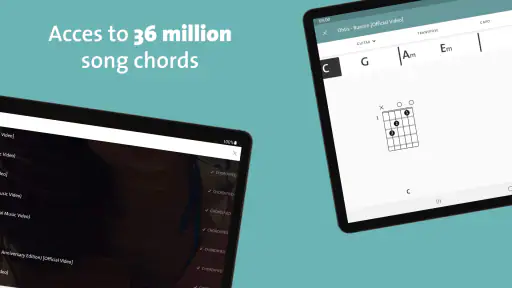
Chordify provides chords for guitar, ukulele, and piano, so players of those instruments can use it to follow songs and practice. The app’s song-focused approach makes it easy to explore music you like and try playing along, whether you are learning the basics or looking for material to work on. Its offering is described as including 36 million chords across those instruments.
What devices and operating systems can run Chordify?
Chordify is a music app for Android and iOS, and its listed minimum operating system requirement is version 8.0. Check that your device meets this requirement before downloading so you can install and use the app. Chordify is rated for Everyone, making it suitable for a broad audience interested in learning and playing music.
What is Chordify and how does it enhance my music experience?
Chordify is a music app designed to help both beginner and experienced musicians transform songs into chords. It enhances your music experience by providing an easy-to-use platform that automatically extracts chords from your favorite songs, making it simpler to play along. Whether you're using a guitar, piano, or ukulele, Chordify offers a seamless way to practice and improve your skills. Its song-focused approach can make practicing feel more direct, since you can work with music you already enjoy.
Is Chordify free to use, and are there any premium features?
Chordify offers a free version with basic features that allow you to convert songs into chords. However, for users seeking more advanced functionalities, Chordify also provides a premium subscription. This paid version includes features such as offline access, capo hints, and the ability to change the song's tempo, enhancing the overall user experience. The app is free to download, with optional in-app purchases ranging from around seven to 54 dollars per item, so review the available purchase options before subscribing.
Pros
- User-friendly interface simplifies learning.
- Large library of songs for all tastes.
- Real-time chord display during songs.
- Offline access for premium users.
- Integrates with music streaming apps.
Cons
- Limited features in free version.
- Occasional chord inaccuracies.
- Ads can be intrusive in free version.
- Requires internet for most features.
- Premium subscription is costly.
- Category
- Music & Audio
- Version
- 1990











