Chilis
- 12.72K
- 4.4
- Installs
- 5.00M
- Price
- Free

Screenshots

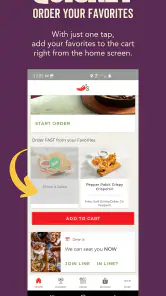
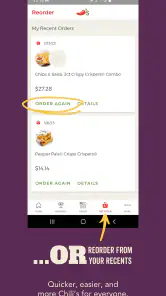





Analysis by Reviewed
When I want Chili’s, I don’t need a recipe collection or a tour of the world’s hottest peppers; I need to know where the nearest restaurant is, what’s on the menu, and whether I can arrange food for a pickup or delivery order. That practical focus is what makes the Chilis app useful. It is a free lifestyle app from Brinker International, built around getting from “what should we eat?” to a restaurant and an order with less back-and-forth.
I see its strongest fit in ordinary, slightly rushed decisions: choosing dinner on the way home, checking the menu before a family outing, or coordinating a meal when nobody wants to cook. It is not a general restaurant-discovery service, and that narrower scope matters. If Chili’s is already the place you’re considering, the app can keep the basic steps in one place. If you are still choosing between several restaurants, a broader maps or dining app may be a better first stop.
Finding your way through a focused restaurant app
Readability and navigation: a short path to the useful parts
The app’s job is easy to understand: help me find a Chili’s, inspect the menu, and move toward an order. That gives the experience a clear purpose. Rather than asking me to browse an endless selection of unrelated restaurants, it is organized around one brand and the decisions a guest makes before eating. For someone who has already settled on Chili’s, that focus can save effort.
The practical advantage is not that every step is automatically effortless; it is that the task itself is familiar. I can think in a simple sequence: identify a location, look over food choices, then decide whether pickup or delivery suits the occasion. That sequence is especially helpful when someone else is waiting for an answer. Instead of trying to remember menu details from a past visit, I can check the current options while we make the plan.
There is a useful distinction between browsing and committing. I’d use the menu to narrow down choices before starting an order, particularly if a group is still debating. That keeps the conversation from turning into repeated searches while everyone changes their mind. Once the group agrees, the ordering step has a clearer purpose. It is a small workflow improvement, but it makes more sense than opening an order first and treating the menu as an afterthought.
The app’s scale suggests that it is an established option for many diners: it has an average rating of 4.4 from around 42,000 ratings, and it has been installed over 5 million times. Those figures don’t tell me whether it will suit an individual’s needs, but they do place it among widely used restaurant apps rather than an obscure utility. It is rated for Everyone, which makes its basic restaurant-planning role appropriate for a broad audience.
Motor and sensory considerations: where the focused task helps
For people who find long browsing sessions tiring, a single-restaurant app can reduce the number of choices in front of them. There is no need to compare dozens of unrelated menus just to check whether Chili’s is an option. A companion, family member, or caregiver can also help with the decision in a straightforward way: one person can discuss the meal while the other checks the location and order choices.
More From Our News Desk

Clash of Clans Is Won Between the Battles

Android Auto Makes the Case for Quieter Car Software

MobiOffice: Transforming Mobile Productivity with Seamless Integration

EA SPORTS FC™ Mobile Soccer: Redefining Mobile Sports Gaming

How Microsoft OneDrive Became a Mobile Productivity Giant

How Google Translate Breaks Language Barriers Effortlessly
That said, the app should not be treated as a substitute for an interface that has been tested for every accessibility need. People who rely on screen readers, larger text, switch controls, voice input, or other assistive settings should try the specific tasks they plan to use, such as finding a restaurant and completing an order. A listing’s general suitability for everyone is not the same thing as a guarantee that every control or screen will work equally well for every person.
For a sensory-sensitive diner, the most helpful use may be reviewing the menu in a quieter moment rather than deciding in a busy restaurant. Looking ahead can reduce pressure at the counter or table, especially when a group is ready to order. I would still confirm any important food or preparation details directly with the restaurant before relying on an assumption; a menu view is useful for planning, but it should not replace a conversation when a dietary or allergy concern is significant.
Situational access: when it earns a place on your phone
Imagine leaving work later than planned and needing to coordinate dinner for two people at home. One person can check nearby Chili’s locations while the other looks at the menu, then you can choose whether pickup or delivery makes more sense. The key benefit is that both parts of the decision—where to go and what to order—start in the same brand-specific place. That is more convenient than trying to remember a past menu or switching between a search result and a separate ordering route.
It can also help when you are planning before you leave. If the group wants Chili’s but has not decided what everyone will eat, browsing first gives people time to settle on their choices. For a parent managing a family meal, that can make the eventual order discussion shorter. For friends meeting after an event, checking location options early can prevent the awkward last-minute scramble of discovering that the restaurant they had in mind is not the one they need.
There is a trade-off, though: the app is most useful after the restaurant choice is made. A general map app is better for comparing nearby dining options across brands, checking a route, or looking for a place that fits a particular neighborhood plan. A restaurant’s own app is usually the more direct option once you have decided on that restaurant. I would use the two types of tools in sequence rather than expecting one to do both jobs equally well.
Remaining barriers and sensible expectations
The narrow focus is also the main limitation. If Chili’s is not convenient for your location or does not fit the group’s preferences, this app cannot solve the larger question of where else to eat. Nor would I install it expecting recipes, food-history articles, community posts, or a general guide to spicy food. Its value lies in helping with a Chili’s visit or order, not in serving as an all-purpose food companion.
Ordering digitally can make planning easier, but it also asks the user to make decisions on a small screen and complete the process without the back-and-forth of speaking to staff. That may not be comfortable for everyone. If you would rather ask about a dish, clarify a special request, or talk through a concern, contacting or visiting the restaurant directly may be a better route. For a time-sensitive meal, I would also avoid assuming that a screen action alone guarantees the exact timing or outcome I have in mind; leave enough room to handle practical details with the location.
Another reasonable question is whether the app is worth keeping if you visit only occasionally. I would decide based on how often I need to check locations or place orders. If Chili’s is a regular choice, having the brand’s menu and ordering path close at hand is convenient. If I go rarely and prefer to discover restaurants through maps or a delivery service, I may be better off using those tools and opening this app only when I need a Chili’s-specific task.
Who benefits most from this focused approach
I would recommend trying it if you already choose Chili’s often enough that checking the menu or arranging food is a recurring task. It may also be handy for households where one person coordinates meals, since a quick menu check can help everyone decide before the order is placed. Travelers who know they want this particular restaurant can use the location search as a starting point, while still relying on a map for broader route planning or comparisons.
I would skip it if you want one app to compare restaurants from different chains, keep track of every meal option in your area, or handle a highly personalized dietary decision without speaking to anyone. The app’s focused scope is a convenience only when that scope matches what you need. For a diner with specific questions about ingredients, preparation, or an accommodation, the sensible choice is to verify directly with the restaurant rather than treating an app menu as the final authority.
On the practical side, the app is free, and its current version is 8.5.3. It has been available since December 15, 2011, so it is not a newly introduced brand companion. Those details may matter when deciding whether to try it, but my main test would be simpler: does it make your next Chili’s decision easier than your usual route? If you already use a broader service that handles your needs comfortably, there may be no reason to change your routine.
An inclusive verdict for a specific kind of diner
My view is that this is a useful, deliberately limited tool rather than a complete dining solution. It brings the core Chili’s tasks—finding a restaurant, checking food choices, and arranging pickup or delivery—into a brand-specific experience. That can make an ordinary meal plan less scattered, especially when the restaurant has already been chosen. The app is at its best when the user knows what they want to do and values a direct route to doing it.
For access needs, I would approach it with practical expectations: the focused purpose may reduce decision clutter, but individual interface needs still deserve a real-world check. Try the exact path you expect to use, and ask the restaurant directly whenever a food or service detail affects comfort or safety. If those steps work for you, the app can be a convenient companion; if they do not, a phone call, in-person conversation, or broader dining tool may be the more inclusive choice.
Discovering the World of Chili
Alright, so I downloaded the Chilis app the other day, and let me tell you, it’s a game-changer. The app opens up with a vibrant interface that immediately sets the tone for a flavorful adventure. Whether you're a chili newbie or a seasoned spice enthusiast, this app has something for everyone.
Easy Navigation, Spicy Exploration
Navigating through the app is as smooth as butter on a hot skillet. You’ve got your tabs neatly laid out, allowing you to explore various chili recipes, local chili events, and even a dedicated section for chili-related merchandise. The search function is top-notch, quickly pulling up results with a few keystrokes. I was pleasantly surprised by how intuitive it was to find exactly what I was craving.
Hot Features to Spice Up Your Experience
Now, let’s talk features. The app offers a personalized spice meter where you can adjust the heat level of the recipes you’re interested in. This is perfect for those who like to tread cautiously into the spicy realm or dive headfirst into fiery flavors. Another cool feature is the community section where users share their chili creations and tips. It’s like being part of a global chili club, exchanging secrets and stories about the beloved dish.
There’s also an event calendar that keeps you updated on all things chili happening around you. From chili cook-offs to spicy food challenges, this app ensures you never miss out on a chance to indulge in some hot fun.
Your Pocket-Sized Chili Encyclopedia
One of the highlights for me was the app’s extensive library of chili recipes. It’s like having a chili cookbook without the need for physical pages. The recipes are detailed, easy to follow, and come with user ratings and reviews which I found incredibly helpful. Plus, the app occasionally throws in some quirky chili trivia to keep things interesting.
Another neat aspect is the Chili History section. It dives into the origins of different chili types, their cultural significance, and how they've evolved over time. As someone who loves a good backstory, this was a delightful addition.
Final Thoughts
In conclusion, the Chilis app is more than just a guide to good chili; it’s a celebration of spice and flavor. Whether you’re looking to spice up your dinner table or explore the world of chili in a fun and engaging way, this app has got you covered. So, if you’re ready to embark on a chili-infused journey, download the app and let the spicy adventure begin!
Chilis Frequently Asked Questions
Is the Chilis app free to download, and who makes it?
Chilis is a free Lifestyle app developed by Brinker International. It is designed to help you find a Chili’s restaurant, browse the menu, and place an order for pickup or delivery. The app’s free download makes it easy to explore its restaurant and ordering tools before deciding whether they fit the way you dine.
What is the Chilis app’s age rating?
The Chilis app is rated Everyone, so its content is intended for a broad audience. Its main purpose is to support restaurant discovery, menu browsing, and food ordering. If you are considering downloading it for a family member, you can also check your device’s app store for the current compatibility details and review the available app information before installing.
What devices can run the Chilis app?
Chilis is a Lifestyle app from Brinker International, available for Android and iOS devices. On Android, the listed minimum operating system is 7.0, so check your device’s software version before downloading. The app is free to install and is intended for everyone. If your device meets the requirements, you can use it to find a restaurant, browse the menu, and order.
What features does the Chilis app offer?
The Chilis app offers a variety of features to enhance your dining experience. You can view the menu, place takeout orders, and even join the waitlist at your local restaurant. The app also provides personalized offers and rewards through the My Chili’s Rewards program, and allows for easy payment options directly within the app.
Is the Chilis app available for both Android and iOS devices?
Yes, the Chilis app is available for download on both Android and iOS platforms. You can find it in the Google Play Store for Android devices and the Apple App Store for iOS devices. Ensure your device meets the minimum operating system requirements for a smooth experience. For Android, the listed minimum is version 7.0; the app is free to download on both platforms.
Pros
- User-friendly interface and easy navigation.
- Wide variety of menu items to choose from.
- Convenient online ordering system.
- Frequent updates with new features.
- Responsive customer support team.
Cons
- Limited customization options for orders.
- Occasional app crashes reported by users.
- Delivery service not available in all areas.
- Some menu items lack detailed descriptions.
- Requires constant internet connection.
- Category
- Lifestyle
- Version
- 8.5.3











