Chick-fil-A®
- 69.52K
- 4.5
- Installs
- 10.00M
- Price
- Free

Screenshots

Analysis by Reviewed
I tend to judge a restaurant app by what happens when I’m hungry, in a hurry, and trying to make a decision with one hand. The Chick-fil-A® app is most useful when I already know I want food from Chick-fil-A: it brings ordering and rewards together, so I can plan a pickup rather than work through the menu at the counter. It’s a free Food & Drink app from Chick-fil-A, Inc., and I’d recommend it most to regular customers who value a familiar order and a little less friction.
What to expect when opening it
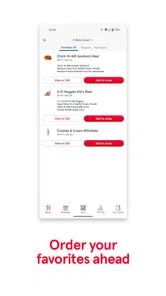
The app’s overall purpose is straightforward, but a restaurant app can still feel slow if it makes you rebuild an order every time. Here, being able to return to past orders is a practical shortcut: I can use it as a starting point, then check the details before placing anything. That matters more than flashy animation when I’m ordering during a short break. My sense of speed is therefore less about a promise of instant loading and more about having fewer steps once I know what I want.
For an ordinary visit, I’d open it before leaving work, choose a familiar meal, review the customizations, and submit the order when I’m ready. That sequence is easier to manage than deciding at a crowded counter, but it still depends on taking a moment to verify the location and order details. I wouldn’t assume that placing an order means I can arrive at any time or skip every wait; the app helps organize the purchase, while the restaurant visit remains part of the process.
Busy moments and useful habits
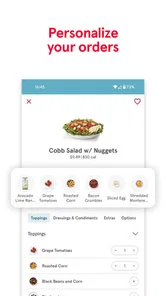
The app is especially handy when one person is ordering for several people. I can go through the items deliberately, apply preferences such as extra pickles or no onions, and review the basket instead of trying to remember everyone’s changes aloud. A useful habit is to confirm each customized item before checkout. It takes a few extra seconds, but it reduces the chance of carrying a mistaken preference all the way to pickup.
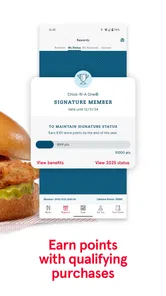
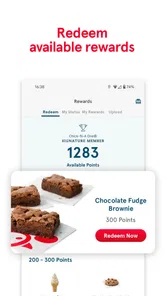
Rewards also make more sense when I treat them as a bonus rather than a reason to spend. Qualifying purchases can earn points, and available rewards can be redeemed, but I’d check what the app currently shows before building a meal around a particular offer. Offers may make trying something different more appealing; they don’t automatically make that choice better value if it isn’t what I wanted in the first place.
Reliability and recovery
The published experience isn’t a guarantee that every session will be flawless. The original review notes occasional freezing while adding items, and that’s exactly the kind of interruption that can be irritating when you’re assembling a larger order. If the app stalls, I’d pause before tapping repeatedly or submitting again. First check whether the basket changed; duplicate attempts can create confusion, while reopening the order carefully gives you a chance to confirm what is actually there.
I also wouldn’t make the app the only plan for a time-sensitive meal. If it isn’t responding, ordering in person is the sensible fallback, especially when you’re already near the restaurant. That trade-off is common with app-based ordering: it can make a routine smoother, but a screen issue can add steps instead of removing them. For a simple repeat order, the past-order shortcut is useful; for a complicated group meal, I’d leave enough time to review everything calmly.
More From Our News Desk

Weather by Xiaomi Review: Clear at a Glance, Less Clear Up Close

X Under Pressure: Can It Recover When Posting Goes Wrong?

Clash of Clans Is Won Between the Battles

Android Auto Makes the Case for Quieter Car Software

MobiOffice: Transforming Mobile Productivity with Seamless Integration

EA SPORTS FC™ Mobile Soccer: Redefining Mobile Sports Gaming
Who gets the most from it
If Chick-fil-A is already part of your routine, this app has a clear job: prepare an order, keep preferences manageable, and make rewards easier to track. It is less compelling if you only visit occasionally, prefer choosing after seeing the food in person, or want one app to compare menus across many restaurants. A general delivery or restaurant-discovery service may suit that broader search better, while ordering directly here is the more focused choice when you have already picked Chick-fil-A.
For a family or a small work group, I’d use it to collect choices before placing the order rather than rushing through customization at the last moment. For a solo stop, it is most useful when I’m repeating a known order. Either way, I’d treat the final review screen as important: confirm the items, customizations, and restaurant before committing. That small check is a better safeguard than assuming a remembered order is automatically right for today.
Discovering the App
When I first downloaded the Chick-fil-A® app, I was impressed by its sleek and intuitive design. The interface is user-friendly, making it incredibly easy to navigate whether you're a tech-savvy millennial or someone who just learned how to use a smartphone. It feels like the developers really put themselves in the customer's shoes to create an app that addresses all our fast-food needs.
Ordering Made Easy
One of the standout features of the app is the effortless ordering process. You can customize your order to your heart’s content, which is fantastic for picky eaters like me. Whether you want extra pickles or no onions, it’s all just a few taps away. Plus, the app remembers your past orders, saving you time on those days when you just want your usual fix.
Rewards and Offers
Now, who doesn’t love a good deal? The app’s reward system is a real treat. Qualifying purchases earn points that you can redeem for available rewards. It’s a nice extra when I was already planning to order, and the app gives me a place to check what can be redeemed. Offers can also make trying a different menu item tempting, though I wouldn’t let a reward steer me toward food I don’t actually want.
Location and Accessibility
Finding a Chick-fil-A near you is a breeze with the app’s location feature. It can help when I’m in an unfamiliar area and need to locate a restaurant. I still check that I’ve selected the right location before submitting an order, particularly if I’m travelling or placing it for someone else. That small pause matters because a carefully customized basket is no help if it is attached to the wrong restaurant.
A Few Bumps on the Road
While the app is pretty useful, it’s not without its quirks. I’ve encountered the app freezing when adding items to an order, which is especially frustrating when the basket has several customizations. If that happens, I avoid repeatedly tapping the add button. I check the basket first, then reopen or review the order before trying again. That careful recovery is less stressful than guessing whether the last tap registered.
Performance on everyday devices
The app is rated for Everyone and supports Android devices running version 9 or later, which gives many Android users a reasonable starting point for compatibility. It has been available since December 20, 2013, and its current version is 2025.21.5. Those details tell me it is an established service with ongoing releases, though an update number alone cannot promise that it will feel equally smooth on every phone.
I would not expect a restaurant-ordering app to demand the same resources as a graphics-heavy game, but I also can’t infer battery use, storage needs, or performance on a particular device from its purpose alone. If an older phone is already short on space or tends to struggle with apps, I’d keep the operating system current where possible and avoid leaving a half-finished order open while switching between tasks. When the connection or device is having a bad day, the restaurant counter remains a more reliable fallback than rushing through a screen that is not responding.
How it compares with other ways to order
Compared with calling or ordering face to face, the app gives me more room to review customizations and revisit a familiar order without explaining it from scratch. Compared with broad delivery services, its appeal is narrower: I’m using it for Chick-fil-A rather than browsing a range of restaurants. That focus is a strength if the choice is already made, but it is not the right tool when I’m still deciding what cuisine or restaurant suits the group.
The app has an average rating of 4.5 from around 204,000 ratings, and it has passed 10 million installs, so it is clearly used by a large audience. I see those figures as context, not a guarantee that every order or device experience will match mine. Its most convincing value is practical rather than universal: returning customers can combine ordering, customization, and available rewards in one place, while occasional diners may find the ordinary in-person route just as easy.
A useful routine for shared orders
When I’m coordinating lunch for a few people, I’d ask everyone for their choices before opening the order rather than passing a phone around while I’m trying to check out. That keeps the person placing it focused on entering each item and its requested changes. I’d then read the basket back to the group, especially if two meals look similar or someone has a specific customization. The app helps organize the details, but it cannot replace that quick human confirmation.
For a solo visit, the best time-saving habit is to treat a previous order as a draft, not an automatic repeat. I might want the same main item but a different side, or I may be ordering for a different restaurant location. Looking over the whole basket before submitting catches those small changes without undoing the convenience of starting from something familiar.
Choosing between ordering ahead and deciding in person
I’d use the app when I’ve settled on Chick-fil-A and want to make choices at my own pace. It is less useful when my group is still debating what to eat or when I want to compare menus and prices across restaurants. In those situations, a broader food or delivery app can help with discovery, while a direct visit works well if I’m already there and want to decide at the counter.
Ordering in person also makes sense if I’m unsure about an item or want to ask a question before choosing. The app is best at handling a known plan, not at replacing every conversation with restaurant staff. I see that as a fair boundary rather than a flaw: the direct ordering experience is focused on Chick-fil-A, and a focused tool will naturally be less useful for an open-ended search.
What I’d check before checkout
Before placing an order, I’d verify the restaurant, each item, and every customization, then make sure the basket reflects the group’s final choices. If I’m using a reward, I’d check that the reward currently appears as available rather than assuming a past offer is still there. This order of operations is practical: settle the food first, confirm the details, and then decide whether a reward fits the purchase.
If the app seems to pause during that process, I’d give it a moment and inspect the basket before repeating an action. That is the clearest way to avoid uncertainty about whether an item was added. For an urgent meal, I’d also keep the simpler in-person option in mind; using an app should make ordering easier, not turn a short break into troubleshooting.
Final Thoughts
All in all, the Chick-fil-A® app is a sensible choice for anyone who often orders from the restaurant and wants to prepare a meal before arriving. It makes customization and repeat orders easier to manage, and it gives qualifying purchases a route to points and available rewards. I wouldn’t call it essential for someone who visits rarely, wants to compare several restaurants, or prefers to decide everything face to face. Its value is in smoothing a specific routine, not in being the best way to handle every meal.
My more measured verdict is that it is worth trying if you often order from Chick-fil-A and like having your usual choices ready to review. Its speed comes from a clearer ordering routine, not from eliminating every wait or possible hiccup. With an average rating of 4.5 and a free download, it is an easy option to test; just use the final order check, keep a backup plan for a frozen session, and skip it if you mainly want to compare restaurants. For the right customer, that focused convenience is enough to make it a useful part of a regular meal routine.
Chick-fil-A® Frequently Asked Questions
Can I browse the Chick-fil-A® menu before placing an order?
Yes. The app lets you explore the menu before deciding what to order, so you can review the available choices and plan a meal from your phone. You can also customize an order and arrange it ahead of time. Browsing first is useful if you want to see what suits you before moving on to checkout.
Can I customize an order in the Chick-fil-A® app?
Yes, you can customize your order while using the app. After browsing the menu, select what you want and adjust the available options before proceeding. This can make ordering ahead more convenient, since you can review your selections on your phone rather than deciding everything at the counter. Check the order details before submitting to make sure they match your preferences.
Does the Chick-fil-A® app let me order ahead for pickup?
Yes. Ordering ahead is one of the app’s main uses, allowing you to place an order from your phone before collecting it. You can browse and customize your selections, then pay in advance. This is a practical option when you want to prepare your order before arriving, though the app’s ordering and fulfillment choices depend on the location you select.
Who develops the Chick-fil-A® app, and what kind of app is it?
Chick-fil-A, Inc. develops Chick-fil-A® as a Food & Drink app for customers who want to explore the menu and manage orders from a phone. Its focus is practical: ordering ahead, earning points on qualifying purchases, and redeeming available rewards. The app is free to download, and its content rating is Everyone, making it suitable for a broad audience.
What is the Chick-fil-A® app and how does it work?
The Chick-fil-A® app is a convenient tool for ordering your favorite Chick-fil-A meals directly from your smartphone. With this app, you can browse the menu, customize your order, and pay in advance, ensuring a quick pickup at any Chick-fil-A location. The app also offers a rewards program where users can earn points with every purchase, which can be redeemed for free food and other benefits.
Pros
- User-friendly interface
- Quick order processing
- Customizable menu options
- Efficient delivery service
- Exclusive offers for app users
Cons
- Limited to certain regions
- Requires constant updates
- Occasional app crashes
- Limited payment options
- No nutritional info on the app











