Chick-fil-A Play
- 620.00
- 4.0
- Installs
- 500.00K
- Price
- Free

Screenshots



Analysis by Reviewed
When I first opened Chick-fil-A Play, I expected a small entertainment extra connected to a familiar restaurant brand, not something I would spend much time discussing. That first impression is still partly true: this is not a full game platform or a replacement for a serious streaming service. Its appeal is more modest and more practical. It gives families and casual users a quick way to find something playful on a phone, especially during the small gaps in a normal day when nobody wants to commit to a long activity.
The app comes from Chick-fil-A, Inc. and sits in the entertainment category. It is free to use, carries an Everyone age rating, and has reached over 500 thousand installs. Those details make its intended audience fairly clear: it is designed to be approachable, easy to try, and suitable for shared moments rather than a narrow group of specialist players. I found that positioning important because it sets the right expectation. You should approach it as a light, family-friendly companion, not as a deep gaming destination.
How Chick-fil-A Play fits into a shared household
The most convincing use case is a shared-device moment. Imagine waiting for food, sitting in the back seat during a short trip, or trying to keep children occupied while adults finish a conversation. In that situation, a quick entertainment app can be more useful than a large game that requires a tutorial, a headset, or a long uninterrupted session. I can see this app working best when the phone is passed between people and the goal is simply to create a little amusement.
That shared setting also reveals its main strength: low commitment. A family does not need to plan an evening around it. Someone can open the app, look around, and decide within a short time whether it suits the moment. If one person loses interest, another can take over without the household having invested money or a complicated setup process. Because the app is free, the decision to test it is easier than with paid entertainment, although “free” does not automatically mean it will become a lasting favorite.
I would be careful about treating it as a universal solution for every child or every age group. An Everyone rating makes it broadly accessible, but it does not tell me that every activity will appeal equally to a toddler, an older child, and an adult. In a real household, age differences matter. A younger child may enjoy the immediate visual appeal, while an older child may quickly compare the experience with more substantial games already installed on the device.
One useful household habit is to decide before opening it who is using the phone and for how long. That sounds simple, but shared entertainment often becomes frustrating when one person controls the screen indefinitely. I would let the child who asked for it choose first, then make the handoff explicit. This turns the app into a small cooperative break instead of another source of arguments over the device.
What the first session feels like
My first session was best understood as an orientation period. I wanted to see how naturally the app fit into an ordinary phone routine, rather than judging it only by whether it looked entertaining for a few minutes. The important question is whether a user can move from curiosity to participation without needing a lot of explanation. For a family app, that transition matters more than elaborate presentation because adults may be helping children while also managing food, travel, or other tasks.
More From Our News Desk

Weather by Xiaomi Review: Clear at a Glance, Less Clear Up Close

X Under Pressure: Can It Recover When Posting Goes Wrong?

Clash of Clans Is Won Between the Battles

Android Auto Makes the Case for Quieter Car Software

MobiOffice: Transforming Mobile Productivity with Seamless Integration

EA SPORTS FC™ Mobile Soccer: Redefining Mobile Sports Gaming
I also noticed the difference between an app that is pleasant to sample and one that becomes part of a daily routine. Chick-fil-A Play has an inviting role as a quick diversion, but I would not install it expecting the same depth or replay value as a dedicated title from a major game publisher. That is not a criticism of its basic concept; it is a boundary that helps explain who will enjoy it. Casual users may appreciate the simplicity, while enthusiastic players may find the experience too limited after the novelty fades.
The store summary presents it as entertainment for the whole family, and that broad idea matches my experience better than calling it a conventional game. It is a place to explore and share rather than a single, demanding challenge. That distinction is useful for parents deciding whether to put it on a common tablet or phone. It can fill a gap, but it should sit alongside other activities rather than become the household’s only digital option.
Setup, account boundaries, and practical limits
Before handing over a shared device, I would inspect the app myself. That is not because the age rating raises an obvious concern, but because account boundaries are always important when several people use one phone. The person who opens an app may not be the same person who normally owns the device, and a child may tap through screens without understanding which actions affect the broader phone experience.
I prefer to establish a simple rule: the adult sets up the app, the child uses it within that agreed session, and any unexpected screen is paused rather than accepted automatically. This is especially sensible for a branded entertainment app, where the experience may be connected to the wider identity of the developer even if the child sees it only as a playful activity. I would not assume that a family-friendly rating removes the need for an adult’s judgment.
Another practical point is device ownership. On a family tablet, the app can function as a communal activity. On a personal phone, it may be better treated as something a parent opens for a child rather than something installed permanently for unsupervised use. That distinction prevents confusion between the child’s entertainment and the owner’s normal phone workflow. It also makes it easier to remove the app later if it no longer earns its place.
The current version is 2026.4.0, and the app supports Android 8.0 or later. For most reasonably maintained Android devices, that minimum should not be an obstacle, but older phones can still behave differently from newer ones. I would check the app on the actual shared device before relying on it during a trip or restaurant visit. A quick test at home is more useful than discovering an awkward loading or compatibility issue when everyone is already waiting.
Because I am reviewing it as a household tool, I would also keep expectations realistic about storage and attention. Even a free app has to justify the space and the place it occupies on a shared screen. If the family opens it only once and never returns, it may be better to uninstall it and revisit it later rather than letting unused apps accumulate. The low financial cost makes trying it easy, but the cost in clutter and screen time still deserves consideration.
Keeping one device from becoming the center of the room
A useful trick is to use the app as a transition activity rather than as an open-ended babysitter. For example, I might offer it while waiting for a meal, then put the phone away when the food arrives. In a home, it could work during a short pause before leaving the house or while one child finishes a task. Giving it a clear beginning and end helps preserve its value and avoids the familiar problem where a quick distraction quietly turns into the entire afternoon.
This approach also makes the app easier to compare with alternatives. A video service is usually better when the household wants passive viewing. A dedicated multiplayer game is stronger when everyone wants rules, competition, and progression. A simple drawing or puzzle app may be better when the aim is creative concentration. Chick-fil-A Play makes more sense when the group wants something light, branded, and easy to sample without paying first.
Coordination when several people want to use it
Shared entertainment succeeds or fails on coordination. I would not judge this app only by what appears on screen; I would judge whether it helps a household avoid unnecessary friction. The best approach is to decide whether the session is individual, turn-based, or simply something everyone watches together. Those are different uses, and assuming one format will fit all of them can create disappointment.
For individual use, the app is straightforward: one person holds the device and explores at their own pace. For turn-taking, I would set the order before starting and keep turns short enough that younger users do not feel forgotten. For group viewing, an adult can hold the phone while children react and suggest what to try next. This last format may be the most comfortable for families with children who are too young to navigate independently.
A non-obvious advantage of this kind of app is that it can create a shared reference point without requiring every person to own a separate device. That matters in households trying to reduce individual screen use. One phone in the middle of the group can be less isolating than several personal screens, even if the activity itself is simple. The trade-off is that the experience depends heavily on patience and clear turn-taking.
I would also avoid using it as a reward system that is too tightly tied to behavior. If every completed chore leads to more screen time, the app can become less about casual fun and more about negotiation. It works better as one option among several: a board game, a conversation, a book, outdoor time, or a short video. Its role is strongest when it adds variety instead of carrying the full burden of keeping everyone occupied.
For travel, I would prepare a backup. Entertainment apps are useful during delays, but a family should not assume that one app will hold attention for the entire journey. Downloading or opening it before leaving can save time, while a charger and a non-screen alternative handle the moments when the phone is unavailable. This is a small but important distinction between an app that is pleasant to have and an app that is safe to depend on as the only plan.
Age, trust, and the adult’s role
The Everyone rating makes Chick-fil-A Play easier to consider for a mixed-age household, but I still prefer active adult awareness for younger users. Ratings describe broad suitability; they do not replace knowing a particular child. Some children can move through a simple entertainment experience independently, while others need help understanding what to tap, when to stop, or why the phone must be handed back.
I would introduce it together the first time. That gives the adult a chance to see what the child finds interesting and to explain the household’s rules without turning the session into a lecture. It also answers a question many parents have before installing an app: will this be something the child can use comfortably, or will it create more requests for help than enjoyment? A short supervised trial reveals that faster than a store description.
Trust works both ways. Children need to know that the adult will not abruptly take the device away without explanation, while adults need confidence that the phone will be treated carefully. I would make the handoff and return time clear, keep the device within sight, and avoid letting a child carry an adult’s phone around simply because the app is entertaining. On a shared tablet, the risk is lower; on a personal phone, the boundary should be firmer.
There is also a useful distinction between age suitability and attention suitability. An app can be appropriate for everyone and still be a poor choice for a child who becomes overstimulated by frequent digital activities. If the child is already tired, hungry, or upset, a screen may not solve the underlying problem. In those moments, I would choose a quieter activity or a direct conversation instead of expecting Chick-fil-A Play to regulate the mood.
Who should install it, and who should skip it
I would recommend trying it if you want a free, approachable entertainment option for occasional family use, especially on a shared Android device. It is a sensible candidate for parents who want something connected to a recognizable brand and suitable for a broad audience without committing to a purchase. It may also appeal to casual users who enjoy discovering small diversions rather than mastering complex games.
I would skip it if you are looking for a deep progression system, a long single-player adventure, or a dependable replacement for established entertainment platforms. Serious players will probably want more challenge and continuity. Adults seeking substantial content may prefer a streaming service, while families wanting structured cooperation may get more from a dedicated multiplayer title or a physical game that does not depend on battery life.
The app’s rating history suggests a generally positive reception, with an average of four stars from around one and a half thousand ratings and more than six hundred written reviews. I treat that as a useful sign that it is landing reasonably well with users, but not as proof that every household will enjoy it. The scale is enough to show real interest, while the less-than-perfect average is a reminder that casual entertainment can be subjective and that expectations matter.
My household verdict after using it
Chick-fil-A Play works best when I treat it as a short, shared break. Its strongest qualities are accessibility, a free entry point, a broad age rating, and a format that can fit around ordinary family routines. I like that it does not need to be the main event. A few minutes while waiting, a turn between siblings, or a quick activity before leaving the house are situations where its modest scope becomes an advantage.
Its limitations are equally clear. I would not expect it to replace a full game library, a video platform, or a carefully designed family activity. The experience may depend on how much novelty a particular household gets from it, and shared-device use requires rules that the app itself cannot provide. Adults still need to manage turns, screen time, device ownership, and the difference between content that is age-appropriate and content that is actually right for the child in that moment.
My final recommendation is to install it with a specific use in mind rather than adding it automatically because it is free. Test it on the device your household will actually share, explore it with the intended users, and decide whether it earns a regular place in your routine. If you want a light entertainment option that can bring several people around one screen, it is worth a look. If you need depth, long-term progression, or a richer alternative to mainstream games and video apps, I would choose something more specialized.
For me, the deciding factor is not whether it can occupy a child indefinitely. It should not be asked to do that. The better question is whether it can make a small waiting period, family pause, or shared-device moment a little more enjoyable without adding unnecessary complexity. On that narrower promise, Chick-fil-A Play is a pleasant and practical choice, provided the household keeps its boundaries clear.
Chick-fil-A Play Frequently Asked Questions
Who makes Chick-fil-A Play, and what kind of app is it?
Chick-fil-A Play is an entertainment app developed by Chick-fil-A, Inc. Its focus is family-friendly digital entertainment, with a playful identity suited to sharing with children. The app’s short description is “Chick-fil-A Play,” while its broader message is “Fun for the whole fam.” If you are looking for a branded app centered on family entertainment rather than a general social network, that gives you a useful sense of its purpose.
What is Chick-fil-A Play?
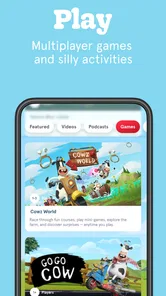
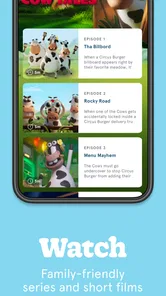
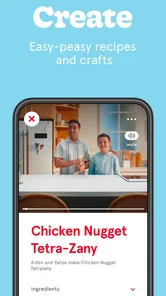
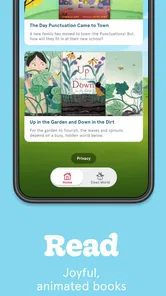
Chick-fil-A Play is a family-focused entertainment app from Chick-fil-A that offers interactive stories, games, animated content, and other activities designed primarily for children. The app is intended to provide a safe, branded digital space for families, with content that can be enjoyed at home or while traveling. Availability and the exact selection of features may vary by device, region, and app updates.
Is Chick-fil-A Play free to download and use?
The app is free to download, allowing families to explore its entertainment content without an upfront charge. However, users should review the current listing in the Google Play Store or Apple App Store before installing, because pricing, optional purchases, subscriptions, or limited promotional features can change. Parents should also check whether mobile data charges may apply when streaming or downloading content.
Is Chick-fil-A Play suitable for children?
Chick-fil-A Play is designed with children and families in mind, featuring age-appropriate entertainment rather than a general-purpose social platform. It is rated Everyone, which makes it a family-oriented choice, but parents should still preview the available content and review the app’s permissions, privacy information, and parental controls before allowing independent use. Younger children may need supervision, particularly if the app includes links, account features, notifications, or content that changes over time.
Does Chick-fil-A Play require an account or internet connection?
Some parts of Chick-fil-A Play may be accessible immediately after installation, while other features can require an internet connection, an account, or additional downloads. Online access may be needed for streaming videos, receiving updated content, or using interactive features. Requirements can differ between Android and iOS versions, so it is best to check the app’s store description and test the features you need before relying on it offline.
Pros
- Simple games make it easy for children to start playing quickly.
- Bright visuals and cheerful sounds create a friendly experience.
- Short activities work well for quick entertainment sessions.
- The app offers a playful way to engage with the Chick-fil-A brand.
- Child-focused content is generally easy for young users to understand.
Cons
- The experience may feel limited after the available activities are completed.
- Some content can seem more promotional than purely entertainment-focused.
- Younger children may still need adult supervision while using the app.
- Compatibility and performance can vary across older mobile devices.
- It may have limited appeal for users unfamiliar with Chick-fil-A.












