ChatOn - AI Chat Bot Assistant
- 5.02K
- 4.5
- Installs
- 10.00M
- Price
- Free

Screenshots
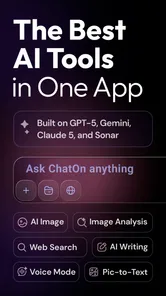
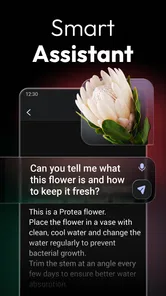

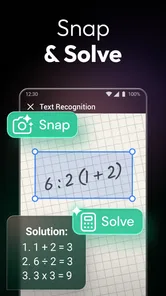

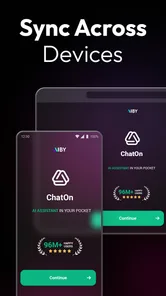
Analysis by Reviewed
I reach for ChatOn - AI Chat Bot Assistant when I want to turn a half-formed thought into something I can use: a clearer explanation, a first draft, or a quick set of ideas. It is a productivity app built around conversation, so it feels less like opening a blank document and more like asking for help in ordinary language. That convenience is the appeal, but it also shapes the right expectations: I use it as a starting point, not as an authority or a replacement for the apps where I keep important work.
When a connection is part of the conversation
An AI chat assistant depends on an internet connection for the central experience: sending a question and receiving a response. That matters more than it might seem when you are drafting something between errands or asking for an explanation while away from home. I’d treat ChatOn as a convenient online helper, not as a tool to count on when connectivity is unavailable or unreliable.
If a reply stalls, I would first check whether the phone has a working connection, then try sending the prompt again once service is steady. For a longer request, keeping a copy of the prompt in a notes app is a simple safeguard against losing your wording if the app or connection interrupts the exchange. I also find it sensible to ask one focused question at a time: that makes it easier to see whether a response addressed the point, and easier to retry if it did not.
Getting Started with ChatOn
So, here I was, curious about finding an AI assistant that actually understands me. Downloading the ChatOn - AI Chat Bot Assistant was a breeze. It's available on both Android and iOS, which is super convenient. Once installed, I was greeted with a sleek and user-friendly interface. No confusing menus or endless settings – just a simple way to start chatting.
ChatOn is a free productivity app from AIBY Inc., with optional in-app purchases ranging from $4.99 to $59.99 per item. Its 4.5 average from around 401,000 ratings and more than 10 million installs suggest that plenty of people have tried it, though popularity alone cannot tell you whether it fits your habits. It is rated Teen, and the current version is 1.85.692-764; on Android, it requires version 8.0 or later. I would check the purchase choices before settling into a regular workflow if you want to keep your use within a particular budget.
Features That Stand Out
One of the first things that caught my attention was the app's ability to hold a conversation. I mean, some AI bots are like talking to a wall, right? But not ChatOn. It felt like I was chatting with a friend who actually "got" my humor and sarcasm. It’s like having a buddy who’s available 24/7 and never judges you for sending those late-night messages about the meaning of life.
Another cool feature is its ability to help with tasks. Whether it's setting reminders, making a quick grocery list, or even helping me brainstorm ideas for a project, ChatOn is there to lend a hand. And the best part? It's always learning and adapting to the way I communicate. It's like having a personal assistant that evolves with you.
More From Our News Desk

Weather by Xiaomi Review: Clear at a Glance, Less Clear Up Close

X Under Pressure: Can It Recover When Posting Goes Wrong?

Clash of Clans Is Won Between the Battles

Android Auto Makes the Case for Quieter Car Software

MobiOffice: Transforming Mobile Productivity with Seamless Integration

EA SPORTS FC™ Mobile Soccer: Redefining Mobile Sports Gaming
For practical work, I get more value when I give the assistant a clear role and a useful boundary: for example, ask for three possible email openings in a friendly tone, then request a shorter version of the one I like. That turns an open-ended chat into a quick editing loop. I would still verify names, dates, calculations, and other details before using an answer in anything important; conversational confidence is not the same as accuracy.
Compared with searching the web, a chatbot is better suited to turning a rough request into a draft or explaining an idea in simpler language, while a search engine is better when I need to inspect current sources myself. Compared with a dedicated notes or reminder app, ChatOn can help shape a list or plan in conversation, but I would keep the final version in the tool where I actually manage tasks. It is a useful starting point, not a replacement for every app it can discuss.
A better fit for drafts than finished decisions
The most useful way I’ve found to work with a chat assistant is to treat the first answer as material to edit. If I need a message to sound warmer without becoming overly familiar, I can ask for a draft, then explain what feels wrong and request a revision. That back-and-forth is more natural than trying to perfect a prompt before I begin. It is especially handy for everyday writing where a sensible tone matters more than specialist precision.
A small but valuable habit is to separate the thinking task from the fact-checking task. I might ask for a list of questions to consider before choosing a service, then research the actual terms elsewhere. Or I might ask for a complicated topic to be explained in plain language, while checking consequential claims against a reliable source. This keeps the app’s conversational strength in its proper role and stops a polished answer from being mistaken for proof.
For brainstorming, I also get better results by asking for contrasting options rather than a single “best” idea. If I am planning a low-key gathering, for instance, I can request a few different themes and then narrow them down according to time, budget, or the people attending. The assistant can help me explore possibilities quickly, but I still make the choice and check whether the suggestions suit my real constraints.
ChatOn in Daily Life
Using ChatOn in my daily routine has been surprisingly beneficial. Imagine waking up and having a quick chat about the day’s agenda. Or maybe you just need to vent about the traffic – ChatOn is there to listen. I also found it pretty useful for learning new things. Just ask it a question, and boom, you've got an instant encyclopedia at your fingertips. It's like having a pocket-sized assistant that’s ready to help at a moment’s notice.
A realistic use is preparing for a busy day on the commute: I might ask it to turn a few rough notes into a short agenda, then refine the wording when I have a moment. I would avoid including sensitive personal or work information in a casual prompt, and I would not assume a conversation is a secure place to store it. For a quick brainstorm or a plain-language explanation, the trade-off is often worthwhile; for private records, precise research, or a task that must be completed without internet access, another approach is a better fit.
That distinction also helps answer who should skip it. If you mainly need reliable reminders, offline access, or a source-backed answer you can independently check, a purpose-built calendar, notes app, or web search will serve you better. ChatOn makes more sense for someone who enjoys asking follow-up questions and wants help turning a vague thought into a usable first draft.
Using it on the move
Phone use often happens in fragments: a few minutes before an appointment, a quiet stretch on public transport, or a pause while waiting for someone. ChatOn suits those moments when the request is short and the answer can be reviewed immediately. I would not start a detailed task while rushing through a noisy place, though. If I cannot read the response carefully or supply the context it needs, I am more likely to accept a vague result or have to redo the exchange later.
One practical workflow is to capture the raw thought outside the chat first, especially if it comes to me while walking or switching between tasks. Later, I can turn that note into a concise prompt with a clear outcome: summarize these points, make this message more polite, or give me a few ways to structure this idea. That extra step keeps a passing thought from becoming a long, unfocused conversation and makes interruptions less costly.
For a longer session, I would also break the work into stages instead of asking for a finished product in one go. First ask for an outline, then choose a direction, then request a draft or revision. If the connection drops between stages, the work already completed is easier to preserve and restart from than a single elaborate request. It is a modest change in habit, but it makes a network-dependent tool feel more manageable on a phone.
"The real magic of ChatOn lies in its ability to seamlessly integrate into your daily life, making tasks easier and conversations more enjoyable."
Where another tool is the better choice
ChatOn is not the option I would choose when the main job is keeping a dependable record. A notes app is better for information I need to find later, and a calendar is better for appointments that must remain visible and organized. The chatbot can help me word a reminder or sort a messy list into categories, but I would transfer anything important into the dedicated tool rather than relying on the conversation as my filing system.
The same distinction applies to research. A web search gives me a path to sources that I can compare, which matters when details may have changed or when I need to cite where a claim came from. ChatOn is more comfortable when I already know the general question and want an explanation, outline, or draft. For medical, legal, financial, or otherwise consequential decisions, I would not treat a conversational answer as a substitute for qualified guidance and independent checking.
There is also a cost trade-off to consider before making it part of a daily routine. The app is free to start, while optional purchases are available, so I would first decide what kind of help I actually use and review the purchase terms shown in the app before committing. A person who only wants occasional wording suggestions may not need to pay for anything; someone weighing a paid option should judge it by repeated, practical value rather than by the promise of having more tools in one place.
Final Thoughts
In a world where we're constantly on the go, having a reliable assistant like ChatOn is a real game-changer. It’s not just about the functionality, but the ease of use and the personal touch it offers. Whether you're tech-savvy or just looking for a simple chat buddy, this app is worth giving a shot. So, why not download it and see how it can spice up your daily routine? You might just find yourself relying on this little assistant more than you ever imagined.
My main advice is to use it in short, deliberate sessions rather than treating it as an all-purpose authority. A prompt that names the audience, tone, and intended result usually gives you a more useful starting point than a broad request, and a quick follow-up can help tailor the draft without starting over. When the network is weak, save important text elsewhere and return to the conversation when you can reconnect; that small habit avoids making the connection itself the weak link in your workflow.
In conclusion, the ChatOn - AI Chat Bot Assistant is more than just an app; it's a virtual companion ready to make your life a tad bit easier. Give it a try, and who knows, you might find yourself wondering how you ever managed without it.
ChatOn - AI Chat Bot Assistant Frequently Asked Questions
What can ChatOn help me do besides answering questions?
ChatOn is presented as an AI chatbot assistant with multiple AI tools, including options for writing AI text and chatting. That makes it useful to explore for productivity tasks such as drafting or shaping written content, as well as asking questions in a conversational format. Its value depends on the kind of help you need and how well its responses fit your task.
Who develops ChatOn, and what should I expect from its user community?
ChatOn is developed by AIBY Inc. It has an average rating of around 4.5, based on about 401,000 ratings, and users have posted roughly 4,700 reviews. Those figures offer a broad snapshot of how the app has been received, but individual experiences can differ. Consider whether its AI chat and writing tools match your own expectations before installing.
Is ChatOn free to download, and are there purchases inside the app?
ChatOn is free to download, so you can try its AI chat and writing tools without paying upfront. It also offers in-app purchases, with prices ranging from $4.99 to $59.99 per item. Before making a purchase, check the options shown in the app and consider whether the available features suit your needs.
What is ChatOn - AI Chat Bot Assistant and how does it work?
ChatOn - AI Chat Bot Assistant is an advanced application designed to provide users with a seamless communication experience through AI-driven chat interactions. It leverages sophisticated machine learning algorithms to understand and respond to user queries in real-time. The app can assist with various tasks like setting reminders, answering questions, and providing recommendations, enhancing productivity and user engagement.
Is ChatOn - AI Chat Bot Assistant available for both Android and iOS?
Yes, ChatOn - AI Chat Bot Assistant is available for download on both Android and iOS platforms. Users can find it on the Google Play Store for Android devices and the Apple App Store for iOS devices. The app is optimized to provide a smooth and efficient user experience across both operating systems, ensuring accessibility for a wide range of users.
Pros
- User-friendly interface for all ages
- Supports multiple languages for global use
- Fast and responsive AI interactions
- Customizable settings enhance user experience
- Regular updates with new features
Cons
- Limited free features
- subscription needed
- Occasional AI response inaccuracies
- Requires internet for full functionality
- Some features hidden behind paywall
- No offline mode available













