Plantum - Plant Identifier
- 2.54K
- 4.4
- Installs
- 5.00M
- Price
- Free

Screenshots

Analysis by Reviewed
I usually reach for a plant identifier when curiosity strikes in the middle of an ordinary day: a volunteer sprout in a pot, an unfamiliar tree on a walk, or a houseplant whose leaves suddenly look different. Plantum - Plant Identifier is built for that quick moment of discovery, but its lasting value depends on whether I use what I learn after the photo is taken. I see it as most useful when identification leads to a practical next step, rather than as a novelty I open once and forget.
Who gets the most from a quick identification
I’d recommend this kind of image-first approach to someone who knows what they are curious about but not what words to search. A beginner looking at an unfamiliar houseplant can start with a picture instead of trying to describe leaf shape, growth pattern, or flower color accurately. The same goes for a casual walker who wants to put a name to a tree without carrying a field guide. That lower starting barrier is the real appeal: curiosity can become a question and then a useful lead in a few moments.
There is a practical distinction between identifying something for interest and identifying it to make a consequential decision. If I’m deciding whether a plant is safe around a pet, whether a wild mushroom is edible, or whether a plant problem needs treatment, I would not rely on one image result. I’d look for confirmation from a trusted specialist or another reliable reference. In those situations, convenience is not the same as certainty, and getting the name wrong can matter more than the time saved.
From a result to a better plant-care decision
For a realistic household routine, I’d use the app at the point when I notice something worth checking, not as a daily inspection checklist. For example, if a new plant comes home, I can identify it first, read the care guidance, and then observe how it responds in its actual spot. If a leaf later turns yellow, I can revisit the information as one clue while checking light, soil moisture, and recent changes in the room. This sequence makes the app a learning aid rather than a substitute for understanding the plant’s conditions.
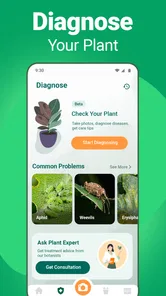
A useful habit is to keep the question narrow. “What plant might this be?” is a good starting point; “What is wrong with it?” is harder to settle from a photo alone. A close-up can hide the overall growth habit, while a wide shot may not show enough detail to distinguish similar leaves. I’d take a clear picture of the whole plant and, when needed, another of the feature that prompted my question. If the result does not fit the visible plant, I’d take another image rather than forcing the care advice to fit.
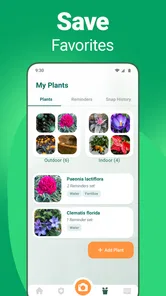
That approach also helps prevent a common trap with plant-care tools: treating a reminder as a command. A scheduled nudge can make me pause and check, but it cannot tell me whether the soil is dry, whether the pot drains well, or whether the plant has had a sudden change in light. I’d use reminders as a cue to observe, then decide what the plant needs. The extra check takes little effort and is more sensible than watering automatically just because an alert appears.
From the first photo to a useful habit
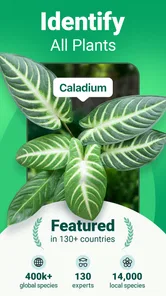
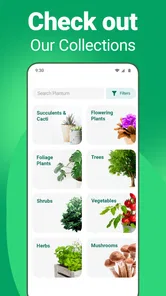
With Plantum - Plant Identifier, identifying plants becomes as easy as pie. The app boasts an extensive database of plants, flowers, trees, and even fungi. All you need to do is snap a picture of the mysterious greenery in question, and voila! The app gets to work. No more flipping through endless field guides or Googling vague descriptions.
More From Our News Desk

Weather by Xiaomi Review: Clear at a Glance, Less Clear Up Close

X Under Pressure: Can It Recover When Posting Goes Wrong?

Clash of Clans Is Won Between the Battles

Android Auto Makes the Case for Quieter Car Software

MobiOffice: Transforming Mobile Productivity with Seamless Integration

EA SPORTS FC™ Mobile Soccer: Redefining Mobile Sports Gaming
Why the first week feels rewarding
One of the coolest features of this app is its image recognition technology. It's like having a botanist in your pocket! The app provides detailed information about the plant, including its scientific name, common names, habitat, and care tips. And if you're anything like me, who loves sharing newfound knowledge, Plantum lets you easily share your discoveries with friends.
Another nifty feature is the care reminders. If you’re into keeping your plants alive and thriving, this is a lifesaver. The app will gently nudge you when it's time to water your plants, ensuring those green babies stay happy and healthy.
The useful trick is to treat a result as a strong lead, not an unquestionable verdict. For a plant with look-alike relatives, I’d photograph more than one clear detail when possible: the whole plant for shape, then a leaf or flower close enough to show its features. A tidy, well-lit image is more helpful than a rushed shot with a busy background. If the identification seems surprising, I’d compare the suggested names and habitat notes with what I can actually see before acting on care advice.
How it fits into a normal routine
Let's talk about user experience for a moment. Navigating through the app is a breeze, thanks to its intuitive design. Even if you're not tech-savvy, you'll find everything you need with just a few taps. The layout is clean, and the information is presented in a digestible format, making the process of learning about plants enjoyable rather than overwhelming.
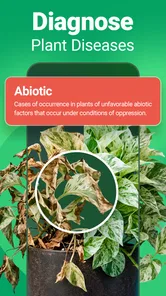
Picture a familiar situation: I’m watering a plant at home and notice a yellowing leaf. I can use the identification and care information to orient myself, then check the plant’s actual soil and recent watering rather than assuming the app can diagnose every cause from a picture. That distinction matters. A photo can help identify what I’m looking at, but a plant’s condition also depends on its environment and recent care. I’d use reminders as prompts to check in, not as a substitute for noticing whether the soil is still damp or the plant has different needs.
Plantum is an education app from AIBY Inc. Its appeal is different from searching the web manually: instead of guessing keywords, I can begin with an image and then explore the result. A field guide or a knowledgeable local gardener may be better when I need careful identification of a rare or potentially harmful species; a general web search can also be useful for comparing several independent descriptions. The app is strongest when I want a convenient first answer and approachable care guidance, not when a mistake could have serious consequences.
Month-to-month value and the upkeep trade-off
Over time, the app makes most sense for someone who keeps several plants, regularly encounters unfamiliar greenery, or enjoys learning names during walks. Those habits create natural reasons to return: identifying a new find, revisiting care information, or using reminders to build a routine. If I only want to identify one plant, the initial excitement may fade once I have the answer. Likewise, a reminder only helps if I set it thoughtfully and still check the plant itself; too many alerts can become background noise rather than useful guidance.
The app is free to download, with in-app purchases ranging from $0.99 to $59.99 per item, so I’d check what an optional purchase covers before committing. Plantum has a 4.4 average from around 47,000 ratings and more than 5 million installs, which suggests broad interest, though those figures can’t tell me whether its suggestions will suit a particular plant or garden. It is rated for everyone, and its current version is 3.15.2; the minimum operating system requirement is 12. The app first appeared on September 21, 2020.
Where it sits beside other plant references
Compared with a printed field guide, Plantum is quicker when I have a camera-ready specimen but less suited to a slow, systematic comparison of features across several pages. A guide can be easier to consult repeatedly in the garden and encourages checking distinctions instead of accepting a single suggested answer. Searching the web has a different advantage: I can compare multiple descriptions and images, though I need to choose search terms and judge which results are dependable. Plantum’s strength is the shortcut from image to an approachable starting point; the trade-off is that a shortcut should not be mistaken for expert verification.
I’d also avoid treating the app as a complete gardening plan. Identification and care information can orient a beginner, but a plant’s needs change with its location, pot, season, and condition. Someone managing a collection with specific requirements may prefer a notebook or a specialist reference where they can record their own observations and decisions. Plantum is more appealing when I want help getting oriented than when I need a detailed record-keeping system or tailored advice for every plant.
For a low-friction routine, I’d identify plants when there is a real question, save or share only discoveries I expect to revisit, and avoid turning every leaf into a diagnosis. That keeps the app from becoming another notification-heavy chore. It is a better fit for curious beginners and casual plant owners than for someone who needs specialist-level certainty, detailed horticultural consultation, or a completely offline reference. On Android or iOS, it can be a handy companion, but the more valuable habit is pairing its suggestions with observation.
Does it earn a place beyond the novelty?
Oh, and did I mention the app is available both on Android and iOS? So, no matter what device you’re rocking, you can join the plant identification fun!
All in all, Plantum is more than just an app; it's a tool for exploration and learning. Whether you’re a seasoned botanist or just starting to dip your toes into the world of plants, this app has something for everyone. So the next time you're out and about, don't forget to have Plantum by your side. Happy identifying!
What keeps it useful after the first burst of curiosity
For me, lasting value comes from using what I learn to make one small, better-informed choice. I might identify a plant before buying another one like it, learn a name to look up later, or use a reminder to inspect a pot I tend to overlook. That is more sustainable than opening the app simply to collect names. If the information changes how I observe a plant, the visit has earned its place in my routine.
The maintenance burden is modest when I keep the routine selective: take a clear photo, read the result, and decide whether there is anything worth following up. The burden grows if I try to catalogue every plant or let alerts dictate care without checking conditions. I’d start with only the plants I genuinely want help remembering, then see whether reminders are useful in practice. A light setup is easier to maintain than a big collection of entries and notifications created during the initial burst of enthusiasm.
There is also a useful boundary between occasional learning and ongoing care. If I have a small number of familiar plants and already know how they respond in my home, I may not need to open Plantum often. That is not a weakness so much as a sign that the app has answered my question. It becomes more valuable again when a new plant arrives, an unfamiliar specimen turns up outside, or I need a prompt to check something I might otherwise forget.
Plantum is free to try, but the presence of optional purchases means I would decide what I need before paying for anything. A person who only wants an occasional identification may be satisfied without adding a purchase; someone considering an upgrade should first make sure the particular option addresses a recurring need rather than a one-time curiosity. That small pause matters because a plant app is only worth paying for if it changes a habit or saves enough effort to justify the expense.
My overall recommendation is for curious beginners, casual plant owners, and people who like learning the names of greenery they encounter. I would skip it as a primary authority for safety-critical identification, specialist diagnosis, or highly tailored horticultural decisions. Used with sensible photo-taking and a willingness to verify surprising results, it can remain a useful pocket reference beyond the first week. Used as an automatic answer machine, its limits will become noticeable quickly.
Plantum - Plant Identifier Frequently Asked Questions
Can Plantum help me learn about plants while I’m outdoors?
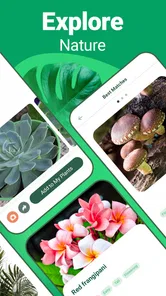
Yes. Plantum is designed to help users explore plants by identifying them from photos and offering related information. You can use it when you come across a flower or tree you do not recognize, then read about the plant and its care. It can be a convenient learning aid for a walk or a garden visit, as well as for looking after plants at home.
Can I use Plantum to identify both flowers and trees?
Plantum is described as a plant identification app for flowers and trees, so it can be useful for more than houseplants or garden flowers. Take a photo of the plant you want to learn about and use the result as a starting point for exploring it further. Clear photos can help make identification easier, and it is sensible to treat results as guidance rather than definitive expert identification.
Who develops Plantum, and what kind of app is it?
Plantum is an educational app developed by AIBY Inc. It is intended for people who want to learn more about plants around them, whether they are caring for flowers at home or exploring trees outdoors. Its central purpose is to identify plants from photos, with related information to help users understand and care for what they find.
What is Plantum - Plant Identifier?
Plantum - Plant Identifier is a mobile application designed to help users identify various types of plants simply by taking a photo. The app uses advanced image recognition technology to provide accurate and immediate results, making it an essential tool for gardening enthusiasts, botanists, and nature lovers. Additionally, it offers detailed information about each plant, including care tips and common issues.
How does Plantum - Plant Identifier work?
The app works by utilizing your device's camera to capture an image of a plant. Once the photo is taken, the app's algorithm analyzes it against a vast database of plant species to identify the plant. Users receive detailed information about the plant, including its scientific name, common names, and care instructions. This process is quick and user-friendly, making plant identification accessible to everyone.
Pros
- Accurate plant identification
- User-friendly interface
- Extensive plant database
- Offline usage available
- Regular updates
Cons
- Contains ads
- Subscription required for premium features
- Occasional misidentifications
- Limited free features
- Can be slow on older devices













