Themify: Theme & Icon Changer
- 654.00
- 3.7
- Installs
- 5.00M
- Price
- Free
Screenshots
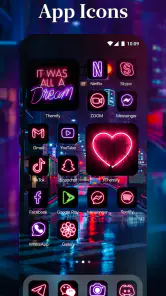
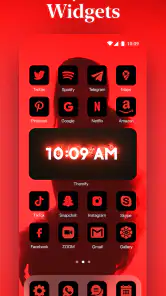
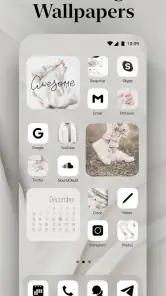
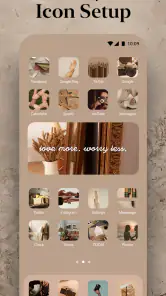
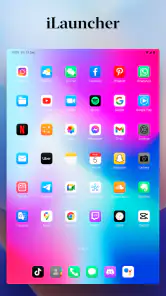
Analysis by Reviewed
I like phone customization most when it makes a device feel more personal without turning setup into a technical project. That is the appeal of Themify: Theme & Icon Changer: it brings visual changes such as themes, icons, wallpapers, and widgets together in one place. The trade-off is that a coordinated look takes more thought than tapping one button, and the result still depends on how well the chosen elements suit your everyday home screen.
What to decide before changing your screen
I would start by asking what feels wrong about the current home screen. If the wallpaper is the only thing that has grown stale, a wallpaper change may be enough; there is little reason to reorganize icons and widgets just because the tools are available. If the screen feels visually mismatched, a more complete theme can make the parts feel intentional. Being clear about the problem first helps keep customization useful instead of turning into an open-ended project.
It also helps to decide which parts of the phone are non-negotiable. Think about the apps you need to reach quickly, any folders you rely on, and whether you use a widget for information or simply like how it looks. I would take note of the current layout before experimenting, especially if I have arranged several screens around work, travel, or daily routines. That gives me a practical reference point if a new arrangement looks attractive but slows me down.
For someone who changes their phone’s appearance with the seasons, a themed setup can be a low-effort way to mark a new mood. A warmer palette might suit evenings at home, while a quieter arrangement can feel more appropriate during a work-heavy stretch. I would not treat those examples as rules: the useful theme is the one that remains comfortable after the first day, not the one that best matches an imagined aesthetic.
Why Themify Stands Out
As a personalization app from AIBY Inc., Themify gives you a straightforward way to explore a different look for your phone. Its appeal is less about changing how the device works and more about making the home screen feel considered. I’d treat it as a visual toolkit: choose a general mood, then check whether the icons and widgets you use most still feel easy to find.
Exploring the Features
First off, Themify is super user-friendly. Even if you’re not tech-savvy, you’ll have no trouble navigating through its features. Upon opening the app, you're greeted with a sleek interface that guides you through the setup process. It's as simple as pick and apply.
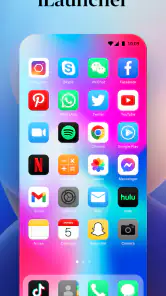
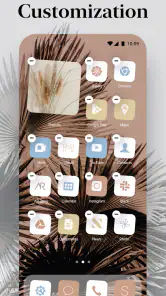
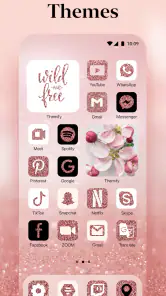
One of the standout features of Themify is the variety of themes. From cool abstract designs to cozy, warm tones, the selection is quite impressive. And let’s talk about the icons! You can mix and match to create a personalized look that’s uniquely yours.
More From Our News Desk

Clash of Clans Is Won Between the Battles

Android Auto Makes the Case for Quieter Car Software

MobiOffice: Transforming Mobile Productivity with Seamless Integration

EA SPORTS FC™ Mobile Soccer: Redefining Mobile Sports Gaming

How Microsoft OneDrive Became a Mobile Productivity Giant

How Google Translate Breaks Language Barriers Effortlessly
But wait, there’s more! The app also supports widget customization. So, not only can you change the icons and themes, but you can also tweak your widgets to match your new look. It’s like having a personal stylist for your phone.
A useful way to avoid a home screen that looks good but feels awkward is to start with the icons and apps you reach for most. I’d pick a theme with clear contrast, apply the look, and then check whether familiar apps remain easy to spot at a glance. A softer or more decorative set may suit a secondary screen better than the main one, where quick recognition matters more than a perfectly matched grid.
Making a theme practical, not just pretty
One small but revealing test is to look at the screen in the lighting and setting where you normally use it. A delicate wallpaper or low-contrast icon design can look polished in a preview and become harder to read outdoors or when you are moving quickly. Before committing to a full look, I would check the most-used screen in ordinary conditions and make sure important app symbols stand apart from the background.
Another useful approach is to choose one visual anchor and let the rest support it. If the wallpaper has a lot of detail, simpler icons and fewer decorative widgets may keep the screen from feeling crowded. If the icons are the main attraction, a calmer background can help them remain recognizable. This is a better way to mix and match than trying to make every element equally bold.
Widgets deserve a separate usability check. I would keep one only if it answers a question I regularly have—such as what I need to see at a glance—or if its presence genuinely improves the layout. A widget that takes up space without changing how I use the phone is an easy candidate to remove. That distinction helps prevent a carefully styled screen from becoming less functional than the one it replaced.
Performance and Usability
Now, we all know that some customization apps can be a bit of a drag on performance. But not Themify. The app is lightweight and runs smoothly without causing any noticeable lag. It’s optimized to work seamlessly on both Android and iOS, ensuring a snappy user experience.
Installing and applying themes takes just a few seconds, and there’s no need to worry about battery drain. Themify is designed to be efficient, so you can enjoy a fresh look without compromising on performance.
In practical use, the key question is not only whether a theme applies quickly, but whether you enjoy living with it after the novelty wears off. I’d make one change at a time—wallpaper first, then icons, then widgets—so it’s easier to tell which choice improves the screen and which one makes it busier. That small, reversible workflow is handy if you like experimenting but don’t want to lose track of what made the layout comfortable.
Choosing a sensible order for experimenting
Changing everything at once can make it difficult to work out why the new screen feels unfamiliar. I prefer to begin with the background, then assess the icon style, and only afterward decide whether a widget belongs. If I miss a familiar app or find myself opening the wrong one, I can pinpoint whether the issue is the icon treatment, its position, or the overall contrast rather than blaming the whole theme.
I would also avoid redesigning every screen in one sitting. The main screen is where speed matters most; a secondary screen can take more decorative risks because it is less central to quick tasks. This split lets me enjoy a stronger aesthetic without asking the busiest part of the phone to do two jobs at once. It is a practical compromise for anyone who wants personality without sacrificing routine.
The User Experience
One of the things I love about Themify is how it lets you express your personality. Your phone is an extension of yourself, and with this app, you can make sure it reflects who you are. Whether you want a professional look for work or something fun and quirky for the weekend, Themify has got you covered.
And the best part? It’s all incredibly easy to use. The app doesn't bombard you with ads or unnecessary pop-ups, which is a huge relief. You can focus on customizing your device without any distractions.
For a realistic routine, imagine refreshing your phone on a Sunday evening before a busy week. I’d choose a restrained wallpaper, keep the most-used apps visually distinct, and use a widget only if it adds information I actually check. That is where a curated theme can help: the screen feels fresh without making workday navigation a scavenger hunt. If the setup starts demanding too many compromises, I’d keep the wallpaper and undo the less useful changes.
When a quick refresh becomes a regular habit
The app is most rewarding when I have a reason to revisit the look rather than feeling obliged to keep rebuilding it. A new season, a change in routine, or simply getting tired of a familiar background can be enough. I would save the idea of a larger redesign for a moment when I have time to test it properly, instead of making several visual changes while rushing out the door and then struggling to find things.
There is also a useful distinction between personalization and organization. A theme can make a screen feel unified, but it does not automatically make the apps better arranged. If my home screen is cluttered, I would first decide which apps deserve a place there and which can stay in folders or on another screen. Then I can style the smaller set of essentials. This keeps the visual choices from disguising a layout problem that needs a different fix.
Who Will Get the Most From It
Themify is best suited to people who enjoy changing the look of their phone and want themes, icons, and widgets gathered into a single customization experience. It is also a reasonable starting point if you are curious about a new aesthetic but do not want to build every visual element from scratch. The app is free to install, rated for Everyone, and has an average rating of 3.7 from over 100,000 ratings, so it has attracted a substantial audience while still leaving room for mixed reactions.
It may be less appealing if you prefer a plain home screen, rely on a very specific arrangement, or would rather customize everything manually through your phone’s built-in settings. Compared with changing only a wallpaper or using a launcher’s basic theme controls, Themify brings more visual pieces into the process; the benefit is convenience, while the cost is spending time checking that those pieces work together. On Android, the current version is 1.30.8 and requires Android 9 or later; people using other platforms should check their device’s compatibility before planning a full redesign.
If you are weighing the cost, the app is free to download, with optional in-app purchases priced from $1.99 to $19.99 per item. I would begin with the free experience and decide whether the available choices fit your style before paying for anything. That is particularly sensible if you only want a one-off wallpaper refresh rather than a continuing hobby of redesigning your screen.
Who may prefer a simpler route
If you only want a different background, the built-in wallpaper controls on your phone are likely the more direct choice. They avoid adding a separate customization routine when the rest of your screen already works well. Likewise, someone who enjoys arranging every detail by hand may find a focused system setting or a launcher with controls they already know more satisfying than browsing a collection of coordinated visual options.
On the other hand, Themify makes more sense if the goal is to explore a whole visual direction and compare how icons, wallpaper, and widgets look together. The convenience comes from having those elements under one roof; it does not remove the need to judge them on your own device. I would use it as a source of ideas and a way to assemble a look, not as a promise that every element will fit every personal layout without adjustment.
One question people often have is whether they need to pay to try it. The app is free to install, and optional purchases are available, so I would explore the choices that are accessible first and only consider spending if I find something I genuinely want. Another practical question is whether it suits an older Android device: the stated minimum is Android 9, which gives a clear compatibility checkpoint before planning a redesign. For iPhone users, I would check availability and compatibility on their own device rather than assume every platform handles customization in exactly the same way.
Final Thoughts
In a world where customization is key, Themify: Theme & Icon Changer stands out as a top choice for those wanting to give their phones a makeover. Its extensive range of themes and icons, coupled with its ease of use, makes it a must-have app for anyone looking to personalize their device.
So, if you're ready to transform your phone into a reflection of your own unique style, give Themify a try. It’s like having a new phone without spending a dime. Pretty cool, right?
My recommendation is for someone who enjoys a visual refresh and is willing to test a few combinations rather than expecting every theme to suit their habits immediately. The app has passed five million installs, but popularity alone does not make a particular layout right for you. I’d use it when I want a more cohesive home screen, keep practical legibility as the deciding test, and skip it if the default setup already feels ideal. That balance is what makes Themify worth considering: it makes experimentation approachable, while leaving the final call—and the everyday usability—with you.
Themify: Theme & Icon Changer Frequently Asked Questions
Is Themify suitable for beginners who have never customized a home screen?
Yes. Themify is intended to make home-screen personalization approachable, so you can browse designs and select the look you want without needing specialist technical knowledge. Its themes bring together visual elements such as widgets, icons, and wallpapers. If you prefer a simple setup, you can start by choosing a design that appeals to you and explore additional customization options at your own pace.
Can I use Themify to give my home screen a coordinated look?
Themify is designed for users who want more than a wallpaper change: its aesthetic themes bring together widgets, icons, and wallpapers for the home screen. You can browse the available designs and choose elements that match your taste. The range of options makes it possible to explore different styles, although some customization content may be available through in-app purchases.
Does Themify work on my phone’s operating system?
Themify is a personalization app for Android and iOS, and the minimum OS requirement is version 9. Check that your phone meets this requirement before downloading. The app is intended to help customize a home screen, but the exact way themes and icons appear can depend on your device and operating system.
What is Themify: Theme & Icon Changer and how does it work?
Themify: Theme & Icon Changer is an app designed to personalize your smartphone by altering themes and icons. It allows users to customize the appearance of their device by choosing from a vast library of themes and icons. The app integrates smoothly with Android and iOS systems, letting users easily apply new looks without needing technical skills. By simply selecting your preferred theme or icon pack, you can transform your device’s interface to match your personal style.
Is Themify free to use or does it require a subscription?
Themify offers a free version that includes basic features and a limited selection of themes and icons. However, to access the full range of premium themes and additional customization options, a subscription or one-time purchase may be required. The app provides in-app purchases to enhance the user experience with more exclusive content, ensuring users can tailor their device exactly as they wish. In-app purchases range from $1.99 to $19.99 per item, so check the purchase details in the app before choosing paid content.
Pros
- Customizes app icons easily.
- Variety of themes to choose from.
- User-friendly interface.
- No root access needed.
- Regular updates and new themes.
Cons
- Some themes are premium only.
- May slow down older devices.
- Ads in free version.
- Occasional bugs in app.
- Limited free theme options.
- Category
- Personalization
- Version
- 1.30.8













