Coin ID - Coin Identifier
- 1.15K
- 4.3
- Installs
- 1.00M
- Price
- Free

Screenshots
Analysis by Reviewed
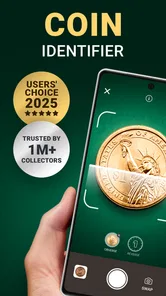
I enjoy apps that turn a small everyday question into something easier to answer, and Coin ID - Coin Identifier fits that idea neatly. It is a tools app from AIBY Inc. designed to help identify coins and estimate what they may be worth. In my testing, the appeal was immediate: instead of searching through coin names, dates, and symbols by hand, I could start with the object in front of me and use the phone as the first step in the investigation.
That does not make it a replacement for a professional appraisal. I see it more as a practical first filter for a jar of change, an inherited collection, or a coin found while travelling. The useful question is not simply whether the app can recognize a coin, but whether it helps you decide what deserves closer attention. On that point, it can be genuinely helpful, provided you treat its result as an estimate rather than a final verdict.
How Coin ID fits into real mobile use
The experience makes the most sense when I am holding a coin and need an answer immediately. A typical situation would be sorting through old pennies at home. I can place one on a plain surface, open the scanner, and use the camera view rather than manually comparing tiny lettering with search results. That saves time, especially when the coin is unfamiliar or the markings are difficult to read.
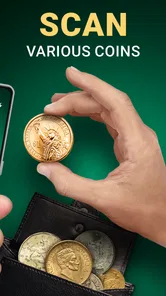
It is also useful in less organized situations. At a flea market, for example, I might want to check a coin before deciding whether to buy it. In that setting, the app gives me a quick starting point while I still have the item in hand. I would not use a single scan to justify a large purchase, but I could use it to identify the country, denomination, or general type that I should research next.
The app is free to install, and it is rated for Everyone, which makes the basic idea approachable for families and casual users. It belongs in the tools category rather than the entertainment space, and that distinction matters: its value comes from reducing effort during a small research task, not from keeping me engaged for long sessions.
Its popularity also suggests that the concept has broad appeal. Coin ID has passed a million installs, with an average rating of 4.3 from roughly nineteen thousand ratings and about twelve hundred written reviews. I read that as evidence that many people find the central workflow useful, while still leaving room for individual results to vary depending on the coin and the photograph.
What happens when the connection matters
The most important connectivity point is that the scanning experience should be treated as a network-aware activity. Image recognition and value information can depend on communication between the app and its online services, so I would not plan a full coin-sorting session around it while travelling with unreliable reception. The camera may be ready in your hand, but a useful result can still depend on the request completing.
More From Our News Desk

Weather by Xiaomi Review: Clear at a Glance, Less Clear Up Close

X Under Pressure: Can It Recover When Posting Goes Wrong?

Clash of Clans Is Won Between the Battles

Android Auto Makes the Case for Quieter Car Software

MobiOffice: Transforming Mobile Productivity with Seamless Integration

EA SPORTS FC™ Mobile Soccer: Redefining Mobile Sports Gaming
This changes how I use it outdoors. In a shop or market, I first make sure the result has loaded before moving away from the item. If I scan several coins, I pause long enough to check that each one has actually produced an identification rather than assuming the last successful result applies to the next coin. That simple habit prevents a surprisingly easy mistake: photographing a new coin and mentally carrying over the previous answer.
Connectivity can also shape patience. A scan that looks stuck may be waiting for a response rather than failing permanently. I prefer to keep the coin still, avoid repeatedly tapping the scan control, and give the app a moment before trying again. If the result does not appear, I capture a clearer image and retry once I have a stronger connection.
For a home collection, this is less troublesome because I can choose a comfortable location with dependable service. For travel, estate sales, outdoor markets, or basements with poor reception, it becomes part of the planning. I would prepare a small manual note-taking method as a backup: record the visible country, denomination, year, and unusual markings so I can continue sorting even if the app cannot respond immediately.
Getting a better scan on a phone
Mobile cameras are convenient, but coins are difficult subjects. Their surfaces reflect light, their details are shallow, and raised lettering can disappear under a glare. I get more consistent results when the coin is flat, the background is plain, and the phone is held directly above it instead of at a steep angle.
Lighting is the first thing I adjust. A bright overhead lamp can create a white reflection across the most important detail, while dim light can soften the edges of letters and numbers. Diffused daylight or a lamp placed to the side usually gives me a more readable surface. I also rotate the coin slightly between attempts if one part of the design is hidden by reflection.
Cleanliness requires judgment. I remove loose dust from the table and wipe the phone camera lens, but I do not scrub a potentially valuable coin. Aggressive cleaning can damage a coin’s surface and reduce its appeal to collectors. The app is a reason to photograph the object, not a reason to alter it.
One useful workflow is to scan the two sides separately when the design is crowded. I begin with the side containing the clearest denomination or portrait, then turn the coin over and compare the second result with the first. If the app offers a value estimate, I use the two views as a consistency check rather than treating the highest number as the correct one.
Another practical tip is to keep the camera distance consistent when scanning a batch. If one coin fills nearly the whole frame and another appears tiny, the app has to interpret very different image conditions. A repeatable setup makes it easier for me to notice when a result is uncertain or clearly mismatched.
Using it for sorting rather than instant selling
The strongest everyday use is triage. Suppose I inherit a box of mixed coins. I would not try to establish the exact market price of every piece immediately. Instead, I would separate common-looking coins from unusual ones, scan the unfamiliar examples, and write down the results beside a simple physical grouping. That turns a chaotic pile into a shortlist for deeper checking.
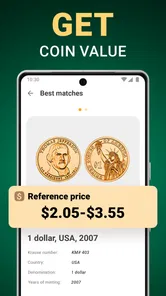
This approach also protects me from overreacting to a surprising estimate. A coin can appear valuable because of its date, metal, condition, mint mark, or rarity, but a phone image cannot fully judge all of those factors. Wear, scratches, cleaning, toning, and authenticity may change the real market value substantially. If a scan suggests that a coin deserves attention, I preserve it carefully and verify the details through a reliable collector source or professional appraiser.
I would use the app differently for modern pocket change. There, speed matters more than a detailed record. I can quickly identify an unfamiliar foreign coin or settle a question about denomination, then return it to the appropriate pile. For a serious collection, the app is better at helping me make an initial inventory than at replacing cataloguing software, reference books, or condition grading.
This is the key trade-off compared with usual alternatives. A web search can provide deeper context, but only after I know what to search for. A printed catalogue is dependable for careful comparison, yet slower to carry and consult. A specialist can offer better judgment, but that is not practical for every inexpensive coin. Coin ID sits between those options: faster than manual research and more accessible than expert evaluation, but less authoritative than either a trusted reference or a human specialist.
When a scan fails and how I recover
Recognition can go wrong for ordinary reasons. A blurry image, a partial view, an unusual angle, a damaged surface, or strong glare may lead to an incorrect match. I do not keep submitting the same photograph and hope the answer changes. I first improve the conditions: clean the lens, move to softer light, place the coin on a stable surface, and make sure both the edge and the main design are visible where possible.
If the app returns an answer that conflicts with the markings, I trust the physical evidence first. The year, denomination, language, portrait, and symbols on the coin are clues I can inspect directly. I then rescan from the clearer side and compare the result. This is especially important for coins that share similar shapes or designs across different countries.
A failed request caused by connectivity needs a different response. I avoid deleting and reinstalling the app as a first reaction. Instead, I check whether other online activity works, move to a stronger signal, and retry later. If I am in the middle of sorting, I label the coin with a temporary note and continue with the next one. That keeps one stalled scan from disrupting the whole session.
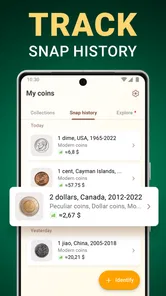
There is also a recovery habit that helps with memory: I record the result as soon as it appears. I might note the apparent country, denomination, year, and any value estimate in a notebook or phone note. This is more reliable than assuming I can find the same result again later, particularly when I am scanning many similar coins in succession.
For a high-value-looking item, recovery should mean verification, not endless rescanning. Repeating a scan can improve recognition, but it cannot establish authenticity or condition. If the object appears rare, I would photograph it carefully, avoid cleaning it, keep it separate, and seek a second opinion. That is where a specialist reference becomes the better tool.
Data-conscious habits during scanning
Because the main interaction involves photographing coins, I use it deliberately rather than pointing the camera at a cluttered table. A tight frame helps the recognition task and also avoids including unrelated objects in the image. I place only the coin in view, keep personal papers out of the background, and review what I am capturing before starting a batch.
I also prefer scanning in a stable session instead of repeatedly opening the app for one coin at a time. This is more efficient and gives me a clearer record of which result belongs to which item. If I am working through a family collection, I group coins by country or size first, then scan the exceptions. That reduces unnecessary image requests and makes the results easier to compare.
Network use is another reason to prepare. When I know I will be handling many coins, I choose a place with a reliable connection and enough battery. I do not assume that a weak signal will behave consistently from one scan to the next. If the connection becomes unreliable, I switch to offline sorting and save the app for the verification stage rather than repeatedly forcing failed attempts.
The app includes in-app purchases priced from around five dollars to around fifty dollars per item. I would approach those options carefully. For occasional identification, the free entry point may be enough to decide whether the app fits my habits. Before paying, I would make sure the extra access addresses a real need in my own workflow, such as frequent collecting, rather than buying simply because one scan produced an exciting estimate.
That pricing also affects who should skip it. If you only own a few common coins and already know how to search their markings, a manual reference may be more economical. Likewise, someone building a formal collection database may prefer dedicated cataloguing software with fields and records designed for long-term organization. Coin ID is most convincing when convenience and first-pass identification matter more than exhaustive documentation.
Who will get the most from Coin ID
I recommend it most to curious beginners, families sorting inherited change, travellers encountering unfamiliar currency, and casual collectors who want a quick way to narrow down what they have. It lowers the barrier to starting because the first action is concrete: place the coin in view and investigate it.
It can also be useful for teaching observation. A child can look for the year, portrait, lettering, and symbols before checking the app’s interpretation. Used that way, the scanner becomes a prompt for learning rather than an answer machine. The Everyone age rating supports that approachable role, although younger users should still handle coins responsibly and understand that an estimate is not guaranteed value.
I would skip it as a primary tool if I needed certified appraisals, precise grading, authentication, or a complete collection-management system. The app can point me toward interesting pieces, but it cannot replace the experience required to judge condition and legitimacy. I would also hesitate to depend on it during a trip where connectivity is uncertain unless I was comfortable taking notes and doing the identification later.
AIBY Inc. has kept the concept focused, and the current version, 1.25.8, makes it a straightforward tool to try rather than a complicated collecting platform to learn. It was released on February 24, 2023, and its minimum operating system is iOS or Android version 12. That requirement is worth checking before installing, particularly on an older phone used for travel or family projects.
My connectivity verdict
Coin ID - Coin Identifier works best when I view it as a connected assistant for the first stage of coin research. A dependable network makes the scanning flow smoother, while a weak connection can turn a quick lookup into a pause or a retry. That does not ruin the app, but it does mean I plan my use differently depending on whether I am at home, in a shop, or outside at a market.
The app’s real strength is convenience. It helps me move from “I have no idea what this is” to “I know what to investigate next” without beginning with a long search. Its main weakness is the temptation to confuse recognition with appraisal. Better lighting, careful handling, written notes, and independent verification make the experience much more reliable.
My recommendation is simple: use it to sort, learn, and decide which coins deserve deeper attention. If that is your goal, the free app is an easy starting point. If you need authoritative valuations or a permanent collector’s record, pair it with a specialist reference instead of expecting a phone scan to settle everything.
Coin ID - Coin Identifier Frequently Asked Questions
Is Coin ID - Coin Identifier available for Android and iOS?
Coin ID - Coin Identifier is a mobile app for recognizing coins with a photo, and the version information listed for it specifies an iOS system requirement. Before downloading, check the app page for your device to confirm that it is offered for your platform. If you use an iPhone or iPad, make sure the device runs iOS 12 or later so it meets the stated minimum requirement.
Can I use Coin ID - Coin Identifier to organize coins I already own?
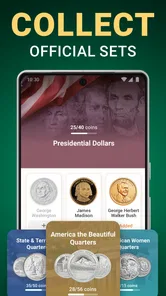
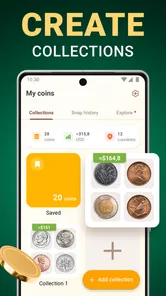
The app’s store summary describes it as a coin scanner that keeps track of your pennies and tells you their value, so it may be useful as a reference while managing a collection. Its identification and collecting details can help you review coins you have scanned. For valuable pieces or a formal collection inventory, keep your own records and treat the app’s information as a helpful starting point.
Is Coin ID - Coin Identifier compatible with my phone?
Before downloading, check that your device runs a compatible operating system. Coin ID - Coin Identifier is available for phones running iOS 12 or later, so an older system may need an update before you can install it. The app is categorized as a Tools app and is rated for Everyone, making it suitable for a general audience.
Who makes Coin ID - Coin Identifier, and is it widely used?
Coin ID - Coin Identifier is developed by AIBY Inc. It has an average rating of 4.3 from around 19,000 ratings, with about 1,200 written reviews and over one million installs. Those figures suggest it has attracted a sizeable audience, but individual experiences can vary, especially when coin photos are unclear or the coin is unusual.
What is Coin ID - Coin Identifier, and what can it do?
Coin ID - Coin Identifier is a mobile app designed to help users recognize coins by taking or uploading a photo. After analyzing the image, it may provide information such as the coin’s country of origin, denomination, approximate date, historical background, and possible collecting details. It is mainly intended for quick identification and learning, rather than replacing professional numismatic research or an official appraisal.
Pros
- Quickly identifies many coins using the phone’s camera.
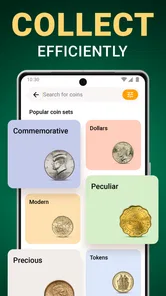
- Useful reference details for collectors and beginners.
- Simple interface makes scanning easy to understand.
- Helps organize discovered coins in one convenient collection.
- Can make identifying unfamiliar coins more engaging and accessible.
Cons
- Recognition may fail with worn
- dirty
- or poorly lit coins.
- Estimated values should not replace advice from a professional numismatist.
- Some features or coin information may require an internet connection.
- Camera results can be affected by glare
- angle
- and image quality.
- Coverage and accuracy may vary for rare or recently issued coins.









