Cars.com: Buy and sell cars
- 20.12K
- 4.7
- Installs
- 10.00M
- Price
- Free

Screenshots






Analysis by Reviewed
When I’m looking for a car, I want a way to compare options before spending an afternoon visiting sellers. Cars.com – New & Used Vehicles gives me a useful place to start: I can browse listings, narrow the field, and keep track of candidates while I work out what deserves a closer look. I see it as a research tool rather than a shortcut around inspecting a vehicle in person.
It’s a free app from Cars.com in the auto and vehicle category, with an Everyone age rating. Its 4.7 average comes from around 190,000 ratings, and it has been installed over 10 million times. Those figures suggest a well-established place to begin a search, but they don’t make every listing suitable or remove the need to verify details yourself.
All About the Ride: Exploring Cars.com
At its core, the app lets me browse a large marketplace of vehicles. Whether I’m considering a new model or a used car, I can explore possibilities without starting at a dealership. That’s most helpful early in the process, when I want to learn what is available before committing to one make, model, or seller.
My most practical advice is to decide on a short list before browsing: a few models, a realistic budget, and the features you genuinely need. That keeps a large marketplace from turning into an endless scroll. If you’re replacing a car quickly, start with the essentials and widen the search only if the nearby results are thin. If you’re just exploring, use the app to learn what different options look like before you commit to a particular make or model.
Features That Make You Go Vroom
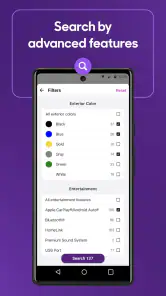
One of the standout features of this app is the detailed filter options. You can narrow down your search by make, model, price range, mileage, and more. This means you spend less time scrolling and more time finding your dream car. I also love the fact that you can compare different vehicles side by side. It’s like having a personal car consultant right at your fingertips!
A useful habit is to avoid changing several filters at once. I’d first set the vehicle type and price, then add mileage or other priorities. If the results become too narrow, removing the least important filter can reveal alternatives without losing the shape of your search. When comparing cars, I’d keep the same must-haves in mind rather than letting a longer equipment list distract me from condition, location, or total affordability.
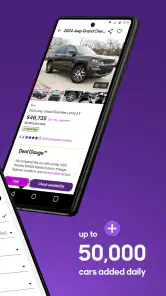
Another nifty feature is the price comparison tool. It gives you insights into whether the car you’re eyeing is a good deal compared to similar models. Plus, the app also offers reviews from other users, so you get an honest, real-world perspective on the cars you’re considering.
More From Our News Desk

Weather by Xiaomi Review: Clear at a Glance, Less Clear Up Close

X Under Pressure: Can It Recover When Posting Goes Wrong?

Clash of Clans Is Won Between the Battles

Android Auto Makes the Case for Quieter Car Software

MobiOffice: Transforming Mobile Productivity with Seamless Integration

EA SPORTS FC™ Mobile Soccer: Redefining Mobile Sports Gaming
I treat those price signals and owner reviews as prompts for better questions, not final answers. A seemingly attractive asking price still deserves a careful look at the vehicle’s history and condition, while reviews can help me identify topics to research before contacting a seller. The app helps organize the search; it cannot inspect a car or decide whether a particular example has been maintained well.
Taking It for a Spin: User Experience
Navigating Cars.com is a breeze. The interface is clean and user-friendly, making it easy to find everything you need. Whether you’re a tech wizard or someone who’s not so savvy with apps, you’ll find this app straightforward and intuitive. The images are high quality, so you can get a good look at the cars before making any decisions.
For a realistic weekday routine, I’d browse during a spare moment, save the strongest candidates for a closer comparison, then revisit the shortlist when I have time to check the details. That is more useful than trying to make a decision from a quick glance at photos. Before arranging a visit, I’d write down the questions each listing raises, such as whether the seller can clarify the vehicle’s condition or show relevant records. It turns browsing into a focused next step.
One thing that stood out to me was how fast the app loads. There’s nothing more frustrating than laggy apps, especially when you’re eager to find your next car. But with Cars.com, everything runs smoothly, ensuring a seamless browsing experience.
Cars.com runs on Android with a minimum OS requirement of version 9, and the current version is 9.66.1. I’d check that your phone meets the requirement before relying on it for a time-sensitive search. The interface is approachable, but a comfortable browsing experience does not remove the work of checking each listing carefully or confirming practical details directly with the seller.
Choosing a Search That Fits Your Situation
The app is particularly useful when you want to compare several vehicles across different listings without driving from one dealership to another just to get a first impression. Compared with searching one dealer’s inventory at a time, a marketplace view can make it easier to see alternatives and refine what matters to you. On the other hand, if you already know the exact dealer or vehicle you want, going straight to that seller may be quicker than searching broadly.
It is also a sensible starting point for someone who is unsure which model fits their needs. Compare a few realistic candidates, then take the shortlist outside the app: check the vehicle details, contact the seller, and arrange an in-person inspection or test drive where appropriate. If you are selling your own car, the app’s marketplace is relevant to that goal too, but I would still plan to handle questions and arrangements carefully rather than assuming an app listing completes the sale by itself.
For an experienced shopper, repeatable habits make the search more manageable: keep a clear budget, apply only the filters that matter, compare like with like, and revisit saved candidates instead of restarting from scratch. One trade-off is that broad searches can surface vehicles that are technically close to your criteria but still inconvenient because of distance, condition, or other details. I would rather expand my search deliberately than treat every matching result as equally worth pursuing.
A More Deliberate Shortlist
When I’m comparing candidates, I try to keep a simple note outside the browsing session: why each car made the list, what still needs checking, and what would make me rule it out. That prevents a polished photo or an appealing headline price from taking over the decision. It also makes it easier to return after a day or two and remember whether a car was genuinely promising or merely caught my eye in the moment.
For a buyer with a commute, for example, the shortlist should reflect the whole routine, not just the vehicle’s headline specifications. I’d think about how far I’m willing to travel to view it, whether the size suits parking and passengers, and which maintenance or history questions I need answered. The app is useful for bringing candidates into view; a little preparation helps me avoid contacting sellers about cars that never fit my practical needs.
People often wonder whether browsing alone is enough to make a confident choice. In my view, it is enough to build a shortlist, not to make the final call. Photos and listing information can help me decide what to ask, but I’d still verify the details with the seller and inspect the vehicle before committing. If a listing leaves an important question unanswered, I treat that as a reason to ask, not as proof of a problem or a reason to assume everything is fine.
Another common question is whether the app is useful to someone who isn’t ready to buy immediately. I think it can be, provided the goal is research rather than constant scrolling. Looking at a small group of comparable vehicles can help clarify which features matter and what trade-offs feel acceptable. I’d keep the search focused and return to it when I have a new question, instead of treating every new listing as a reason to rethink the entire plan.
Where the Marketplace Has Limits
A broad marketplace is not automatically the best route for every shopper. If I already have a specific dealership in mind, its own inventory may be the quicker path. If I’m buying through a trusted local contact, a wide search may add noise without improving the decision. And if I need someone to assess mechanical condition, an app cannot replace a qualified inspection or a careful test drive.
There is also a trade-off between casting a wide net and keeping the results actionable. A search that covers too much ground can leave me with appealing options that are awkward to visit or difficult to compare fairly. I’d widen the area only after checking whether the closer candidates truly fail my priorities, and I’d compare cars on similar terms rather than treating every result as interchangeable.
For sellers, the app can be a way to bring a car into the marketplace, but listing it is only one part of the job. I’d be prepared to respond to questions, explain the car accurately, and make sensible arrangements with interested people. Anyone hoping for an entirely hands-off sale should look for a process built around that need instead of assuming a listing app handles every step.
The Final Lap
So, who should give Cars.com – New & Used Vehicles a shot? Honestly, anyone in the market for a car! Whether you’re a first-time buyer or someone looking to upgrade, this app simplifies the whole process. It’s comprehensive, easy to use, and packed with features that make car shopping a breeze.
I’d especially recommend it to people who want one place to begin comparing options and who are willing to verify details before making a decision. It may be less useful if you only want a single seller’s inventory, already have a trusted local source, or expect an app to judge a vehicle’s condition for you. The marketplace can help you narrow the field, but the final checks still belong to you.
In conclusion, if you’re ready to find your next vehicle without the hassle of hopping from dealership to dealership, download Cars.com. It’s a must-have for anyone serious about car shopping, and it might just save you a ton of time and effort. Happy car hunting!
Cars.com: Buy and sell cars Frequently Asked Questions
Can I browse Cars.com without creating an account?
Cars.com is a free app for exploring vehicle listings and researching cars, so it can be useful when you are still deciding what you want. You can browse available options and compare vehicles before choosing whether to contact a seller or dealer. If you find a car that interests you, review its listing carefully and confirm key details directly with the seller.
Does Cars.com let me track vehicle listings I am interested in?
Yes. Cars.com highlights the ability to track vehicle listings, which can help you keep an eye on cars you may want to revisit as you shop. Tracking listings is useful when you are comparing several possibilities or taking time to decide. Keep in mind that availability and listing details can change, so check the current information and confirm it with the seller before making plans.
Can I use Cars.com to research a car before contacting a seller?
Yes. Cars.com is designed to support vehicle research as well as browsing listings, so you can compare cars and review information before reaching out to a dealer or seller. This can help you narrow your choices and prepare questions for a conversation. Treat listing details as a starting point, then confirm important information directly with the seller.
What is Cars.com used for?
Cars.com is a comprehensive platform designed for buying and selling new and used vehicles. Users can browse an extensive inventory of cars, compare prices, read expert and user reviews, and even find local dealers. The app provides a seamless experience for car shoppers, offering detailed information on different car models and facilitating the entire car-buying process.
Is Cars.com free to use?
Yes, Cars.com is free for users to browse car listings, research vehicles, and contact dealers. While the app itself does not charge users for these services, keep in mind that purchasing a car or any additional services through dealerships may incur costs. The app aims to make the car buying process as transparent and straightforward as possible.
Pros
- Extensive vehicle listings available.
- User-friendly interface for easy navigation.
- Comprehensive search and filter options.
- Access to vehicle history reports.
- In-app financing and insurance tools.
Cons
- Occasional app crashes reported.
- Limited private seller options.
- Some features require account creation.
- Slow customer support response.
- Ads can be intrusive at times.
- Category
- Auto & Vehicles
- Version
- 9.66.1