Cards - Mobile Wallet
- 5.50K
- 4.7
- Installs
- 10.00M
- Price
- Free
Screenshots
Analysis by Reviewed
I judge a wallet app by what happens at the checkout: can I find the right card without fumbling, and does it make the physical wallet lighter without adding a new chore? Cards - Mobile Wallet is a productivity app built around that simple routine. In my experience, it makes most sense as a home for cards and passes I need to show, rather than a replacement for every payment or identity tool on my phone.
Start with the cards you reach for most
I would begin with a few frequently used loyalty cards, a gym membership, or an event pass, then try retrieving each one when I actually need it. That small test is more useful than importing everything at once: it shows whether the details are readable and whether the app fits your checkout habits. For a café stop, for example, I can open the relevant card before reaching the counter instead of searching through a stuffed wallet.
The useful habit is to keep the app’s contents intentional. Cards you use every week deserve a spot; expired offers and rarely needed cards can make the collection harder to scan. If you are switching between several shops, sorting out what you use most before a busy day can save more time than adding every card you own.
Settings and security deserve a real check
The published review describes PIN or biometric protection as options, and I would check the security settings rather than assume they are enabled. A phone wallet holds information you may want to keep private if someone else gets access to your device. I would also consider the lock screen and general phone security part of the same routine, not treat the app as the only safeguard.
Cards is free to download, with in-app purchases listed from $0.99 to $99.99 per item. I would check what an optional purchase covers before paying and decide whether it solves a problem I actually have. The app is rated for Everyone, and the developer is Cards. Its 4.7 average across around 287,000 ratings and more than 10 million installs suggest broad use, but popularity cannot tell you whether its workflow suits your own phone and habits.
All Your Cards in One Place
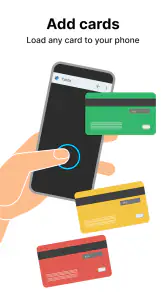
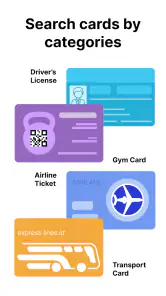
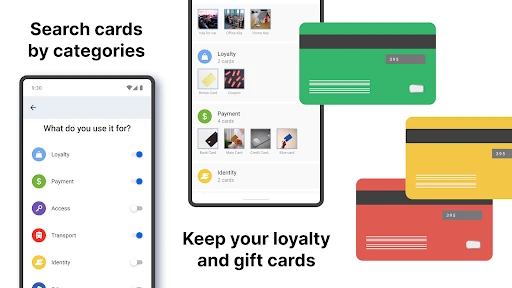
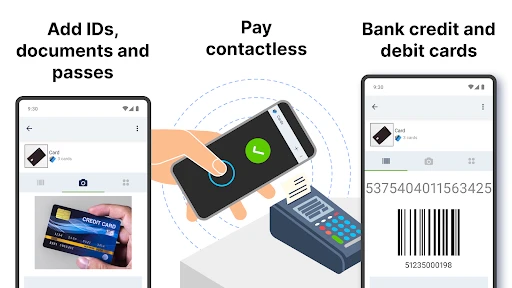
Let’s dive into the main feature of Cards - Mobile Wallet. Imagine having all your cards—yes, from loyalty cards to your gym membership—organized in one digital space. No more bulging wallets or forgetting your loyalty card at home. This app allows you to scan and store your cards with ease. I must say, the scanning process is as smooth as butter, and it recognizes the card details almost instantly. It’s like having a super-organized assistant in your pocket.
User-Friendly Interface
One feature that really caught my attention is the app’s user-friendly interface. Navigating through the app is intuitive, even for someone who isn’t tech-savvy. The design is sleek, and the buttons are well-placed, making it easy to find what you need. It’s almost like the app knows what you’re thinking. Plus, the setup process is a breeze. I was up and running within minutes of downloading the app.
You May Like

Clash of Clans Is Won Between the Battles

Android Auto Makes the Case for Quieter Car Software

MobiOffice: Transforming Mobile Productivity with Seamless Integration

EA SPORTS FC™ Mobile Soccer: Redefining Mobile Sports Gaming

How Microsoft OneDrive Became a Mobile Productivity Giant

How Google Translate Breaks Language Barriers Effortlessly
Faster routines, with a sensible backup
A practical shortcut is to build a repeatable sequence: open the app before joining the queue, locate the card, and have its display ready at the till. That avoids juggling a shopping basket while navigating a collection of cards. For a gym visit, the same habit means checking the membership card before leaving home. These little routines matter more than speed claims: they reduce the chance of being caught without the card when you need it.
I would still keep a physical backup for any card that is essential to an appointment or trip. A phone can run low on battery, be unavailable, or simply be inconvenient to unlock at the wrong moment. A digital copy is most valuable as a handy everyday alternative, not a reason to discard every original card before you know the places you visit will accept it.
Security You Can Trust
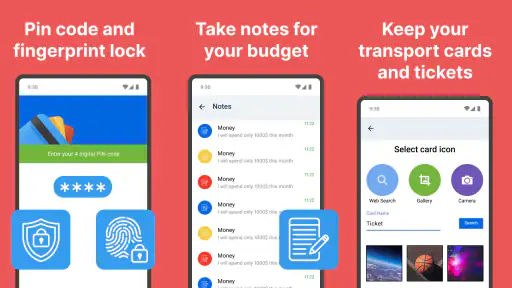
We all know how crucial security is, especially when it comes to storing sensitive information like card details. Rest assured, Cards - Mobile Wallet does not disappoint. The app uses advanced encryption to keep your data safe. I felt quite secure knowing that my information was protected. Plus, you can add an extra layer of security with a PIN or biometric authentication, which is a feature I highly recommend activating.
Where a mobile wallet may not be enough
The main trade-off is acceptance. A stored card is only convenient when the business can use what the app displays or scans; it does not automatically mean the app replaces a bank’s payment wallet, a dedicated travel ticket app, or an official identity document. I would keep those specialist tools for tasks they handle directly and use Cards for the cards and passes it is suited to hold. If you need automatic payment or a guaranteed travel credential, the relevant payment or transport app is the better choice.
It is also worth checking a card soon after adding it, not for the sake of setting up a perfect collection but to avoid discovering a problem at the counter. If a scan is unclear, keep the physical card available and try again in a calm moment. This is a small but useful distinction: convenient storage does not remove the need to verify that a particular card can be presented successfully.
Practical Use Cases
Now, let’s talk about the real-world application. Whether you’re shopping, heading to the gym, or grabbing a coffee, this app has you covered. Simply pull out your phone, open the app, and your card details are ready to be scanned. It’s that simple! It’s especially useful for those spontaneous shopping trips where you realize you’ve left your loyalty card at home. With this app, your excuse for missing out on points is officially void.
Cards has been available since May 21, 2013, and its current version is 4.1.5, with Android 5.0 as the minimum operating system. That makes device compatibility worth checking before installing on an older phone. The app’s store review count is around 5,500, which is a different signal from its much larger rating count: I would use both as context, but make the decision based on whether the cards I rely on work well in my own routine.
Making a collection easy to maintain
Once the essential cards are working, I would use a simple maintenance rule: add a card when it becomes part of a regular routine, then remove or ignore it when that routine ends. This keeps a wallet from turning into a second archive of every membership and offer you have ever collected. The payoff is not just a tidier screen; it is less hesitation when someone is waiting while you find the card you came for.
It also helps to think about the moment of use when deciding what to add. A loyalty card needed at checkout is different from a ticket you may need while moving through a crowded venue. For the latter, I would open the relevant pass before joining a line and make sure I know which entry on the screen is the right one. That small preparation is more dependable than trying to organize everything while people are waiting behind me.
Useful for shared routines, not shared accounts
Cards can be handy in a household where one person regularly carries several membership cards, but I would not assume a digital wallet automatically solves access for everyone else. If a family member needs a card while you are away, the practical question is whether they have their own usable copy and whether the organization accepts it. I would test that arrangement before relying on it for a time-sensitive visit rather than treating a screenshot or stored image as a guaranteed substitute.
This is one reason I prefer it as a personal organizer rather than the single source of truth for a group. A physical card can still be passed along, while an app on one person’s phone cannot help someone who is not carrying that phone. The distinction is easy to overlook when setting up a neat collection, but it matters for families sharing gym visits, errands, or membership access.
How it compares with other wallet choices
Compared with carrying a stack of plastic cards, the appeal here is obvious: fewer items to remember and a quicker way to bring several cards together. Compared with a phone’s built-in payment wallet, the job is different. A payment wallet is the natural choice when you want to tap to pay; Cards is more useful for collecting cards and passes you present or scan. I would use both if my routine includes both kinds of tasks rather than forcing one tool to do everything.
There is also a case for sticking with a retailer’s own app. If you mainly shop at one business and its app handles membership, offers, and checkout in one place, that single-purpose option may be more convenient. Cards becomes more appealing when your useful cards are spread across different places and you want one familiar place to retrieve them. The best choice depends less on the number of cards you own than on how many separate apps you are willing to open.
Small checks that prevent awkward moments
When I add a new card, I would compare its stored details with the physical version before putting the original away. Check that the displayed information is legible and that the code or card face is not cut off. Then try it on a low-pressure visit. This is a practical quality check, not extra fuss: a smooth scan during setup does not prove every cashier or scanner will handle every card in the same way.
I would also avoid adding sensitive documents simply because the app can hold cards and passes. A membership card and a government identity document do not carry the same consequences if a phone is lost or accessed by someone else. Keep the app’s role clear, use the protection options you are comfortable with, and leave anything that requires formal identity verification in the appropriate official service.
Who should choose another tool
If your main goal is contactless bank payments, I would start with the payment wallet supported by your phone and bank. If you need live journey information or a ticket that must be validated inside a transport provider’s system, use that provider’s app or the original ticketing method. And if a venue requires an original physical pass, a stored digital version may not be enough. Cards is strongest when it reduces everyday card clutter, not when the task depends on a separate service’s rules.
I would also skip it if you rarely carry cards or already have a simple system that works. Adding an app is only a win when it removes more friction than it creates. Someone who uses one loyalty card once in a while may be better off leaving it in a pocket or using the retailer’s existing app; someone juggling cards across several shops has a clearer reason to try a central collection.
Who will get the most from it
I think this is a good fit for someone who regularly carries loyalty cards, membership cards, tickets, or passes and wants a single place to retrieve them. It is less compelling if you only use one or two cards, prefer a paper wallet, or need a dedicated service that processes payments or handles travel credentials. The best test is simple: add a card you use often, try it in the situation where you normally need it, and keep the original until you are confident the digital version is practical.
In conclusion, if you’re looking to declutter your wallet and streamline your life, Cards - Mobile Wallet is definitely worth a download. It combines convenience with security, wrapped up in an easy-to-use package. So go ahead, give it a try and thank me later!
Cards - Mobile Wallet Frequently Asked Questions
What should I check before adding important wallet items?
Before relying on Cards - Mobile Wallet for something important, make sure the specific card, ticket, pass, or key you need can be added and opened as expected. Try setting it up ahead of time rather than waiting until you need it. It can also be sensible to keep another way to access an essential item, especially when timing or entry depends on it.
Who is Cards - Mobile Wallet designed for?
Cards - Mobile Wallet is a productivity app for people who want a digital place to keep cards and other wallet items on a phone. Its focus is on bringing supported items together rather than carrying each one separately. Whether it suits you depends on the kinds of items you use and whether the app supports the ones you want to organize.
Does Cards - Mobile Wallet support tickets, passes, and keys as well as cards?
Cards - Mobile Wallet is presented as a digital wallet for cards, tickets, passes, and keys, so it may suit people who want these items together on their phone. The exact options you can add depend on the item and how it is supported in the app. Before relying on it for an important ticket or pass, check that the relevant item can be added and accessed as you expect.
Is Cards - Mobile Wallet free to download, and are there optional purchases?
Cards - Mobile Wallet is free to download, which makes it easy to try before deciding whether it fits your routine. It also offers in-app purchases, with individual items priced from $0.99 to $99.99. Those purchases are separate from the initial download, so review the purchase details shown in the app before confirming anything. The app is rated for Everyone.
What is Cards - Mobile Wallet?
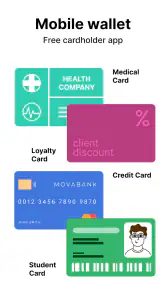
Cards - Mobile Wallet is a convenient mobile application that allows users to store and manage all their cards digitally in one place. Whether it's membership, loyalty, or identification cards, this app transforms your smartphone into a digital wallet, helping you declutter your physical wallet and access your cards anytime, anywhere.
Pros
- Conveniently organizes various cards in one place.
- Supports a wide range of card types.
- Easy to use with a user-friendly interface.
- Enhances security with encryption.
- Saves physical wallet space.
Cons
- Requires constant app updates.
- Limited offline functionality.
- May drain battery quickly.
- Possible privacy concerns.
- Not compatible with all devices.
- Category
- Productivity
- Version
- 4.1.5













