Car Scanner ELM OBD2
- 7.17K
- 4.7
- Installs
- 10.00M
- Price
- Free

Screenshots
Analysis by Reviewed
Ever wondered what’s really going on under the hood of your car? Well, wonder no more because the Car Scanner ELM OBD2 app is here to save the day! It’s like having a friendly mechanic right in your pocket, ready to diagnose your car’s health at any time. Let’s dive into what makes this app a must-have for any car owner.
My more measured view is that this is a useful companion, not a substitute for a mechanic or a magic fix. You do need compatible hardware, and the information makes most sense when you treat it as a clue to investigate rather than a final diagnosis. Get that distinction right and the app can help you have a more informed conversation about your car.
Discovering the Magic of Car Diagnostics
So, you’ve got your phone, and your car is acting a bit funky. What do you do? Open up the Car Scanner ELM OBD2 app and plug in your OBD2 scanner, and voila! You’re now armed with tons of data about your vehicle. This app is designed to connect with any ELM327 compatible OBD2 scanner and instantly provides you with real-time data. And seriously, who doesn’t love a bit of real-time action?
That hardware requirement is the first practical decision. The app itself is free, but you’ll need an OBD2 adapter that works with your vehicle and phone, and an unreliable adapter can make pairing or readings frustrating. I’d check compatibility before buying one rather than assuming every device described as an OBD2 scanner will behave identically. Once connected, keep the phone secured and let a passenger handle the screen; watching live readings while driving is a distraction, not a useful test.
Getting a Reliable Read Before You Rely on One
It helps to treat your first connection as a setup session, not a roadside emergency drill. Park somewhere safe, allow time to pair the adapter, and learn where the app presents codes and live readings before you need them. If the connection drops or the values look odd, repeat the check while stationary rather than trying to troubleshoot through a moving car. A calm first run also gives you a useful baseline for what the app looks like when there is no warning demanding your attention.
Before ordering an adapter, check that its connection method suits your phone and that it is intended to work with the vehicle you plan to scan. “OBD2 compatible” does not guarantee that every adapter, car, and phone will work equally smoothly together. The app cannot compensate for unreliable hardware, so spending a little time checking compatibility is more useful than buying the cheapest device on the assumption that they are all interchangeable.
There is also a useful distinction between reading information and acting on it. A code can point toward a system or condition without proving which component is faulty. If the car has new noises, poor braking, overheating, or other symptoms that make driving unsafe, a phone reading should not talk you into carrying on. I would use the scan to explain what I have noticed when contacting a repair professional, not as permission to ignore symptoms.
More From Our News Desk

Weather by Xiaomi Review: Clear at a Glance, Less Clear Up Close

X Under Pressure: Can It Recover When Posting Goes Wrong?

Clash of Clans Is Won Between the Battles

Android Auto Makes the Case for Quieter Car Software

MobiOffice: Transforming Mobile Productivity with Seamless Integration

EA SPORTS FC™ Mobile Soccer: Redefining Mobile Sports Gaming
Features That Make It Stand Out
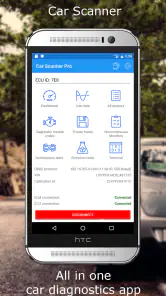
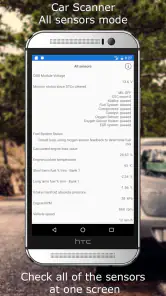
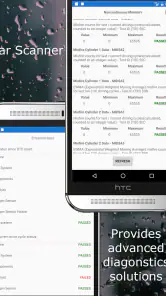
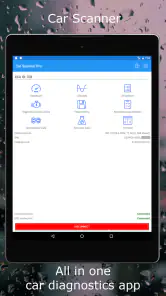
Firstly, this app is super user-friendly. You don’t need to be a tech wizard to navigate it. The interface is straightforward, allowing you to easily interpret the various diagnostic codes. Whether it’s engine light checks, sensor data, or fuel usage, everything is just a tap away.
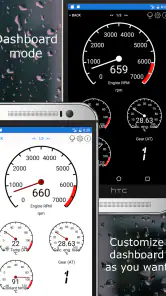
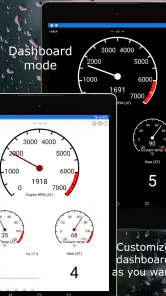
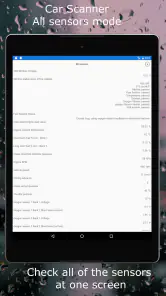
One of the coolest parts is the live data feature. Imagine seeing live graphs of your engine’s RPM, speed, and even the temperature! It’s like turning your car into a high-tech racing machine dashboard. Plus, with the ability to customize the dashboard to show the metrics you care about, you can tailor the app to suit your needs perfectly.
A practical way to use those graphs is to look for a pattern, not obsess over every changing value. If a warning appears, note the code and the conditions around it, then compare readings later under similar circumstances. A graph can make an intermittent change easier to spot than a single snapshot, but it does not explain every possible cause. I’d avoid clearing a warning simply to make the light disappear: keeping the code available can help you or a technician understand what happened.
For example, if you are trying to understand a temperature reading that changes during a journey, a graph is more informative than checking the value once and guessing what it means. Make comparisons when the car is in similar conditions and keep your notes simple: what you noticed, when it happened, and whether a warning appeared. That gives you a clearer record to discuss with a technician, without turning a pattern on screen into a diagnosis.
The customizable dashboard is best approached as a focused workspace, not a place to show every available figure at once. I’d choose only the readings that answer the question I have, such as watching a particular value during a parked check or reviewing a trip afterward. A crowded screen makes it harder to notice what matters, and more displayed information is not automatically more useful. Changing the layout to suit one task can make the app easier to read than trying to build a permanent dashboard for every situation.
The app’s appeal is strongest for owners who like to learn what their car is reporting and are comfortable doing a little interpretation. If you only want a simple yes-or-no answer, a basic code reader may feel less demanding. If you need a repair performed, a qualified mechanic is the better next step. This app sits between those options: it can make the first conversation more informed, while leaving the actual diagnosis and repair to the right person.
Where It Fits in a Driver’s Toolkit
Compared with a basic handheld code reader, this app can be more useful when you want to explore live readings and arrange them in a dashboard rather than just retrieve a code. The trade-off is that you need a compatible adapter, a phone, and enough patience to interpret what you see. A simple reader may be the better choice for someone who wants a dedicated device with fewer setup steps. A repair shop’s diagnostic equipment and expertise are better suited to complex faults that call for deeper investigation.
It also occupies a different role from navigation, fuel-log, or maintenance-reminder apps. Those tools are built around routes, records, or service planning; this one is most appealing when you want to inspect information coming from the car. You can use it alongside other tools, but I would not choose it expecting it to replace them. Its strongest case is as an accessible bridge between noticing a problem and asking a better-informed question.
That makes it particularly handy for people who maintain more than one compatible vehicle or enjoy learning how their car behaves over time, provided they are willing to keep the adapter and connection process straight. For a driver who rarely wants to see anything beyond a warning light, the extra readings may feel like clutter. The best fit is not the person who wants the most data; it is the person who has a reason to look at particular data and knows when to stop interpreting it alone.
Why Every Car Owner Needs This App
Forget those expensive trips to the mechanic for every little issue. With this app, you get the power to know exactly what’s wrong with your car before you even step out of your house. Whether it’s a minor issue or something that needs immediate attention, you’ll be in the know.
Moreover, the app also helps you save on fuel by monitoring your driving habits. It’s like having a personal driving coach who whispers tips to save those extra bucks at the pump. And let’s be honest, who doesn’t love saving money?
Picture a familiar situation: a warning light comes on before your commute, but the car still seems to drive normally. With an adapter already paired, you can check the reported code while parked, write it down, and decide whether to arrange a prompt inspection or seek advice before making a longer journey. That is a more realistic benefit than expecting an app to declare a car safe. The reading can guide your next question; it cannot guarantee that continuing to drive is harmless.
Fuel figures also deserve a little caution. They can help you compare your own trips and notice whether a change in driving style seems to affect consumption, but they are most useful as a trend rather than a promise of exact savings. For a fair comparison, keep routes and conditions reasonably similar. If you want a dedicated navigation tool, maintenance scheduler, or hands-on repair guide, a specialist app may suit that job better; Car Scanner’s value is its connection to vehicle diagnostics and live information.
A sensible fuel comparison starts with a question rather than a target: did a change in your usual driving seem to alter the figures the app shows? Compare familiar routes under reasonably similar conditions, and avoid drawing a firm conclusion from one unusually busy or quiet trip. That approach can help you notice broad trends without mistaking an estimate for a guaranteed saving or blaming your driving for every variation.
The same restraint helps when a code appears. Write down the code and any symptoms, then look for a reliable explanation and consider whether the car needs professional attention. The app is useful for making that conversation more precise, but it should not be used to order parts based on a guess. If you are not comfortable interpreting the result, that is a good reason to take it to a technician, not a reason to keep tapping through readings until one seems reassuring.
There is a learning curve behind the friendly interface. Vehicle sensors and codes can be confusing, and a displayed fault does not automatically identify the failed part. Results may also depend on the car and the adapter, so I would not treat one unexpected reading as proof of a serious fault. The sensible workflow is to record what you see, check the code’s meaning using a reliable source, and get professional help when the symptoms or warning call for it.
Another limitation is that the app’s usefulness depends on having the adapter with you and being able to connect when you want to scan. If you only remember it after a warning appears, setup may be an extra source of stress at the wrong moment. I’d test the complete phone-and-adapter setup in advance and keep the adapter somewhere easy to find. If you prefer not to manage accessories or interpret technical information, a straightforward visit to a repair shop may be less hassle.
Who I’d Recommend It To
I’d recommend it to curious owners who want more context than a warning light provides, especially drivers who are comfortable recording readings and asking a professional what they mean. It can also suit someone preparing for a service visit: having the reported code and a brief account of when it appeared gives the discussion a more concrete starting point. The benefit is not that you become your own mechanic, but that you can describe the concern more clearly.
I would skip it if you expect an app to tell you with certainty whether a car is safe, identify the exact part to replace, or carry out a repair. It is also a poor match if buying and pairing a separate adapter sounds like needless friction or if technical readings would make you more anxious than informed. In those cases, a trusted mechanic or a simple reader may serve you better than a feature-rich phone dashboard.
For someone new to diagnostics, the most helpful habit is to keep a short note with the scan: the warning or symptom, the conditions when it appeared, and the code shown. That record is more useful than trying to memorize a string of letters and numbers. It also makes repeated checks easier to compare, while leaving room for a professional to interpret the details in context.
Wrapping It Up
In conclusion, the Car Scanner ELM OBD2 app is more than just a diagnostic tool; it’s your car’s new best friend. Whether you’re a car enthusiast or just someone who wants to keep their vehicle in tip-top shape, it’s a handy way to get closer to what the car is reporting. With its features and ease of use, it’s easy to see why drivers keep it available.
So, if you haven’t already, grab your OBD2 scanner and download this app. Trust me, you’ll wonder how you ever lived without it. Happy scanning!
CAR SCANNER LLC develops this free Auto & Vehicles app, which is rated for Everyone. It has a 4.7 average from around 305,000 ratings and more than 10 million installs. Version 2.0.50 supports Android 5.0 and up, and optional in-app purchases range from $1.49 to $5.49. For an owner who wants to explore live readings and arrive better prepared when asking for help, I think it is worth trying; for anyone expecting a phone alone to diagnose and repair a car, it is the wrong tool.
Car Scanner ELM OBD2 Frequently Asked Questions
What should I check before connecting an OBD2 adapter to my phone?
Before using Car Scanner ELM OBD2, you’ll need an OBD2 adapter that can connect to your phone and communicate with your vehicle. The app relies on that connection to retrieve car information, so check that the adapter is compatible with your device and supports the OBD2 system in your vehicle. A dependable adapter can make readings and diagnostics more consistent.
Can I use Car Scanner ELM OBD2 to monitor my car while driving?
The app’s trip-computer and dashboard features are intended to help you view vehicle information, including real-time readings. Set up the app and choose any dashboard information before setting off, rather than handling your phone while driving. Keep your attention on the road, and use a passenger to check the display if needed. Live information can be useful, but it should not distract from safe driving.
Is Car Scanner ELM OBD2 free to download, and what does it cost to use?
Car Scanner ELM OBD2 is free to download, so you can install it and explore its core functions without paying upfront. It also offers in-app purchases, with items ranging from $1.49 to $5.49. The app is developed by CAR SCANNER LLC and is listed for everyone, making it suitable for a broad audience of drivers interested in vehicle monitoring and diagnostics.
What phones and operating systems can run Car Scanner ELM OBD2?
The Android version requires Android 5.0 or later, so check your device’s software version before installing. Car Scanner ELM OBD2 is an app in the Auto & Vehicles category, and its current version is 2.0.50. If your phone meets the minimum operating-system requirement, you can download it and connect it to a compatible OBD2 adapter to use its vehicle-focused tools.
What is Car Scanner ELM OBD2 and how does it work?
Car Scanner ELM OBD2 is a powerful application designed for car enthusiasts and professionals alike, allowing users to diagnose and monitor various vehicle conditions. It works by connecting your smartphone to your car's onboard diagnostics (OBD2) system using an ELM327 adapter. Once connected, the app retrieves real-time data and diagnostic information, helping you to understand and improve your vehicle's performance.
Pros
- User-friendly interface for easy navigation.
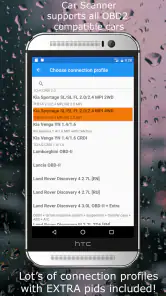
- Compatible with a wide range of vehicles.
- Real-time data monitoring and logging.
- Customizable dashboard for personalized views.
- Supports multiple OBD2 protocols.
Cons
- Limited free version functionality.
- Requires an OBD2 adapter for use.
- Some features may need in-app purchases.
- May not support all car models.
- Occasional connectivity issues.
- Category
- Auto & Vehicles
- Version
- 2.0.50