Caller Id & Block Spam SMS
- 4.00
- 3.6
- Installs
- 50.00K
- Price
- Free
Screenshots
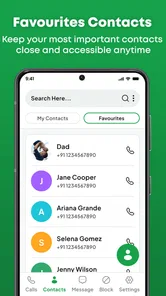
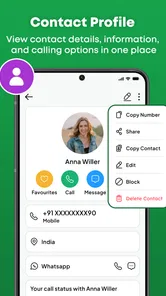
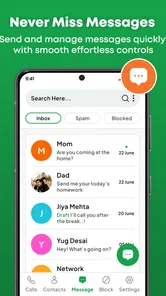
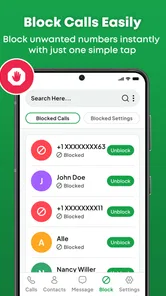
Analysis by Reviewed
Before installing another call-management tool, I’d first ask what is actually costing me attention: unknown calls, unwanted texts, or the time spent deciding what to do with both. Caller Id & Block Spam SMS is designed for that narrow but common headache. I see it as a practical companion to the phone’s normal calling and messaging tools, not a replacement for them, and its value depends on whether it makes those everyday decisions easier on your device.
A focused tool for uncertain calls
It is a free communication app from Code Cookies, rated for Everyone. Its name points to caller identification and spam-message blocking, but I would approach those as aids rather than guarantees. An unknown number can still be legitimate, and a message that looks suspicious may deserve a closer look before it is filtered. The useful question is whether the app gives you enough help to make a calmer choice without adding more hassle.
That makes this most relevant to people who regularly receive calls or texts they do not recognize. If your phone is quiet and its built-in controls already suit you, a separate app may not change much. If unwanted contact repeatedly interrupts work, family time, or errands, a dedicated place to think through calls and messages may be worthwhile.
What it feels like to use day to day
I look at the day-to-day experience as a question of whether this tool helps me pause and choose, rather than react to every unfamiliar alert. A useful habit is to decide in advance which calls I would answer immediately and which can wait for a check during a break. That boundary makes caller information more helpful while keeping the phone’s ordinary communication tools firmly in the picture.
Speed matters most before you answer
With a caller ID tool, speed is less about opening screens quickly and more about getting useful context at the moment a call arrives. If I am expecting a delivery, a callback, or a call from a number I do not recognize, even a small delay or an unclear result can make the feature less useful. I would try the app with ordinary incoming calls soon after installing it, rather than waiting until an urgent call to find out how it behaves on my phone.
That expectation also keeps the app’s role in perspective. A caller label can help me make a better guess, but it should not be treated as proof that a call is safe or dangerous. When a number appears unfamiliar, I would still use judgment, especially for calls involving personal details, account access, or payment. The best result is a little more context, not a reason to switch off common sense.
Message blocking has a different rhythm. It is most helpful when it reduces the need to inspect suspicious texts one by one, but the cost of a mistaken block can be higher if a message is time-sensitive. I would review how the app handles messages before relying on it for important conversations, and keep an eye on anything that might be filtered unexpectedly.
More From Our News Desk

Weather by Xiaomi Review: Clear at a Glance, Less Clear Up Close

X Under Pressure: Can It Recover When Posting Goes Wrong?

Clash of Clans Is Won Between the Battles

Android Auto Makes the Case for Quieter Car Software

MobiOffice: Transforming Mobile Productivity with Seamless Integration

EA SPORTS FC™ Mobile Soccer: Redefining Mobile Sports Gaming
Busy days reveal the useful trade-offs
A realistic example is a workday when I am in meetings and my phone keeps receiving calls from numbers I do not have saved. Rather than answering each interruption, I can use caller information as one input and decide whether to respond during a break. If spam texts are arriving at the same time, having a dedicated tool for that problem may feel more manageable than treating every alert as equally important.
There is a useful distinction here: blocking is convenient when the nuisance is obvious, while identification is more valuable when I still need to make a decision. I would avoid blocking a number simply because it is unfamiliar if I am waiting for a doctor, a service appointment, or a job-related call. A cautious workflow is to use identification first, block only numbers I have reason to distrust, and check the call history before making a lasting decision.
For people who receive occasional spam, the phone’s built-in call and message controls may already be enough. This app is easier to justify when unwanted contact is frequent enough that I want a separate, focused place to manage it. That is a practical trade-off rather than a promise that a third-party app will always outperform the tools already on a device.
Reliability is about trust, not just uptime
I would not judge a blocking app only by whether it opens. It also needs to behave predictably: legitimate contacts should remain reachable, unwanted calls should be handled in a way I understand, and I should be able to reverse a choice if I block the wrong number. Since blocking can affect communication I care about, I would start conservatively and test the app with low-stakes situations before depending on it for important calls.
One practical tip is to keep a short mental list of numbers or types of contact I must not miss, then check that the app’s behavior does not interfere with them. Another is to avoid changing several call-handling settings at once. If something unexpected happens, changing one setting at a time makes it easier to identify what caused the difference. This is especially useful for someone who depends on their phone for work or family coordination.
The app’s average rating is 3.5 from around 447 ratings, with 4 written reviews. I read that as a reason to approach it with a little patience rather than assume universal satisfaction. Ratings can reflect different phones, expectations, and spam patterns; my own test would focus on whether the app handles the calls and messages I actually receive, not whether it promises a perfect result for everyone.
Device fit and version expectations
Caller Id & Block Spam SMS is on version 1.1 and supports devices running Android 8.0 or later. That minimum makes it relevant to a range of Android phones, including older ones, but compatibility alone does not tell me how light or smooth it will feel on a particular device. I would check its behavior over several days, especially if my phone is older or already struggles when several apps are active.
I would also avoid assuming that a communication app has no effect on battery or background activity simply because its purpose sounds simple. A caller identification tool may need to be ready when a call comes in, so the practical question is whether it remains unobtrusive during normal use. I would notice whether the phone still feels responsive and whether call handling remains consistent, rather than relying on a single quick launch as a performance test.
If I use a phone with limited storage or a heavily customized Android setup, I would install it only if I expect to benefit from its specific call and SMS focus. For someone whose built-in spam controls already work well, adding another app may create more settings to maintain without a meaningful improvement. The value is strongest when the problem is real and recurring.
Free to start, with a purchase choice
The app is free to install, with in-app purchases listed from $4.99 to $23.99 per item. I would begin with the free experience and decide whether it solves a concrete annoyance before spending anything. That approach matters for a utility app: the upgrade only makes sense if the extra value is clear in my own routine, not merely because a paid option exists.
Before buying, I would consider how often spam disrupts me and whether I need more than the basic caller-identification and blocking purpose. Someone dealing with a handful of unwanted calls may be satisfied with their phone’s existing tools. Someone who faces repeated interruptions may be more willing to pay for a dedicated solution, provided it proves reliable on their device first.
Who should choose it—and who should look elsewhere
I would recommend Caller Id & Block Spam SMS to an Android user who regularly receives unwanted calls or messages and wants a focused communication app to help manage them. Its store page shows over 50 thousand installs, so it has attracted a meaningful audience, though that alone does not guarantee it will match my phone’s behavior or my expectations.
I would skip it if I rarely receive spam, already trust the phone’s built-in screening, or need a highly customizable call-management setup. I would also be cautious if missing an unknown call could cause serious trouble: no caller ID should replace a plan for handling important numbers, such as saving known contacts and checking missed calls deliberately. If I need broader phone automation or a feature set tailored to a particular device maker, the built-in option may be the better fit.
Compared with the usual alternatives, the main choice is between relying on the phone’s native controls and adding a dedicated app. Native tools are convenient because they are already part of the device’s calling experience. A separate app can be appealing when I want a more focused approach to both calls and messages, but it also means another app to evaluate and maintain. I would choose based on which option causes fewer missed legitimate contacts, not simply which one offers more controls.
Small habits that make a trial more useful
I would test the app during a normal week rather than judge it from one quiet afternoon. Note whether unknown calls are common at particular times, and check whether the caller information actually changes what you decide to do. That simple comparison helps separate a genuine improvement from the feeling that an extra tool must be helping just because it is installed.
For texts, I would be especially careful during the first few days: check the messages you expect to receive, including delivery or appointment updates, before treating filtering as something you can forget about. If you are waiting on a one-off confirmation, keep the sender’s number or conversation in mind and verify it arrived. This is not a reason to avoid blocking; it is a sensible way to avoid letting convenience hide a missed message.
Another useful boundary is to distinguish repeat nuisance from one-off uncertainty. A persistent unwanted caller may be a reasonable candidate for blocking, while an unfamiliar number that calls once could be a legitimate person using a new line. I would let repeated behavior and context inform the decision instead of turning every unknown number into a permanent block.
What to expect from a separate app
People often ask whether a caller ID app can identify every number. I would not plan around that expectation. Identification is useful when it provides enough context to guide a decision, but an incomplete or uncertain result should lead me back to ordinary precautions: let the call go to voicemail when appropriate, then verify the caller through a trusted route before sharing sensitive information.
Another practical question is whether this can replace the phone’s native controls. I would treat it as an alternative layer to evaluate, not assume it must replace anything. Start with one approach, see how it fits your calling habits, and avoid enabling multiple overlapping blocking systems at once until you understand which one is handling calls. That keeps troubleshooting simpler if an expected call does not come through.
The age rating is Everyone, but that does not answer whether the app is suitable for every phone or every communication need. The important distinction is between age suitability and practical fit: someone who relies on unknown callers for work may need a more cautious setup than someone mainly trying to reduce obvious spam. The same feature can be useful in one routine and frustrating in another.
My performance verdict
My recommendation is measured: try Caller Id & Block Spam SMS if nuisance calls and texts are a regular problem, then judge it by how quickly and predictably it helps you make decisions. I would test caller identification during normal incoming calls, be selective about blocking, and monitor messages for anything important. That small, careful trial is more useful than expecting any app to recognize every unwanted contact.
For a person who wants a straightforward layer of help without changing their whole phone routine, this app is worth considering. For someone already well served by built-in screening, it may add friction rather than relief. The strongest reason to keep it is practical: it should save attention on a busy day without making trusted communication harder. I would let that balance—not the promise of perfect protection—decide whether it earns a place on my phone.
Caller Id & Block Spam SMS Frequently Asked Questions
What is Caller Id & Block Spam SMS used for?
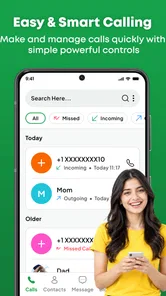
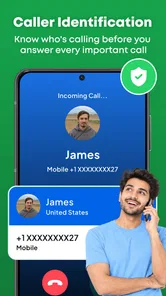
Caller Id & Block Spam SMS is designed to help identify incoming callers and manage unwanted calls or text messages. Depending on the features available in your version, it may show caller information when a number is not saved in your contacts, let you block selected numbers, and help filter suspected spam. Caller identification is not guaranteed, so an unfamiliar number may remain unknown or display incomplete information.
Does Caller Id & Block Spam SMS automatically block every spam call and message?
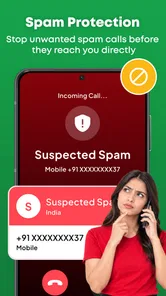
No spam-filtering app can reliably catch every unwanted call or text, and legitimate messages can sometimes be flagged by mistake. Caller Id & Block Spam SMS may offer blocking or filtering tools, but you should review its settings and any filtered-message folder regularly. For important contacts or messages, check the number and content before blocking or deleting them, especially if you are expecting a delivery or service notification.
What permissions and personal information might the app need?
Caller identification and blocking features may require access to phone-related functions, contacts, or SMS, depending on the app version and your device. Before granting permissions, read the permission prompts and the developer’s privacy policy to understand how information is collected, used, and shared. You can usually manage permissions in your phone’s settings, though restricting access may prevent some features from working as intended.
Is Caller Id & Block Spam SMS free, and are there in-app purchases or ads?
Availability, pricing, advertisements, and optional paid features can differ by platform, region, and app version. Check the Google Play Store or Apple App Store listing before downloading for current details, including any subscriptions or in-app purchases. If the app offers a premium plan, review its price and renewal terms carefully, and confirm whether the caller identification or blocking features you want are included in the free version.
Will Caller Id & Block Spam SMS work on every Android or iPhone?
Compatibility depends on your device, operating-system version, region, and the permissions or default-app settings supported by your phone. Some call and SMS filtering capabilities are restricted or configured differently on Android and iOS, so features may not be identical across platforms. Check the store listing for minimum system requirements, and review the app’s setup instructions after installation; you may need to enable supported filtering options in your device settings.
Pros
- Identifies many unknown callers
- helping you decide whether to answer.
- Can block unwanted numbers and reduce repeat nuisance calls.
- SMS spam filtering keeps suspicious messages separate from your inbox.
- A shared spam database can flag numbers reported by other users.
- Simple caller and message screening can save time day to day.
Cons
- Caller identification may be inaccurate or out of date.
- Spam detection can sometimes block legitimate calls or messages.
- Some features may require permissions to access calls
- contacts
- or SMS.
- Shared caller databases may raise privacy concerns for some users.
- Protection may be limited for new or rarely reported spam numbers.












