Boost Visual Voicemail
- 13.64K
- 4.7
- Installs
- 10.00M
- Price
- Free

Screenshots

Analysis by Reviewed
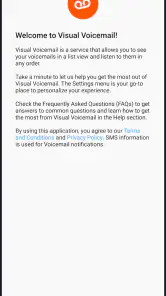
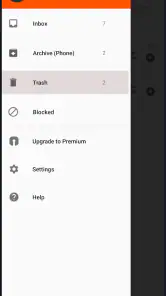
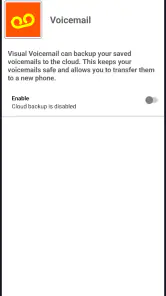
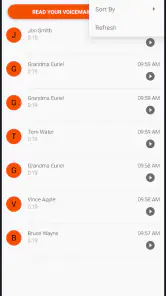
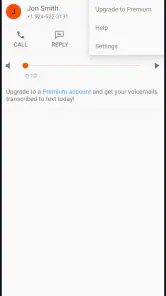
Voicemail is easy to ignore until an important call arrives while I am busy, driving, or away from my phone. That is where Boost Visual Voicemail makes sense: it puts voicemail messages in a more accessible place on the device instead of making me rely only on a traditional call-in system. I found the idea most useful when I wanted to see that a message was waiting and decide which one deserved attention first.
This is a free communication app from DISH Wireless L.L.C., aimed at Boost customers who want a simpler way to handle voicemail. Its average rating is 4.7 from around 97 thousand ratings, and it has passed 10 million installs, which suggests that the basic task is resonating with a large audience. The app is also rated for Everyone, so its purpose is straightforward rather than entertainment-focused or specialized.
How Boost Visual Voicemail feels in everyday use
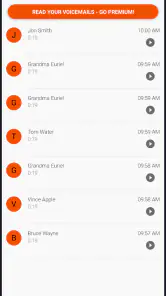
The main advantage is the change in workflow. Instead of calling a voicemail number, listening through messages in sequence, and remembering which ones matter, I can approach voicemail more like an inbox. That small shift is valuable when several people have called or when I need to return one message but not the others.
Articles Related to Boost Visual Voicemail
Clash of Clans Is Won Between the Battles
Its raids are quick; its community is a long-term project of coordination, teaching, rivalry, and shared responsibility—with all the friction that entails.
Android Auto Makes the Case for Quieter Car Software
The car interface is no longer judged by how much it can do, but by how quietly it helps. Android Auto shows what drivers now expect—and what still gets in the way.
MobiOffice: Transforming Mobile Productivity with Seamless Integration
MobiOffice: Word, Sheets, PDF is redefining mobile productivity with a surprising blend of functionality and innovation.
EA SPORTS FC™ Mobile Soccer: Redefining Mobile Sports Gaming
Dive into EA SPORTS FC™ Mobile Soccer, where immersive gameplay and strategic depth transform mobile sports gaming.
In a realistic workday, I might miss a call during a meeting, notice the voicemail afterward, and quickly review the available messages. I can focus on the message that sounds urgent and leave a less important one for later. This is not a dramatic feature, but it removes a repetitive step from a task most people would rather finish quickly.
The real benefit is control over attention, not extra communication features. The app does not need to become a full messaging platform to be useful. Its role is narrower: make voicemail easier to reach and organize from the phone itself.
Speed expectations when checking messages
For this kind of app, perceived speed is less about demanding graphics or complex screens and more about how quickly the voicemail area becomes useful after opening it. I found the experience best suited to short, frequent checks rather than leaving it open for long periods. The interface has one clear job, so there is little reason to spend time navigating around.
That focused design also makes the app feel less mentally expensive than a traditional voicemail call. With the conventional method, I have to wait through prompts and audio before deciding what deserves attention. A visual list gives me a quicker starting point, especially when I am checking messages between errands or before calling someone back.
You May Like

How Microsoft OneDrive Became a Mobile Productivity Giant

How Google Translate Breaks Language Barriers Effortlessly

Why Google Sheets Is the Ultimate Mobile Productivity Tool

Unveiling the Dynamic World of My Talking Tom Friends

Free Fire MAX: Dominating the Battle Royale Arena

Free Fire: Winterlands – The Ultimate Winter Gaming Adventure
There is an important distinction, though. Visual voicemail does not make the caller’s message itself faster. A long message still takes time to hear, and an unclear message still requires patience. The improvement is in choosing where to spend that time. If I have only one voicemail waiting, the difference may be modest; if several are waiting, the benefit becomes much more noticeable.
What happens during heavier voicemail use
The app is most helpful during bursts of activity: after a period when I could not answer calls, during a busy day with multiple callbacks, or when I am sorting personal and work-related messages. Those are the moments when the usual voicemail process becomes tedious because every message feels equally hidden behind the same phone menu.
I would not treat it as a replacement for a notes app or a customer relationship tool. If I need detailed records of conversations, follow-up dates, or searchable text, a visual voicemail screen alone will not provide that broader organization. My practical workaround is to listen carefully, note the essential action elsewhere, and then return to the voicemail list when I am ready to clear it.
One useful habit is to deal with messages in two passes. First, I identify which calls need a response. Then I listen fully and handle the callback or note. This prevents me from replaying every message simply because I opened the voicemail area. The app supports that decision-making style better than a sequential call-in menu.
Another trade-off appears when I am receiving many messages close together. A visual list can make the queue easier to see, but it can also tempt me to postpone everything because the messages remain visible. I get the best value when I use the list as a triage tool rather than treating it as a permanent archive.
Reliability and recovery when something goes wrong
Voicemail is a service where reliability matters more than visual polish. If I am waiting for a message from a doctor, delivery driver, employer, or family member, I need confidence that the app will show me what is available when I check. Boost Visual Voicemail is designed around delivering voicemail to the device, so its usefulness depends on that connection between the phone, the app, and the carrier service.
My advice is not to make the app the only place where an important message exists until I have confirmed that it is working properly on my phone. After installation, I would make a test call from another phone, leave a short message, and check whether it appears as expected. That simple test is more useful than assuming every voicemail setup behaves identically.
If a message does not appear immediately, I would avoid repeatedly tapping the same screen. First I would check the phone’s connection, reopen the app, and give the service a moment to update. If the problem continues, placing a conventional call to voicemail is a sensible recovery path. This is one reason I still regard visual voicemail as a convenience layer rather than a reason to forget the underlying voicemail access method.
Recovery also matters after changing phones or adjusting service settings. I would verify voicemail again after a device migration, a SIM or account change, or any situation that affects cellular service. The app can simplify access, but it cannot independently repair a carrier-side setup issue. That boundary is important for anyone expecting the application to solve every voicemail problem automatically.
Device support and practical constraints
The current version is T.11.3.0.2, and the app supports devices running Android 8.0 or later. That gives it a relatively broad Android range, including phones that are not recent. For someone using an older compatible device, this is encouraging because voicemail access does not automatically require the newest hardware.
Still, operating-system support is not the same as an identical experience on every phone. Older devices may feel slower when opening any app, and manufacturer software can affect notifications, background activity, or how quickly information refreshes. I would not judge the app solely by how it behaves on a budget or aging phone without also considering the phone’s general condition.
Resource demands appear naturally modest for an app with such a focused purpose, but I would avoid making absolute claims about battery or memory use across all devices. The sensible approach is to watch how it behaves during normal use. If voicemail notifications arrive late, I would inspect the phone’s battery-saving or background restrictions before concluding that the app itself is unstable.
The Android requirement also defines who should look elsewhere. iPhone users need an iOS-compatible voicemail solution rather than assuming this Android application will transfer directly to their device. Likewise, people who do not use Boost service should first consider whether the app fits their carrier arrangement. A visual voicemail app is closely tied to the phone service it supports, so carrier compatibility is more important than the generic category label.
How it compares with ordinary voicemail and alternatives
The usual alternative is the carrier voicemail number. That method is familiar and often useful as a fallback, but it makes me work through audio prompts and message order. Boost Visual Voicemail is preferable when I want to see what is waiting before committing time to listening. It is especially convenient for users who receive several calls in a day and dislike handling them one at a time.
Another alternative is the phone’s built-in voicemail screen, where available. In that situation, the choice may come down to which experience is more dependable on the particular device and account. I would not install a separate voicemail app just for a different appearance if the phone already provides a stable visual option. The reason to choose this one is its connection with Boost service and its focused purpose, not novelty.
It also differs from transcription-based voicemail tools. A transcription service can be better when I need to scan a message silently, such as in a meeting or on public transport. Boost Visual Voicemail should be considered the better fit when direct access to voicemail is the priority and I am comfortable listening to the message. If reading a transcript is essential, I would compare other options carefully instead of expecting this app to provide that workflow.
Privacy-conscious users may also prefer a simple voicemail interface over adding another layer of analysis or transcription. On the other hand, users who need searchable text, automatic summaries, or team-level call handling may find the app too narrow. Its strength is clarity around one task, and that is also the reason it will not satisfy everyone.
Who will get the most from it
I would recommend it to Boost customers who frequently miss calls and want a less mechanical way to review messages. It is a particularly good match for people who receive appointment calls, delivery updates, family messages, or work callbacks and need to decide what to handle first.
It can also help users who are uncomfortable with voicemail menus. A visual presentation is easier to understand than a sequence of spoken instructions, especially for someone who does not remember the available keypad commands. The app keeps the task closer to the familiar experience of checking a phone inbox.
People with older compatible Android phones may appreciate that the minimum requirement reaches Android 8.0. I would still test it on the actual device, because general phone performance and carrier configuration can influence the experience. The low price also lowers the risk of trying it: the app is free, so the main cost is the time spent setting it up and deciding whether it fits the phone’s existing voicemail behavior.
I would skip it if I rarely receive voicemail, already have a dependable built-in visual voicemail screen, or rely heavily on transcription and advanced call records. In those cases, the added app may not improve the routine enough to justify another icon and another possible point of failure.
My performance verdict
Boost Visual Voicemail succeeds because it makes an overlooked phone task easier to approach. It does not need elaborate tools to be useful. The visual workflow helps me prioritize messages, avoid unnecessary menu steps, and return calls with less friction. During a busy day, that can be a meaningful improvement even though the app’s purpose is narrow.
Its performance should be judged by dependable access and sensible recovery rather than by demanding speed tests. On a compatible Android phone with properly configured Boost service, it is a practical communication utility. If a message is delayed, I still want the traditional voicemail route available, and I would verify the setup before trusting it with something urgent.
The app was released on Apr 13, 2022, and its continuing presence alongside a 4.7 average and more than 14 thousand written reviews indicates that it has remained relevant to a substantial user base. I would not choose it for advanced voicemail analysis, cross-carrier flexibility, or transcription-heavy workflows. I would choose it for the simple, specific job it handles well: turning Boost voicemail into something I can check and prioritize directly from my Android phone.
Boost Visual Voicemail Frequently Asked Questions
Can I listen to voicemail messages without opening the app?
Boost Visual Voicemail delivers voicemail directly to your device, making messages easier to access than by calling in and listening to them in sequence. Whether you can play a message through a notification or another phone feature depends on your device and service setup. You can also open the app to view available messages and use its supported playback controls.
Does Boost Visual Voicemail need an internet connection?
An internet connection may be needed for the app to synchronize voicemail messages with your device. You may be able to connect through mobile data or Wi-Fi, depending on your phone and service. Playing or refreshing messages over a cellular connection can use mobile data, so consider your plan and connection when deciding how to access voicemail away from Wi-Fi.
Can I keep or delete messages in Boost Visual Voicemail?
Boost Visual Voicemail is intended to make voicemail easier to manage, and supported devices may offer options such as deleting or saving messages. The available controls can vary with your phone, account, and service configuration. Before relying on the app to keep an important message, check the options available on your device and consider whether the message should also be saved in another way.
Is Boost Visual Voicemail available without a Boost Mobile account?
Boost Visual Voicemail is intended for eligible Boost Mobile customers, so downloading the app alone may not provide access to voicemail features. Your line needs an active Boost Mobile connection and voicemail service that supports the app or your device’s visual voicemail feature. If you are considering switching carriers or using another provider, check that provider’s voicemail options instead.
Can I switch from calling voicemail to using Boost Visual Voicemail?
If your device and Boost Mobile service support visual voicemail, the app can offer a more organized way to access messages than calling a voicemail number and listening in sequence. The change depends on account eligibility, device compatibility, and voicemail activation. You may still be able to call voicemail when needed, but check your line’s setup before treating the app as a complete replacement.
Pros
- Transcribes voicemail messages into readable text for quick scanning.
- Keeps voicemail messages organized in a dedicated visual inbox.
- Supports playback controls for reviewing important parts of a message.
- Can reduce time spent calling voicemail and listening to messages sequentially.
- Offers a simpler voicemail experience for users with compatible carriers.
Cons
- Availability depends heavily on carrier
- region
- and supported phone plans.
- Transcription accuracy may drop with accents
- noise
- or unclear speech.
- Some advanced features may require a paid subscription or carrier support.
- Notifications can be delayed when network coverage or app syncing is poor.
- Compatibility may vary between Android devices and carrier voicemail systems.

- Category
- Communication
- Version
- T.11.3.0.2












