Boost Mobile
- 32.98K
- 4.6
- Installs
- 1.00M
- Price
- Free

Screenshots

Analysis by Reviewed
I judge a carrier account app by a simple question: can I handle routine tasks without turning a quick check into a support call? In my experience, Boost Mobile is most useful when you already use Boost and want a straightforward place to keep an eye on your account. It is a free communication app from DISH Wireless L.L.C., and its purpose is practical rather than entertaining: account management on your phone.
Start with the account tasks you actually need
Before installing a carrier app, I’d think about the small jobs I want it to make easier: checking usage, taking care of a payment, or finding a way to contact support. That helps set realistic expectations. A phone account app is not a substitute for choosing a suitable carrier or plan; it is a day-to-day tool for people whose service is already with that provider.
That distinction matters if you are comparing options. The app can make account upkeep more convenient, but it cannot tell you whether service will suit every place you go or whether a plan fits your household’s habits. I would decide those things separately, then use the app as part of managing the service if Boost is the right carrier for you.
Articles Related to Boost Mobile
Getting Started with Boost Mobile
First things first, downloading the Boost Mobile app was a breeze. Available on both Android and iOS, it’s just a tap away in your respective app store. Once installed, I was immediately welcomed with a user-friendly interface. The app's design is sleek and intuitive, making it easy for even the less tech-savvy among us to navigate without a hitch.
That simplicity is the main decision point. If you want a place to check account details and take care of common service tasks, a carrier’s own app is usually a better fit than a general budgeting tool or your phone’s settings screen. Those alternatives can help you track spending or device data, but they do not replace an account portal for managing service. If you are not a Boost customer, this app is unlikely to be useful on its own; it is not a general messaging or calling app.
An Array of Features
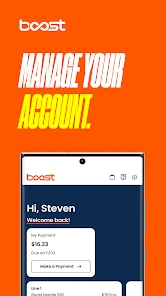
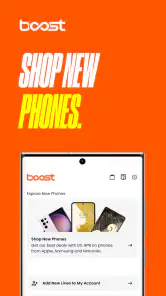
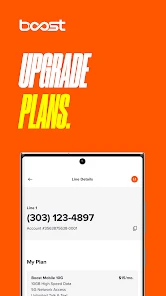
What really caught my attention were the features packed into this little app. I could manage my account effortlessly, from checking my data usage to paying my bills. The app also lets you recharge your account, change your plan, and even get access to some sweet offers and promotions. I especially liked the data tracking feature which allows me to keep a close eye on my usage, ensuring I never hit a surprise data cap!
A useful habit is to check usage before making a plan change or recharge, rather than relying on memory near the end of a billing period. That quick comparison can help you decide whether your current plan still suits your routine. For instance, if a busy week means more streaming or hotspot use, checking the account first gives you a clearer basis for choosing what to do instead of reacting after the fact. Account figures are helpful for planning, though I would still treat them as a guide and check the app again before making a decision that depends on current usage.
You May Like

How Microsoft OneDrive Became a Mobile Productivity Giant

How Google Translate Breaks Language Barriers Effortlessly

Why Google Sheets Is the Ultimate Mobile Productivity Tool

Unveiling the Dynamic World of My Talking Tom Friends

Free Fire MAX: Dominating the Battle Royale Arena

Free Fire: Winterlands – The Ultimate Winter Gaming Adventure
One practical way I’d use the usage view is as a pattern check, not just an emergency warning. If a month feels unusually data-heavy, looking at the account before the next plan decision can help you ask whether it was a one-off or a change in routine. A single busy stretch does not automatically mean you need a different plan; it may simply be worth watching usage again during a more typical week.
I’d also avoid making a plan change while distracted. First review what you use, then read the available choices carefully, and only confirm once you are sure the option matches your needs. The app makes account actions more accessible, but the convenience of a few taps is also a reason to slow down before committing to a change.
User Experience
The app isn’t just about functionality; it’s also about the experience. Navigating through the app was smooth, with no noticeable lags or crashes. The menus are well-organized, making information easy to find. Plus, the app offers customer support features, allowing me to contact support directly through the app, which is super convenient!
For a realistic everyday example, I’d use it while waiting for a commute: check the account, confirm whether a payment or recharge needs attention, and move on without opening several separate tools. If something is confusing, the in-app support route gives you a convenient next step. It is still worth keeping any account details you may need handy, since a support conversation can be more efficient when you can clearly describe the issue.
Another thing that stood out was the notifications. The app sends timely reminders for bill payments and data usage, so you’re never caught off guard. This feature is a lifesaver for someone like me who tends to forget these things amidst a busy schedule.
I would not rely on reminders as the only safeguard, though. Notifications are most useful when enabled and noticed, so checking the account directly before a payment deadline is a sensible backup. This is a small but important trade-off: the app can make account upkeep easier, but it cannot remove the need to review details before confirming a payment or plan change.
Where Alternatives May Fit Better
People comparing carriers should separate the service decision from the app decision. A well-organized account app can make everyday management less of a chore, but it does not by itself establish whether a carrier’s coverage, plan terms, or support meet your needs. Compare those service details independently. If you prefer handling bills on a computer, or you mainly want one place to track expenses across several providers, a browser-based account page or a general finance tool may suit your habits better.
There is also a useful distinction between this kind of app and a phone’s built-in data monitor. The phone setting can help you understand device-level consumption, while the carrier account view is the more relevant place to review account usage and service actions. If the two seem different, I would avoid assuming that one automatically explains the other; use the carrier account when making an account decision and the phone’s own tools when troubleshooting how an individual device is using data.
Likewise, a household that manages several mobile accounts may prefer a shared spreadsheet or finance app for a broad monthly overview. That can make costs across providers easier to compare, but it will not take the place of Boost-specific account actions. I see the strongest setup as using each tool for its proper job: the carrier app for account management, and a broader tool only when you need a view across multiple bills or services.
The app’s audience is clearest in its scale: it has more than a million installs, an average rating of 4.6 from around 273,000 ratings, and an Everyone age rating. It was released on October 13, 2021, and version 4.1.3 requires Android 8.0 or later. Those details make it easy to assess basic compatibility, but they do not guarantee that every device or account experience will feel identical.
For someone deciding whether to install it, the main question is whether they have a Boost account and want mobile access to its everyday tasks. If they do, the app’s purpose is clear. If they only want to compare service options, they will get more value from comparing carrier coverage and plan conditions directly before spending time setting up an account tool.
What to Consider Before Switching
If you are already a Boost customer, using the app does not mean you need to change how you receive service; it is simply a mobile route to account tasks. If you are considering switching carriers, first check the practical details that matter to you, such as coverage where you live and travel, the plan’s conditions, and how you prefer to get help. Moving providers can also mean updating recurring payments and account arrangements, so I would make a short checklist before starting rather than treating the app as the whole switching process.
For people who share responsibility for a household account, it helps to agree on who checks reminders and handles payments. That prevents two people from assuming the other has taken care of a task. Likewise, before changing a plan, I would note what matters most—predictable costs, enough data for regular routines, or flexibility—and review the available account choices against that priority. These are simple steps, but they make the app more useful as a decision tool rather than just a place to tap through menus.
If you are moving away from Boost, I would treat the app as one piece of the transition rather than the transition itself. Make a list of recurring payments and account tasks you currently manage there, then check each one as you arrange the new service. That small bit of preparation makes it less likely that a familiar routine gets overlooked simply because the account portal has changed.
For someone moving to Boost, the reverse applies: decide on the service first, then use the app to manage the account once it is relevant. Installing an account app before you know whether you want the carrier does not answer the important questions about coverage or plan fit. The app is most valuable after the service decision, when you need a convenient way to look after the account you chose.
Final Thoughts
Wrapping it up, the Boost Mobile app is a solid choice for managing your mobile account. It combines functionality with simplicity, making it a handy tool for both tech enthusiasts and casual users. While there are many mobile service apps out there, this one stands out with its comprehensive feature set and ease of use. If you’re a Boost Mobile user, or considering becoming one, I’d say this app is definitely worth checking out. It’s like having a mini customer service rep right in your pocket!
My recommendation is strongest for current customers who want to check usage, handle payments or recharges, and keep account reminders in one mobile place. I would skip it if you are looking for a general communication app, or if your main priority is comparing carriers rather than managing an existing account. For the right person, it is a convenient companion; just make the carrier decision on service needs, not on the app alone.
I’d also recommend it to someone who prefers handling a quick account check on a phone instead of sitting down at a computer, especially if reminders help them stay on top of routine tasks. It is less compelling for people who rarely manage their service themselves, or who want a single portal for several carriers. In those cases, a wider account-management habit may matter more than installing one provider’s app.
My overall advice is to use it deliberately: check account details when you need them, use the usage view to inform—not dictate—plan decisions, and keep a separate checklist for any carrier switch. That gives the app a clear role without asking it to solve questions it was not designed for. For Boost customers, that focused role is exactly what makes it useful.
Boost Mobile Frequently Asked Questions
Can I use the Boost Mobile app without a Boost Mobile account?
The app is designed to help customers manage a Boost Mobile account, so it is most useful if you already have Boost Mobile service. If you are considering the service, you can still learn about Boost Mobile separately, but the app’s main purpose is account management rather than general communication or browsing. You may need account details to use its account-related features.
Is the Boost Mobile app available for iPhone as well as Android?
Boost Mobile is a mobile app for managing an account, and its app availability can depend on the device and platform you use. Before downloading, check the app store on your phone and confirm that the developer is DISH Wireless L.L.C. The Android version supports devices running Android 8.0 or later, while the iOS app store can show compatibility for your Apple device.
What does the Boost Mobile app help me manage?
Boost Mobile is a communication app for managing a Boost Mobile account. It offers a convenient place to handle account-related tasks from a mobile device, while wireless services and plan options are part of the wider Boost Mobile offering. The app is free to download, and its straightforward purpose makes it most useful for people who already use Boost Mobile or are considering its service.
Is the Boost Mobile app free, and what devices can install it?
The Boost Mobile app is free to download. It supports devices running Android 8.0 or later, so it is worth checking your device’s operating system before installing. The app is rated for Everyone, making its content suitable for a broad audience. As with any app, available features and performance can depend on your device and the version you are running.
What is Boost Mobile and what services does it offer?
Boost Mobile is a wireless telecommunications brand offering prepaid cell phone plans. It provides affordable plans with no annual contracts, unlimited data, talk, and text options, and nationwide coverage. Users can also benefit from features like mobile hotspot, international calling, and a variety of smartphone options. Boost Mobile is known for its cost-effective solutions and flexible plan structures.
Pros
- Affordable plans with no hidden fees
- No annual service contracts required
- Good network coverage in many areas
- Unlimited music streaming without data counts
- Easy plan adjustments through the app
Cons
- Limited international roaming options
- Phone selection is somewhat restricted
- Customer service can be hit or miss
- Data speeds may slow after certain limit
- No family plan discounts available

- Category
- Communication
- Version
- 4.1.3












