Blackboard
- 11.37K
- 3.3
- Installs
- 10.00M
- Price
- Free

Screenshots
Analysis by Reviewed
Choosing a mobile learning app is less about finding the prettiest interface and more about matching the app to the way your school or university already works. In my experience, Blackboard makes the most sense when your courses, announcements, assignments, and grades are already managed through Blackboard by your institution. It is a free education app from Anthology Inc., available to users of all ages, and its mobile purpose is straightforward: bring the learning environment from a computer screen to a phone or tablet.
I would not describe it as a replacement for every study tool. It is not primarily a note-taking app, a flashcard system, or a general classroom messenger. Its value comes from connecting students with the course spaces they already use. That distinction matters because your experience depends heavily on whether your school has adopted Blackboard effectively. When the institution keeps its courses organized, the app can reduce the need to check a browser constantly. When course content is incomplete or poorly arranged, the app cannot fix that underlying problem.
The application has been available since January 15, 2015, and its current version is 11.6.1. It requires iOS 11 or later, which keeps it accessible on many older Apple devices. With a 3.3 average from roughly 104,000 ratings and more than 10 million installs, it is clearly used on a large scale, although the rating also suggests that the experience is not equally smooth for everyone. I see that mixed response as an important part of the decision rather than a reason to dismiss it immediately.
What I looked for when deciding whether Blackboard is worth using
When I decide whether Blackboard deserves a regular spot on a student’s phone, I look past the first convenient check and ask what keeps it useful once classes settle into a routine. The key is whether it helps you stay oriented without adding another place to monitor. That comes down to the habits it supports, the upkeep it requires, and the kinds of course activity that can make mobile access feel tiring.
The first question is whether your institution depends on it
Before judging the interface, I would ask a practical question: does your school or university actually use Blackboard as its official learning platform? If the answer is yes, installing the app is usually sensible because it gives you a more convenient route into course information. If your teachers use a different system, the app will not become useful simply because it is popular. This is a platform-dependent tool, not an independent study service that creates value on its own.
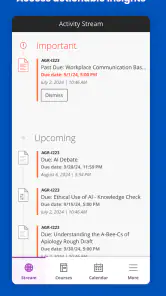
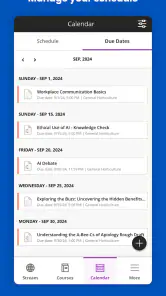
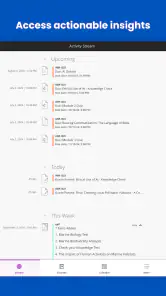
I also considered how quickly a student can answer everyday questions. Can I see what needs attention? Can I find a course announcement without opening several unrelated tools? Can I check a deadline while away from my desk? Those are more meaningful tests than whether the app looks modern for a few minutes. A mobile learning app earns its place when it shortens small, repeated tasks during a busy week.
It works best as a companion to the full learning environment
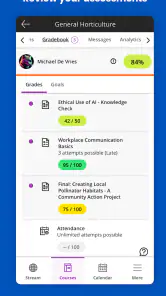
My view is that Blackboard is strongest for monitoring and responding, not necessarily for doing every part of a course on a small screen. A phone is convenient for checking updates, reading instructions, reviewing a grade, or confirming that an assignment is due. Longer writing, detailed research, file organization, and careful editing are usually more comfortable on a computer.
More From Our News Desk

Weather by Xiaomi Review: Clear at a Glance, Less Clear Up Close

X Under Pressure: Can It Recover When Posting Goes Wrong?

Clash of Clans Is Won Between the Battles

Android Auto Makes the Case for Quieter Car Software

MobiOffice: Transforming Mobile Productivity with Seamless Integration

EA SPORTS FC™ Mobile Soccer: Redefining Mobile Sports Gaming
That is not a failure unique to this app. It is a trade-off created by mobile learning itself. The useful question is whether the app helps you move between quick checks and deeper study without losing track of what matters. For that, its connection to your existing courses is more important than any single visual detail.
A realistic day with the app
Imagine a student commuting to campus in the morning. Instead of waiting until arriving at a library computer, the student opens the app to check whether a lecturer has posted a change to the day’s work. Later, between classes, the student reviews the instructions for an upcoming submission and checks the course area for a new announcement. In the evening, the student uses a laptop for the actual writing but keeps the phone nearby to confirm the requirements.
That is where I find the app most convincing. It turns short gaps in the day into useful check-in moments. It does not make a long assignment easier to write, but it can prevent the common problem of discovering an important update too late. For students managing several subjects, that lightweight access can be more valuable than a collection of advanced study features they may never use.
Three habits that make the mobile experience more useful
My first practical tip is to treat the app as a dashboard rather than as your entire study desk. Use it to identify priorities, then move to a larger screen when a task involves extended typing, comparing documents, or managing several files. This division of labor reduces frustration and avoids forcing a phone to handle work better suited to a computer.
Second, check course areas after a teacher announces a change, even if you have already looked earlier. Mobile access is most useful when it becomes part of a routine around actual course activity, not when it is opened randomly. A quick check before leaving for class and another before starting evening study can help catch changes while they are still relevant.
Third, read assignment instructions inside the course context before relying on a brief notification or summary. A short alert may tell you that something changed, but the surrounding course material is where the details and expectations usually matter. I find this especially important when several assignments have similar names or deadlines.
Where the app wins against ordinary browser use
The clearest advantage is convenience. A browser can provide access, but it often encourages a slower sequence: open the browser, find the correct page, sign in if needed, locate the institution, and then search through the course area. A dedicated app gives the learning platform a more immediate place on the device. That matters when you are checking one small detail rather than settling in for a full study session.
The app also fits students who move between locations. A commuter, a student with a part-time job, or someone sharing a computer can benefit from having course information available on a personal device. It is not about replacing the computer; it is about reducing dependence on one. In that sense, the mobile version solves an access problem rather than an academic one.
Another strength is continuity. When your institution uses Blackboard consistently, the app can keep course-related activity closer to one familiar environment instead of making you remember separate destinations for every subject. That does not guarantee perfect organization, because instructors still control how material is arranged, but it gives the student one central place to begin.
Where a different kind of app may fit better
If your main goal is memorizing vocabulary, practicing mathematics, building flashcards, or following a structured self-study course, a dedicated learning app may be a better choice. Blackboard is tied to institutional course delivery, so it is not designed to replace tools built around repetition, drills, or independent lesson plans.
A browser may also be preferable for students who want the broadest view of a course page or who regularly work with several windows. On a larger display, it is easier to compare instructions with a draft, organize downloaded material, and move between subjects. I would choose the browser for intensive work and the app for quick access unless the mobile layout happens to suit a particular course unusually well.
Students whose teachers communicate almost entirely through another platform should also think carefully before adding Blackboard to their routine. More apps can mean more notifications, more places to check, and a greater chance of missing the real source of information. The best platform is the one your instructors actually maintain, not automatically the one with the largest user base.
The limitations I noticed in the overall proposition
The rating of 3.3 is a useful warning that convenience does not equal universal satisfaction. A mobile learning experience can feel inconsistent when courses are structured differently, when content is designed mainly for desktop viewing, or when an institution’s setup creates extra steps. Those problems may feel like app problems even when they originate in course administration, but the student still experiences the friction through the app.
I would also avoid depending on a phone alone for important submissions. Small screens make it easier to overlook a requirement, select the wrong course, or rush through a process that deserves a final review. My safer workflow is to use the mobile app for awareness and preparation, then use a computer for substantial work and final checks whenever possible.
There is another less obvious trade-off: centralization can be helpful, but it can also create a false sense that everything important is in one place. Course announcements, personal notes, calendars, email, and group conversations may still exist elsewhere depending on how a class is run. Blackboard can be the starting point without being the whole communication system. I would keep a simple personal list of deadlines rather than assume that opening the app once guarantees complete coverage.
What switching to it really involves
The cost of switching is low in money because the app is free, but the time cost depends on your institution’s setup. You may need to identify the correct school environment, sign in, and learn where each course places its key material. If your courses are already active in Blackboard, that adjustment is usually manageable. If they are not, installing the app adds little value and may create another account or notification habit to maintain.
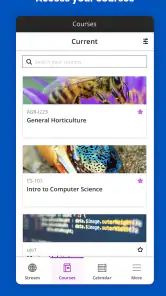
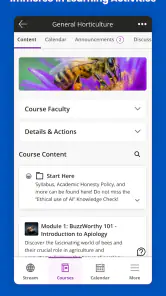
There is also a learning cost for instructors and students. A teacher who posts announcements in one area, assignments in another, and supporting documents somewhere unexpected makes the mobile experience harder to follow. Before committing to the app as your main reference, I would open each current course and find the locations of announcements, assessment instructions, and grades. That small setup step can save repeated searching later.
For someone moving from browser-only access, I would not delete the browser shortcut. Keep both approaches available for a while. Use the app for quick checks and the browser for tasks that feel cramped or unclear. This hybrid approach is more realistic than expecting the mobile version to replace every desktop workflow from the first day.
Who should install it and who should skip it
I recommend trying Blackboard if you are enrolled in courses delivered through the Blackboard system, frequently travel between home and campus, or need a quick way to monitor several subjects. It is particularly useful for students who do not always have immediate access to a computer and want a convenient companion for announcements and course checks.
I would be less enthusiastic if you are looking for independent lessons, intensive practice, advanced personal organization, or a single tool for every academic task. I would also skip it if your institution does not use Blackboard actively. In those situations, a dedicated study app, a browser-based workflow, or the platform your teachers already prefer may be more effective.
The age rating is Everyone, so the app is broadly accessible from a content perspective. That does not mean every course is suitable for every learner, of course; the academic material comes from the institution and instructors. The important point is that the app itself is positioned as a general education tool rather than a narrowly specialized resource.
My recommendation after weighing the trade-offs
Blackboard is worth installing when it matches the system your classes already use. I see it as a practical bridge between formal course administration and everyday mobile access. Its best quality is not that it turns a phone into a complete classroom. Its best quality is that it can make the small but important parts of studying easier to keep up with.
The large user base, with over 10 million installs, shows that the app serves a substantial audience, while the mixed average rating reminds me to keep expectations realistic. Your satisfaction will depend on course setup, instructor habits, device comfort, and how much work you expect to complete on a phone. Those factors matter more than the app’s general reputation.
After using it as a decision guide, my advice is simple: install it if Blackboard is already central to your education, but pair it with a computer for serious assignments and with your own deadline system for backup. If your school relies on another platform, choose the tool that your teachers actually update. Blackboard is a useful access point, not a complete study strategy.
For that reason, I would recommend it to institution-based learners who want faster course checks and more freedom from a desktop. I would not recommend it as a standalone learning solution. Used within the right academic setup, it can quietly remove daily friction; used outside that setup, it is unlikely to give you a reason to keep opening it.
Blackboard Frequently Asked Questions
Is Blackboard suitable for younger students?
Blackboard is an education app with an Everyone content rating, so its rating does not restrict it to older users. Whether it suits a particular student depends more on the courses and materials their school or organization provides. A student generally needs an account from an institution that uses Blackboard, and the institution controls which learning tools and content are available.
Can I use Blackboard on both a phone and a tablet?
Blackboard is designed for mobile learning, so it can be useful on a compatible mobile device when you need to check coursework away from a computer. Before downloading, check that your device meets the app’s operating system requirement. The experience and available course tools can depend on your institution’s Blackboard setup, so it is worth confirming that your school supports access through the mobile app.
Is Blackboard free to download, and what devices can run it?
Blackboard is a free education app for mobile devices, making it possible to check in on coursework without paying to download it. It requires iOS 11 or later on Apple devices, so check your device’s operating system before installing. The app is rated Everyone, and its listed current version is 11.6.1.
Who develops Blackboard, and is it widely used?
Blackboard is developed by Anthology Inc. and is designed to support mobile learning for students whose schools or organizations use the platform. It has more than 10 million installs, and its average rating is 3.3 from around 104,000 ratings. Those figures give a sense of its reach, though your own experience will depend on your institution’s setup and the courses you access.
What is Blackboard, and what can I use it for?
Blackboard is a digital learning platform used by schools, universities, and other educational organizations. After signing in through your institution, you can access course materials, announcements, assignments, grades, discussion boards, calendars, and sometimes virtual classes. The exact tools available depend on how your school has configured Blackboard, so the app may offer different features for different students.
Pros
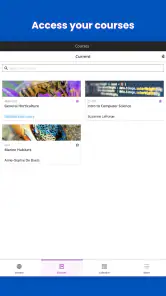
- Clear course organization for assignments
- grades
- and announcements.
- Supports video
- audio
- documents
- and other common learning materials.
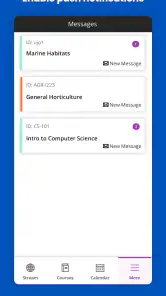
- Push notifications help students track deadlines and course updates.
- Built-in messaging makes communication with instructors convenient.
- Works across Android
- iOS
- and web for flexible access.
Cons
- Some features depend on how the institution configures Blackboard.
- The interface can feel cluttered when many courses are active.
- Notifications may become excessive without careful customization.
- Large files and video lessons can consume considerable mobile data.
- Occasional login or synchronization issues may require contacting support.
- Category
- Education
- Version
- 11.6.1











