AudioLab Audio Editor Recorder
- 6.27K
- 4.7
- Installs
- 10.00M
- Price
- Free

Screenshots
Analysis by Reviewed
When I’m starting with a voice note, a song clip, or audio I want to use as a ringtone, I usually want one simple path: bring it in, make a focused change, then get a file I can actually use. AudioLab Audio Editor Recorder aims to cover that whole trip on a phone, rather than making me jump between a recorder, a cutter, and a converter. That all-in-one approach is its strongest idea, though it also means there is more to explore than in a single-purpose tool.
When a phone-based audio workflow makes sense
The best reason to try AudioLab is not that a phone can replace a studio. It is that many audio tasks are small, time-sensitive, and easier to finish where the recording already lives. I might want to cut a spoken reminder before sending it, make a ringtone from a music excerpt, or convert a clip so it is more convenient to pass along. For those jobs, avoiding a transfer to a computer can matter more than having every advanced control.
It is particularly useful for someone who regularly moves between different kinds of short audio: a student clipping a lecture reminder, a hobby musician checking an idea, or a person making a quick voice message clearer before sharing it. If all I needed were occasional recordings with no edits, a basic recorder would be less distracting. If I were arranging a full song with many tracks, a desktop editor would give me a more suitable working environment.
A practical starting point for everyday audio
I’d reach for it when I need to clean up a short recording, trim a music excerpt, join a couple of clips, or try a sound effect without opening desktop software. For example, if I recorded a reminder in a noisy room and wanted to keep only the useful sentence, the appeal is being able to record, edit, and prepare the result in one place. It is aimed at casual creators and people who handle small audio jobs on the go, not necessarily anyone building a polished studio production.
AudioLab is a free music and audio app from HitroLab - Mp3 Audio Editor and Ringtone Maker Dev. It has a 4.7 average from around 318,000 ratings and more than 10 million installs, which suggests it has found a broad audience. The app is rated for Everyone, runs on Android 8.0 and later, and its current version is 1.3.13. Optional in-app purchases range from $0.99 to $59.99 per item, so I’d check what is included before relying on a paid option; the core appeal is that I can start without paying.
From recording or importing to a finished clip
First off, the installation process was a breeze. Within minutes, I was all set to start my audio editing journey. The interface is super user-friendly, which means you don’t need to be a tech wizard to navigate through it. I mean, who wants to spend hours trying to figure out an app, right?
Choosing the right source before editing
Before I touch an edit, I’d decide whether I’m recording something new or working with a file I already have. That choice shapes the rest of the job: a live voice note calls for attention to the room and microphone position, while an imported music excerpt is more about finding the exact moment to keep. AudioLab brings these tasks into one app, but the source still determines how good the finished result can be.
More From Our News Desk

Weather by Xiaomi Review: Clear at a Glance, Less Clear Up Close

X Under Pressure: Can It Recover When Posting Goes Wrong?

Clash of Clans Is Won Between the Battles

Android Auto Makes the Case for Quieter Car Software

MobiOffice: Transforming Mobile Productivity with Seamless Integration

EA SPORTS FC™ Mobile Soccer: Redefining Mobile Sports Gaming
For a quick spoken clip, I’d record a short test first and listen back before capturing the full thought. It is an easy way to notice a loud fan, wind, or a voice that sounds too distant while there is still time to change position. With music, I’d identify the intended start and finish before trimming, then leave enough of the musical phrase to make the excerpt feel deliberate rather than abruptly chopped.
Features That Make a Difference
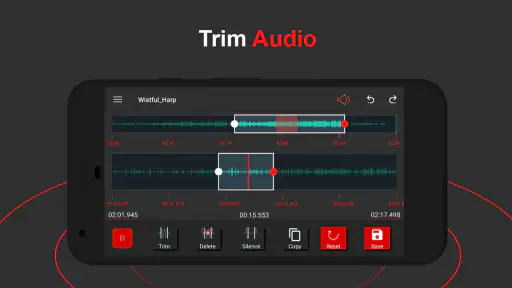
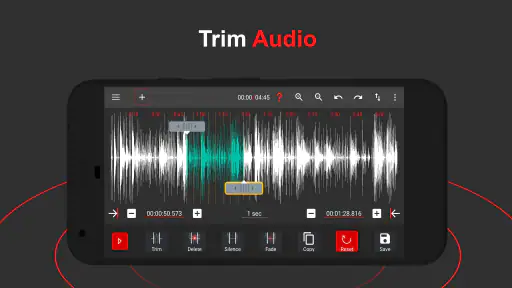
What really sets AudioLab Audio Editor Recorder apart is its plethora of features. Whether you’re looking to trim audio, merge files, or even convert formats, this app has got you covered. The editing tools are intuitive, and trust me, the drag-and-drop functionality is a lifesaver. Plus, the app supports a wide range of audio formats, ensuring that whatever you’re working on, compatibility won’t be an issue.
For a smoother workflow, I’d decide on the end use before editing. A ringtone needs a concise, recognizable section, while a spoken clip may need a little breathing room at the start and end. I’d keep an untouched copy of the original recording where possible, then make cuts on a working version; that makes it easier to backtrack if I trim too tightly. When joining clips, listen through the transition rather than judging only by the waveform or edit boundary. A technically clean join can still sound abrupt if the two parts have different volume or room tone.
Small editing choices that improve the handoff
One useful habit is to make the edit serve its destination instead of chasing a technically perfect waveform. For a ringtone, I’d choose a recognizable musical moment and check that the opening does not begin halfway through a note. For a spoken message, a fraction of silence around the words can make it easier to understand and less jarring to play. Those decisions are simple, but they often matter more to the listener than adding another effect.
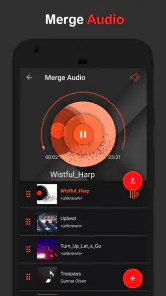
Joining clips also calls for a little planning. I’d listen to the ends of both source pieces before combining them, because different background sounds can make the seam obvious even when the words or music line up. If the clips were recorded in different places, I would not expect an edit to make them sound as though they came from the same room. In that case, a clean, understandable transition is a more realistic goal than perfect uniformity.
Creative edits without a desktop detour
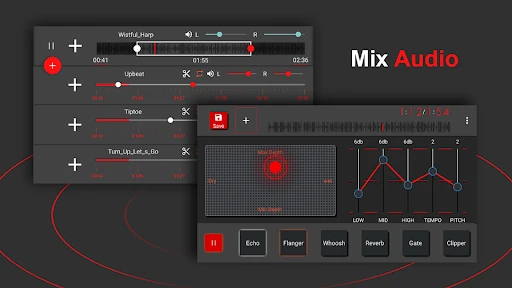
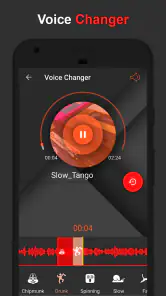
Now, if you’re someone who loves to experiment with sound effects, you’ll be thrilled with the options available. From echo and reverb to changing the pitch, the creative possibilities are endless. It’s like having a sound playground at your fingertips!
That flexibility is useful for quick experiments, but I wouldn’t treat a phone effect as a substitute for careful mixing. Effects can make a voice harder to understand, especially when several are layered or the original recording is already noisy. I’d try one change at a time and compare it with the unprocessed clip before keeping it. For a social post, a playful pitch shift might be exactly the point; for an interview or class recording, intelligibility matters more than a dramatic sound.
Recording, listening, and handing off the result
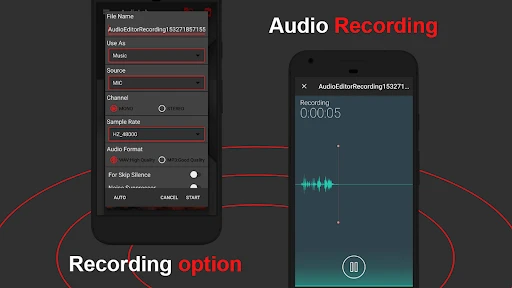
Another standout feature is the recording capability. Whether you’re recording a podcast, a song, or just some random thoughts, the clarity is top-notch. And for those worried about background noise, the noise reduction feature is impressive. It’s almost like having a professional setup without the hefty price tag.
In an everyday situation, I might capture an idea while commuting, then later trim away the pause at the beginning, reduce distracting noise, and export a shorter clip to share. Before sending it, I’d listen once through on headphones and once through the phone speaker: a detail that sounds fine in headphones can disappear on a small speaker. Noise reduction is best used with restraint, too; pushing it hard can make speech sound unnatural, so it is worth comparing the result with the original rather than assuming more processing means better audio.
Oh, and did I mention the real-time audio effects? You can actually apply effects as you record, which is a huge time-saver. No more waiting for post-production to hear how your audio sounds with effects.
The handoff is part of the job, not an afterthought. If I’m making a ringtone, I want a short, clear excerpt; if I’m sharing a voice note, I want a format the recipient can open and a file that is not needlessly complicated. AudioLab’s conversion and sharing options make it convenient to move from editing toward that outcome. I’d still play the exported file before deleting the source, because the final listen catches clipped endings, awkward fades, and level changes that are easy to miss while editing.
Picking a format and checking the finished file
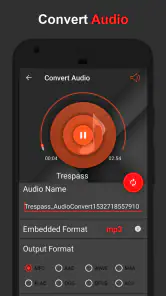
Conversion is handy when the next person or device needs a different format, but it is not a way to improve the sound of a poor source. I’d choose the output based on where the file is going and avoid changing formats repeatedly without a reason. Each conversion adds another step where an unsuitable choice can make the handoff less convenient, so a short test export is sensible when the file matters.
After exporting, I’d check the actual saved clip rather than trusting the editing screen. I listen for the first and last moments, confirm the important words or musical phrase are present, and make sure the file plays as expected. This is especially useful when the clip is meant for someone else: they receive the export, not the project or the intention behind it. Keeping the source until that check is complete gives me a safe fallback if I need to adjust the cut.
Who benefits, and where the workflow can snag
Compared with using separate basic recorder and trimming apps, AudioLab’s advantage is having several kinds of audio work gathered together. That can save effort when a task involves recording, cutting, effects, and conversion. The trade-off is that a dedicated recorder may feel simpler if all I ever do is capture notes, while desktop audio software is a better fit for detailed multitrack work, precise automation, or a longer production. I wouldn’t choose this as my main tool for a complex music project; its practical strength is handling individual mobile tasks without a computer.
For a person who mainly sends voice messages, the choice comes down to whether editing is part of the routine. If I often want to remove a pause, keep one useful sentence, or make a recording easier to share, having those tools close by is a real convenience. If I rarely alter a recording, the extra range may be more than I need. Likewise, someone producing a podcast with multiple speakers and a detailed mix should treat AudioLab as a companion for quick mobile edits, not the whole production setup.
It is also worth remembering that a long recording is not the same kind of job as a short clip. Before starting an important take, I’d check the surroundings, keep the phone steady, and make a brief test recording so I can hear how the room sounds. That small step can prevent a frustrating session, especially if I’m relying on a built-in microphone. If the source is already poor, editing can help with trimming and some noise, but it cannot reliably turn a distant or distorted recording into clean studio audio.
Another point I would keep in mind is attention: when an app offers recording, cutting, effects, and conversion together, it is tempting to keep adjusting after the clip already does its job. I find it more useful to set a clear stopping point: make the needed edit, listen through, and export. That keeps a quick mobile task quick, and it reduces the chance of adding processing that makes a straightforward voice recording less natural.
If you’re asking me, the time and effort saved using this app are worth its weight in gold. The efficiency and quality of edits you can achieve are remarkable, especially for an app that fits snugly on your phone. Plus, being able to share your creations directly from the app is a neat perk.
My main caution is to keep the workflow modest: make a copy, edit for a clear purpose, and check the exported result before passing it along. People who want a simple recorder with no editing choices may prefer a more focused app, and anyone needing deep control will probably be happier on a computer. But for short recordings, ringtone preparation, format changes, and casual sound experiments, this puts useful tools within reach. The free starting point makes it easy to explore, while optional purchases mean it is sensible to inspect any upgrade before buying.
My recommendation for the right kind of listener
I’d recommend AudioLab to someone who regularly has a small audio job to finish on a phone and wants recording, trimming, effects, and conversion available in the same place. It is also a reasonable fit for curious beginners who want to experiment with a voice clip or musical excerpt without beginning with a desktop workflow. The key is to treat its breadth as convenience, not as a promise that every task needs a complicated edit.
I’d skip it if my only need were to record and play back a note, or if my work depended on detailed control over a long, layered production. A simpler recorder makes more sense for the first case; a dedicated computer editor is better suited to the second. Between those extremes, the app’s practical value is that it can take a short piece of audio from capture or import through a basic edit and into a shareable file without requiring several separate tools.
In conclusion, whether you’re a budding musician, a podcast enthusiast, or just someone who loves to play around with audio, this app is definitely worth checking out. It’s versatile, powerful, and above all, easy to use. So why not give it a whirl and let your creativity run wild?
AudioLab Audio Editor Recorder Frequently Asked Questions
Can AudioLab import audio files, or is it only for recording new sound?
AudioLab is presented as more than a recorder: its tools let you work with audio files as well as capture sound directly in the app. That makes it useful if you want to edit an existing clip, trim a song, or combine recording and editing in one workflow. The app’s listed functions include cutting, merging, mixing, and converting audio.
Can I record voice or other audio directly in AudioLab?
Yes. AudioLab includes audio recording alongside its editing tools, so you can capture sound in the app and then work with it rather than switching between separate recording and editing apps. It is presented as a voice recorder as well as an audio editor, making it useful for users who want to record and prepare audio in one place.
What is AudioLab Audio Editor Recorder and what can it do?
AudioLab Audio Editor Recorder is a comprehensive audio editing app designed for Android and iOS devices. It offers a wide range of features, including cutting, merging, mixing, and converting audio files. Users can also apply effects, record audio, and perform noise reduction. This app is ideal for both beginners and professional users looking to edit audio on the go.
Is AudioLab Audio Editor Recorder free to use?
AudioLab is free to download, with in-app purchases available for users who want paid options. The app provides audio editing and recording tools, and purchases are priced from $0.99 to $59.99 per item. This gives you the option to try the app without paying upfront, then decide whether any available purchase suits your needs. Check the purchase details in the app before buying.
Can I export edited audio in a different format or turn it into a ringtone?
AudioLab’s feature set includes audio conversion as well as ringtone creation, so it can help with both changing an audio file’s format and preparing a clip for use as a ringtone. The app also includes cutting tools, which are useful when you want to choose a specific section before using it elsewhere. Available output choices may depend on the task and app version.
Pros
- User-friendly interface
- Wide range of editing tools
- Supports multiple formats
- High-quality audio output
- Real-time editing features
Cons
- Can be resource-intensive
- Limited free version features
- Occasional ads disruptions
- Requires internet for some features
- Some advanced tools need purchase
- Category
- Music & Audio
- Version
- 1.3.13











