Arlo Secure: Home Security
- 59.58K
- 3.2
- Installs
- 5.00M
- Price
- Free

Screenshots
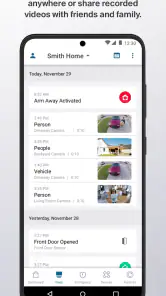
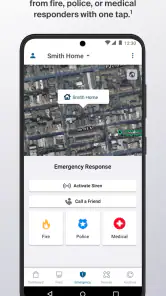
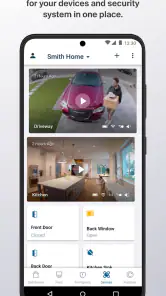
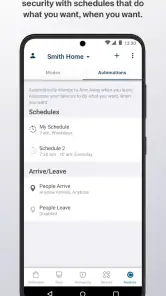
Analysis by Reviewed
Before I install any security app, I want to know what role it plays in the home and what choices I’ll be asked to make. Arlo Secure: Home Security is Arlo Technologies, Inc’s free lifestyle app for managing compatible Arlo devices. It is not a phone-only security system: its usefulness depends on having Arlo hardware and configuring it to suit the household. The app has an average rating of 3.2 from around 177,000 ratings, which makes me cautious about assuming every setup will feel equally smooth.
Getting oriented before relying on alerts
The app is aimed at people who want to check their home through Arlo devices, not at someone looking for a standalone phone-based security system. That distinction matters: the usefulness of the app depends on having compatible equipment and taking time to configure it. For a household already using Arlo cameras, one place to check live views and alerts can be more convenient than switching between separate device apps. If you have no Arlo hardware and do not plan to add any, the app alone is unlikely to be a reason to change your security arrangements.
Its record on the store is substantial, with over 5 million installs, but popularity is not a guarantee that the experience will fit your needs. I’d also keep the rating in perspective: an average of 3.2 across a large number of ratings suggests users’ experiences vary. The app is free to download and rated for Everyone; the current version is 6.6.0_6060002, and it requires Android 9 or later. Those details help with basic compatibility, but they do not tell you whether your particular camera or preferred features will work as you expect.
What the app makes convenient
In day-to-day use, the core benefit is being able to check a camera feed without being at home. That can be handy when I’m away for the afternoon and want to see whether a delivery has been left at the door, or when I’m travelling and want a quick visual check of a room. A live view is useful in those moments, but it is not a substitute for a reliable internet connection, a correctly positioned camera, or a plan for what to do if an alert needs attention.
Notifications can help make a camera setup less demanding, but they also need thoughtful choices. If every movement creates an interruption, I’m more likely to ignore the phone; if alerts are too narrowly configured, I may miss something I wanted to notice. I’d start by considering which areas genuinely need attention and what times matter, then adjust the available settings and observe whether the alerts are useful in real life. A quiet stretch at home and a busy entrance may call for different expectations.
Trust, access, and sensitive moments
Security footage is personal, so I would treat account access and phone notifications as part of the setup, not as an afterthought. Before relying on the app, I’d review the account and device controls that are visible to me, use a strong account password, and avoid leaving a shared phone open to security alerts. I would also think carefully about who else can access the account or see notifications on a lock screen. These are practical habits, not a claim about Arlo’s data practices or the app’s permissions.
The most sensitive moments are often ordinary ones: a camera pointed toward a shared entrance, someone else in the household checking a feed, or a notification appearing while another person is holding your phone. I’d place cameras with privacy in mind and agree with household members about where monitoring is appropriate. If you rent, share a home, or have visitors regularly, those conversations can matter as much as the app’s controls. The clearest choice is to use only the coverage you need, rather than treating every possible view as automatically worthwhile.
More From Our News Desk

Weather by Xiaomi Review: Clear at a Glance, Less Clear Up Close

X Under Pressure: Can It Recover When Posting Goes Wrong?

Clash of Clans Is Won Between the Battles

Android Auto Makes the Case for Quieter Car Software

MobiOffice: Transforming Mobile Productivity with Seamless Integration

EA SPORTS FC™ Mobile Soccer: Redefining Mobile Sports Gaming
Planning a useful first week
A small, deliberate trial is more revealing than installing several cameras and trying to tune everything at once. For example, if I were checking a front entrance, I’d first decide what I actually need to see: the approach to the door, a delivery spot, or both. A camera angle that includes a public walkway or a neighbour’s space may create more privacy concerns than useful information. Reviewing the view during daylight and after dark can also help me decide whether the chosen placement serves its purpose without capturing unnecessary activity.
I’d then keep a simple mental note of which alerts were actionable and which ones only interrupted me. The useful question is not whether the phone receives many notifications, but whether each one helps me make a decision. If a busy household creates frequent harmless movement, I might narrow the coverage or change the alert choices rather than reflexively disabling every notification. Conversely, if I tend to miss alerts while working, I would not assume that adding more cameras solves the problem; the routine for checking them matters too.
Who benefits from an Arlo-centered setup
This app makes the most sense for someone who already owns compatible Arlo equipment, wants to check cameras personally, and is willing to review settings as the household’s routine changes. A parent checking whether a familiar visitor has arrived, a homeowner looking at a delivery area, or someone who wants a visual check while travelling may find that kind of access reassuring. These are practical checks, not a promise that a camera can prevent an incident or replace a response plan.
I’d be less inclined to recommend it to someone who wants security without buying or maintaining compatible hardware, or who expects a professional service to notice and respond to events on their behalf. It may also be a poor fit for a person who finds frequent phone alerts stressful or cannot reliably check them. In those cases, a different arrangement—such as a professionally monitored system, or a simpler camera setup with fewer notifications—may better match the person’s needs.
Costs and the limits of a camera-first approach
Although the app is free, in-app purchases range from $9.99 to $299.99 per item. I’d check the price and included features for any purchase before committing, especially if a feature you want depends on a paid plan. Costs can change the comparison with a basic camera app or a security service that bundles monitoring differently. Consider the ongoing value you expect from recordings and alerts, not just the convenience of setting up the app.
Before paying, I’d write down the exact job I want the purchase to do: for instance, keeping recordings available, or adding a particular capability to my setup. Then I’d check that the relevant option is included and that its cost makes sense for how often I would use it. The important trade-off is not simply free versus paid; it is whether the paid option gives me something I will actually rely on, rather than an appealing feature that does not change my everyday decisions.
Compared with a basic camera app, Arlo Secure is more relevant when you want to manage an Arlo-centered setup in one place. Compared with a professionally monitored alarm service, it is not automatically an equivalent: camera access and phone alerts put more responsibility on you to notice and respond. That can be a good fit if you want to check in yourself, but less suitable if you need someone else to handle urgent events or want a system that does not depend on your attention.
Account choices and household routines
For a shared home, I’d settle the practical questions before inviting anyone else into the routine: who needs access, who is responsible for checking alerts, and whether camera views are appropriate in each location. Those decisions help prevent the common mismatch where one person expects another to respond to a notification, while neither has agreed to do so. I would also consider whether a phone’s lock-screen previews reveal more than I want when the device is left on a table or passed to someone else.
When deciding whether the app is comfortable to use, I’d look at the controls actually available in my account and on my devices instead of assuming that every privacy or sharing option exists. A good setup is one I can explain to the people affected by it: what the cameras cover, who can check them, and how the household handles alerts. That approach keeps the review grounded in visible choices and avoids treating app access as a substitute for consent or clear expectations.
A practical way to decide
For a realistic test, I’d set up one camera in a useful location, then use the app through a normal week before expanding the system or paying for extras. Notice whether live viewing is quick enough for your routine, whether alerts arrive at sensible times, and whether the account controls are comfortable for everyone who needs access. This small trial can reveal problems such as a camera angle that captures too much of a shared area or alerts that interrupt work without adding useful information.
During that week, I’d include an ordinary scenario rather than testing only when something unusual happens: leave for work, receive a delivery, and check whether the app helps answer the question I care about without pulling me into repeated monitoring. If it takes too much effort to find the relevant view or the notifications are easy to dismiss without noticing, that is useful evidence about fit. I’d also test the routine from the phone I actually carry, since a household’s security process is only practical if it works with everyday habits.
Arlo Secure is best for people who already own compatible Arlo devices and are comfortable taking an active role in checking their home. I’d skip it if you want a no-hardware solution, dislike managing phone alerts, or expect a subscription to replace a monitored service without checking what it actually includes. The app has 60,000 reviews, and its 3.2 average reinforces my cautious view: it may be practical for the right setup, but I would verify the controls and costs that matter to me before building my security routine around it.
Setting Up and Getting Started
Alright, first things first. Setting up the app is a breeze. I’m not exactly a tech wizard, but even I found it straightforward. After installing the app, which is available on both Android and iOS, you’ll need to create an account. Then, you can start syncing your Arlo devices. The app guides you through the process with clear, step-by-step instructions. Honestly, it’s as easy as setting up a new social media account.
Features That Stand Out
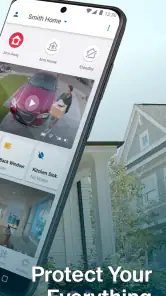
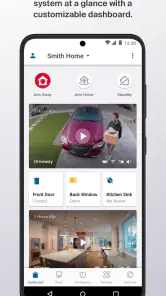
Once you’re in, the app opens up a world of features that make home security feel both accessible and advanced. One of the coolest things is how the app provides real-time video streams from your cameras. You can check in on your home anytime, anywhere, which is perfect for keeping an eye on things when you’re out on a trip or just out for the day.
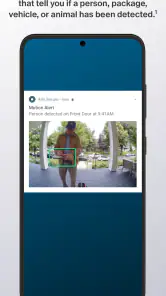
But what really blew me away was the motion detection feature. The app doesn’t just notify you about any movement; it uses AI to differentiate between people, animals, and even vehicles. So, you won’t be bombarded with alerts every time a squirrel decides to frolic across your lawn.
Peace of Mind with Smart Notifications
Let’s talk about notifications. They’re smart, and by that, I mean you can customize them to suit your needs. Want to know when a package arrives? There’s a notification setting for that. Concerned about late-night visitors? You’ll get an alert right away. It’s all about giving you peace of mind, knowing that you’re in control of how and when you’re alerted.
Additionally, the app integrates seamlessly with other smart home systems. Whether you’re a Google Home enthusiast or an Alexa aficionado, you can easily sync your devices, making your security setup even more comprehensive.
Subscription Plans: Worth the Investment?
Now, let’s chat about the subscription plans. While the app itself is free, the real magic happens when you subscribe to one of Arlo’s plans. These plans unlock additional features like cloud storage for your video recordings, advanced object detection, and emergency response options. It’s a bit of an investment, but for what you get in return, it’s totally worth it. Plus, they often have deals and promos, so keep an eye out for those!
In conclusion, if you’re serious about home security, the app is a must-have. It’s intuitive, packed with features, and provides a level of security that’s both modern and effective. Whether you’re a tech newbie or a seasoned smart home user, this app makes safeguarding your home simple and stress-free.
So, go ahead, check it out, and let me know what you think. Trust me, it’s like having a little security guard right in your pocket!
Arlo Secure: Home Security Frequently Asked Questions
Can I use Arlo Secure without owning an Arlo camera?
Arlo Secure is designed to connect with Arlo cameras, so its main home-monitoring features are most useful when you have compatible Arlo equipment set up. Without a camera, you may not be able to use the app for live viewing, activity alerts, or footage access. It is free to download, but some services and features may involve in-app purchases.
Who makes Arlo Secure, and what is the app intended for?
Arlo Secure is a lifestyle app from Arlo Technologies, Inc, built around smart home security protection. It gives Arlo camera owners a mobile place to manage monitoring and check activity at home. The app has been available since September 4, 2019, and its store summary describes it as smart home security protection, which gives prospective users a clear sense of its focus.
What devices do I need before downloading Arlo Secure: Home Security?
Arlo Secure is a home-security app built to connect with Arlo cameras, so its usefulness depends on having compatible Arlo equipment set up at home. Once connected, the app provides a place to view camera feeds, receive activity alerts, and access footage. It is free to download, while some services and features may involve in-app purchases.
Is Arlo Secure: Home Security free to use?
The app is free to download, but some optional services and features may require a paid plan or in-app purchase. Arlo Secure includes purchase options ranging from $9.99 to $299.99 per item, so costs can vary depending on what you choose. Consider which features you need and review the purchase details before subscribing or buying anything.
What is Arlo Secure: Home Security and how does it work?
Arlo Secure: Home Security is a comprehensive security app designed to provide you with peace of mind by protecting your home through video surveillance, motion detection, and real-time alerts. The app works by connecting to Arlo cameras installed in and around your home, allowing you to monitor live video feeds, receive notifications of any unusual activity, and access recorded footage directly from your smartphone or tablet.
Pros
- Easy setup and installation process.
- High-quality video and audio streaming.
- Customizable alerts and notifications.
- Integration with smart home devices.
- User-friendly mobile app interface.
Cons
- Requires a subscription for full features.
- Occasional connectivity issues.
- Limited compatibility with older devices.
- Battery life of cameras could be better.
- Higher initial cost compared to competitors.
- Category
- Lifestyle
- Version
- 6.6.0_6060002











