AndroPods - Airpods on Android
- 3.89K
- 4.2
- Installs
- 5.00M
- Price
- Free

Screenshots



Analysis by Reviewed
Ever wondered what it would be like to use AirPods with your Android device? Well, wonder no more! AndroPods is here to bridge the gap between Android users and Apple’s beloved AirPods. As an avid tech enthusiast, I couldn’t resist the urge to dive into the world of AndroPods and see what it had to offer. Let me tell you, it was quite the adventure!
Seamless Integration with a Touch of Magic
First off, let’s talk about the setup. I was pleasantly surprised at how easy it was to get started with AndroPods. You just download the app, and it guides you through the pairing process like a breeze. It’s almost like having a tech-savvy friend by your side, holding your hand throughout the whole process. And once it’s set up, you’re in for a treat!
Features that Stand Out
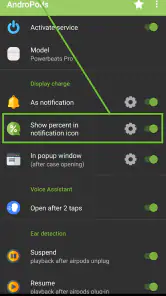
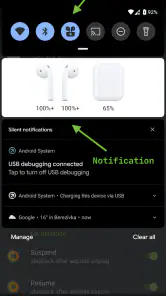
Now, let’s get to the goodies. The app boasts a bunch of features that make using AirPods on Android feel like a native experience. You get the battery level indicators right on your screen, so you’re never caught off guard with a dead earbud. The app even supports the double-tap feature, letting you customize actions like play/pause or skipping tracks, which is pretty cool if you ask me.
Another feature worth mentioning is the in-ear detection. Just like on an iPhone, your music pauses when you take an earbud out and resumes when you pop it back in. It’s these little touches that make a big difference and enhance the overall user experience.
Smooth Sailing or Rough Waters?
Of course, no app is perfect, and AndroPods is no exception. During my testing, I did encounter a few hiccups, like occasional connectivity issues and some latency with the in-ear detection. But hey, nothing’s perfect, right? And honestly, these minor setbacks didn’t overshadow the sheer convenience the app brings to the table.
One thing I did appreciate was the developer’s responsiveness. They’re always working on updates and improvements, which is a reassuring sign that they’re committed to making the app as user-friendly as possible. It’s always nice to see developers who genuinely care about their user base.
Wrapping It Up
So, what’s the final verdict? If you’re an Android user longing for that AirPods magic, AndroPods is definitely worth checking out. It’s not without its quirks, but the convenience and features it offers make it a worthy addition to any Android device. Plus, the fact that it brings a taste of the Apple ecosystem to Android is something to be celebrated.
In the end, AndroPods might just be the app you didn’t know you needed. It’s a testament to how technology can bring different worlds together, and I, for one, am all for it. Give it a try and see for yourself—you just might find yourself pleasantly surprised!
Pros
- Seamless AirPods connection
- Battery status notifications
- Customizable touch controls
- Automatic reconnection feature
- Supports all AirPods models
Cons
- Limited free version features
- Occasional connection drops
- In-app ads can be intrusive
- Requires location services
- Compatibility varies by device

- Category
- Music & Audio
- Version
- 1.5.28