Alight Motion
- 12.04K
- 4.0
- Installs
- 100.00M
- Price
- Free

Screenshots
Analysis by Reviewed
When I need a short video to feel more polished than a quick trim and filter can manage, I reach for a mobile editor that gives me room to shape movement and graphics. Alight Motion is built for that kind of project: it brings layered editing and animation tools to a phone, without requiring me to start on a desktop. It suits creators who enjoy adjusting details, though the extra control comes with a learning curve.
Before I open a project
I get the most from this app when I know what the finished piece is meant to do. A short social clip, a title card, and a moving logo each need a different amount of animation, so I choose the purpose before I start adding effects. That simple decision helps prevent a common mobile-editing trap: spending time decorating every shot before the basic story or message is clear.
It is particularly useful when the visual idea depends on movement rather than just a sequence of cuts. I might want a title to arrive in time with a moment in the footage, or an illustrated element to move alongside a subject. For a video that only needs trimming and a caption, I would probably choose a faster, simpler editor. The extra controls here are worthwhile when I plan to use them, not merely because they are available.
This video-editing and animation app is developed by Alight Motion and is free to start using, with in-app purchases ranging from around fifty cents to about eighty dollars per item. It is rated for everyone, and the current version is 5.0.272.1028407. Its average rating is four stars from around 1.2 million ratings, and it has passed 100 million installs. It first appeared on August 5, 2018, and the Android version requires Android 7.0 or later. Those figures suggest a mature, widely used app, but the more important question for me is whether its hands-on editing style suits the job I have in mind.
Choosing the right starting point
I find it helps to begin with a clear destination: a title sequence, a moving graphic, or a short social clip. That choice keeps a project focused and makes it easier to decide which images, video clips, and visual elements belong in it. For example, if I’m making a birthday story from a few phone clips, I can plan a simple opening title and a few animated accents rather than trying to decorate every moment.
For that birthday story, I would first pick a few clips that carry the memory, then decide where the title and accents can support them without covering faces or important details. I would keep the opening readable and avoid letting an effect compete with what the clip is about. This kind of planning is useful because animation can make an edit feel intentional, but it can also distract when every layer asks for attention at once.
I also think about where the video will be watched before I begin. A title that looks tidy while I am zoomed in on a phone can be too small when the finished clip is viewed casually. I check text against the actual footage, especially over busy backgrounds, and use contrast and placement to keep it legible. That small check can save a round of reworking after the whole sequence is assembled.
More From Our News Desk

Clash of Clans Is Won Between the Battles

Android Auto Makes the Case for Quieter Car Software

MobiOffice: Transforming Mobile Productivity with Seamless Integration

EA SPORTS FC™ Mobile Soccer: Redefining Mobile Sports Gaming

How Microsoft OneDrive Became a Mobile Productivity Giant

How Google Translate Breaks Language Barriers Effortlessly
From a rough idea to a finished edit
So, the first thing you'll notice when you fire up Alight Motion is its sleek and intuitive interface. It’s designed to make you feel at home, even if you’re a total newbie. With a few taps, you can start creating animations and motion graphics that look like they’ve been pulled straight out of a professional studio. The app is available for both Android and iOS, so no one’s left out of the fun!
Build the visual rhythm
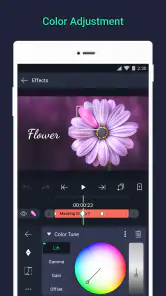
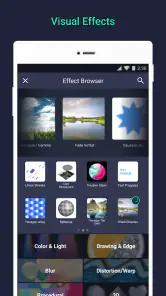
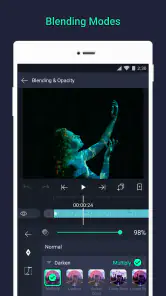
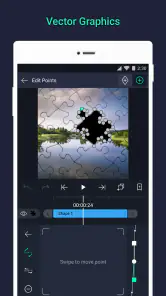
Honestly, the feature set in Alight Motion is kind of mind-blowing. We're talking multiple layers for graphics and videos, blending modes, visual effects, and color correction capabilities. And let’s not forget the vector graphics and freehand drawing tools that let you unleash your inner Picasso. It’s like they took all the best features from desktop software and shrunk them down to fit your phone.
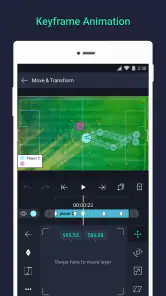
One standout feature is the keyframe animation, which allows you to make frame-by-frame adjustments. This is particularly cool for those who love to add intricate details to their edits. Plus, the ease of use in applying these keyframes makes it accessible for both beginners and seasoned pros.
My practical tip is to animate only the elements that need to move. A title can fade or travel into view while the main footage stays steady; giving every layer its own motion can make a small screen feel cluttered and can turn fine-tuning into busywork. Keyframes are most useful when I decide the start and end positions first, then check the motion in context instead of tweaking one point in isolation.
Keeping a project manageable
For a layered edit, I treat each added graphic as a decision with a purpose. If I draw a small accent or add a second title, I ask whether it clarifies the message or simply makes the timeline busier. This is not just an aesthetic preference: fewer unnecessary moving pieces make it easier to spot a timing mistake and revise the right element later.
I also work in passes rather than trying to finish everything at once. First I arrange the main footage and establish the order; next I add the text or graphic that carries the idea; only then do I refine movement and color. That sequence keeps me from polishing an effect on a shot I may later remove. It is a practical way to stay in control when several visual layers are competing for attention on a phone screen.
When a motion feels wrong, I check the whole sequence instead of judging a single keyframe. A movement that seems smooth in isolation can feel too abrupt when it follows a quiet shot, while a simple entrance can feel lively if it lands at the right moment. I prefer to make one adjustment, replay the surrounding section, and then decide whether it helped. That slower loop is often more effective than piling on more effects.
A realistic phone-to-finished-video routine
Imagine I have a handful of phone clips from a friend’s birthday and want to send a short, personal recap that evening. I would select the moments that tell the story, put them in a clear order, and make a restrained opening title. I might add one or two moving accents, but I would leave the important faces and gestures unobstructed. The result should still feel like a memory, not a showcase of every tool I can use.
Before I share it, I would watch the whole piece once for pacing and once more for details: does the title stay long enough to read, do the accents appear at sensible moments, and does the final shot feel like an ending? I would then consider the handoff. If someone else is meant to continue editing, I would make sure the project is still useful to them rather than assuming that a finished video and an editable project are interchangeable. If I only need to send the result, I would focus on the exported video and check it again after it is saved.
That distinction matters in any editor. A project is the place where layers and animation can be adjusted; a rendered clip is the version a friend can simply watch. I plan for the recipient before I finish, because a collaborator may need an editable handoff while a family group chat only needs a clean, playable video. Keeping that outcome in mind helps me avoid last-minute confusion about what I am actually sharing.
Check the work before handing it off
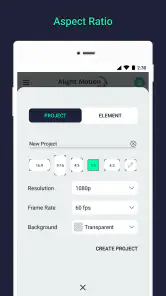
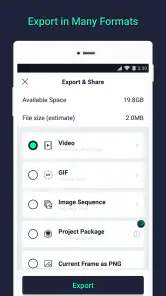
Now, I’ve tried my fair share of editing apps, and performance can be a real dealbreaker. But with Alight Motion, edits run smoothly, and exporting is a breeze. The app doesn’t crash or lag even when working on more complex projects, which is a huge relief. You can easily export your projects in various formats and resolutions, perfect for whatever platform you’re targeting.
For a practical handoff, I’d review the edit from beginning to end before sharing it: check that animated titles appear when intended, colors stay consistent between shots, and the final moment doesn’t feel abruptly cut off. If the clip is for a friend or a social post, I’d also watch it at the size it will be seen on a phone. Tiny details that look clear while editing may become hard to read in the finished video.
I would also leave time for the export and a quick playback check, rather than treating the export button as the end of the job. Watching the saved result catches issues that are easy to miss while concentrating on individual layers: a title may pass too quickly, a transition may interrupt the rhythm, or the ending may cut off a beat too soon. For something I care about, I would rather catch that before sending it than ask everyone to watch a corrected version later.
Where the workflow can snag
Another thing worth mentioning is the support community. There are tons of tutorials online, and the app's support team is pretty responsive. This makes it super easy to troubleshoot any issues or pick up new tricks.
That flexibility can still ask a lot of a beginner. Layers, blending options, drawing, and keyframes create more decisions than a basic editor, and learning to control them takes practice. If I only need to trim a clip, add a plain caption, and send it immediately, a simpler editor is likely quicker. I’d also avoid starting with a complicated animation when a deadline is close; a small test project is a better way to learn the controls without risking the whole edit.
One useful habit is to try an unfamiliar effect or animation in a disposable test before bringing it into a project that matters. I can see how it changes the image, whether its movement fits the clip, and how much adjustment it demands. That test-first approach is especially sensible when I am learning from a tutorial: the technique may look effortless in a demonstration, but my own footage and timing can make it feel quite different.
There is a trade-off between control and speed, and it shows up most when a project grows. Every extra layer gives me another place to refine the result, but also another thing to inspect if the timing feels off. I keep the visual plan modest when I am working on a small screen or under time pressure. If the concept needs elaborate compositing or a very long edit, I would consider moving to a desktop workflow rather than forcing a phone app to do every stage.
The free starting point is helpful for trying the workflow, but I would not assume every paid option is necessary. I would first work out whether my regular projects actually need something beyond what I can do without a purchase, then decide whether the cost makes sense for my use. The listed in-app purchase range is broad, so it is worth checking the specific item in the app before spending; the range alone does not tell me which purchase fits a particular creator.
Who will get the most from it
If you’re someone who loves creating content that stands out, Alight Motion is your go-to app. It offers professional-grade tools without the hefty price tag. Whether you're editing a simple birthday video or crafting a complex animation, this app has got you covered. Plus, there's just something satisfying about creating something spectacular from your smartphone.
Compared with the usual quick-cut mobile editors, this one makes more sense when motion design is part of the idea, not just a finishing touch. I’d choose it for an animated logo, moving text, or a stylized clip with layered artwork. For a straightforward montage where speed matters more than custom movement, a simpler timeline editor may be the less frustrating choice. The free starting point makes it approachable, but the in-app purchases mean I’d check what I need before committing to a paid option.
I would recommend it to someone who likes shaping how an image moves and is willing to learn a more hands-on editing process. It is a good fit for a student making a short title sequence, a hobby creator experimenting with animated graphics, or a small-business owner who wants a distinctive visual for a post and has time to refine it. Those users can benefit from the combination of video, graphic layers, drawing, effects, and keyframe control in one mobile workspace.
I would steer away from it if the priority is simply speed. Someone who routinely trims clips, joins a few shots, and adds an ordinary caption may be happier in a basic editor with fewer controls to learn. The same goes for anyone who dislikes making detailed adjustments on a touchscreen. Alight Motion’s appeal is not that it removes editing decisions; it gives me more of them, which is great only when I want that creative control.
It is also worth being realistic about the word “professional.” The app offers tools that invite careful visual work, but the finished quality still depends on the footage, the choices I make, and the time I spend reviewing it. Having keyframes and effects does not automatically make a clip clear or polished. I get better results by keeping the idea focused, checking readability, and using motion to support the content rather than letting it take over.
In a world where content is king, having the right tools at your fingertips can make all the difference. So why not give Alight Motion a try? It just might turn your creative spark into a full-blown flame.
Ready to take your creations to the next level? Head over to your app store and download Alight Motion today. Trust me, your social media feed will thank you.
Alight Motion Frequently Asked Questions
Does Alight Motion work offline, or will I need an internet connection while editing?
Alight Motion is designed for creating animations, video and photo edits, and visual effects on a mobile device. Whether you can complete every task offline may depend on the feature or content you are using, so it is sensible to have an internet connection available when downloading the app, accessing online resources, or managing purchases. For ordinary editing, check the app’s behavior on your device before relying on it without internet access.
How much space should I leave on my device before installing Alight Motion?
It is a good idea to leave some free storage before installing Alight Motion and starting projects. Video, image, and audio media can take up space, and edited projects may need room alongside their source files. The amount you need depends on the media you choose and how much you create, so check your device’s available storage and keep extra room for working comfortably.
Can I save and share videos or animations made with Alight Motion?
Alight Motion is intended for making animations, video edits, photo edits, and visual effects, so saving and sharing finished work is a natural part of using it. You can prepare projects around the media you import and export your finished edits for use elsewhere. Before beginning a large project, it is helpful to try a short edit and confirm that the result suits the way you plan to share it.
Is Alight Motion suitable for beginners, or do I need editing experience?
Alight Motion can be useful for people who are new to editing as well as those who already work with video and animation. Its range of tools may take time to learn, so beginners should expect to explore the controls and build skills through practice. If you want to create animations, video edits, photo edits, or visual effects on a mobile device, it offers a flexible place to start.
What is Alight Motion and what can I use it for?
Alight Motion is a powerful video and animation editing app available for both Android and iOS devices. It is designed for both amateur and professional videographers and animators who want to create high-quality graphics, animations, and video edits directly from their smartphones. With features like multiple layers for graphics and videos, vector support, visual effects, and color correction, it's a versatile tool for anyone looking to enhance their video content.
Pros
- Intuitive user interface.
- Wide range of editing tools.
- Supports multiple layers.
- High-quality export options.
- Frequent updates and improvements.
Cons
- Steep learning curve for beginners.
- Some features require a subscription.
- Occasional crashes reported.
- Limited free version capabilities.
- Resource-intensive on older devices.
- Category
- Video Players & Editors
- Version
- 5.0.272.1028407











