7-Eleven: Rewards & Shopping
- 134.57K
- 4.9
- Installs
- 10.00M
- Price
- Free

Screenshots

Analysis by Reviewed
For a shared household, convenience-store errands can become a small coordination problem: one person needs fuel, someone else wants a snack, and nobody remembers whether there’s a nearby store on the route. I see 7-Eleven: Rewards & Shopping as most useful when it helps with errands a household already makes, rather than as a reason to add extra stops. Its mix of shopping, rewards, store finding, fuel information, and ordering gives it a broader role than a simple loyalty card.
A shared errand, with individual accounts in mind
Picture one person heading home after work while another texts in a request for a drink and something for breakfast. Checking nearby locations and looking into pickup or delivery can make it easier to decide whether a stop is practical. If the driver is also buying fuel, the app’s fuel information and gas-related benefits may be useful in the same planning session. That is a more convincing household use than opening the app just to browse offers.
I would still treat rewards as personal to the account being used. If several people share a phone or sign in on one device, they should agree whose account is active before a purchase. That simple check can prevent confusion about which person is collecting or using rewards. I wouldn’t assume the app provides household profiles or family controls; the practical approach is to keep sign-in decisions clear and avoid passing a logged-in device around without checking.
Setup choices that make errands smoother
Before relying on the app for a time-sensitive stop, I’d open it at home, sign in, and check the store or order options for the area. That gives you a chance to sort out account access and learn where the features sit before you’re standing outside or trying to make a quick decision from the car. For shared devices, signing out when the next person should use a different account is a sensible boundary.
It also helps to check an offer before choosing what to buy, rather than assuming every purchase earns the same benefit. I’d review the terms shown in the app and make sure the selected store and order method fit the offer. A deal that looks appealing can be less useful if it doesn’t match the trip you were already planning. For a regular 7-Eleven customer, that quick check may help make rewards feel like a bonus instead of a prompt to spend more.
All-in-One Convenience at Your Fingertips
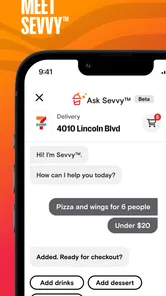
First off, let me tell you, the 7-Eleven: Rewards & Shopping app isn’t just about rewards. Sure, that’s a big part of it, but it's also about making your life a whole lot easier. With this app, you can locate the nearest 7-Eleven store, check fuel prices, and even place orders for delivery or pickup. It's like having a mini 7-Eleven right in your pocket!
Rewards and Offers
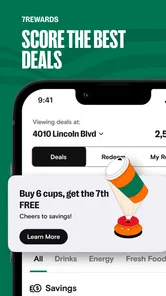
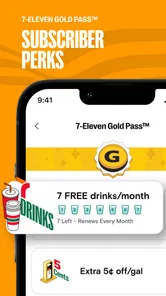
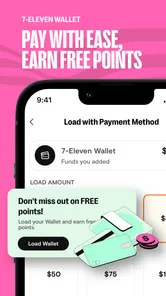
Now, onto the rewards. Every time you make a purchase, you earn points. These points can be redeemed for a range of goodies from free snacks to discounts on gas. It's a sweet deal, especially if you’re a regular at 7-Eleven. Plus, the app frequently updates with exclusive offers and promotions which always keeps things exciting. I mean, who doesn’t love a good deal?
More From Our News Desk

Weather by Xiaomi Review: Clear at a Glance, Less Clear Up Close

X Under Pressure: Can It Recover When Posting Goes Wrong?

Clash of Clans Is Won Between the Battles

Android Auto Makes the Case for Quieter Car Software

MobiOffice: Transforming Mobile Productivity with Seamless Integration

EA SPORTS FC™ Mobile Soccer: Redefining Mobile Sports Gaming
The main trade-off is that rewards are most compelling when 7-Eleven is already part of your routine. If you usually shop at a supermarket for planned groceries, that will often be a better fit for a full basket; this app makes more sense for a quick stop, a drink, or an item you need right away. Likewise, someone who rarely visits the chain may not get much out of keeping another shopping app on their phone.
User Experience
The user interface is pretty straightforward. Navigating through the app is a breeze, and all the features are easy to access. Whether you’re tech-savvy or a bit of a novice, you’ll find it simple to use. And while it’s mostly smooth sailing, I did notice the occasional slow loading time during peak hours. But hey, nothing's perfect, right?
For a busy household, I’d use the location and ordering tools as a decision aid, not a guarantee that every item or option will suit the moment. Check the app before setting out, especially if the trip depends on a particular store or on pickup or delivery being convenient. When speed matters more than loyalty benefits, going directly to a nearby shop or using a familiar grocery service may be simpler than comparing offers.
Age, trust, and who should use it
The app is rated Everyone, so its audience is broad, but that doesn’t mean every child should manage an account or make purchases independently. For a household with younger users, I’d keep account access and payment decisions with an adult and let children participate in choosing a snack or checking an offer together. That keeps the app’s shopping features in context without assuming it has parental tools.
It’s free to download, is developed by 7-Eleven, Inc., and has been available since January 20, 2013. The current version is 4.2511.0, and it requires Android 9 or later on Android devices. It has a 4.9 average from around 432,000 ratings, with more than 10 million installs; those figures suggest wide use, though they can’t tell you whether nearby stores or offers will suit your household.
Making the app useful without letting it run the errand
One small habit can make the rewards side more practical: decide what the household actually needs before opening the offers. I’d treat the app as a way to check whether a planned purchase has a useful deal, rather than scrolling first and building a shopping list around whatever catches my eye. That order matters, because a discount is only a saving when it applies to something you would have bought anyway.
For a shared trip, it can also help to have one person handle the app while the other handles the shopping list. The person checking the store and order options can confirm whether a stop fits the route; the person who requested items can keep the list specific. This avoids a familiar convenience-store problem: arriving for one essential item and leaving with several impulse buys because the household never agreed what the errand was meant to cover.
If you’re ordering for more than one person, I’d check the final order together before placing it. That gives everyone a chance to catch a missed drink or an unsuitable substitute in the plan, and it keeps the person whose account is active from guessing what others meant. It is a simple coordination step, not a special household feature, but it makes a shared order less dependent on memory or a rushed text exchange.
Choosing between pickup, delivery, and a quick stop
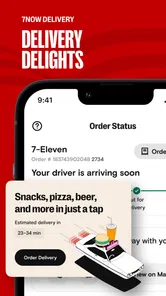
Pickup and delivery are useful alternatives when leaving home is inconvenient, but I wouldn’t assume either is automatically the fastest choice. For a single item, the time spent checking options and arranging an order may outweigh the benefit of simply stopping in. For several small requests, or when someone is already home and cannot make the trip, ordering may be more convenient. I’d compare the app’s available choices with the actual errand instead of treating one method as the default.
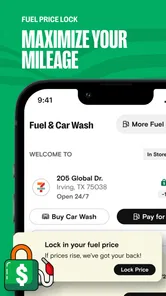
The same principle applies to fuel. If a trip already includes a fuel stop, checking the app’s fuel information and gas-related benefits can make sense alongside the snack or household-item run. If fuel is not part of the route, it shouldn’t turn a quick food errand into a detour. The strongest use case is combining things you were going to do, not adding new travel just to chase a possible benefit.
Compared with a supermarket app, this is a narrower tool for immediate convenience purchases rather than a place to plan a complete weekly shop. Compared with a basic loyalty card, it brings location, ordering, and fuel-related information into the same experience. That combination is handy for regular customers, though people who mainly want broad grocery selection or a single-purpose fuel tool may prefer the service they already use for those needs.
Questions worth settling before a household relies on it
A common practical question is whether every person in the home should use the same login. I’d avoid assuming that sharing a device means sharing an account is the best arrangement. Rewards and purchase decisions can become muddled when different people use one active account, so decide who is responsible for signing in and checking the purchase. If separate people want separate account histories or rewards, they should make their own account choices rather than relying on an informal shared-device routine.
Another question is whether you need to be a frequent customer for the app to be worthwhile. In my view, regular 7-Eleven visitors are the clearest fit because they have more chances to use its shopping and reward features as part of existing errands. A person who passes a store only occasionally can still use the location or ordering tools when needed, but may not find enough reason to check offers or keep the app in regular rotation.
People also wonder whether the app can replace a grocery service. I wouldn’t use it that way. It is better suited to a focused convenience run, a snack, a drink, or an item needed between larger shops. For planned meals, a bigger selection, or a household’s full grocery list, a supermarket remains the more natural option. That distinction keeps expectations realistic and helps the app serve the job it handles best.
Final Thoughts
All in all, the 7-Eleven: Rewards & Shopping app is a handy companion for anyone who frequents the store. It not only offers convenience but also makes the mundane task of grabbing groceries a little more rewarding. Sure, there are minor hiccups here and there, but the benefits far outweigh them. If you haven’t tried it yet, I’d say give it a go. You might just find your new favorite shopping buddy. So, next time you’re heading out for a Slurpee or a midnight snack, don’t forget to have this app downloaded and ready to earn those rewards!
My household verdict is simple: it’s worth trying if 7-Eleven is already a regular stop and one person can keep the account details organized. It’s less persuasive for occasional visitors, people seeking a full grocery-shopping tool, or families expecting shared profiles and built-in supervision. Used for planned convenience runs, rather than as a reason to buy extra, it can make a familiar errand easier to coordinate.
7-Eleven: Rewards & Shopping Frequently Asked Questions
What devices and operating systems can run 7-Eleven: Rewards & Shopping?
The app is available for Android and iOS, so you can use it on either platform. On Android, it requires version 9 or later. Before downloading, check your device’s operating system and make sure the app is compatible. Keeping your device’s software current can also help you get the best experience with shopping, rewards, and other app features.
Do I need a 7-Eleven account to use the app’s rewards and shopping features?
The app is built around rewards and shopping, which are most useful when you can access your account and keep track of your activity. If you plan to collect or redeem rewards, be ready to follow the sign-in or account setup steps shown in the app. You can still decide whether its offers, store information, and ordering options suit your needs before installing.
Can I order food for delivery through 7-Eleven: Rewards & Shopping?
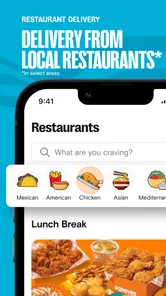
The app promotes 24/7 food delivery, so it can be useful when you want to browse convenient food options and arrange delivery from your phone. Delivery availability and the choices shown may depend on your location and the service operating in your area. If you mainly want a quick way to access 7-Eleven food and offers, delivery is one of the app’s advertised conveniences.
What is the 7-Eleven: Rewards & Shopping app?
The 7-Eleven: Rewards & Shopping app is a multifunctional tool designed to enhance your shopping experience at 7-Eleven stores. It allows users to access exclusive rewards, find nearby store locations, and shop for products directly from their mobile devices. With this app, you can earn points on purchases, redeem special offers, and enjoy a convenient, streamlined shopping experience.
How do I earn and redeem rewards using the app?
To earn rewards, simply make purchases at 7-Eleven stores and scan your app's barcode at checkout. You'll accumulate points for every purchase, which can be redeemed for various rewards, such as discounts, free items, or special promotions. The app provides a user-friendly interface to track your points and explore available rewards, making it easy to maximize your benefits.
Pros
- User-friendly interface
- Exclusive member discounts
- 24/7 shopping convenience
- Earn points for rewards
- Instant notifications for deals
Cons
- Limited to participating locations
- Requires internet access
- Frequent app updates needed
- Occasional login issues
- Limited payment options











