10bii Financial Calculator
- 207.00
- 4.4
- Installs
- 50.00K
- Price
- $5.99

Screenshots



Analysis by Reviewed
When I need to check a loan or investment figure while I’m away from my desk, a basic phone calculator is rarely enough. The hard part isn’t multiplying numbers; it’s setting up the financial question correctly and keeping track of what each value represents. That is where a dedicated tool such as 10bii Financial Calculator can help. It is a finance app from In A Day Development, built around the style of the HP 10bII, with a more approachable phone interface. I see its appeal most clearly when I already know what I want to solve and need a focused way to work through the numbers.
Start with the question, not the buttons
A financial calculator works best when the problem is framed before you begin entering values. For a borrowing decision, for example, I first identify the amount borrowed, the interest rate, the payment schedule, and the length of the loan. For an investment comparison, I separate the initial outlay from later cash flows and decide what result I actually need. This small preparation matters: the calculator can help process the inputs, but it cannot decide whether I have chosen the right assumptions.
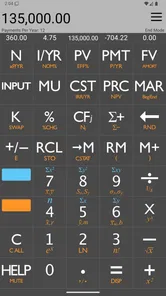
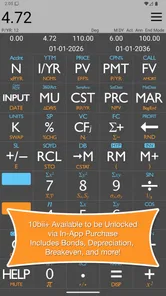
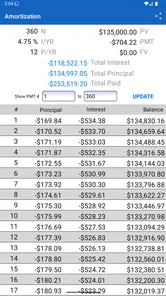
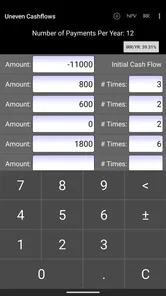
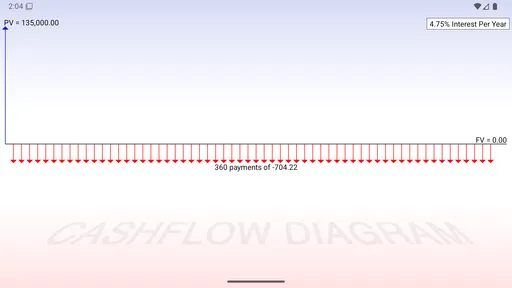
The app’s time-value-of-money, amortization, and cash-flow tools are useful for those questions, while its HP 10bII-inspired layout makes it more specialized than the ordinary calculator already on a phone. The trade-off is that this kind of keypad takes a little learning. If you have never used a financial calculator, you may need to pause and consult the help section rather than expect every key to explain itself at a glance. I would treat that as a brief learning curve, not a reason to avoid it.
Follow one calculation from inputs to decision
Imagine I’m comparing a loan offer with a different repayment term. I enter the figures that define the borrowing problem, check that the rate and payment period match, then solve for the value I care about. I can repeat the calculation with the alternative term and compare the outcomes. That is more useful than asking a standard calculator to handle a formula manually, because the app is organized around common financial relationships rather than isolated arithmetic.
My practical tip is to change one assumption at a time. If I alter both the rate and the term together, it becomes harder to tell what caused the result to move. I also keep a short note outside the calculation when a figure depends on an estimate or a lender’s wording. A precise-looking answer is only as dependable as the inputs behind it, so I would verify the assumptions before using a result to make a commitment.
Features that Make It Stand Out
The 10bii Financial Calculator isn't just your average calculator app. It's specifically designed for financial calculations, making it a powerhouse for anyone who needs to crunch numbers efficiently. The app supports a multitude of functions including time value of money, amortization, and even cash flow analysis. You name it, it does it!
One of the things that I absolutely love about this app is its user-friendly interface. You don't need to be a tech wizard to navigate through its features. The app provides a neat and clean layout that is intuitive to use, even if you're a first-timer. Plus, it includes a comprehensive help section that can guide you through any hiccups you might encounter.
More From Our News Desk

 Gmail
Gmail in a Busy Inbox: Who Benefits Most?
From first account to crowded workday, Gmail earns its place through dependable search and flexible sorting—but its best fit depends on how much inbox maintenance you can tolerate.

 Prime Video
Switching to Prime Video: What Changes in Your Viewing Routine
Prime Video can make a compelling second home for streaming, but switching means learning a different catalog, rental layer, and route from browsing to playback.

 Universal TV Remote Control
 Works Best as a Reliable Backup
A phone remote earns its place through quick setup and reliable habits. Here is how to get more from Universal TV Remote Control—and where its limits show.

 Weather - By Xiaomi
Weather by Xiaomi Review: Clear at a Glance, Less Clear Up Close
Xiaomi’s weather app makes everyday forecasts quick to scan, but its calm surface can leave useful details and recovery paths harder to find than they should be.

 X
X Under Pressure: Can It Recover When Posting Goes Wrong?
A resilience-focused review of X, examining setup, mistaken posts, interruptions, weak connections, and the gaps that matter when recovery needs to be dependable.

 Clash of Clans
 Is Won Between the Battles
Its raids are quick; its community is a long-term project of coordination, teaching, rivalry, and shared responsibility—with all the friction that entails.
Latest News



Working between the app and real-life decisions
For me, the handoff from calculation to action is where a financial tool earns its place. I might use the app to compare two possible payment schedules, then carry the result into a conversation with a lender or into my own budget notes. Saving calculations can make a repeat check less tedious, but I still label or record what the saved figures refer to in a separate note. A remembered result without its context can be misleading later, especially if I have changed the assumptions in the meantime.
That workflow suits people who regularly study loans, investment cash flows, or financial coursework and want a dedicated calculator close at hand. It is less compelling if your needs stop at splitting a bill, checking a discount, or adding monthly expenses: the built-in phone calculator will be faster for those simple jobs. It also is not a substitute for advice or for checking a contract’s terms. I use the result as a way to understand a scenario, not as proof that a particular product is right for me.
Where the specialist approach pays off—and where it doesn’t
Compared with a spreadsheet, this app is quicker for a focused calculation when I already know the inputs and want to test a variation on the spot. A spreadsheet is usually better when I need a custom layout, a long series of scenarios, charts, or a record that colleagues can inspect and edit. Compared with a basic calculator, the app saves me from rebuilding financial formulas by hand, but it asks me to learn a more specialized way of entering values. Choosing between them depends less on which is “best” and more on whether I need a quick financial solve or a flexible document.
A useful habit is to work through a small, familiar example before relying on the app for an unfamiliar one. I can check whether I understand the direction of the answer, then vary one input and see whether the result changes in a way that makes sense. This is not a substitute for confirming the calculation independently when the stakes are high; it is a way to catch a misplaced rate, period, or cash-flow sign before that slip travels into a decision.
Everyday use, price, and the learning trade-off
A realistic use case is reviewing a car-loan offer during a break. I can note the proposed amount, rate, and term, compare the payment implications with another option, and then return to the offer with clearer questions. The benefit is not that a phone app can negotiate for me; it is that I can arrive at the conversation with a better grasp of which assumptions matter. If the quote uses fees or conditions that are not represented in my calculation, I need to account for those separately rather than mistake the result for the full cost.
The app costs $5.99, with in-app purchases listed from $0.99 to $3.99 per item. I would weigh that against how often I expect to use a dedicated financial calculator: regular study or repeated loan and investment comparisons make the expense easier to justify than occasional household arithmetic. The Everyone age rating also makes clear that it is not presented as an adults-only app, but the financial concepts themselves can still be challenging for a beginner. Its current version is 4.15, and the app has been available since November 8, 2010; that long history may be reassuring to someone seeking an established tool, though it does not remove the need to learn its workflow.
Who will get the most from it?
I would point students learning financial mathematics, people who compare borrowing options, and users who routinely work with cash-flow questions toward this kind of calculator. The appeal is strongest when a problem fits the app’s financial functions and I want to solve it without building a spreadsheet from scratch. In A Day Development has shaped it for people who recognize the HP 10bII approach or are willing to learn a dedicated keypad rather than rely on a general-purpose calculator.
I would steer a casual user toward the phone’s standard calculator if they rarely need finance-specific work. Someone who needs to share assumptions, maintain a detailed audit trail, or explore many linked scenarios may be happier in a spreadsheet. And if financial notation is unfamiliar, I would first spend time with the help section and practice examples; speed comes after understanding what the entries mean, not before.
Why I Think It’s Worth a Download
Let's face it, financial calculators are not typically the most exciting apps to download. But 10bii Financial Calculator breaks the mold by offering a seamless experience that's both educational and practical. Whether you're calculating a mortgage or evaluating investment opportunities, this app brings a level of professionalism that paper calculators just can't match.
Another cool feature is the ability to save calculations. This means you can revisit your previous computations without starting from scratch—saving you valuable time and effort. And with regular updates, the app continues to improve, adding new features and enhancing existing ones.
Reading the result with care
When I return to a saved calculation, I make a point of checking its inputs before treating the answer as current. A saved result is convenient for revisiting work, but a rate, term, or intended scenario may have changed since I first entered it. For a comparison, I keep both alternatives’ assumptions together so that I am not judging one option using a newer set of figures than the other. That simple discipline is especially useful when a quick check becomes part of a longer decision.
The app’s 4.4 average rating from 799 ratings, along with 50K+ installs and 207 reviews, suggests that it has found an audience among people looking for a dedicated finance calculator. I would take that as context rather than a promise that every user will find the keypad effortless. The decisive question is whether I need its specialist functions often enough to justify learning them and paying for the app, rather than whether a general calculator can do something similar with extra manual work.
End Thoughts: Is It Right for You?
In a world where financial literacy is becoming increasingly important, having a reliable tool like the 10bii Financial Calculator at your fingertips is invaluable. It packs a punch in terms of functionality and ease of use, making it a must-have for both professionals and personal finance enthusiasts alike.
If you're tired of dragging around an old-school calculator or need a more versatile option than what your smartphone's native calculator offers, this app is definitely worth considering. So go ahead, give it a whirl, and see how it transforms the way you handle your finances. Trust me, you won't regret it!
My final recommendation
My recommendation is more measured: this is a strong fit when financial calculations are a recurring part of your work, study, or personal decisions, and a less convincing purchase when you only need basic arithmetic. I like the focused approach, the ability to revisit calculations, and the help available when I get stuck. The main friction is the responsibility that comes with a specialist tool: I need to know what each input represents, keep assumptions consistent, and verify important outcomes before acting on them.
If that sounds like a reasonable trade-off, I would consider trying it with a low-stakes example first, then use it for a real comparison once the workflow feels familiar. If I need broad collaboration or a polished record, I would choose a spreadsheet instead; if I only need quick everyday sums, I would stay with the built-in calculator. For the person in between—someone who wants a dedicated way to work through loans, cash flows, and other finance questions—this app is a practical option rather than a universal replacement.
10bii Financial Calculator Frequently Asked Questions
How much does 10bii Financial Calculator cost, and are there in-app purchases?
10bii Financial Calculator is a paid app priced at $5.99, with additional in-app purchases listed from $0.99 to $3.99 per item. Before downloading, check the purchase options shown for your device so you understand which features or content, if any, involve an extra charge. The app is intended for financial calculations, so consider whether its calculator functions fit your needs before purchasing.
What devices and operating systems can run 10bii Financial Calculator?
The app is available for Android and iOS. On Android, it requires version 6.0 or later, so it is worth checking your device’s operating system before installing. Its store description presents it as a financial calculator modeled on the HP 10bII, with an easier-to-use approach. If you rely on the app across different devices, make sure you download the version intended for each platform.
What is the 10bii Financial Calculator app used for?
The 10bii Financial Calculator app is primarily used for financial calculations such as loan payments, interest rates, cash flows, and investment analysis. It replicates the functionalities of the popular HP 10BII financial calculator, making it a valuable tool for finance students, professionals, and anyone in need of a reliable financial calculator on their mobile device.
Is the 10bii Financial Calculator app user-friendly for beginners?
Yes, the 10bii Financial Calculator app is designed to be user-friendly, even for beginners. It features a straightforward interface that mimics the physical calculator, along with comprehensive tutorials and help guides to assist users in understanding how to perform various financial calculations. This accessibility makes it a great choice for both novices and experienced users.
Does the 10bii Financial Calculator app require an internet connection to function?
No, the 10bii Financial Calculator app does not require an internet connection to perform calculations. This means users can access and utilize its full range of features offline, making it convenient for use in environments where internet access may be limited or unavailable, such as during travel or in remote areas.
Pros
- Robust financial functions support.
- User-friendly interface for quick navigation.
- Customizable settings for precision.
- Comprehensive help and guides included.
- Available offline without connectivity issues.
Cons
- Interface can be outdated aesthetically.
- Initial learning curve for beginners.
- Limited support for non-financial needs.
- Occasional minor bugs in calculations.
- No free version available for trial.