نبض Nabd - اخبار العالم ، عاجل
- 5.11K
- 4.5
- Installs
- 10.00M
- Price
- Free

Screenshots




Analysis by Reviewed
I reach for a news app for two different reasons: to catch up when I have a few spare minutes, and to check what’s happening when a story is moving quickly. نبض Nabd - اخبار العالم ، عاجل is built around both habits, bringing news from selected sources into one place. I find that approach useful when I want a broad view without opening a row of individual publisher apps, though it works best when I treat a quick headline as a starting point rather than the whole story.
A useful first check, not the whole briefing
The distinction I keep in mind is between noticing a story and understanding it. A combined feed is good at helping me notice: several subjects and sources can share one reading session, which is handy when I have only a short break. Understanding still takes a little more work. I open the full report, check who published it, and look for the details that a headline cannot carry, such as timing, qualifications, or what remains uncertain.
That makes the app most rewarding for someone who wants to stay aware across a range of interests without building a routine around several separate apps. It is less suited to a reader who wants a single publication’s complete daily package or a carefully edited long-form selection. The difference is not simply the amount of news; it is whether you want an overview assembled across sources or a deeper relationship with one outlet.
Where Nabd fits into a daily routine
In a typical morning, I might scan the feed while making coffee, pause on one headline that affects my plans, then return later for a closer read. A combined feed makes that first check quicker than visiting several news sites one by one. The trade-off is that a selection of sources can feel less focused than following a single newspaper, especially if I want one consistent editorial voice or deep reporting on a particular subject.
I would recommend this style of news app to readers who follow several topics and like to compare coverage across sources. If you mainly want long-form analysis, a specialist publication may serve you better; if you only trust one outlet, its own app is likely the simpler choice. For me, Nabd is most useful as a daily overview, not as a replacement for reading the full article or checking important claims in context.
A Seamless News Experience
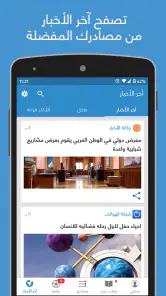
When I first downloaded نبض Nabd, I was curious about how an app could make news consumption easier and more enjoyable. Boy, was I in for a pleasant surprise! The app interface is incredibly intuitive, making it a breeze to navigate through different sections. Whether you’re interested in politics, sports, entertainment, or technology, everything is just a tap away.
Customizing Your Feed
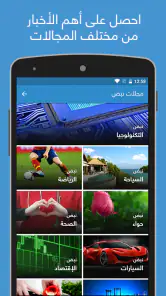
One of the coolest features of Nabd is its ability to personalize your news feed. As someone who’s always on the lookout for tech updates and the latest sports scores, I found this feature to be a game-changer. You can tailor your feed to prioritize topics that matter most to you, ensuring that you only see the news you care about. It’s like having your own personal news butler!
More From Our News Desk

Weather by Xiaomi Review: Clear at a Glance, Less Clear Up Close

X Under Pressure: Can It Recover When Posting Goes Wrong?

Clash of Clans Is Won Between the Battles

Android Auto Makes the Case for Quieter Car Software

MobiOffice: Transforming Mobile Productivity with Seamless Integration

EA SPORTS FC™ Mobile Soccer: Redefining Mobile Sports Gaming
A practical way to make that personalization work for you is to keep the feed deliberately narrow at first. I’d start with the subjects I check every day, then add broader interests once I know the main screen is not becoming another endless scroll. That small choice can make a multi-topic feed feel like a useful briefing instead of a pile of unrelated headlines. It also helps to remember that a personalized selection can leave blind spots, so I would occasionally browse beyond my usual interests when I want a wider sense of the day.
I would also use topic choices as a way to manage attention, not just to express taste. If a subject is important for a short period, bringing it into the regular mix can help me notice relevant coverage; when it stops being useful, I can narrow the feed again. This keeps the daily scan purposeful. It is a better approach than trying to follow every possible subject and then abandoning the feed because it feels too busy.
Real-Time Alerts
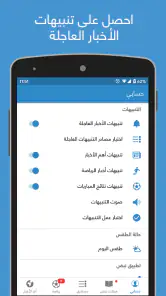
We live in a fast-paced world, and sometimes, being even a few minutes late to a news story can make all the difference. Nabd keeps you on your toes with real-time alerts for breaking news. Whether it’s a major political event or a groundbreaking tech announcement, you’ll be one of the first to know. It’s like having a news ticker in your pocket that’s always on.
For a calmer routine, I’d be selective about which alerts I allow to interrupt the day. A breaking-news notification is helpful when I’m following a developing event, but a steady stream of alerts can pull attention away from work or family. I use notifications as a prompt to check a story, not as a reason to assume I already understand it: an early headline may be brief, and the details can change as coverage develops. Readers who prefer to check news only at chosen times may be happier opening the feed manually.
A useful trade-off is to decide in advance what deserves an interruption. If I am following a story closely, an alert can save me from repeatedly refreshing a feed. If I am not, the same prompt can add noise without changing what I know. When I see an alert during a busy moment, I can note the subject and return when I have enough time to read, rather than letting a short message pull me into a half-informed scroll.
But it’s not just about speed. The alerts are crafted to give you a quick snapshot of the story, so you can decide if you want to dive deeper or move on with your day. It’s efficient, and let’s face it, who doesn’t love efficiency?
Why Nabd Stands Out
In a sea of news apps, what makes Nabd stand out is its commitment to delivering a clutter-free, user-friendly experience. The app is lightweight, meaning it won’t hog your device’s resources or slow it down. Plus, it supports both Arabic and English languages, making it accessible to a broader audience.
Nabd is a free news and magazines app from Nabd Ltd, with optional in-app purchases listed from $6.99 to $54.99 per item. That makes it easy to try without paying up front, while anyone considering a purchase should check what that specific option includes before deciding. The app is rated for Everyone, and it has an average rating of 4.5 from around 854,000 ratings, alongside roughly 5,100 written reviews. Its reach is reflected in more than 10 million installs, but popularity alone does not tell me whether its mix of sources suits my interests.
The app first appeared on August 7, 2013, and its current version is 18.9, which suggests a product with a long-running history and continued versioning. That is useful context for existing users: an app that has been around for years may feel familiar, while a new version number by itself does not tell me exactly what changed. I would judge an update by whether the feed, language experience, and reading flow still work well for my routine, rather than assuming every release brings a visible new feature.
For someone returning after a long break, I would approach the current version as the present state of a mature app, not as proof that every part of the experience has changed. The meaningful test is practical: do the topics I care about remain easy to find, can I distinguish a quick alert from a full report, and does the mix still make sense for my habits? Existing users may value continuity, while new readers should spend a little time shaping the feed before deciding whether it suits them.
Limits worth keeping in mind
A multi-source feed saves time, but it can also compress different outlets’ coverage into a stream where headlines compete for attention. When a topic matters, I’d open the underlying report, compare how another source frames it, and separate confirmed detail from an early alert. That habit is especially valuable for developing stories, where a quick notification is useful for awareness but not enough for a considered conclusion.
The same convenience can make personalization a mixed blessing. A feed tuned tightly to sports and technology may be pleasant to browse, yet it can make other major developments easier to miss. I’d occasionally widen the topics I follow or scan beyond my usual picks. If you need a carefully curated specialist briefing, or prefer to read one publication’s complete coverage in sequence, a dedicated outlet may be a better fit than an aggregator.
Another practical question is language: the app supports Arabic and English, which is helpful for bilingual readers, but I would choose the language that makes the source material easiest for me to assess. If I switch between languages, I’d pay attention to whether I am comparing the same event and not simply relying on a translated or shortened headline. The app’s appeal is access to a mix of news, not a substitute for checking the wording and context of an important report.
There is also a difference between getting several headlines and getting genuinely varied reporting. Multiple items about one event can help me see that it is developing, but a feed can still feel repetitive if many sources lead with similar updates. When that happens, I avoid reading every near-identical item. I look for a report that adds a distinct angle, then use a second source when the stakes justify the extra time. That keeps the convenience from turning into a misleading impression that repetition equals confirmation.
How I’d use it, and what to watch
For a commuter, student, or busy parent, the most useful workflow is simple: scan a personalized feed during a break, save the few headlines that deserve attention in your own routine, and return to full coverage when there is time. For example, if a local development affects the route I take to work, I would use an alert to notice it, then read the article before changing plans. That keeps speed useful without letting a short notification stand in for the whole report.
Another everyday case is a reader who wants to follow a work-related topic while keeping an eye on sport or culture. I would check the main feed for a quick overview, then open the relevant source when a story has practical consequences or deserves more than a glance. This is where an aggregator can save small amounts of time across the day: it helps me decide what deserves a longer read, rather than asking me to give every headline equal attention.
If you are deciding whether to install it, the key question is not whether it has many headlines, but whether its selected sources and topic mix match the way you actually read. Nabd is a sensible option when you want a quick, customizable overview across interests; a publisher’s own app is better when you value a single editorial perspective, and a specialist service is better for depth in one field. I’d also keep an eye on whether future versions improve the parts that matter in daily use—relevance, clarity, and control over interruptions—rather than judging change by a version number alone.
The practical questions I would ask before settling into it are straightforward: can I make the feed reflect my routine, do the alerts help rather than distract me, and can I reach the original reporting when a headline matters? I would test those points during ordinary use instead of deciding from a quick first impression. The free starting point makes that trial approachable, while the in-app purchase choices are a reason to inspect an offer carefully before spending. Readers who want an uninterrupted, one-source reading experience may find a publisher’s app more comfortable; readers who enjoy scanning across interests are more likely to appreciate Nabd’s format.
For Android users, the stated minimum operating system is version 6.0, so device compatibility is worth checking before installing. Beyond that basic fit, I would judge the experience on how naturally it works with my own reading habits: whether I prefer Arabic, English, or both; whether I want alerts or a quieter manual check; and how often I need the full article rather than a headline. Those choices matter more than simply having a large collection of topics on screen.
Another aspect worth mentioning is the app's dedication to accuracy. In an age where misinformation is rampant, Nabd ensures that the news you receive is credible and well-sourced. This level of trustworthiness is something I truly appreciate as a user.
In conclusion, if you’re looking for a reliable, efficient, and user-friendly way to stay informed about what’s happening in the world, نبض Nabd - اخبار العالم ، عاجل should definitely be on your radar. It’s more than just an app; it’s a gateway to the world’s most pressing stories, delivered right to your fingertips.
My bottom line for daily readers
I would choose Nabd when I want a flexible overview and am willing to follow important headlines to their sources. I would skip it if my main need is extensive analysis, a single publication’s complete reporting, or a quiet reading routine with no breaking-news prompts. The best reason to try it is the combination of topic choice and cross-source discovery; the best reason to be cautious is that a fast feed can make coverage feel more complete than it is. Used as a doorway to reporting rather than a final authority, it earns a useful place in a news routine.
نبض Nabd - اخبار العالم ، عاجل Frequently Asked Questions
Does Nabd focus on local news, international news, or both?
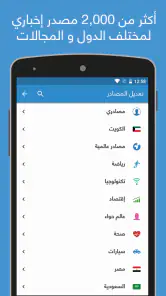
Nabd brings together local and international news, making it useful if you want to follow developments close to home as well as stories from around the world. The app’s focus is to present updates from sources you choose, so your experience can reflect the coverage and subjects you are most interested in. You can shape the feed around the kinds of news you want to keep up with.
What languages or regions does Nabd cover?
Nabd is described as an app for local and international news, so its coverage is intended to bring together stories from different places rather than focus on a single locality. Its store summary is in Arabic, and the app’s name is also presented as Nabd. If you are considering it for a particular language or region, the sources and topics available in the app are worth exploring to see whether they fit your reading preferences.
Who develops Nabd, and is it suitable for all ages?
Nabd is developed by Nabd Ltd and is listed for everyone, making it suitable for a broad audience interested in news. As with any news app, the stories it presents may cover serious or sensitive real-world events, so parents may want to consider how younger readers engage with current-affairs content.
What is Nabd and how does it work?
Nabd is a leading news aggregation app that provides users with real-time updates and breaking news from around the world. The app covers a wide range of topics, including politics, business, technology, sports, and more. With its user-friendly interface, Nabd allows users to customize their news feed based on their interests and preferences, ensuring they receive the most relevant news updates. Its focus is bringing local and international news together from sources users choose, so the feed can be shaped around what matters to each reader.
Is Nabd available for both Android and iOS devices?
Yes, Nabd is available for both Android and iOS devices. Users can download the app from the Google Play Store for Android devices or the Apple App Store for iOS devices. The app is designed to be compatible with a wide range of smartphones and tablets, ensuring a seamless experience across different platforms. On Android, it requires version 6.0 or later, so it is worth checking your device’s software before installing.
Pros
- User-friendly interface for easy navigation
- Provides real-time news updates
- Customizable news feed for personal preferences
- Wide range of categories to explore
- Supports multiple languages for diverse users
Cons
- Limited offline access to news content
- Frequent ads can disrupt reading experience
- Some articles lack in-depth analysis
- Occasional app crashes reported
- Requires internet connection for full functionality
- Category
- News & Magazines
- Version
- 18.9











