بلد - مسیریاب، نقشه - Balad
- 837.00
- 4.4
- Installs
- 10.00M
- Price
- Free

Screenshots

Analysis by Reviewed
Choosing a route is only one part of getting somewhere: I also want to know whether I can follow directions comfortably, adapt if the road changes, and still make sense of the map when I arrive. That is the practical lens I use for Balad, a free navigation app from Balad maps. Its Persian voice assistant gives it a clear identity, while its maps, traffic information, and city-guide role make it relevant to more than just driving.
Starting with a destination, not a guess
My most useful habit with any navigator is to check the destination before setting off rather than entering it while moving. With Balad, I would first confirm the place on the map, then look at the suggested route and traffic conditions. That brief pause matters if a destination has a similar name to somewhere else or sits on a busy street where stopping to correct a mistake is awkward.
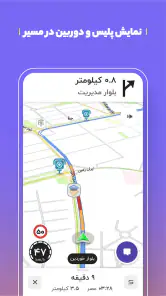
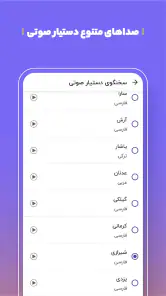
The Persian voice guidance is especially relevant for people who prefer spoken directions to continually checking a screen. It can make following a route less distracting, though I still treat voice prompts as guidance rather than a reason to ignore road signs or changing conditions. The app’s city-guide angle is useful when the destination is part of a wider outing: I can think about the area I am heading to, not only the final turn.
Getting to Know Balad
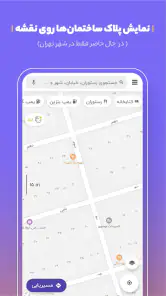
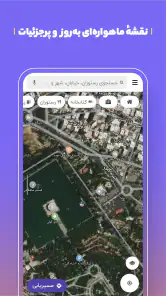
First things first, Balad is designed to make your navigation experience as smooth as possible. It's like having a local guide right in your pocket. The app offers detailed maps and real-time traffic updates, which is a lifesaver during rush hours. One feature that really stands out is its voice-guided navigation, making it super convenient when you're behind the wheel.
Why Balad Stands Out
What I love about Balad is its user-friendly interface. Whether you're tech-savvy or not, you'll find it easy to navigate through its features. The app provides accurate and up-to-date information, ensuring you always know the best route to take. Plus, it covers a wide range of locations, so whether you're in a bustling city or a remote area, Balad has got you covered.
Another fantastic feature is the offline maps. Yes, you heard that right! You can download maps and use them without an internet connection. This is particularly useful when you're traveling to places with poor network coverage. It's like having a trusty map book that never goes out of date.
Making the handoff from screen to street
Once I start following a route, the key handoff is from the map to the real road. Voice prompts can help me keep my attention forward, but I would still check an unfamiliar turn while parked or ask a passenger to help. For a practical offline workflow, I would download the relevant map before leaving reliable coverage, then avoid assuming that offline navigation will provide the same live traffic picture as an internet-connected trip.
More From Our News Desk

Weather by Xiaomi Review: Clear at a Glance, Less Clear Up Close

X Under Pressure: Can It Recover When Posting Goes Wrong?

Clash of Clans Is Won Between the Battles

Android Auto Makes the Case for Quieter Car Software

MobiOffice: Transforming Mobile Productivity with Seamless Integration

EA SPORTS FC™ Mobile Soccer: Redefining Mobile Sports Gaming
For example, if I’m driving across town to meet someone during a busy part of the day, I can check traffic before leaving, start voice guidance, and listen for a revised route if conditions change. If the signal becomes unreliable later, a previously downloaded map may help me keep my bearings. That combination is more useful than treating any single feature as a guarantee of the fastest or simplest journey.
The Real-Time Advantage
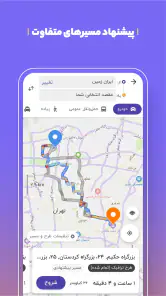
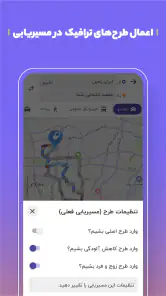
The real-time traffic updates are a huge plus. Imagine being able to avoid those dreaded traffic jams and save precious time. Balad constantly updates its information, providing alternative routes if there's heavy traffic ahead. It's like having a personal traffic helicopter guiding you from above.
I also appreciate the community-driven updates. Users can report accidents, road closures, and other incidents, which helps keep the information reliable and timely. It's a collaborative effort that benefits all users.
How it fits beside other navigation choices
Compared with the familiar map apps many people already use, Balad’s clearest distinction is its Persian voice assistant and its combination of navigation with a city-guide purpose. That makes it worth considering for Persian-speaking users who want spoken directions and local orientation in one place. If you already rely on another map service for a particular region or routine, I would compare the route suggestions on a trip you know before making Balad your only navigator.
Community reports are helpful, but they depend on people noticing and sharing changes. I would therefore treat an incident alert as a useful prompt to pay attention, not proof that every road condition is represented. Similarly, downloaded maps are most valuable when prepared in advance; they are a backup for coverage gaps, not a substitute for checking traffic while connected.
Who is likely to get the most from it
Balad makes the most sense for drivers who want Persian spoken guidance, traffic-aware routing, and a map that can still be useful after downloading an area. It can also suit someone exploring an unfamiliar city who wants more context than a turn-by-turn route alone. The app is free, rated for Everyone, and has an average rating of 4.4 from around 60,000 ratings, with over 10 million installs. Those figures suggest broad adoption, though personal fit still depends on the places and language you need.
I would be less inclined to depend on it as my sole option if my main need were a navigation tool I had already tested extensively in a specific region, or if I needed to make a high-stakes journey without checking route details myself. Before a long drive, I would download the map I need, verify the destination, and keep an alternative way to orient myself. That modest preparation is sensible with any navigation app, and particularly useful when connectivity or road conditions may change.
Putting it to work on an ordinary day
A useful first trial is a familiar errand with one unfamiliar leg: perhaps driving to a shop you know, then continuing to a nearby address you have not visited. That lets me compare the route with my usual choice without making the whole trip depend on a new app. I can check whether the destination pin matches the right entrance or street, listen to the spoken prompts, and notice whether the suggested route feels sensible once I am on the road.
That kind of test also helps answer a practical question: does Balad suit the way I travel, not just the way I plan? A driver who prefers a quick glance at the map may value traffic context, while someone who wants minimal screen interaction may care more about whether the Persian instructions arrive clearly and in time. I would make those judgments on a short, low-pressure outing rather than during a rushed appointment.
Small habits that make the route more useful
I would treat the map download as a pre-trip task, not something to improvise after coverage has already dropped. Downloading the area before leaving also gives me a chance to confirm I selected the right place. For a trip that crosses several areas, I would think about the full route rather than assuming one downloaded section covers everything I need.
Another helpful habit is to review the route while stopped and note a couple of recognizable points, especially if I am heading somewhere unfamiliar. That gives me a fallback if a prompt is missed or a road change makes the map harder to interpret. It also keeps the app in its proper role: useful assistance, not a replacement for observing signs, lane markings, and the actual road.
When a traffic report suggests a delay, I would weigh the alternative against the kind of trip I am making. A detour may be sensible when I have time and know the surrounding streets, but a route that looks shorter on a screen is not automatically easier in practice. In a dense or unfamiliar area, I may prefer a straightforward route over a complicated sequence of turns. This is where my own judgment matters as much as live information.
Where another tool may suit you better
Balad is most compelling when Persian voice guidance and its local map-and-guide approach match what I need. Someone who mainly wants a familiar global mapping service, has already built a routine around another app, or needs to compare a particular region’s coverage should keep that alternative available. I would not switch solely because one route looks quicker on a single journey; route quality is something to judge across trips I know and places I actually visit.
It is also not the right fit for someone expecting offline use to remove every uncertainty. A downloaded map can help with orientation when reception is poor, but the connected experience and the offline one are not interchangeable. If live traffic context is central to a journey, I would check it while connected and remain ready for conditions to change. For a complicated trip, a passenger or a second map source can provide reassurance without asking the driver to troubleshoot a phone.
Everyday comfort and practical limits
The voice assistant is a meaningful convenience, but spoken guidance does not make every drive hands-free in the broader sense. I still need to set up the destination before moving, keep the phone positioned safely, and avoid tapping around to investigate a reroute while driving. If a turn sounds unclear, I would continue safely and reassess when stopped rather than make a sudden maneuver.
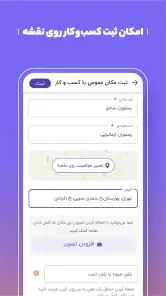
City-guide use also depends on what I want from a day out. Balad can help me orient around a destination as well as navigate to it, which is useful when an outing involves several stops. But if I only need a dependable route for a routine commute and already have a service that handles it well, the extra breadth may not be a reason to change. Its value is strongest when the map, guidance, and area context work together for my plans.
Final Thoughts
In conclusion, Balad is more than just a navigation app; it's a travel companion that ensures you get from point A to point B with ease. Whether you're commuting daily or embarking on a road trip adventure, Balad is there to guide you every step of the way. So, next time you're planning a journey, give Balad a try. You might just find it to be the reliable co-pilot you never knew you needed!
The app’s current version is 4.74.1 and it supports Android 4.4 and later. I see it as a practical option to test on an ordinary route first, then rely on more confidently once I know how its directions and map coverage work for my own journeys. Its strongest case is the blend of Persian voice guidance, traffic awareness, and offline map preparation; the best results still come from pairing those tools with a quick check before setting out.
بلد - مسیریاب، نقشه - Balad Frequently Asked Questions
What kind of app is Balad, and who might find it useful?
Balad is a maps and navigation app designed to help people explore routes and places, with a Persian voice assistant and a city guide. It may suit drivers and other travelers who want spoken directions as well as map-based guidance. If you are choosing a navigation app, consider whether Persian guidance and a city-focused map experience match the way you plan and travel.
Is Balad free to download, and is it suitable for everyone?
Balad is free to download, and its content is rated for Everyone. That makes it suitable for a general audience, although the app’s usefulness will depend on whether its navigation tools and Persian voice guidance fit your needs. As with any app, check the download page and your device’s settings before installing so you know what you are choosing.
What languages does Balad support for navigation and guidance?
Balad is described as a map and navigator with a Persian voice assistant, making spoken Persian guidance one of its defining features. This can be useful if you prefer to hear directions rather than continually check the screen. Before downloading, consider whether Persian voice guidance suits your needs and whether you are comfortable using the app’s map and navigation interface.
What features does the Balad app offer to its users?
Balad is a comprehensive navigation app that provides users with real-time traffic updates, voice-guided navigation, and offline maps. It also includes features such as speed camera alerts, route planning, and the ability to search for nearby places like restaurants and gas stations. Users can customize their navigation preferences for a more tailored experience.
Is the Balad app available for both Android and iOS devices?
Yes, the Balad app is available for download on both Android and iOS platforms. Users can find it on the Google Play Store for Android devices and the Apple App Store for iOS devices. It is designed to provide a seamless navigation experience across different operating systems.
Pros
- Accurate real-time traffic updates.
- User-friendly interface and design.
- Comprehensive local maps coverage.
- Voice-guided navigation available.
- Offline maps for data saving.
Cons
- Limited international map coverage.
- Occasional app crashes reported.
- Battery consumption can be high.
- Frequent ads in the free version.
- Some features require premium access.
- Category
- Maps & Navigation
- Version
- 4.74.1











