Zip News: Latest & Alerts
- 500.00
- 4.2
- Installs
- 1.00M
- Price
- Free

Screenshots

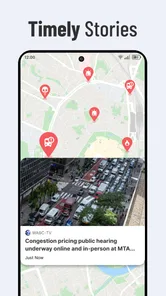
Analysis by Reviewed
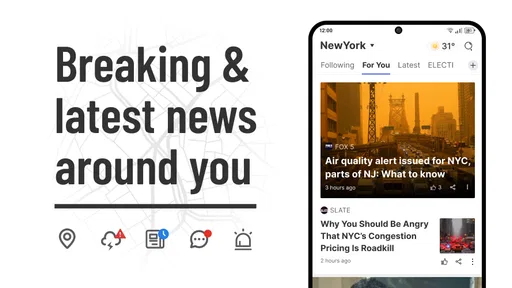
I usually reach for a news app when I have a few spare minutes, not when I want to build a research project. That starting point matters: a useful feed should help me find a story worth reading, then let me put the phone away. Zip News: Latest & Alerts is aimed at that everyday routine, with a personalized stream and breaking-news updates in a free news app from EASE Group.
Picking a feed that fits the moment
That kind of quick check can be useful in the small gaps of a day: waiting for a meeting to start, standing in a queue, or taking a short break between tasks. I don’t need an app to turn every spare minute into a deep dive. I want a few relevant leads, enough context to decide what deserves my attention, and an easy way to return to the rest of my day.
The trade-off is that a personalized starting point is not the same as a complete picture. If I only open stories that confirm what I already follow, I can miss a topic that matters precisely because it is outside my routine. I’d use the feed to discover what is worth checking, then deliberately widen the lens when an issue has wider consequences.
From opening the app to finding a story
The practical first step is setting your interests so the feed has a sense of what you want to follow. That can make a quick check more focused than opening a broad news homepage and scanning every section. I’d treat those choices as a starting filter rather than a promise that every important angle will appear: when a story matters, I still look beyond a single feed to understand how different outlets are covering it.
For example, on a commute I might check the feed for a headline that affects my day, read the article while I have a connection, and save something longer for later. If I’m following a developing event, alerts can bring a change to my attention without requiring me to keep refreshing the app. The useful habit is to decide which updates deserve interruption and which can wait for the next time I open the feed.
Making preferences useful instead of restrictive
I’d approach the initial interest choices as a practical experiment, not a permanent profile. Start with the subjects you genuinely want to see, then pay attention to whether the feed helps you find useful stories or simply repeats familiar territory. If it feels too narrow, adding an adjacent subject can be more helpful than selecting every topic at once. A broad set of interests may make the feed feel busy; a very narrow one may leave you with little variety.
There is also a useful distinction between what I want to read casually and what I need to monitor. A sports headline may be welcome whenever I have time, while a developing local or public issue might be worth checking promptly. I’d let that difference guide which alerts I keep enabled. This is a small habit, but it makes a news app feel like a tool I control rather than another source competing for attention.
More From Our News Desk

Weather by Xiaomi Review: Clear at a Glance, Less Clear Up Close

X Under Pressure: Can It Recover When Posting Goes Wrong?

Clash of Clans Is Won Between the Battles

Android Auto Makes the Case for Quieter Car Software

MobiOffice: Transforming Mobile Productivity with Seamless Integration

EA SPORTS FC™ Mobile Soccer: Redefining Mobile Sports Gaming
What happens after a headline catches your eye
The handoff from browsing to reading is where personalization is most useful: it reduces the initial search, while the article itself gives me the detail needed to judge whether the headline is worth sharing or saving. A reading list can also serve as a small queue for a lunch break or evening, instead of leaving open tabs scattered across a browser. I’d use it selectively, though; saving every interesting headline turns a tidy list into another inbox to manage.
Sharing is another natural next step when a story is relevant to someone else. Before forwarding a breaking update, I’d open the article and check its context rather than pass along a notification alone. That small pause matters with fast-moving news, where a headline may not tell the whole story. Offline reading is useful for articles already available to download, but it is not a substitute for a live connection when you want fresh updates.
A routine that keeps reading manageable
One workflow I find sensible is to scan the feed once when I have a genuine pause, open only the stories that look useful, and save no more than I expect to read later. At lunch, I can work through that short queue instead of reopening the app repeatedly. If a saved story no longer matters by then, removing it is part of keeping the list useful, not a failure to keep up.
For a changing story, I’d separate the alert from the follow-up. An alert can tell me there is something new to inspect, but I would still read the article and check another outlet before treating a consequential detail as settled. That is especially important if I plan to pass the information to a colleague or family member. The app can shorten the path to a story; my judgment still has to do the work of weighing it.
The Simplified News Experience
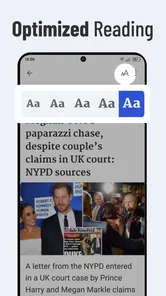
The first thing that caught my attention about Zip News is its beautifully designed interface. It's sleek, intuitive, and doesn’t bombard you with ads or unnecessary features. Navigating through the app feels like a breeze, and the minimalist design truly enhances the user experience. You don’t need to be tech-savvy to figure this one out, trust me.
Curated Content at Your Fingertips
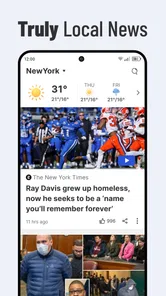
What sets Zip News apart from the crowded marketplace of news apps is its ability to curate content that's tailored to your interests. Upon setting up, the app asks a few questions about your preferences, and voilà, your news feed is filled with articles that actually matter to you. Whether you're into politics, sports, or the latest celebrity gossip, this app’s got you covered.
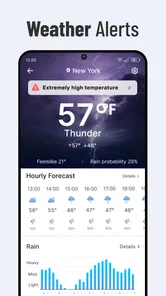
Moreover, the app sends you timely alerts about breaking news, ensuring you’re always in the loop. These alerts are customizable, so you're not constantly bombarded with notifications. I personally love this feature as it keeps me informed without being intrusive.
Reading when the connection is not part of the plan
Offline access fits a particular moment well: I can prepare by downloading something I already want to read, then use a flight, a weak-signal commute, or a spot with unreliable reception to catch up. The important step is to save the article while it is available, rather than assume the feed will bring in new material without a connection. I’d treat offline reading as a way to carry chosen stories, not as a replacement for live news.
This also changes how I’d use the reading list. For a story that needs attention soon, I’d read it while connected; for a longer piece I have deliberately chosen, I’d keep it for a quieter window and make sure it is ready beforehand. That simple distinction avoids the frustration of opening a saved item at the exact moment I cannot load it. It is a modest feature, but it rewards a little planning.
Offline Reading and Sharing
Another feature I found particularly useful is the offline reading mode. If you're like me, always on the move, this feature is a lifesaver. You can download articles to read later when you have no internet connection. Plus, sharing interesting articles with friends and family is just a tap away, integrating seamlessly with social media platforms.
Zip News also allows for a personalized reading list, so you can save articles to revisit later. It's like having your own little library of interesting reads at your fingertips.
How it compares with other ways to follow news
Compared with opening a general news homepage, a tailored feed can cut down the time spent scanning sections I rarely read. Compared with following individual publisher apps, it gives me a broader discovery point instead of asking me to decide which single newsroom to open first. Each approach has a different strength: publisher apps make sense when I want a familiar outlet’s coverage, while a customizable feed is more convenient when I want a quick cross-topic browse.
A dedicated news reader can be a better fit for someone who wants to choose exact sources, organize them into precise groups, or follow a strict chronological order. I would not choose Zip News as a research workspace for that kind of source-by-source comparison. Its value is the lighter handoff from interests to articles, not a promise that one personalized stream can replace every publication or perspective.
Who benefits most from the shorter route
I think the app makes the most sense for casual readers who want a convenient mix of topics, people who like a small set of timely alerts, and anyone who tends to lose articles in browser tabs. It can also suit someone building a simple daily habit: check the feed at breakfast, save one or two worthwhile reads, and return to them during a break. That is more realistic than expecting to follow every developing story all day.
I’d steer away from it if your main goal is to read one publisher’s work in depth, audit where every story comes from, or compare multiple accounts of a sensitive event in a single organized view. In those cases, going directly to trusted publications or using a source-focused reader gives you more deliberate control. Personalization is convenient, but it is not the same thing as editorial completeness.
Where the smooth routine can snag
The central limitation is the same one that comes with any curated feed: what appears can shape what I notice. A comfortable stream may make the app feel more relevant, but it can also make familiar interests feel like the whole news agenda. I’d periodically check topics beyond my usual selections and use another source for stories where context, disagreement, or local detail matters.
Alerts can also interrupt at the wrong time, even when they are adjustable. If I find myself dismissing them without reading, I would reduce the subjects that trigger them and rely on opening the feed when convenient. That is a better routine than allowing every notification to train me to ignore the app. The useful test is whether an alert changes what I do, not simply whether it arrives quickly.
There is a further handoff to keep in mind when sharing. A compact notification or headline is easy to pass along, but the article is the more responsible unit to send because it carries context. If the recipient needs to make a decision, I would add a second source rather than treating a personalized recommendation as a final authority. The app can make discovery easier; it cannot remove the need to check important claims.
Final Thoughts
In a world where information overload is the norm, Zip News: Latest & Alerts stands out as a beacon of simplicity and efficiency. It's perfect for those who want to stay informed without feeling overwhelmed. The app’s user-friendly design, coupled with its intelligent content curation, makes it a must-try.
There are trade-offs behind that easy entry point. A personalized feed can narrow what you encounter if you only follow familiar subjects, so I’d occasionally browse outside my usual interests or check another news source for a fuller picture. People who want to compare original reporting, adjust detailed source settings, or build a deep research workflow may be better served by a publication’s own app or a news reader that gives them more control over sources.
Who it suits, and where it can fall short
I’d recommend it to someone who wants a quick, tailored news check, appreciates alerts they can tune, and likes keeping a few articles for later. It is less suited to readers who prefer a completely chronological feed, rely on one specific publisher, or want every story verified through several sources in the same place. In practice, I’d use it as a convenient front door to current stories, not as my only source for consequential decisions.
If notifications feel too frequent, I’d start by narrowing the alert choices rather than turning every update on or off at once. For a calmer routine, check the feed at set moments and reserve alerts for the subjects where timing genuinely matters. If the recommendations stop matching your interests, revisiting the preferences is a better first move than abandoning the app; a feed is only as useful as the signals you give it.
Zip News is free, rated for Everyone, and has an average rating of 4.2 from around 12,000 ratings, with over one million installs. It was released on March 7, 2023, and version 2.5.2 supports devices running Android 8.0 or later. Those details make it an accessible option for many Android users, while the rating offers a broad snapshot rather than a guarantee that its selection will suit every reader.
Final Thoughts
So, if you're on the hunt for a reliable news app that respects your time and preferences, give Zip News a shot. It might just become your go-to source for news, as it has for me!
Zip News: Latest & Alerts Frequently Asked Questions
What devices and operating systems can run Zip News: Latest & Alerts?
Zip News: Latest & Alerts is a mobile news app for Android and iOS. On Android, it requires version 8.0 or later, so checking your device’s software version before downloading is a sensible first step. The app is listed in the News & Magazines category and is developed by EASE Group.
Is Zip News: Latest & Alerts suitable for all ages, and how popular is it?
The app has an Everyone content rating, making it suitable for a broad audience. Zip News: Latest & Alerts has more than one million installs and an average rating of 4.2 from around twelve thousand ratings, with 452 written reviews. These figures offer a sense of its reach and reception, though whether its news selection suits you will depend on your interests.
What is Zip News: Latest & Alerts and how does it work?
Zip News: Latest & Alerts is a mobile application designed to keep you updated with the latest news and alerts from around the world. By aggregating news from multiple sources, it provides real-time updates and personalized feeds based on your interests. You can customize alerts for specific topics, ensuring you never miss important news. The app uses a simple, user-friendly interface to deliver content efficiently.
Is Zip News: Latest & Alerts free to use?
Yes, Zip News: Latest & Alerts is free to download and use. However, it may offer in-app purchases or a subscription model for premium features. These may include ad-free browsing, exclusive content, or advanced customization options. The free version provides ample functionality for most users, allowing them to stay informed without any cost. Check the app store page for current pricing and feature details.
How can I customize my news feed in Zip News: Latest & Alerts?
Customizing your news feed in Zip News: Latest & Alerts is straightforward. Upon initial setup, the app may ask for your interests to tailor content to your preferences. You can modify these settings anytime by accessing the preferences menu. Here, you can select specific topics, regions, or news sources. Additionally, you can adjust the frequency and type of alerts you receive, ensuring that your feed remains relevant and engaging to your personal interests.
Pros
- User-friendly interface
- Customizable news categories
- Real-time notifications
- Wide range of news sources
- Offline reading mode
Cons
- Contains in-app ads
- Limited free content
- Requires internet for updates
- Occasional slow loading
- No dark mode option













