Local News - Latest & Smart
- 3.81K
- 4.1
- Installs
- 10.00M
- Price
- Free

Screenshots



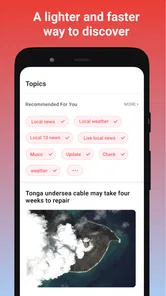



Analysis by Reviewed
When I want to know what is happening close to home, I don't always need a full news briefing. Sometimes I just want to check whether a local story deserves a closer look, or catch up on something I heard about while going through the day. That is the role I see for Local News - Latest & Smart: a free Android news app from EASE Group built around nearby coverage, with a 4.2 average from around 35,000 ratings and over 10 million installs. It is rated for Everyone, and Android support starts at version 5.0.
Where local coverage fits into a daily routine
I see the strongest use for this app in the small gaps of an ordinary day: checking what is happening nearby before leaving home, catching up during a lunch break, or looking for a local update after hearing something from a neighbor. A location-focused news feed can make those quick checks more relevant than opening a broad national news app and searching for a town or neighborhood each time. That convenience matters most when local context is the point, not when I want a complete picture of world events.
For example, if I hear that a road near my usual route may be affected, I can use a local news app as a first place to look for coverage and then decide whether I need a more authoritative source before changing plans. I would treat a news alert as a prompt to check the story, rather than as a substitute for official emergency or transport information. That distinction keeps convenience from turning into overconfidence.
Stay Connected with Your Community
One of the standout features of Local News - Latest & Smart is its ability to tailor news specifically to your location. The app uses your GPS location to bring you the most relevant news stories, ensuring you're always in the loop about what's going on in your community. It doesn't matter if you're in a bustling city or a quiet town, you'll find the news that's pertinent to you. I found this feature incredibly useful as it saves time scrolling through irrelevant headlines and gets straight to the stories that matter to me.
That location-led approach is also a trade-off. It helps when I want news tied to where I am, but it may be less useful if I regularly follow several places, such as a hometown, a workplace, and a family member's area. In that situation, I would check whether the stories on offer match the place I care about at that moment instead of assuming a location-based feed automatically covers every community I follow.
Smart and Intuitive Design
The app boasts a sleek and intuitive design that's easy to navigate. With a simple swipe, you can move between different news categories such as politics, sports, entertainment, and more. The user interface is clean, with a minimalist approach that I appreciate. It's not bogged down by unnecessary features, making it quick and easy to find the news you're looking for. The app also includes a night mode, which is a blessing for those late-night news browsing sessions.
For speed, I would set expectations around quick browsing rather than assume that every story will appear instantly or that every local event will be covered as it unfolds. A concise layout can reduce the time spent finding a section, but the usefulness of a feed still depends on the availability and freshness of the news it brings together. If a headline matters for a decision, opening and reading the full story is a better habit than relying on a quick glance.
More From Our News Desk

Weather by Xiaomi Review: Clear at a Glance, Less Clear Up Close

X Under Pressure: Can It Recover When Posting Goes Wrong?

Clash of Clans Is Won Between the Battles

Android Auto Makes the Case for Quieter Car Software

MobiOffice: Transforming Mobile Productivity with Seamless Integration

EA SPORTS FC™ Mobile Soccer: Redefining Mobile Sports Gaming
One practical way to keep a short check from becoming a long scroll is to decide what you came to learn before opening the app: a local headline, a category you follow, or a story you saved earlier. That simple routine makes a compact news reader easier to use between other tasks. It also helps me notice when I have reached the limit of what a local feed can answer and should turn to a direct source or a broader publication.
Real-Time Notifications
In today's fast-paced world, staying updated in real-time is crucial. The app provides real-time notifications for breaking news and important events, ensuring you never miss out on significant happenings. I particularly love this feature because it allows me to be one of the first to know about major news stories. Plus, the notifications are customizable, so you're not bombarded with alerts about topics that don't interest you.
Alerts are most useful when they earn their place on the screen. I would keep them focused on topics I genuinely want to notice promptly, then use the app itself when I have time to read beyond the headline. If every alert feels urgent, the feature can become another source of interruption; a selective approach makes it more likely that a local update stands out when it matters.
Another cool feature is the option to save articles for later. If you come across an interesting story but don't have time to read it immediately, you can save it and come back to it whenever you want. This feature is perfect for those of us who are always on the go.
That save-for-later habit works particularly well for a busy commute or a day with scattered breaks: I can flag a story when I have only a moment, then return when I can give it proper attention. It is also a useful way to keep a developing local issue in view without repeatedly searching for the same headline. I would still revisit saved stories with care, since a developing situation can change and an older article may no longer reflect the latest details.
Engage with the Community
The app also allows users to engage with their community by commenting on news stories and sharing them on social media. This interactive element adds a layer of engagement that I find quite enjoyable. You can see what others are saying about the news and join the conversation yourself. It's a great way to connect with others who share your interests and opinions.
Conversation can add useful local perspective, especially when residents point out details that a short article may not cover. I would read comments as individual viewpoints, though, rather than treat them as verified reporting. When sharing a story, I also think it is worth checking that the article itself supports the claim being discussed; that small pause can prevent a fast-moving conversation from spreading a misleading summary.
Using the feed without letting it take over
A useful routine is to treat the feed as a quick local scan, not an endless reading queue. I would start with the place or topic I care about that day, open only the stories that seem consequential, and save anything that needs more attention. This keeps the app useful for small windows of time without turning every spare minute into another round of scrolling.
For a realistic example, imagine checking the app over breakfast before heading across town. A nearby headline might suggest that a community issue is developing, so I would read the article and then check a relevant official source if it could change my route or plans. If it is simply a story I want to understand later, saving it makes more sense than interrupting the morning to read every related comment. The benefit is not that one feed answers every question; it helps me decide what is worth following up.
Who will get the most from it
This is a natural fit for someone who wants a lightweight way to keep an eye on neighborhood and town news without making a general news app their only source. It may be particularly handy for people who have recently moved, commute through different areas, or want a simple way to notice local stories between other responsibilities. By contrast, readers who need deep investigative coverage, a carefully curated national and international briefing, or authoritative live instructions during an emergency should pair it with more specialized sources.
Compared with the usual alternatives, a local news feed prioritizes geographic relevance over the breadth and editorial control of a single newspaper or a large national outlet. That can save effort when the question is “what is happening around me?” but it is not automatically better for every topic. I would use it as a local discovery and catch-up tool, then follow a story to a trusted publisher or official source when detail, confirmation, or practical instructions matter.
It is also worth thinking about how you prefer to follow news. Someone who already reads a local newspaper from beginning to end may value its consistent editorial voice and deeper treatment more than a feed that helps surface nearby stories. Someone who mainly wants national headlines may find a broad news reader more efficient. I would choose this app when the missing piece in my routine is local awareness, rather than expecting it to replace every publication I use.
Performance, access, and everyday limits
Local News - Latest & Smart is a free news app from EASE Group. It has a 4.2 average from around 35,000 ratings, and over 10 million installs. Its Everyone age rating makes it broadly accessible, while Android support starts at version 5.0. The current version is 2.7.1. Those details make it approachable for many Android users, but they do not guarantee identical speed or stability on every device.
In ordinary use, the simple browsing style is suited to short visits, but I would avoid assuming how much battery, data, or storage it uses without checking on my own phone. If performance feels slow, I would first try closing other demanding apps, checking the connection, and reopening the story rather than repeatedly tapping the same control. If the app closes unexpectedly, reopening it and returning to the feed is a sensible first recovery step; for important information, I would keep a browser or another news source available as a fallback.
The app’s local focus is its main reason to install it, not a promise that every nearby event will appear or that every report will be complete. Coverage can feel uneven depending on the place and the story, so I would judge its usefulness by whether it consistently surfaces items relevant to my own area. Readers who prefer a newspaper’s single, clearly defined editorial voice may find that more satisfying than a feed that brings local stories together.
For an older or more modest Android phone, the minimum operating-system support means the app is accessible to a broad range of devices, but it does not tell me how smoothly it will run on any one handset. I would make a practical check after installing: browse a few sections, open a full story, and see whether the experience remains comfortable alongside the apps I use every day. If it feels sluggish, a stable connection and closing resource-heavy apps are sensible first checks, rather than assuming the news feed itself is the cause.
My performance verdict
For quick local check-ins, I like the idea of having location-relevant headlines, topic controls, alerts, saved articles, and a place to follow public discussion in one app. Its best role is as a convenient starting point: it can help me notice what deserves a closer look, while careful reading and source-checking remain my responsibility. I would recommend trying it if local awareness is a regular need, but I would skip relying on it alone if comprehensive reporting or guaranteed real-time emergency guidance is essential.
If you are deciding whether to keep it, I would give it a fair trial against your own routine rather than judge it by how many headlines it can show at once. Does it surface useful stories about the area you care about? Are alerts helpful rather than distracting? Can you find and return to an article without slowing down a busy day? Those are more meaningful tests than expecting any local news app to provide a complete account of every event.
In conclusion, if you're looking for a reliable, user-friendly, and efficient way to stay updated on local news, Local News - Latest & Smart is definitely worth checking out. Its smart features, real-time updates, and community engagement tools make it a standout choice for anyone wanting to keep their finger on the pulse of their local area. Give it a try, and you'll wonder how you ever stayed informed without it!
Local News - Latest & Smart Frequently Asked Questions
Can Local News - Latest & Smart help me keep up with breaking local stories?
The app is presented as a way to follow local and latest news, with live updates intended to help you stay informed about what is happening near you. That focus may suit readers who want a quick overview of nearby developments alongside current news. As with any news app, the stories you see can depend on what is being reported and the sources available to the app.
Is Local News - Latest & Smart suitable for children and family use?
Local News - Latest & Smart has an Everyone content rating, so it is classified as suitable for a broad audience. That rating can be useful for families considering the app, though news stories may cover serious or sensitive events. Parents may want to review how the app is used and discuss stories with younger readers, especially when current events include difficult topics.
What does Local News - Latest & Smart do, and who publishes it?
Local News - Latest & Smart is a news app focused on bringing local and current stories together, with the aim of helping users stay informed about what is happening near them. It is published by EASE Group and belongs to the News & Magazines category. The app is free to download, and its content rating is Everyone, making it suitable for a broad audience.
Is Local News - Latest & Smart free to download, and what should I know about its cost?
Local News - Latest & Smart is available as a free app, which provides access to a wide range of news content. The free price means you can try the app without paying to download it. If you are deciding whether it suits you, keep in mind that free news apps may include advertising; check the app’s current store details for any optional purchases before installing.
What features does Local News - Latest & Smart offer to its users?
Local News - Latest & Smart provides users with a personalized news experience by aggregating local news from various sources. The app offers features like customizable news feeds, breaking news alerts, and the ability to follow specific topics or regions. Users can also save articles for offline reading and share news stories with friends and family directly through the app.
Pros
- Real-time local news updates.
- Customizable news feed.
- User-friendly interface.
- Offline reading mode.
- Low data consumption.
Cons
- Limited international news coverage.
- Ads can be intrusive.
- Occasional loading delays.
- Requires frequent updates.
- Limited multimedia content.