Your Player - All Format Video
- 74.00
- 3.9
- Installs
- 5.00M
- Price
- Free
Screenshots
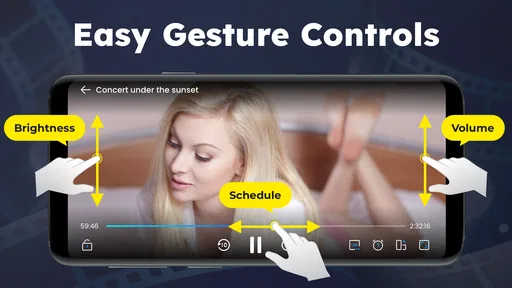
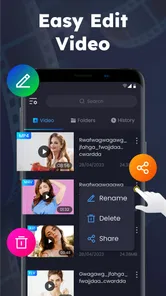
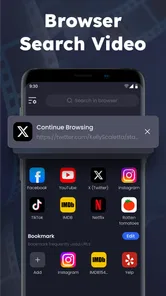
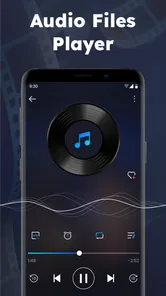
Analysis by Reviewed
When I choose a video player, I care less about a long feature list than about whether it makes the files I already have easy to watch. Your Player - All Format Video is a free video-playing tool from jundeveloper, and that no-cost starting point makes it straightforward to try without weighing up a purchase first. The app has a 3.9 average from around 5,300 ratings, which gives a potential user a useful sense of its reception while still leaving room for individual experiences to differ.
What free access means for this choice
There is no purchase price to factor into the decision: I can approach it as a free option rather than comparing paid tiers or calculating whether a subscription will pay off. That matters most if I only need a player occasionally, or want to test whether a separate app fits my viewing routine before settling on one. Free access lowers the barrier to trying it, but it does not by itself tell me how every feature works or what the experience will be like on every device.
The app is rated for Everyone, and it was released on May 21, 2023. Its current version is 1.6.9, with Android support beginning at version 7.0. Those details make it easier to judge basic fit: an older Android device may meet the stated minimum, while iPhone or iPad users should check the relevant platform’s availability and requirements before planning around it. I would not assume that an Android version number translates directly to an iOS experience.
Seamless Video Playback
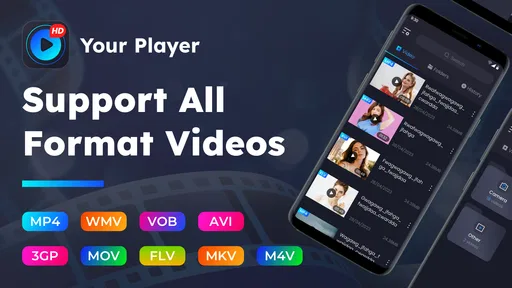
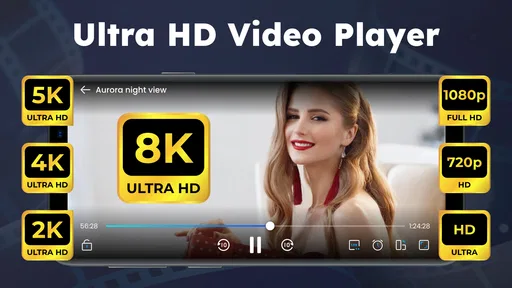
You know that frustrating moment when you download a video only to find out your player can’t handle the format? Kiss those days goodbye! With Your Player - All Format Video, you can play anything under the sun. From MP4, AVI, to MKV, this app supports all video formats like a pro. I’ve thrown all sorts of files at it, and it hasn’t flinched once. The playback is incredibly smooth, and the video quality is top-notch, making it a joy to binge-watch my favorite series.
Making a mixed video folder easier to use
The practical appeal of a separate player is clearest when a phone has videos from several sources: a clip saved for a commute, a family recording, and an episode stored locally for a trip. Instead of opening each file in the app that happens to be associated with it, I can try one player as a consistent place to watch. For this app, the broad-format promise is most useful in exactly that sort of mixed collection, where the next file may not be encoded like the last one.
I would still treat “all formats” as a useful aim, not a guarantee that every file will work. Format labels can cover different codecs, audio tracks, subtitles, and file conditions, so a troublesome video may fail for reasons beyond its extension. A sensible test is to try a few files I watch often before moving a whole library or relying on it for a long journey. If one unusual file causes trouble, keeping a second player available is a practical fallback rather than a reason to abandon the app outright.
That small test also helps answer a common question: should I install it if my phone already plays videos? If the built-in player handles the files I use and I rarely need extra controls, there may be little to gain. If I regularly encounter files that refuse to open, or prefer a dedicated place for local viewing, trying this free tool is a low-commitment way to see whether it fills that gap.
More From Our News Desk

Weather by Xiaomi Review: Clear at a Glance, Less Clear Up Close

X Under Pressure: Can It Recover When Posting Goes Wrong?

Clash of Clans Is Won Between the Battles

Android Auto Makes the Case for Quieter Car Software

MobiOffice: Transforming Mobile Productivity with Seamless Integration

EA SPORTS FC™ Mobile Soccer: Redefining Mobile Sports Gaming
User-Friendly Interface
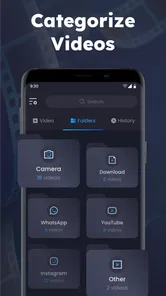
Navigating through the app is as easy as pie. The interface is intuitive, sleek, and doesn’t bog you down with unnecessary clutter. Whether you’re a tech newbie or a seasoned user, you’ll find it straightforward to get around. I particularly love how everything is organized, with easy access to my playlists and settings. It’s designed with the user in mind, ensuring that anyone can use it without a steep learning curve.
A smoother routine for everyday watching
One useful way to judge a player is not by the first video it opens, but by how little effort it takes to get back to what I meant to watch. If I save a few clips for later, playlists can help turn a loose folder into a short viewing queue. I would keep a playlist focused—say, travel clips for a train ride or videos I want to show family—rather than treating it as a complete catalog. That makes the feature more useful without requiring me to reorganize every file on the phone.
For a realistic day-to-day example, imagine downloading a few videos over home Wi-Fi before leaving for an appointment. Once away from a reliable connection, local playback can make that saved material useful without depending on streaming. I would open the files beforehand, check that the audio and subtitles are right, and arrange the ones I want to watch. That quick preparation is more dependable than discovering on the train that a particular file or subtitle needs attention.
Compared with the built-in player, a dedicated app is worthwhile when it gives me a more comfortable way to browse, queue, or adjust videos. Compared with a full media-library manager, this kind of tool can be the simpler choice if I mainly want to open a file and watch. The trade-off is that a basic player may not suit someone who wants an elaborate catalog, cloud syncing, or a highly managed home-media setup. I would choose based on the job: straightforward local playback is different from maintaining a complete media collection.
Customizable Features
One of the standout features of this app is its customization options. You can tweak the playback settings, adjust the speed, and even change the theme to suit your mood. I’ve found the subtitle support and adjustment features particularly handy. You can sync subtitles easily, which is a lifesaver when you’re watching foreign films. The app also allows you to create and manage playlists effortlessly, so you can queue up your videos just the way you like them.
Small adjustments that can prevent a frustrating viewing session
Speed controls are useful beyond watching something quickly. If I am checking a tutorial for one specific step, slowing playback can make a quick instruction easier to follow; for a familiar talk or lecture, speeding it up can save time. I would return to normal speed for films, where changing the pace can make dialogue and timing feel unnatural. The point is to use the control for a purpose, rather than leave a changed setting in place and wonder why the next video sounds or feels wrong.
Subtitle timing is another feature worth testing before settling in. When captions appear ahead of speech or lag behind it, adjustment can restore a comfortable rhythm without forcing me to give up on the file. I would first check whether the subtitle file matches the video, then make a small timing change and watch a short exchange to see whether it holds. If timing drifts progressively, a simple offset may not solve the underlying mismatch; that is a case where another subtitle file or player may be the better fix.
Theme customization is more personal than essential. I see it as a small comfort choice for frequent use, not a reason on its own to install another app. Playlists and subtitle controls have more practical value because they change how I organize or follow a video. If those are the controls I actually use, they make the app more relevant; if I only tap one file and watch, a simpler player may be enough.
Performance and Reliability
In terms of performance, Your Player - All Format Video is a beast. It’s fast, reliable, and doesn’t crash or lag, even with large files. I’ve tested it on both Android and iOS, and it performs brilliantly on both platforms. Plus, it doesn’t drain your battery like some other heavy-duty apps out there. It’s optimized to ensure you get the best performance without compromising on battery life, which is a huge plus in my book.
Choosing it for the right kind of library
The strongest case for this player is a person who keeps videos on a phone and wants a straightforward way to play them, with controls that can help when subtitles or playback speed need attention. It may also suit someone who is helping a less technical relative watch saved clips: a simple route from choosing a video to pressing play can matter more than a large collection of advanced tools. Since the app is free, trying it with a small set of everyday files is a practical way to decide whether its approach feels comfortable.
I would be more cautious if my main need were streaming subscriptions, synchronized viewing across several devices, or a meticulously searchable library. A local video player is not automatically a replacement for those services. Likewise, if I rely on specialist codec support, unusual audio tracks, or finely tuned playback behavior, I would test those exact files and controls rather than infer compatibility from a broad format claim. The best player is the one that handles the material I actually watch.
There is also a difference between “free to install” and “valuable to keep.” The value here depends on whether the app saves me effort: opening a file that another player rejects, keeping a few videos in a usable queue, or correcting subtitle timing. If I never run into those needs, the built-in option may already do the job. I would not install several players just because they are available; I would keep this one only if it earns a regular place in my routine.
With over 5 million installs, it has reached a broad audience, though popularity alone does not tell me whether it will suit a particular phone or file collection. The useful approach is to check the Android minimum, install it if the device meets that requirement, and try representative videos before depending on it. For iOS users, I would verify the version offered for their device separately rather than assume that the Android requirements apply.
One more practical question is whether it should become the default app for every video. I would wait until I have tried it with a short clip, a longer file, and any subtitles I commonly use. If those behave as expected, making it the regular choice can reduce friction. If one kind of file is important but inconsistent, keeping the phone’s existing player as a backup avoids turning a minor compatibility issue into a travel-day problem.
In conclusion, if you’re on the hunt for a versatile and robust video player, Your Player - All Format Video is a fantastic choice. It ticks all the boxes for a top-tier video player with its wide format support, user-friendly design, and superb performance. It’s like having a Swiss Army knife for video playback right in your pocket. So, go ahead, give it a whirl, and let it revolutionize your video-watching experience!
My buy-or-skip verdict
Because it is free, my decision is less about whether it is worth paying for and more about whether it deserves space in my app lineup. I would try it if I watch locally saved videos, want playlist organization, or often need subtitle and speed adjustments. I would skip it if my current player already opens everything I use and I have no interest in extra playback controls. That is a simple, fair test: use a few real files, keep it if it makes watching easier, and move on if it does not.
Your Player - All Format Video Frequently Asked Questions
What kind of app is Your Player - All Format Video?
Your Player - All Format Video is a video player in the Tools category, designed to make playing videos straightforward. Its short store description is “Your Player,” while its summary invites users to play their favorite videos with ease. It is free to download and is rated for Everyone, making it a general-purpose option for people looking for a video playback app.
What video formats does Your Player support?
Your Player - All Format Video supports a wide range of video formats, ensuring that users can play virtually any video file without the need for additional codecs. Popular formats such as MP4, AVI, MKV, MOV, and more are supported. This flexibility makes it a versatile choice for users who have a diverse collection of video files.
Is Your Player available for both Android and iOS devices?
Yes, Your Player - All Format Video is available for both Android and iOS platforms, ensuring a seamless experience across different devices. Users can download the app from Google Play Store for Android devices and the Apple App Store for iOS devices, allowing them to enjoy their videos on the go.
Does Your Player offer offline playback?
Your Player - All Format Video supports offline playback, allowing users to watch their favorite videos without an internet connection. Users can download videos directly onto their devices within the app and enjoy them offline, making it a perfect travel companion for long trips or areas with limited connectivity.
Are there any in-app purchases in Your Player?
While Your Player - All Format Video is free to download, it offers in-app purchases to enhance the user experience. These may include premium features such as ad-free viewing, advanced playback controls, or additional customization options. Users can choose to purchase these features to unlock the app's full potential.
Pros
- Supports various video formats flawlessly
- User-friendly interface and easy navigation
- Offers high-quality video playback
- Customizable playback settings
- Efficient battery usage
Cons
- Contains ads in the free version
- Occasional playback lag on older devices
- Limited advanced features in free version
- Requires in-app purchases for full access
- No cloud storage integration