X-VPN: Fast VPN & Secure Proxy
- 21.48K
- 4.5
- Installs
- 50.00M
- Price
- Free

Screenshots
Analysis by Reviewed
I approached X-VPN: Fast VPN & Secure Proxy as a practical privacy tool rather than as a magic shield for every online risk. It is a free Android app in the Tools category from LIGHTNINGLINK NETWORKS PTE. LTD., designed to create a private VPN connection while browsing or using Wi-Fi. After spending time with its general workflow, my main impression is that it aims to make VPN use understandable for ordinary phone users, including people who do not want to study networking before protecting a connection.
That simplicity matters from an inclusion point of view. A privacy app can be technically capable yet frustrating if its controls are crowded, its labels are vague, or its connection process requires precise taps under pressure. X-VPN is most appealing when I need a quick change in how my phone connects to the internet, especially on a public network. It is less convincing when I need detailed control, a fully transparent explanation of every technical choice, or a solution for every device in a household.
How the app reads and guides you through a VPN connection
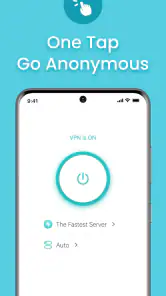
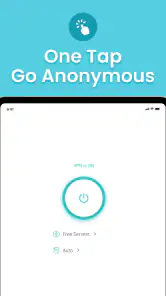
The first thing I look for in a VPN is whether the central action is obvious. X-VPN presents itself as a focused utility, not a dashboard packed with unrelated tools. That makes the basic journey easier to understand: open the app, identify the connection control, and decide whether to activate the protected tunnel. For a person who has never used a VPN, this is a friendlier starting point than a service that immediately exposes protocol names, server rules, and advanced routing options.
The uncluttered approach also helps when attention is limited. If I am moving between a café, a library, and public transport, I do not want to interpret a long technical status page before connecting. A clear main screen reduces the amount of reading needed for the most common task. This is useful for users with cognitive fatigue, limited technical confidence, or simply a preference for one-purpose screens.
At the same time, simplicity should not be confused with complete transparency. A VPN changes an important part of the phone’s network behavior, so I still want to know when the connection is active, when it has ended, and whether a location choice has changed. The app is easier to approach when its main control is prominent, but users who need a detailed explanation of connection states may find a streamlined interface less informative than a specialist VPN client.
I also consider text density and contrast when reviewing an app for everyday accessibility. X-VPN’s purpose is easier to grasp when the interface uses short labels and familiar actions instead of forcing users to decode abbreviations. However, the practical experience can still depend on the phone’s display settings, system font size, and how the app presents secondary information. Anyone who relies on enlarged text should check whether the most important controls remain comfortably visible at their preferred setting rather than assuming every screen will adapt perfectly.
Navigation is strongest for the person who wants a quick connection and weakest for the person who expects a carefully layered control panel. That is a deliberate trade-off I can understand. A beginner benefits from fewer decisions, while an experienced user may want more visible information about server selection, connection behavior, or exceptions. If your priority is getting protected on a familiar Wi-Fi network with minimal setup, the reduced complexity works in your favor.
What the main workflow feels like in real use
My realistic use case is arriving at a busy café and needing to check email, manage a booking, or access a work dashboard from a shared wireless network. I would open the app before entering sensitive information, activate the VPN, and then continue with the task. The value here is not that the app makes the internet anonymous in every sense; it is that it gives me a straightforward way to add a privacy layer when I do not fully control the network I am using.
For someone with limited dexterity, the number of precise interactions matters. A short route to connection is easier than a sequence of small switches and nested menus. I would still avoid tapping hurriedly while walking, because a VPN status should be checked rather than guessed. The safest habit is to pause after activation and confirm that the app shows the intended state before opening a banking, health, or work service.
People who use screen readers or other assistive technologies should judge the app by how clearly its controls are announced on their particular phone. I cannot treat a simple visual layout as proof of perfect assistive-technology support. The sensible approach is to install it, move through the primary connection control with the device’s accessibility tools enabled, and confirm that the status can be understood without relying only on color or position.
Motor, visual, and sensory considerations
A VPN app is often used in short, urgent moments, so large, recognizable controls are more useful than decorative design. X-VPN benefits from being centered on one main purpose. That can reduce accidental navigation for users with tremors or limited fine motor control, particularly compared with an app that places many small settings close together.
There are still practical concerns. A connection button that changes appearance may be easy to recognize visually but less helpful for someone who cannot distinguish colors reliably. I would look for a text status or another clear confirmation, not rely on a color change alone. Likewise, users sensitive to animation or sudden visual changes may prefer to enable their phone’s reduced-motion or display settings and see whether the app remains comfortable to use.
Audio is another consideration. If the app uses sound or vibration to signal connection changes, that may help one user and distract another. Because phones differ in notification behavior and accessibility configuration, I would keep the device’s broader sound and vibration settings in mind. The most dependable workflow is a visible or spoken status check, followed by a brief pause before starting a private task.
For users with reading difficulties, the app’s focused purpose is a positive starting point, but technical terms can still create friction. “VPN,” “proxy,” and location-related choices do not mean exactly the same thing to every reader. I would prefer to see plain-language explanations beside advanced choices, especially when a setting could affect speed, access, or how a website interprets the connection. When those explanations are brief, a user can make a choice without searching elsewhere.
Access in different places and under different pressures
The strongest everyday scenario for X-VPN is a phone user moving through networks they do not administer. Public Wi-Fi is the obvious example, but the same workflow can help when a family member asks for assistance connecting securely or when I need a quick privacy step before using a shared connection. The app is also relevant to people who want their browser traffic to travel through a VPN rather than relying only on the security settings of each individual website.
That convenience is especially valuable for people who cannot easily inspect network details. A user with low vision, limited technical knowledge, or reduced energy may not want to compare encryption labels or configure a connection manually in the phone’s system settings. A dedicated app can put the action in one place. The trade-off is that the user must trust the app’s design and service choices more than they would with a manually configured connection.
X-VPN is available as a free app, which lowers the barrier to trying it. Its content rating is Teen, and it supports Android devices running version 9 or later. That makes the compatibility question fairly easy for many Android owners: check the phone’s system version before installing, then test the actual workflow with the accessibility settings and network conditions you use every day.
The app has reached a broad audience, with over fifty million installs and an average rating of four and a half from around eight hundred thirty-nine thousand ratings. Those figures suggest that the basic concept is approachable to many people, but popularity does not settle whether it suits your specific needs. A user who depends on a particular screen reader setup, needs a fixed connection policy, or wants household-wide coverage should evaluate the actual controls rather than treating adoption as a guarantee.
One useful habit is to connect before beginning a session, not halfway through it. If I am already signed into a service and then change the network path, the service may ask me to verify my identity again or behave differently. That is not necessarily a fault in the VPN; it is a reminder that privacy tools can alter how websites see a connection. Planning the switch at the start of a task makes the experience less confusing for users who find unexpected login prompts stressful.
Where it differs from ordinary alternatives
The usual alternative is to use public Wi-Fi without a VPN and rely on the network’s password or on the security of each website. That approach may be acceptable for low-risk browsing, but it gives me less control over the connection as a whole. Another alternative is the VPN feature built into a browser or a phone’s system settings. Those options can be convenient when I only want to protect one browsing activity, while X-VPN is more suitable when I want a dedicated app handling the VPN connection for broader phone use.
Manual configuration can offer more control, but it asks the user to understand server details and connection settings. I would choose that route for a managed workplace, a technically experienced household, or a situation where a specific provider and policy are required. I would choose X-VPN for a person who values a short setup and does not want to translate networking instructions into system settings.
There is also a difference between a VPN and a privacy promise. A VPN can protect the path between the device and the VPN service, but it does not make a user immune to phishing, malicious downloads, weak passwords, tracking inside an account, or unsafe websites. I would not recommend installing X-VPN as a substitute for multifactor authentication, software updates, or careful browsing. Its role is narrower and more useful when understood that way.
Points that may create friction for some users
The free entry point is helpful, but the app includes in-app purchases ranging from around twelve dollars to around ninety-two dollars per item. That range makes it important to read the purchase screen carefully before confirming anything. A person using a shared device, a young user, or someone who needs predictable spending should review the phone’s purchase controls and avoid treating every upgrade prompt as necessary for basic experimentation.
Another limitation is the tension between ease and control. A beginner may appreciate not being confronted with a technical maze, while an advanced user may feel that a simplified workflow does not answer enough questions. If you need to select a very specific route, apply different rules to different apps, or integrate the VPN into a wider network policy, a more configurable service may be the better choice.
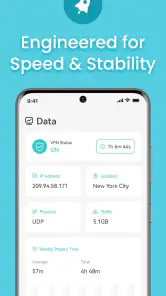
Speed and reliability can also vary with the network, the selected connection, and the distance to the VPN endpoint. I would not use any VPN as an automatic promise of faster browsing. On a weak public network, adding a VPN can make delays more noticeable. For accessibility, that matters because slow loading and repeated reconnects can increase fatigue, especially for users navigating with assistive technology or limited patience for changing screens.
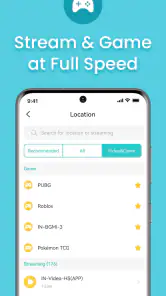
Streaming, gaming, calls, and location-sensitive services may react differently when a VPN is active. A connection that is excellent for reading or messaging may be less comfortable for a live call or a latency-sensitive game. My practical advice is to test the app with the activity that matters most to you. If uninterrupted calls are your priority, compare the experience with and without the VPN before relying on it during an important appointment.
Finally, a VPN can sometimes trigger extra security checks from websites. That may protect an account, but it can also create an accessibility barrier if the verification process is difficult to read, times out quickly, or requires a second device. If a service repeatedly blocks or challenges the connection, I would not keep retrying blindly. I would switch to a trusted network or use the service’s supported security method rather than allowing the VPN to turn a simple task into a frustrating loop.
Who I would recommend it to
I would recommend X-VPN to an Android user who wants a recognizable, dedicated VPN app for public Wi-Fi and ordinary browsing, especially someone who prefers a simple starting point over a technical configuration project. It is a reasonable fit for people who need a quick privacy step, have a compatible phone, and are comfortable checking the connection state before entering sensitive information.
I would be more cautious recommending it to someone who needs strong customization, consistent performance for demanding real-time activities, or a carefully managed solution across many devices. I would also ask anyone with specific accessibility requirements to test the actual interface with their preferred font size, screen reader, contrast settings, and input method. The app’s focused design is encouraging, but only hands-on testing can show whether its controls are genuinely comfortable for that person.
For families, I would explain the purchase model before handing over the phone. The app is free to install, but optional purchases can be substantial, so purchase restrictions and clear expectations are worthwhile. For teenagers, the Teen content rating is a useful part of that conversation, though it does not replace supervision about privacy, account security, or the limits of VPN protection.
A balanced conclusion for inclusive everyday use
My overall view is that X-VPN succeeds most clearly as an approachable privacy utility. Its focused workflow can reduce the reading, decision-making, and setup burden that often keeps people away from VPNs. That is meaningful for users with limited technical confidence, reduced attention, or a need to connect quickly in unfamiliar places. The developer, LIGHTNINGLINK NETWORKS PTE. LTD., has built an app with broad reach, and its strong user response reflects how appealing that straightforward role is.
Still, I would not describe it as the right answer for every privacy or accessibility situation. The free version’s purchase prompts, possible performance changes, website verification issues, and limited appeal to users seeking deep control all deserve consideration. It is also important to remember that a VPN protects one part of the online journey, not every action performed on a phone.
My recommendation is simple: choose X-VPN when you want an uncomplicated VPN starting point, then test it in the exact situations that matter to you. Check the connection status, try your preferred accessibility settings, compare it during a normal public Wi-Fi session, and see how essential websites and calls behave. If that routine feels clear and comfortable, the app can be a useful addition to your Android toolkit. If you need precise policies, predictable performance, or specialized assistive support, a more configurable alternative may serve you better.
Pros
- Simple one-tap connection makes it easy for VPN beginners.
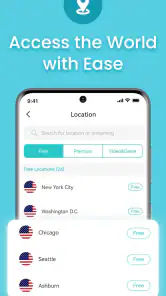
- Offers servers in multiple countries for broader location choices.
- Can help secure data on public Wi-Fi networks.
- Includes a free tier for users who want to test the service.
- Works across Android and iOS devices with a familiar interface.
Cons
- Free access may include ads
- limits
- or slower connection speeds.
- Some advanced privacy features require a paid subscription.
- Connection quality can vary depending on server distance and traffic.
- VPN use may reduce battery life during extended sessions.
- The privacy policy should be reviewed carefully before trusting sensitive data.

- Category
- Tools
- Version
- Varies with device











