Whitepages - Find People
- 22.27K
- 3.9
- Installs
- 5.00M
- Price
- Free

Screenshots



Analysis by Reviewed
When an unfamiliar call interrupts an ordinary day, my first question is usually simple: is this someone I should call back, or can I ignore it? Whitepages - Find People is built around that practical moment. Its reverse phone lookup gives me a way to check a number against available contact information, rather than relying only on a missed-call notification or guessing from the area code. I find that focus useful because it turns a broad people-search service into something I can reach for in a specific situation.
That lookup is not a guarantee that every number will lead to a clear identity. The result depends on what information is available, so I treat it as a clue to verify, not proof of who called. Used with that expectation, it can help me decide whether a call looks familiar enough to return, whether I should wait for a voicemail, or whether I need another way to confirm the caller.
What a reverse lookup can actually help with
The app’s central appeal is that I can start with a phone number rather than a person’s name. That matters when a number appears on my screen without context, or when I have an old number in a message and want to see whether it is associated with someone I know. Whitepages can return a name, location, and other details when those are available. I would not treat every field as current or complete, but having several pieces of context can be more helpful than a number alone.
My most useful tip is to search with a clear question in mind. If I am trying to identify a caller, I look at the result as a starting point, then compare it with details I already have, such as a recent conversation or a business name mentioned in a voicemail. A match is more persuasive when separate clues agree. If the result is vague, I avoid making a decision about a person based on that alone.
How I would use it during an ordinary day
Imagine I am waiting for a delivery or a call about an appointment, and an unfamiliar number rings while I am busy. I can look it up when I have a moment instead of interrupting what I am doing to call back immediately. If the search connects the number to a recognizable business or person, I have a reason to follow up; if it does not, I can wait for a message or use a known contact channel. That small pause is the real benefit: the app helps me make a more considered choice, not an automatic one.
The same approach works when I receive a number from someone and want to check the context before saving it. I can search first, then decide whether it belongs in my contacts and what name to use. I would still confirm directly with the person before relying on a result for anything important. Phone records and people-search information can be incomplete or out of date, so I see this as a convenience for everyday sorting, not a substitute for direct confirmation.
Where it fits among other ways to check a caller
Compared with searching the number on the open web, Whitepages offers a dedicated place to try a people lookup and see available details together. A general search engine may be better when I want recent public mentions, a company’s official contact page, or context from a specific website. My phone’s built-in caller information is quicker because it is already on the call screen, but it may not answer a lookup question after the fact. I see Whitepages as a useful middle step when those basic options leave me curious.
You May Like

Clash of Clans Is Won Between the Battles

Android Auto Makes the Case for Quieter Car Software

MobiOffice: Transforming Mobile Productivity with Seamless Integration

EA SPORTS FC™ Mobile Soccer: Redefining Mobile Sports Gaming

How Microsoft OneDrive Became a Mobile Productivity Giant

How Google Translate Breaks Language Barriers Effortlessly
It is also different from simply asking the caller to identify themselves. If someone leaves a voicemail, calling a published business number or replying through a known channel is a safer way to confirm a sensitive request than trusting a search result. For routine calls, though, a lookup can help me prioritize which missed calls deserve attention. The best choice depends on the stakes: for a casual callback, an available match may be enough context; for money, account access, or personal information, I would verify independently.
Who gets the most value from it
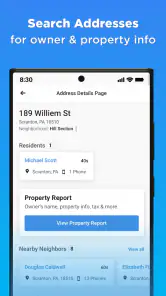
I can see this app helping people who regularly receive calls from unfamiliar numbers, keep track of contacts they have not spoken to in a while, or need to check a phone number before deciding what to do next. It also offers searches by name and address, along with business searches, so the phone lookup sits within a broader directory-style tool. Whitepages is less compelling if I only need caller identification once in a while, already get enough context from voicemail, or prefer to search through a browser and official sources.
One practical trade-off is that a search service is only as useful as the result it can surface. A missing or ambiguous match does not tell me that a caller is suspicious, just as a plausible match does not prove that the caller is who they claim to be. I use the app to narrow possibilities and then choose a sensible next step. That measured use is more valuable than expecting a directory to settle every question by itself.
Whitepages is a free communication app from Whitepages, with optional in-app purchases ranging from $0.99 to $249.99 per item. It has a 3.9 average from around 74,000 ratings, and more than 5 million installs; its Everyone age rating makes it broadly accessible. The app first appeared on November 15, 2011, and version 8.3.0 lists Android 8.0 as its minimum operating system. Those details give a sense of its established presence, but they do not change my main advice: try the basic lookup for a real question before deciding whether any paid option is worthwhile. I would not spend money just because one search returned an uncertain result.
Before installing, I would also ask whether I am comfortable using a people-search service for the situations I actually face. If my need is occasional, a free lookup may be enough; if I need reliable confirmation for a sensitive matter, I would use an official source or contact the person through a channel I already trust. The app is most useful when I want a quick lead and understand its limits, not when I expect it to replace judgment.
Getting Started with Whitepages
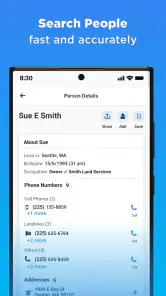
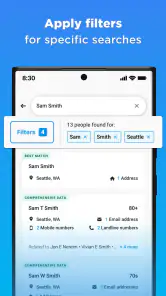
Setting up Whitepages - Find People is a breeze. Just download it from your app store, and you're good to go. The user interface is clean and straightforward, making navigation a walk in the park. Once you're in, you can search for people by name, phone number, or address. It's as simple as typing in the details and hitting the search button.
Features that Stand Out
One of the standout features of the app is its reverse phone lookup. Ever get a call from an unknown number and wonder who's on the other end? With this feature, you can easily find out. The app provides information like the caller's name, location, and other available details. It's like having a personal detective in your pocket!
Another feature I found useful is the ability to search for businesses. Whether you're looking for a new restaurant to try or need to contact a local service provider, the app has got you covered. It provides business details such as addresses and phone numbers, which is incredibly convenient.
Security and Privacy
In an era where data privacy is a significant concern, Whitepages - Find People takes security seriously. The app assures users that their searches are confidential, and it doesn't share personal information with third parties. This is a huge relief for anyone worried about privacy when using such services.
Moreover, the app allows users to opt-out of having their information displayed, giving you control over your personal data. It's features like these that give me peace of mind when using the app.
My Personal Take
Having spent some time exploring the app, I can confidently say that Whitepages - Find People is a valuable tool for anyone needing to find people or businesses quickly. It's user-friendly and packed with features that make searching for information a seamless experience.
The ease of use, coupled with the comprehensive data available, makes it a no-brainer for those who frequently need to access such information. While there are many apps out there offering similar services, Whitepages stands out for its reliability and respect for user privacy.
In conclusion, if you're in need of a reliable app for people and business searches, give Whitepages a try. It's like having a digital Rolodex that fits right in your pocket.
Whitepages - Find People Frequently Asked Questions
Is Whitepages - Find People free to download, and can I use it without paying?
Whitepages - Find People is free to download, but some features may involve an in-app purchase. Basic searches, such as phone number lookups, are typically free, while more detailed reports may require payment. Before using a paid feature, review the purchase details shown in the app so you understand the cost and what you are buying.
What kind of information can I search for in Whitepages - Find People?
The app is designed for people searches and can help you look up phone numbers, email addresses, and addresses. It also offers background checks and reverse phone and address lookup tools. The precise information available can depend on the person or search, so treat results as a starting point and verify important details through appropriate independent sources.
Who develops Whitepages - Find People, and what is its age rating?
Whitepages - Find People is developed by Whitepages and is a communication app for people who want to find individuals or look up contact details. It carries an Everyone content rating, making it suitable for a general audience classification. Because searches and reports can involve personal information, use the app responsibly and consider whether each search is appropriate.
What devices can run Whitepages - Find People?
Whitepages - Find People is an app for Android devices, and its listed minimum operating-system requirement is version 8.0. Before downloading, check your device’s software version and available storage in the app store. If your device meets the requirement, you can install it and explore its people-search, phone-lookup, email and address finder, and background-check features.
When was Whitepages released, and how widely is it used?
Whitepages was released on November 15, 2011, and its current version is 8.3.0. It has more than five million installs, with an average rating of 3.9 based on around 74,000 ratings and about 22,000 reviews. Those figures offer a broad sense of its reach, but they do not guarantee that every person-search result will suit your needs.
Pros
- Comprehensive people search tool.
- Accurate contact information database.
- Intuitive and user-friendly interface.
- Quick results with minimal effort.
- Offers reverse phone lookup option.
Cons
- Free version has limited features.
- Occasional outdated information.
- Requires internet for full functionality.
- Some features require subscription.
- Privacy concerns with data usage.

- Category
- Communication
- Version
- 8.3.0











