Wendy’s
- 63.38K
- 4.7
- Installs
- 10.00M
- Price
- Free

Screenshots


Analysis by Reviewed
I find the Wendy's app most useful when a meal is already on my mind and I want to sort out the details before reaching the counter. It brings Wendy’s ordering, offers, rewards and restaurant information into one place, which can make a quick food stop feel less improvised. That convenience depends on being able to connect at the right moments, though, so I’d treat it as a practical companion rather than a guaranteed shortcut in every situation.
When a connection matters
Browsing the menu, checking offers and sending an order are the moments where a reliable connection matters most. I’d look through the choices before leaving home or while I have a stable signal, then place the order once I know where I’m going. That small bit of planning is useful if I’m travelling or approaching a busy restaurant, because it avoids trying to make every decision while standing in line.
The app is a free Food & Drink app from Wendy's Int'l., LLC. It has a 4.7 average from around 598,000 ratings, and more than 10 million installs. Those figures suggest that it has become a familiar option for many customers, but they don’t guarantee that every order will be equally smooth: the experience still depends on the restaurant, the connection and how clearly I enter the order.
A User-Friendly Experience
The first thing I noticed about the Wendy's app is how user-friendly it is. The interface is clean, intuitive, and easy to navigate, making it a breeze to place an order. Everything you need is just a few taps away, from the menu items to exclusive deals. You can even customize your order to your heart's content, ensuring that your meal is exactly how you want it.
Exclusive Deals and Offers
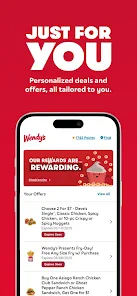
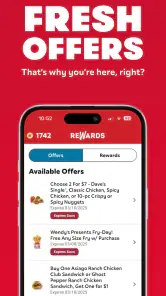
If you're a fan of saving money (and who isn't?), the app's exclusive deals section is a treasure trove of discounts and offers. I mean, who doesn't love a good deal on their favorite burger or fries? The app frequently updates its offers, so there's always something new to look forward to. Plus, earning rewards with every purchase adds an extra layer of excitement to your fast-food adventures.
I’d check the available deal before choosing a meal, rather than treating the offer screen as an afterthought. That makes it easier to decide whether the promotion suits what I actually want, instead of adding something just because it appears discounted. Since offers can change, I’d confirm the selected deal in the order before submitting; a quick review is more useful than assuming that browsing an offer automatically applies it.
Order Ahead and Skip the Line
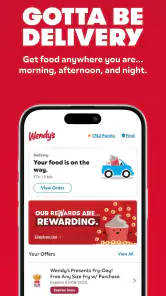
One of the standout features of the app is the ability to order ahead and skip the line. This feature is a lifesaver, especially during peak hours when the drive-thru line seems never-ending. You can place your order, pay through the app, and have your meal ready for pickup without the hassle of waiting. It's fast food, even faster.
More From Our News Desk

Weather by Xiaomi Review: Clear at a Glance, Less Clear Up Close

X Under Pressure: Can It Recover When Posting Goes Wrong?

Clash of Clans Is Won Between the Battles

Android Auto Makes the Case for Quieter Car Software

MobiOffice: Transforming Mobile Productivity with Seamless Integration

EA SPORTS FC™ Mobile Soccer: Redefining Mobile Sports Gaming
For me, “order ahead” is most helpful as a way to move decisions out of the busiest part of a visit, not as a promise that pickup will always be instant. I’d choose a location before building the order and give myself enough time to get there. If the trip changes or I’m still far away, I’d wait to submit rather than placing an order for a pickup I may not be able to make promptly.
Restaurant details when plans change
Additionally, the app allows you to find the nearest Wendy's location, complete with the restaurant's hours and contact information. This is particularly handy when you're on the go and need to satisfy that sudden craving.
Those details are especially useful when I’m deciding between a familiar stop and the closest one on my route. I’d check the hours before leaving, then use the listed contact information if I need to clarify a restaurant-specific question. For a broader search across different chains, though, a maps app is more practical; Wendy’s app is best when I’ve already narrowed the choice to Wendy’s.
Customizing Your Meal
Customization is key when it comes to food, and the app excels in this area. Whether you're removing onions from your burger or adding extra cheese, the app's customization options ensure that your meal is tailored to your liking. It's like having a personal chef at your fingertips!
Customization is also where a careful final glance pays off. When I’m ordering for someone else, I’d confirm each item and its changes before moving on, rather than relying on memory after several edits. For an unusual request that may need explanation, I’d prefer speaking with restaurant staff; an app can make standard choices easier to enter, but a conversation is clearer when the request needs context.
Planning around a busy day
For a realistic weekday use, I’d check the nearby location and its hours before setting off, then browse the menu while waiting for a bus or taking a break. If I’m collecting lunch between errands, ordering ahead can help me arrive with the decision already made. I still leave a little flexibility in the plan: a digital order can reduce time spent choosing at the counter, but it can’t make traffic, a crowded restaurant or an unexpected delay disappear.
A useful routine is to separate deciding from submitting. I can look over the menu during a quiet moment, think through what everyone wants, and place the order once the destination and timing are settled. That keeps a short lunch break from turning into a hurried series of taps. It also makes the app a better fit for a predictable stop than for a spontaneous detour where the location, timing and meal are all still undecided.
The app suits people who visit Wendy’s often enough to make rewards and changing offers worth checking, and anyone who likes choosing meal details before ordering. It is less compelling if I’m only looking for nearby restaurants across many brands; a general maps or food-discovery app is a better starting point for that. Likewise, if I prefer to compare a wide range of restaurants in one place, Wendy’s own app is naturally focused on Wendy’s rather than the whole local food scene.
Small choices that prevent friction
I find it helpful to review the final order carefully before sending it, especially after changing toppings or selecting a deal. That last check can catch a missed customization or an offer that wasn’t applied as expected. If I’m ordering for more than one person, I’d settle everyone’s choices first and enter them together rather than repeatedly reopening the menu; it keeps the process clearer and makes the pickup plan easier to follow.
There’s a small trade-off when ordering for a group: using one phone can keep the order together, but it also makes one person responsible for catching everyone’s preferences. I’d read the items back to the group before placing the order, especially if several meals have different changes. If people are still deciding, it may be easier to wait than to edit a nearly finished order while others are calling out additions.
On the go, I’d avoid waiting until I’m inside a crowded restaurant to build a complicated order if my signal is unreliable. A connection interruption can make browsing or submitting less convenient, so I’d retry when reception is steadier and check the order status before assuming it went through. If the app doesn’t appear to respond, I would avoid immediately submitting the same order again, since checking first helps prevent accidental duplicates. For a simple visit where speed matters more than customization, ordering in person may be the calmer option.
When the network is unreliable
Connectivity is the practical weak point in a phone-based order. If the menu or order screen takes time to load, I’d pause rather than repeatedly tapping buttons, then check whether the action completed before trying again. That is a sensible way to avoid uncertainty around duplicate submissions. If I’m already at the counter and the connection is poor, switching to a direct order is often simpler than troubleshooting while people are waiting behind me.
I’d also keep the location and pickup plan in mind before sending anything. A change of destination after ordering can turn a convenient shortcut into extra hassle, so I’d verify that I’m working with the restaurant I intend to visit. If plans suddenly shift, I would check the app for the current order status and use the restaurant’s contact details when a direct clarification is needed, rather than guessing what happened.
Data, device fit and everyday alternatives
Because menu browsing and online ordering involve connecting to the service, I’d use Wi-Fi when it’s readily available if I’m trying to limit mobile data. I’d also keep the app updated: the current version is 11.40.0, and it supports devices running Android 9 or later. The app is free and rated Everyone, so it is broadly suitable for everyday use, though parents can still guide younger children through placing an order and making payment choices.
If I’m watching my mobile data, I’d avoid browsing repeatedly just to revisit the same choices while away from Wi-Fi. A quick look at the menu and offers when I have a stable connection can help me make a decision before I’m out and about. I’d still expect to need a working connection for online tasks such as sending an order, so I wouldn’t make a pickup plan that depends on the app responding in a place where reception is uncertain.
The app was released in 2012, and its current version reflects an ongoing mobile ordering experience rather than a one-off menu page. That history may make it a familiar tool for returning customers, but what matters day to day is whether it fits my device and routine. With Android 9 or later, the stated system requirement is clear; on an older device, I’d use another way to order rather than assuming the app will work.
Compared with calling a restaurant or deciding at the counter, the app gives me room to inspect choices and customize before I arrive. The trade-off is that a phone-based order relies on the connection and on careful confirmation, while speaking to staff can be simpler when I have a special request or need to clarify something. I’d choose the app for a familiar meal and a planned pickup, and the counter when I want a quick conversation or don’t want to depend on my phone.
Compared with third-party food-ordering services, Wendy’s own app is the more focused choice when I want Wendy’s offers, rewards and ordering in one place. A multi-restaurant service is more useful when I’m still comparing cuisines or want to browse several nearby businesses. The decision is less about which kind of app is universally better and more about whether I’ve already chosen Wendy’s: once I have, the dedicated app makes more sense; while I’m still choosing where to eat, a broader service is easier to use.
Who will get the most from it
I’d recommend it most to regular Wendy’s customers who like planning a familiar order, checking current offers and collecting rewards through their visits. It can also suit someone with a short lunch break who wants to choose before arriving, provided they have a dependable connection and enough time to reach the selected restaurant. The app’s 4.7 average, drawn from around 598,000 ratings, points to broad appeal, though individual experiences can still vary with the location and the circumstances of a visit.
I’d skip it if I rarely eat at Wendy’s, prefer to decide only after speaking with staff, or need one app to compare a wide range of restaurants. It is also not my first choice when reception is unreliable and I need a guaranteed, immediate way to place an order. In those cases, the counter or a phone call is more direct, while a general maps or restaurant app is better for finding alternatives.
Final Thoughts
All in all, the Wendy's app is more than just a tool for ordering food; it's an experience that brings convenience, savings, and satisfaction right to your smartphone. Whether you're a longtime fan of Wendy's or a fast-food newbie, this app is worth downloading. So next time you're craving a juicy burger or some crispy fries, open the app, place your order, and enjoy the deliciousness that is Wendy's.
My verdict is positive, with one practical condition: it works best when I have a steady connection and already know what I want. I’d use it to check an offer, tailor a familiar meal and plan a pickup, but I wouldn’t rely on it as my only option during a rushed stop with poor reception. If that matches how you buy fast food, it’s an easy app to keep handy; if you rarely visit Wendy’s, ordering at the restaurant may be all you need.
Wendy’s Frequently Asked Questions
Can I browse Wendy’s menu before placing an order?
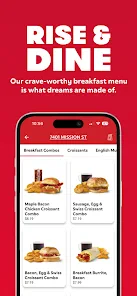
Yes. Wendy’s app is useful for exploring menu choices before you decide what to order. You can review items, consider how you might customize a selection, and look at nutritional information in the same app. Browsing first can help you plan a meal at your own pace, while mobile ordering is there if you decide you are ready to continue.
Can I find a Wendy’s location using the app?
Yes. The app can help you find nearby Wendy’s locations, which is handy when you are planning where to pick up an order or want to check what is close by. You can use location browsing alongside the menu and ordering features, making the app practical both for customers who already know what they want and for those still deciding.
Is Wendy’s app free to download, and what devices can run it?
Wendy’s is a free Food & Drink app from Wendy’s Int’l., LLC. It is available for Android and iOS, and the Android version requires Android 9 or later. The app is rated for Everyone, so it is broadly suitable for users of all ages. Check that your device meets the operating-system requirement before installing.
What is Wendy's app and what features does it offer?
Wendy's app is a convenient mobile platform designed to enhance your fast-food experience. It offers features like mobile ordering, exclusive deals, and discounts, a rewards program, and the ability to customize your orders. Users can also find nearby Wendy's locations, view nutritional information, and access their order history for easy reordering.
Is Wendy's app available for both Android and iOS devices?
Yes, Wendy's app is available for both Android and iOS devices. You can download it from the Google Play Store for Android devices or the Apple App Store for iOS devices. Ensure your device meets the minimum operating system requirements to enjoy a seamless experience with the app. The Android version requires Android 9 or later.
Pros
- User-friendly interface with easy navigation
- Wide variety of menu options available
- Fast and reliable delivery service
- Engaging loyalty program for rewards
- Regular updates with new features
Cons
- Limited customization options for orders
- Occasional app crashes reported
- Requires stable internet connection
- No table reservation feature
- Some users report slow customer support
- Category
- Food & Drink
- Version
- 11.40.0











