

Weather forecast
- 1.18K
- 4.3
- Installs
- 5.00M
- Price
- Free
Screenshots
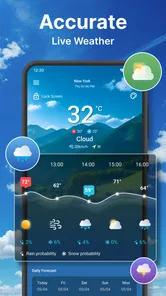
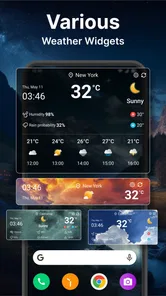
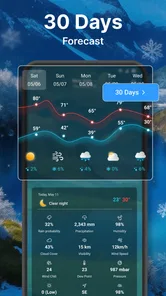
Analysis by Reviewed
I judge a weather app by how quickly it helps me answer a practical question: should I take a jacket, leave earlier, or change an outdoor plan? Weather forecast is a free weather app built around current conditions, hourly outlooks, and radar. That makes it a practical choice for quick checks rather than a tool I would treat as a complete meteorological workstation. Its appeal is straightforward: get a local picture of the weather, then look ahead or at the radar when the day’s plans depend on it.
A quick check before heading out
For ordinary routines, the most valuable weather information is often the simplest. I want to know what it feels like now, whether conditions may change later, and whether rain appears to be approaching. This app’s focus on current temperature, hourly forecasts, and radar fits that sequence well. It gives me a reason to open it for a specific decision instead of browsing through a large collection of unrelated tools.
That focused scope also sets a sensible expectation for speed. A weather app can only be as quick to use as its presentation and connection allow, and no app can make a weak network or slow phone disappear. Still, the core information here is the kind people usually seek in a brief visit. If you check the forecast while getting ready or before walking to a bus stop, a compact set of current and near-future details is more useful than a screen crowded with unfamiliar charts.
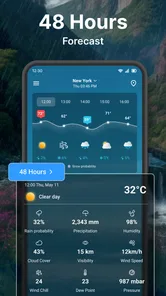
I would use the hourly view to make a practical choice, not to plan every minute with false precision. If the morning looks dry but the afternoon seems less certain, I can decide whether to carry a compact umbrella or move an errand earlier. Looking at the radar after that gives a different kind of context: it can help me judge whether precipitation is nearby or whether a gray forecast is still some distance from my location. The useful habit is to compare the hourly outlook with the radar rather than relying on either in isolation.
Make the forecast serve the plan
The app’s features make most sense when used together. Imagine I am leaving home for a walk, then meeting a friend outdoors later. I can start with the current temperature to choose comfortable clothing, check the hourly outlook for the time of the meet-up, and consult radar if rain might affect the route. That is a more grounded workflow than checking only a daily high and assuming the whole day will feel the same.
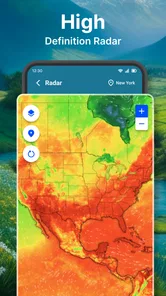
There is a trade-off: more detail is not automatically more certainty. Radar can be useful for seeing how precipitation is developing, but it should not be treated as a promise about the exact conditions at one street corner. Likewise, an hourly forecast helps with timing but is still an estimate. I would use the app to improve a decision, then leave a little flexibility for plans where getting wet or delayed would matter.
Choose the right moment to check
One useful everyday routine is to check once while getting ready, then return to the forecast only when a decision is close. If I have a flexible lunch walk, for instance, I can compare the hourly outlook with radar shortly before leaving and choose a route or time that suits the conditions. Checking repeatedly without a specific decision in mind can make small forecast changes feel more important than they are.
More From Our News Desk

 Gmail
GmailGmail in a Busy Inbox: Who Benefits Most?
From first account to crowded workday, Gmail earns its place through dependable search and flexible sorting—but its best fit depends on how much inbox maintenance you can tolerate.

 Prime Video
Switching to Prime Video: What Changes in Your Viewing Routine
Prime Video can make a compelling second home for streaming, but switching means learning a different catalog, rental layer, and route from browsing to playback.

 Universal TV Remote Control
Universal TV Remote Control Works Best as a Reliable Backup
A phone remote earns its place through quick setup and reliable habits. Here is how to get more from Universal TV Remote Control—and where its limits show.

 Weather - By Xiaomi
Weather by Xiaomi Review: Clear at a Glance, Less Clear Up Close
Xiaomi’s weather app makes everyday forecasts quick to scan, but its calm surface can leave useful details and recovery paths harder to find than they should be.

 X
XX Under Pressure: Can It Recover When Posting Goes Wrong?
A resilience-focused review of X, examining setup, mistaken posts, interruptions, weak connections, and the gaps that matter when recovery needs to be dependable.

 Clash of Clans
Clash of Clans Is Won Between the Battles
Its raids are quick; its community is a long-term project of coordination, teaching, rivalry, and shared responsibility—with all the friction that entails.
Latest News



This approach is particularly helpful when the day includes both indoor and outdoor commitments. I might not need to change anything for a brief walk from a car to a building, but a long wait at a stop or an exposed cycle ride calls for more thought. The app is most useful when I relate its information to the time I will spend outside, not simply to the day’s general label.
How it fits into a busy day
I use this section to think about where a quick weather check earns its place in a packed routine: not as another reason to keep looking at my phone, but as a small prompt before a decision. A useful habit is to tie each check to a real transition—getting dressed, leaving work, or starting an outdoor errand—so the forecast can guide the next step without taking over the day.
Short sessions and heavier-use moments
The app is most convincing during short bursts of use: checking before commuting, revisiting the forecast around lunch, or making a last-minute call about a walk. Those are moments when current temperature and an hourly view can answer a direct question without requiring a long session. Radar adds value when the situation is changing, especially if a forecast says showers are possible and I want a visual sense of their movement.
A useful, slightly less obvious approach is to check at decision points rather than repeatedly out of habit. For example, I might look once before leaving, then again before starting an outdoor errand if the weather looks unsettled. That reduces the temptation to treat every refresh as a meaningful update. It also makes the app’s information easier to act on: I am checking because I need to choose, not simply because I can.
For a day with multiple stops, I would think in terms of exposure. A short dash between buildings may be fine in light rain, while a long walk or time spent waiting outdoors may not be. The radar is more relevant to the latter, while the current temperature is especially useful for deciding whether a brief trip calls for an extra layer. The same forecast can lead to different choices depending on how long I will be outside.
I would not rely on this app alone for high-stakes decisions such as severe-weather preparation or travel where a sudden change could create a safety issue. A general consumer forecast is convenient for everyday planning, but when the consequences are serious, I would also consult official local alerts and guidance. That is not a failing unique to this app; it is a sensible boundary for any quick-check weather tool.
Reliability comes from reading the views together
The developer is Accurate Weather Forecast & Weather Radar Map, and the app has an average rating of 4.3 from around 40,000 ratings. Those figures suggest that many people have tried it, but popularity cannot tell me whether a particular forecast will match conditions in my neighborhood. I would judge reliability by whether the information is clear enough to support a reasonable choice, while remembering that weather changes and forecasts can differ in accuracy by place and timing.
For routine decisions, the strongest safeguard is to read the app’s different views as complementary. Current conditions describe what is happening now; hourly information helps with timing; radar offers a visual perspective on precipitation. If those views seem inconsistent, I would avoid overconfident conclusions and check again closer to the time I need to leave. That small adjustment is more useful than assuming one screen must always be definitive.
There is also a practical distinction between a forecast that is wrong and a forecast that has changed. A plan made several hours earlier may no longer suit conditions later in the day. I would treat the hourly outlook as something to revisit when the decision is approaching, rather than as a fixed schedule. This is particularly helpful for outdoor plans, where a modest shift in timing can matter more than the day’s overall summary.
Device demands and everyday friction
I cannot responsibly promise that the app will feel equally fast on every phone or under every network condition. Weather information depends on connectivity, and radar views may involve more visual detail than a simple temperature check. On a constrained device or a weak connection, I would start with the basic current and hourly information and open the radar only when it answers a real question. That is a sensible way to keep a weather check focused, regardless of the phone.
For people concerned about storage, battery, or background activity, the best approach is to pay attention to the app’s actual behavior on their own device rather than assume that all weather apps have identical costs. I would avoid leaving any information-heavy screen open when I am finished, and I would check the phone’s settings if resource use becomes noticeable. The app’s core role does not require a long browsing session, which makes it easy to use briefly and close.
One point of friction for any app with several kinds of weather information is deciding which view deserves attention. If I only need to know whether it is cold outside, opening radar would be unnecessary. If I am deciding whether to start a long outdoor activity, current temperature alone would be too narrow. Matching the screen to the question keeps the experience quicker and avoids treating extra detail as automatically helpful.
Who is likely to find it useful?
Weather forecast suits people who want a simple routine built around present conditions, the hours ahead, and a radar view for changing weather. It is a reasonable fit for commuters, people who walk or cycle locally, and anyone who wants a quick check before deciding what to wear or whether to carry rain protection. It is free, has an Everyone age rating, and has passed five million installs, so it is easy to consider as an everyday option without making a purchase commitment.
It may not be the best fit for someone who wants a specialist forecasting workflow, extensive analytical displays, or a source to rely on for official emergency instructions. In those cases, a dedicated meteorological service or local authority alert source is a better companion. Likewise, if you already get clear hourly forecasts and radar from a weather app you trust, switching only makes sense if this app’s presentation works better for your habits.
Compared with the usual alternatives, the main distinction is not a promise of superior accuracy; it is the combination of a quick current check with hourly planning and radar in one weather-focused app. Some alternatives emphasize a polished daily summary, while others provide more specialist detail. I would choose this one when I value a straightforward route from “what is it like now?” to “could rain affect my next few hours?” and choose a more advanced service when I need deeper interpretation.
Useful expectations before installing
The app is listed for everyone and is free, which makes it easy to try as a second opinion alongside a weather service you already use. Its audience is broad, but the practical fit is narrower: it makes most sense if you regularly need to decide what to wear, when to head out, or whether rain could affect a local plan. If your weather decisions depend on specialist interpretation, an everyday forecast app should remain a convenience rather than your main source.
For a newcomer, I would begin with one familiar question, such as whether an evening walk looks manageable. Check the hourly outlook first, then use radar only if precipitation is part of the concern. That simple sequence reveals whether the app’s mix of views suits your way of planning without requiring you to study every screen at once.
My performance verdict
Weather forecast has a clear everyday purpose, and its combination of current temperature, hourly outlooks, and radar gives me a useful sequence for making small plans. Its performance is best judged as a quick decision aid: check the conditions, look ahead, and use radar when the weather is unsettled. It is not a substitute for official warnings or careful planning in high-stakes situations, and the value of its extra detail depends on whether I use it to answer a specific question.
With a release date of March 14, 2020, the app has been available long enough to become a familiar option for many users, though age alone does not guarantee a perfect experience on every device. I would recommend trying it if you want a free, focused weather companion and do not need specialist forecasting tools. For me, the best reason to keep it handy is not to check constantly, but to make one better-informed choice before stepping out.
Weather forecast Frequently Asked Questions
What can I do with the Weather forecast app?
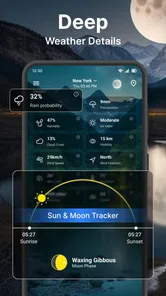
Weather forecast is designed to help you check current conditions and plan for the days ahead. Depending on the version and features available on your device, it may show details such as temperature, precipitation, wind, humidity, and hourly or multi-day forecasts. Forecasts can change as conditions develop, so use the app as a helpful guide rather than a guarantee, especially when making plans that depend on severe weather.
Does Weather forecast provide accurate and up-to-date information?
Weather forecast can display useful local forecasts, but accuracy depends on the weather data provider, your location, and how conditions change. Short-term predictions are generally more useful for immediate planning, while forecasts further into the future are less certain. Check that location access or your chosen city is correct, and compare with official local alerts when decisions involve dangerous conditions, travel safety, or other important risks.
Does the app need access to my location?
Location access can let Weather forecast show conditions for where you are without requiring you to search for a city each time. You may also be able to enter locations manually, which can be preferable if you do not want to share precise location data. Review the app’s permission prompts and privacy information before granting access, and choose the least precise option that still supports the features you want.
Can I use Weather forecast for free, and does it include ads or in-app purchases?
Availability, advertising, and paid features can vary by app version, region, and platform. Before downloading, check the listing in the Google Play Store or Apple App Store for details about the price, in-app purchases, subscriptions, and ads. If the app offers a paid upgrade, review what it includes and whether payment renews automatically. You can also check recent user reviews for feedback about the current experience.
Can Weather forecast send severe-weather alerts, and will they always arrive on time?
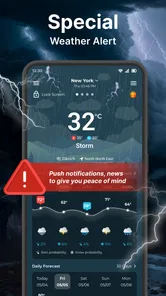
Some weather apps offer notifications for rain, storms, or other hazardous conditions, but the available alerts depend on the app, your region, and its data sources. Notifications may require permission and an internet connection, and delivery can be affected by device settings or network delays. Do not rely on one app as your only warning system; follow official emergency services and local authorities during severe weather.
Pros
- Clear forecasts make it easy to check conditions at a glance.
- Useful hourly and extended forecasts help with planning ahead.
- Weather alerts can provide advance notice of changing conditions.
- Location-based updates show forecasts for your current area.
- A range of weather details offers more than just temperature.
Cons
- Forecast accuracy can vary by location and weather conditions.
- Some features may require an internet connection to update.
- Location access may be needed for automatic local forecasts.
- Frequent alerts can become distracting if not adjusted.
- Extended forecasts are less reliable than short-term predictions.













