

Weather Radar - Windy, rain
- 4.77K
- 4.6
- Installs
- 5.00M
- Price
- Free
Screenshots
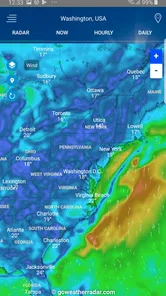
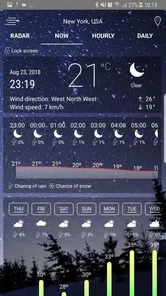
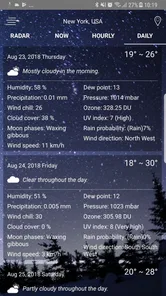
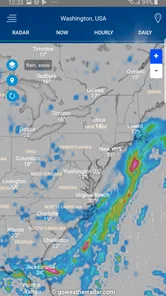
Analysis by Reviewed
I judge a weather app less by how impressive its map looks on day one than by whether I still open it when the novelty wears off. Weather Radar - Windy, rain ra is most useful when a change in the sky could change my plans: a commute, a walk, or time outdoors. Its radar-led approach gives me a reason to look beyond a single temperature, though it is not automatically the best fit for someone who wants the fastest possible glance.
What the first week gets right
Weather apps often feel impressive at first because a moving map is more engaging than a list of temperatures. Here, the radar view gives me a quick visual way to judge whether rain or snow is nearby, while the option to zoom helps put local conditions into a wider picture. That is useful when I am deciding whether to walk, cycle, or drive, but I would still check the forecast details before making a plan that depends on precise timing.
For a realistic weekday example, I might look at the map before leaving for work, then check the hourly forecast before arranging an outdoor lunch. If the radar suggests weather is approaching, I can adjust the plan rather than relying on a single daily high and low. The app is most helpful when I use those views together: the map gives context, and the forecast helps me think through the next part of the day.
First Impressions and Features
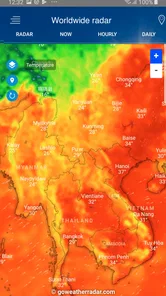
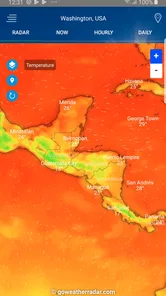
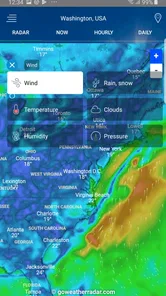
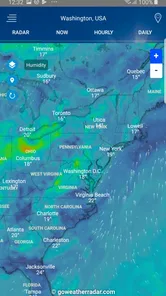
From the moment you open Weather Radar - Windy, rain ra, you're greeted with a sleek and intuitive interface. The app is designed to be user-friendly, whether you're a meteorologist or someone just trying to figure out if you need an umbrella tomorrow. The main screen displays a comprehensive weather map that updates in real-time, showing you current weather conditions such as rain, snow, and wind patterns.
One of the standout features of this app is its interactive radar map. You can zoom in and out to get a localized or global view, which is fantastic if you're planning a trip or just want to see how the weather is shaping up in different parts of the world. The app also offers detailed weather forecasts with hourly updates, so you're always in the know.
Getting more from the map
The map becomes more useful when I treat it as a way to ask a specific question, not as something to browse without a purpose. For instance, if I have a choice between walking now and later, I can inspect the local view first, then widen it to understand whether the weather appears to be part of a larger area of rain or snow. That wider context can help me decide whether postponing a short errand is likely to make a difference.
A second practical habit is to check the place I am actually going to, rather than assuming conditions at home will match those elsewhere. When I have a trip planned, looking at the destination and nearby areas gives me a better planning picture than checking only my current location. I would still use the forecast for the timing of a plan; the map is most valuable as context, not as a guarantee of exactly what will happen at a particular street corner.
More From Our News Desk

 Gmail
GmailGmail in a Busy Inbox: Who Benefits Most?
From first account to crowded workday, Gmail earns its place through dependable search and flexible sorting—but its best fit depends on how much inbox maintenance you can tolerate.

 Prime Video
Switching to Prime Video: What Changes in Your Viewing Routine
Prime Video can make a compelling second home for streaming, but switching means learning a different catalog, rental layer, and route from browsing to playback.

 Universal TV Remote Control
Universal TV Remote Control Works Best as a Reliable Backup
A phone remote earns its place through quick setup and reliable habits. Here is how to get more from Universal TV Remote Control—and where its limits show.

 Weather - By Xiaomi
Weather by Xiaomi Review: Clear at a Glance, Less Clear Up Close
Xiaomi’s weather app makes everyday forecasts quick to scan, but its calm surface can leave useful details and recovery paths harder to find than they should be.

 X
XX Under Pressure: Can It Recover When Posting Goes Wrong?
A resilience-focused review of X, examining setup, mistaken posts, interruptions, weak connections, and the gaps that matter when recovery needs to be dependable.

 Clash of Clans
Clash of Clans Is Won Between the Battles
Its raids are quick; its community is a long-term project of coordination, teaching, rivalry, and shared responsibility—with all the friction that entails.
Latest News



Making the radar useful, not just interesting
On a first visit, it is tempting to keep panning across the map simply because it is visual. I get more value by starting with the place I actually need, checking the forecast, and then using the radar to see the broader weather pattern. When I am travelling, looking at a destination and the surrounding area can provide helpful context; for a routine commute, a close local view is usually more practical than exploring faraway regions.
One useful habit is to compare what the map seems to show with the hourly forecast rather than treating a radar image as a promise about exactly when conditions will change at my door. A map helps me understand movement and coverage, while forecast information supports planning. If I need certainty for a safety-critical decision, I would also consult official local alerts rather than relying on one app alone.
Who will appreciate the detail?
What I love about Weather Radar - Windy, rain ra is its attention to detail. The app doesn't just tell you the temperature; it gives you a full breakdown of what to expect throughout the day. From humidity levels to wind speed and direction, it's all there. This level of detail is perfect for anyone who needs precise weather information, like hikers or outdoor event planners.
Another feature worth mentioning is the weather alerts. The app sends you instant notifications for severe weather conditions in your area. This is a game-changer, especially during storm season when having up-to-date information can be crucial.
I can see the appeal for someone who makes frequent outdoor plans and wants more than a basic temperature check. A hiker, a person who cycles to work, or anyone organising an event outside can use wind and humidity alongside the broader outlook to make a more considered choice. For a quick decision about whether to take a coat, though, the additional detail may be more than they need.
Choosing it over a basic forecast
That distinction matters when choosing between this app and a phone’s built-in weather screen. A built-in forecast is often the quicker option for a simple glance; this app makes more sense when I want to inspect a map, compare places, or spend a little longer planning around changing conditions. I would not keep both open out of habit if I only ever check the temperature once a day.
Compared with a plain forecast app, the central trade-off is attention. A radar map can make weather easier to interpret spatially, but it also asks me to look at more than one view and make a judgement. That is worthwhile when rain could affect a bike ride or an outdoor commitment. If I simply need to know whether it will be warm, a compact forecast is less work and may serve me just as well.
Where the routine can snag
While there's a lot to love about this app, it's not without its quirks. Sometimes, the app can take a few extra seconds to load data, especially if you're checking a remote location. It's a minor inconvenience, but something to be aware of if you're in a hurry. The free version of the app comes with ads, which can be a bit distracting during a quick check.
That loading delay affects how I would use it: I would not wait until I am already at the door to open the map if the decision matters. Checking a little earlier leaves time to let the view load and compare it with the forecast. A built-in weather screen can be more convenient when I need an immediate answer, while this app earns its place when the extra visual context is useful enough to justify opening it.
What keeps it useful after the novelty?
The lasting value depends on whether radar is part of a real routine. I would keep the app if I regularly check conditions before travel or outdoor plans, then use its map and hourly outlook to make a decision. If I open it only to watch clouds move across a screen, the novelty is likely to wear off. A practical approach is to check it at the moments when weather could change what I do, rather than adding unnecessary app checks to the day.
Its maintenance burden seems modest in that sense: the main effort is remembering to consult it and allowing time for a map to load when the connection or location makes that slower. The ads may also interrupt a quick check, so people who dislike advertising or want the simplest possible interface may prefer a basic weather app. I would not pay to remove ads without first deciding that I use this particular radar view often enough to justify it.
It can also help to keep the check focused. I would pick one or two recurring moments, such as before a commute or before leaving for an outdoor activity, and use the local map and hourly outlook together. That gives the app a practical job instead of turning weather checking into a habit of repeatedly refreshing the screen. If those moments rarely affect my plans, I would not expect a radar tool to become valuable just because it has a detailed display.
Who should install it, and who can skip it?
I would recommend trying it if weather regularly changes how you travel or spend time outdoors. It is a particularly sensible option for someone who wants a visual overview of rain or snow as well as forecast details, and who is willing to spend a little longer checking than they would with a basic widget. It may also suit people who compare conditions between their home and a destination before setting out.
I would skip it if my only question is whether to bring a jacket, if ads are a deal-breaker, or if I need an authoritative source for emergency instructions. For serious weather risks, I would use official local alerts alongside any general-purpose forecast app. The radar can inform an everyday decision, but I would not treat it as a substitute for an official warning or a guarantee of street-level conditions.
Details for deciding whether to install
This is a free weather app from Accurate Weather Forecast & Weather Radar Map, and its Everyone age rating makes it suitable for a broad audience. It has a 4.6 average from around 110,000 ratings, with more than 5 million installs. The app was released on September 28, 2018, and version 1.52 supports Android 5.0 and later.
Those numbers tell me it is established, but they do not mean it will suit every routine. I would recommend giving it a try if you want a visual radar alongside a more detailed forecast, especially if you regularly plan around rain, snow, or wind. I would skip it if you want nothing beyond an at-a-glance temperature, dislike ads, or need a source specifically tailored to official emergency guidance.
For someone deciding whether to keep it, I would give the map a fair test on the kinds of days when it can change a choice: a wet commute, a walk with a flexible start time, or a trip where conditions may differ between locations. If I find myself using both the map and the hourly view in those situations, the extra step has earned its place. If I keep going back to the simpler forecast instead, that is a clear sign the radar is not part of my routine.
My long-term take
All in all, Weather Radar - Windy, rain ra is a useful option for anyone who wants more context than a temperature readout. Its mix of a map and forecast detail can make ordinary planning easier when weather is changeable, but it asks for a little more attention than a basic phone forecast. I would keep it for regular outdoor or travel planning, not just for the novelty of watching a map. Give it a try if that extra context would affect your decisions; if not, a simpler weather app may fit your day better.
Weather Radar - Windy, rain Frequently Asked Questions
Is Weather Radar - Windy, rain ra suitable for everyday weather checks?
Weather Radar - Windy, rain ra is a weather app built around radar and forecast information, so it can be useful for checking conditions as part of a daily routine. Its map brings together radar imagery, temperature forecasts, wind information, and rain predictions. The combination is handy when you want a quick overview as well as a closer look at changing conditions in a particular area.
What is the minimum Android version needed to install Weather Radar - Windy, rain ra?
For Android users, the app requires Android 5.0 or later. Checking your device’s operating system before downloading is a simple way to avoid compatibility problems. Weather Radar - Windy, rain ra is a weather app, and its central tools include radar imagery and forecast information. Once installed, live radar and refreshed weather details rely on an internet connection.
Can I use Weather Radar - Windy, rain ra to check weather for a different location?
The app’s interactive weather map is designed to let users zoom in on specific regions, which is useful when checking conditions beyond their immediate area. It also presents radar images, temperature forecasts, wind information, and rain predictions. This makes it practical for comparing weather across places, though live radar and updated information depend on an internet connection.
What features does Weather Radar - Windy, rain ra offer?
Weather Radar - Windy, rain ra offers a comprehensive suite of weather tracking features, including real-time radar images, detailed temperature forecasts, and wind speed analysis. Users can also access rain predictions and severe weather alerts, ensuring they stay informed about any upcoming weather changes. The app also provides an interactive weather map that allows users to zoom in on specific regions for more detailed information.
Is Weather Radar - Windy, rain ra available for both Android and iOS devices?
Yes, Weather Radar - Windy, rain ra is available for download on both Android and iOS platforms. Users can easily find the app on the Google Play Store for Android devices and the Apple App Store for iOS devices. The app is designed to offer a seamless experience across both operating systems, ensuring all users have access to its robust weather tracking features.
Pros
- Highly accurate weather forecasts.
- User-friendly interface with easy navigation.
- Detailed radar and satellite imagery.
- Customizable alerts for severe weather.
- Supports multiple locations tracking.
Cons
- Contains ads in the free version.
- Requires internet for real-time updates.
- Some features locked behind a paywall.
- Can drain battery with prolonged use.
- Occasional slow loading times.













