WAMR: Reveal deleted messages!
- 6.38K
- 4.4
- Installs
- 50.00M
- Price
- Free

Screenshots

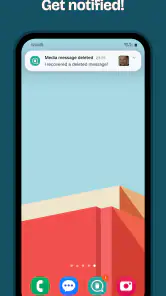
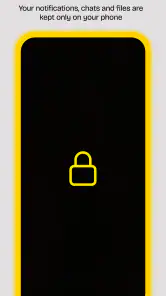
Analysis by Reviewed
I see WAMR as a useful safety net for notification-based chats, not a reliable time machine for every message someone removes. It can help when a brief text disappears before I have a chance to read it, but its usefulness depends on what reaches the phone in the first place. That trade-off is the key to deciding whether this communication app belongs on your device.
Set expectations before relying on it
The most important question is not simply whether WAMR can recover a deleted message, but whether your phone displayed enough of that message for the app to record it. If you hide notification previews on the lock screen, for example, you may protect private conversations from casual glances, but you also limit what a notification-based tool can preserve. I would choose which matters more for each chat rather than changing privacy settings across the phone just to capture everything.
This makes the app a better fit for people who want a second look at occasional alerts than for anyone expecting a searchable transcript of every conversation. I would not install it as a way to reconstruct an argument, keep a formal record, or retrieve an important instruction weeks later. For those jobs, saving the information directly or using the messaging service’s own chat history and backup options is the safer habit.
What it can—and cannot—catch
Because the app works from notifications, it is most helpful when a message arrives while notifications are enabled and visible. If a conversation is muted, a preview is hidden, or the phone does not show the message notification, there may be nothing for the app to save. I would treat it as a convenient record of some incoming alerts, not a complete archive or a guaranteed way to recover every deleted conversation.
That distinction also matters for media. Notification-based recovery is not the same as restoring an original file from a chat backup, and a media item may not be recoverable if it never generated a usable notification. If a photo or voice note is important, I still save it through the messaging app rather than relying on WAMR as the only copy.
A practical routine before you need it
My advice is to set it up before a message disappears, then check that notifications from the chats you care about are enabled and that their previews behave as you expect. A quick test with a harmless message can show whether the alert is being captured on your device. Notification settings and battery restrictions can affect background apps, so if captures become inconsistent, those are sensible places to check before assuming the app has failed.
For example, imagine a friend sends an address while I am away from my phone, then deletes the message before I open the conversation. If the alert appeared and was logged, WAMR may let me see what I missed. If the phone was offline, the chat was muted, or the notification preview contained no message text, that same situation may produce no useful record. It is a helpful fallback, but not a substitute for asking the sender to resend something important.
More From Our News Desk

Weather by Xiaomi Review: Clear at a Glance, Less Clear Up Close

X Under Pressure: Can It Recover When Posting Goes Wrong?

Clash of Clans Is Won Between the Battles

Android Auto Makes the Case for Quieter Car Software

MobiOffice: Transforming Mobile Productivity with Seamless Integration

EA SPORTS FC™ Mobile Soccer: Redefining Mobile Sports Gaming
A small test can prevent a big misunderstanding
I would test one message from a conversation I am comfortable using for that purpose, then check whether the captured notification contains the detail I need. This is more useful than assuming that a successful installation means every chat is covered. Try a short text first, and then separately check how a media notification appears; those are different cases, and a result for one does not prove the other will work the same way.
It is also worth checking the app after changing notification behavior. Muting a group, switching preview visibility, or adjusting background activity can change what reaches a notification-based log. If I depend on WAMR for a particular practical reason, I would make sure the relevant chat still generates a visible alert rather than waiting for a deleted message to discover that the setup has changed.
Where it fits among chat tools
Most messaging apps are designed around the conversation itself: their own chat history and any backup or restore options are the natural place to look for messages you still have permission and access to view. WAMR takes a different route by keeping track of notification content. That makes it handy for quick, accidental deletions, while a chat app’s built-in backup is usually the better choice when I need a more dependable record of conversations or want to move chats to another phone.
I would also be thoughtful about whose messages I am retaining. A deleted message may have been removed intentionally, and being able to see a notification copy does not make every use considerate. I would use the app for practical missed details, not as an excuse to monitor someone or to share private content. That personal boundary matters just as much as the technical limitation.
When a different approach is better
Compared with ordinary chat features, WAMR is a narrow, useful workaround: it can preserve some notification content, while a chat’s own history or backup is the more appropriate place to manage conversations over time. If I need to transfer chats to a new phone, verify a long exchange, or keep an important file in its original form, I would use the messaging app’s own tools or save the item myself. WAMR is most compelling when the need is immediate and small—a line of text that appeared and then vanished.
There is a trade-off between convenience and discretion. Keeping previews visible enough to capture useful text can expose more of a conversation in notifications, especially when the phone is sitting on a desk or shared space. If that makes me uncomfortable, I would keep previews hidden and accept that WAMR may have little to work with. That is a sensible choice, not a setup mistake; privacy can matter more than recovering an occasional message.
Ever been curious about those sneaky deleted messages that pop up in your notifications, only to vanish into thin air? I get it, I’ve been there too. That’s where WAMR swoops in like a superhero to save the day. This app is basically your personal detective, helping you uncover the mystery of deleted messages. Let’s dive into what makes this app tick!
Unmasking the Mystery
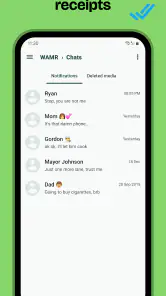
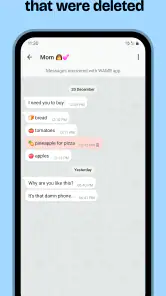
So, what exactly does WAMR do? Essentially, it acts like a backup service for all your notifications. Whenever someone sends you a message and then deletes it, this app has already saved a copy for you. It’s like having a superpower, allowing you to read messages that were never meant to be seen. From WhatsApp to Instagram and Facebook Messenger, it covers a variety of platforms, which is pretty cool if you ask me!
How It Works
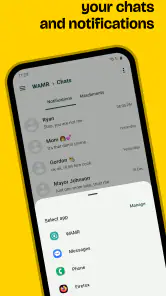
The way WAMR operates is quite ingenious. Once you install the app, it begins to log notifications from selected apps. Whenever a message is deleted, WAMR retrieves it from its notification log. The interface is user-friendly, making it easy for anyone to navigate and retrieve lost messages with minimal fuss. Plus, it’s got a simple setup process, so you’re good to go in just a few taps!
What to check in everyday use
In my view, the useful workflow is deliberately modest: let the app run for the chats where a missed detail would matter, then treat anything it captures as a prompt to reopen the conversation or ask for clarification. A recovered fragment can tell me that a message contained a location or a correction, but it may not provide the surrounding context. I would avoid acting on a clipped or ambiguous notification without checking with the sender.
This is particularly relevant in busy group chats. A quick update can appear between several replies, and seeing one saved line later may not explain which plan or person it refers to. WAMR can reduce the frustration of wondering what vanished, but it cannot guarantee that a fragment makes sense on its own. When timing or context matters, a quick follow-up in the original chat is still the more reliable next step.
Features You’ll Love
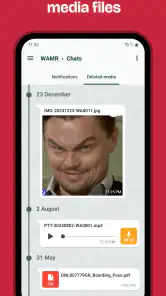
Aside from the obvious perk of recovering deleted texts, WAMR also lets you save media files like photos, videos, and even voice notes. This means you won’t miss out on any important media files that get deleted. The app also includes a ‘status downloader’, allowing you to save your friends’ stories and statuses directly to your phone. It’s like having a Swiss army knife for your digital communication needs!
Those extras are most useful when I already have a clear, legitimate reason to keep something, rather than as a substitute for asking someone to share it again. If a picture is needed for directions or a voice note contains an instruction, I would still save it from the original chat as soon as possible. A notification-focused tool may help in some cases, but it is not the same as having a complete, durable copy of the original media.
Now, let’s talk about the elephant in the room—privacy. I know, the concept of an app reading your notifications might sound a bit intrusive. However, WAMR doesn’t have access to the messages themselves; it only works with what appears in your notifications. So, in terms of privacy, you’re pretty much covered.
Privacy deserves a deliberate choice
I would still think carefully about what notification access means in my daily routine. Even when a tool is working from alerts rather than opening a conversation, notifications can contain personal details. Before enabling it, I would consider whether I am comfortable with that content being recorded on my device and who else can access the phone. If I share my device or keep sensitive chats, limiting which notifications appear is a reasonable priority.
There is also a social side to the feature. People delete messages for different reasons: a typo, a changed plan, or a wish not to leave a message visible. Recovering a notification can be convenient, but it does not tell me why the sender removed it. I would use the saved text to resolve a practical gap, not to challenge someone over every deletion. That restraint makes the tool feel more like a backup for missed information than surveillance.
My Personal Take
After using WAMR for a while, I must say it’s an app that I didn’t know I needed until I tried it. The convenience of not having to wonder what a deleted message said is a game-changer. While some may argue that it invades privacy, I believe it strikes a good balance between utility and security. Just remember to use it wisely!
Who I’d Recommend It To
I think it suits people who receive time-sensitive details in busy group chats, where a deleted address, meeting point, or quick correction can leave everyone guessing. It can also help someone who often puts the phone down during work and checks notifications later. If you mainly want a dependable archive, though, I would choose a messaging app’s own backup tools instead; WAMR’s notification-based approach is better for catching snippets than preserving a whole chat history.
There is a small habit that makes the app more useful: decide in advance which conversations genuinely matter, and keep their notifications configured to show the information you need. That avoids expecting a recovery tool to reconstruct content your phone never displayed. It also keeps the idea focused on practical misses rather than trying to capture every alert from every conversation.
Who should skip it
I would skip WAMR if I rarely allow notifications, keep previews hidden across the board, or need dependable access to a complete record. In those situations, the central thing it relies on—an incoming notification with useful content—is unavailable or intentionally restricted. Someone who wants fewer notifications rather than another way to retain them may also find that this solves the wrong problem. Turning off unnecessary alerts and asking a sender to repeat an important message can be a better fit.
For a parent, team, or anyone managing sensitive conversations, I would also weigh whether notification capture is appropriate on that particular device. The feature may be convenient, but convenience alone is not a reason to retain private snippets. A direct request to resend a detail is sometimes clearer and more respectful, especially when the deletion seems intentional or the message concerns something personal.
Choosing it with realistic expectations
WAMR is free to install, with optional in-app purchases listed at $3.60 per item. It is made by drilens, is rated for Everyone, and version 2.2 requires Android 5.0 or later. Its average rating is 4.4 from around 993,000 ratings, and it has over 50 million installs. Those figures suggest broad interest, but I would still judge it by whether notification capture works consistently with my own phone settings and the apps I use.
If you want to try it, I would begin with the free experience and see whether the notifications you care about are actually captured before paying for anything. The app is a poor fit if you keep message previews hidden for privacy, rarely allow notifications, or need guaranteed recovery of media and long conversations. In those cases, leaving the message unrecovered—or asking the sender to send it again—is more dependable than expecting WAMR to fill in what it never received.
In conclusion, if you’re someone who hates missing out on conversations or just loves being in the know, give WAMR a shot. It’s a nifty little app that makes sure you’re always in the loop, even when others try to keep you out of it. Happy snooping!
WAMR: Reveal deleted messages! Frequently Asked Questions
What Android version do I need to install WAMR?
WAMR requires Android 5.0 or later, so check your device’s operating system before downloading. It is an Android app rather than an iPhone app, and its recovery approach relies on Android notifications and device storage. Meeting the minimum requirement lets you install it, but it does not guarantee that every message or media file can be recovered.
Can I recover a message that was deleted before I installed WAMR?
No. WAMR can only save message content after it has been installed and set up to capture notifications. It cannot reach back and retrieve messages that were already deleted before the app began storing them. If you want it to help with future deletions, set it up first and make sure the relevant messaging app is allowed to show notifications.
Does WAMR work in the background, and can phone settings affect it?
WAMR relies on notifications being displayed and stored, so your phone’s notification settings can affect what it captures. Muted chats, disabled notifications, or a device being offline when a message arrives may prevent the app from saving it. Review notification access and the settings for the messaging apps you use so WAMR has a chance to record incoming content.
Does WAMR work on iPhone, or is it only for Android?
WAMR is an Android app, so it is intended for use on Android devices rather than iPhone. If you use Android, check that your device runs Android 5.0 or later before downloading. The app’s message-recovery approach depends on Android notifications and device storage, so it is not a general-purpose way to retrieve deleted messages across every phone.
Is WAMR free, and does it include in-app purchases?
WAMR is free to download, with in-app purchases listed at $3.60 per item. You can consider trying the app before deciding whether any optional purchase suits you. Its central function is to save message content and media when available, but recovery depends on notifications and files being captured before deletion rather than on paying to retrieve content that was never stored.
Pros
- Recovers deleted messages swiftly.
- User-friendly interface design.
- Supports multiple messaging apps.
- Doesn't require root access.
- Efficient notification system.
Cons
- May miss some messages occasionally.
- Advertisements can be intrusive.
- Limited to text messages only.
- Doesn't recover media files.
- Privacy concerns with data access.
- Category
- Communication
- Version
- 2.2