Wallet - Digital Card Wallet
- 419.00
- 4.7
- Installs
- 1.00M
- Price
- Free

Screenshots
Analysis by Reviewed
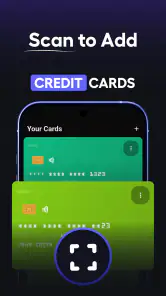
I like digital wallet apps when they solve a very ordinary problem without turning it into another complicated system to manage. Wallet - Digital Card Wallet takes that practical approach. It is a free tools app from Wallet Assistant for keeping credit cards, barcodes, and loyalty cards together instead of leaving them scattered through a physical wallet, screenshots, email messages, and separate retailer apps.
After spending time with it, my view is fairly clear: this is most useful as a tidy card organizer, not as a complete replacement for every payment or identity wallet. That distinction matters. If your main frustration is finding a supermarket loyalty barcode or a membership card at the checkout, the app has a sensible purpose. If you expect it to handle every bank-card function, travel document, ticket, or secure payment task, you should keep your expectations narrower.
The app is free to install, is suitable for Everyone, and runs on Android 7.0 or later. Its current version is 6.2.5, and it has grown to more than a million installs. A 4.7 average from around 23 thousand ratings suggests that its straightforward job is connecting with many users, although a high score should not be mistaken for proof that it fits every kind of wallet workflow.
What using the wallet feels like day to day
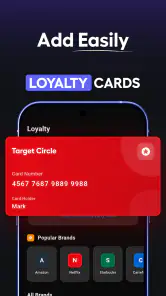
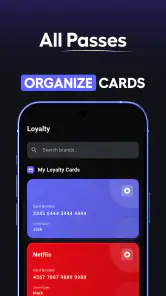
The first useful change is mental rather than technical: cards become items I can search for and open when I need them, rather than objects I have to remember carrying. I can group the cards I use regularly, keep less important ones out of the way, and open a barcode without switching between several retailer applications. That makes the app particularly appealing for people who collect loyalty cards but rarely want the full shopping app installed for each store.
A realistic example is a weekend grocery trip. I arrive at the checkout, open the wallet, select the supermarket card, and present its barcode. I do not need to search through a photo gallery or remember which email contains the membership number. The saving is small each time, but it becomes noticeable when the wallet contains cards for pharmacies, cafés, gyms, cinemas, transport services, and local shops.
It also works well for households where one person keeps several cards for occasional use. A card that is only needed once every few months is easy to forget in a physical wallet. Storing its barcode digitally gives it a predictable place. I found that the real benefit is not simply reducing plastic; it is reducing the number of tiny decisions made at a counter.
The credit-card side needs a more careful interpretation. The app can help organize card information visually, but I would not treat a stored card image or entry as a substitute for a bank’s official mobile application or a contactless payment service. Payment authorization, balance checks, fraud alerts, and card controls belong with the financial institution that issued the card. Wallet - Digital Card Wallet is better understood as a convenient reference point than as a banking tool.
Where the card collection becomes genuinely useful
The strongest part of the experience is consolidation. Instead of asking whether a particular retailer has its own mobile app, I can think in terms of one place for the cards I actually carry. That is especially helpful when a store’s application is slow to open, requires a separate account, or offers far more content than I need at the checkout.
Barcodes are also a practical choice for loyalty programs because they are usually the thing the cashier or scanner needs to see. I can focus on presenting the code clearly rather than navigating a promotional home screen. This makes the app feel lighter than a collection of full retailer apps, even though those official apps may still be better for coupons, order tracking, receipts, or account management.
One useful habit is to add cards in order of frequency instead of trying to recreate the entire physical wallet in one sitting. I would start with the cards used weekly, then add occasional cards after the basic routine feels comfortable. This keeps the main screen from becoming a long, confusing catalogue and makes the app faster to use under pressure.
Another small but important habit is to use consistent names. “Blue card” may seem obvious today, but it becomes unhelpful once several cards look similar. Naming entries by the actual store, organization, or purpose makes the search process more dependable. I also prefer checking a newly added barcode at home before relying on it at a busy checkout. That is not a criticism unique to this app; it is simply good practice whenever a physical card is replaced by a phone screen.
How it compares with ordinary alternatives
The traditional wallet still wins for immediate access when a phone battery is low, the screen is hard to read outdoors, or a business insists on a physical card. It also avoids the need to unlock a device and find an entry. For a small number of cards, carrying plastic may honestly be simpler.
Phone makers’ built-in wallets usually have a different focus. They are often strongest for supported payment cards, passes, and tightly integrated device features. Wallet - Digital Card Wallet makes more sense when your priority is a broad collection of barcodes and loyalty cards, particularly cards that do not fit neatly into a payment-focused system. The trade-off is that it may not provide the same level of integration as a native wallet for contactless payments or system notifications.
Official retailer apps sit at the other end of the comparison. They are usually the better choice when I need digital receipts, personalized offers, shopping history, delivery information, or account changes. Their weakness is fragmentation: each card may live in a different app. This wallet is more convenient for quick identification, while the official app remains more capable for deeper customer-service tasks.
A photo folder is the cheapest alternative and can work in a pinch, but it quickly becomes messy. Images have no clear context, old barcodes remain mixed with current ones, and finding the right picture takes attention. A dedicated card organizer gives the collection a purpose. The improvement is not that it performs magic; it is that the information is stored according to how I use it.
The limitations I would take seriously
The biggest weakness is the boundary between organizing a card and actually supporting the service behind it. A barcode in a wallet does not automatically provide the account features connected to that barcode. I may still need the retailer’s application or website for changing personal details, viewing points, claiming a digital coupon, or resolving a missing transaction. Anyone expecting one app to replace all those services may find the experience incomplete.
There is also a practical dependence on the phone. If the device is unavailable, out of power, locked behind a problem, or difficult to use in bright light, the digital collection is less convenient than a physical card. I would keep essential identification and any card that a particular business routinely requires in its original form. This is a sensible backup strategy, not a failure of the app.
Privacy deserves common sense too. A wallet containing payment-card details and loyalty identifiers should be treated as sensitive personal information. I would avoid adding data merely because it is possible, and I would use the device’s own security protections consistently. The app’s convenience is strongest when I store only what I genuinely need and avoid turning it into a complete record of every account I have.
The in-app purchase range runs from $9.99 to $69.99 per item. Since the app can be installed for free, I would begin with the unpaid experience and decide whether the additional value is relevant to my own routine before spending anything. A person with five occasional cards may never need to pay. Someone using the app as a central archive may judge extra options differently, but the decision should be based on daily usefulness rather than the number of cards that could theoretically be stored.
Another limitation is that a clean organizer still requires maintenance. Cards expire, memberships change, and businesses sometimes replace barcode systems. I would remove old entries rather than allowing them to accumulate. Once a wallet contains duplicates and outdated cards, the original time-saving advantage starts to disappear. The app reduces clutter only if I spend a little time keeping the collection accurate.
Who should use it, and who should skip it
I would recommend it to someone who carries many loyalty cards, frequently forgets which app contains a barcode, or wants a single Android location for cards that do not belong in a payment wallet. It is also a good fit for users who prefer a focused utility over a retailer’s larger shopping application. The Everyone age rating makes it broadly approachable, and the relatively old minimum Android requirement means it can serve people who are not using the newest phones.
It is particularly practical for occasional-use cards. A gym membership, library barcode, café rewards card, or event-related membership can be easy to misplace physically but still important when needed. Keeping these entries together can make the app valuable even if I open it only a few times each month.
I would be more cautious about recommending it as the primary tool for financial management. If your priority is tap-to-pay, transaction history, card freezing, spending controls, or bank authentication, use the payment and banking tools designed for those jobs. This app can sit beside them, but it should not be judged as though it were a full banking platform.
I would also skip it if you carry only one or two cards and already use a built-in phone wallet comfortably. Adding another place to look may create more friction than it removes. Likewise, people who regularly need retailer-specific coupons, receipts, and account services will probably spend more time switching to official apps than they save by using a central organizer.
Small workflow changes that make it better
I found that the best setup is selective rather than exhaustive. Add the cards used at physical counters first, then test them in normal conditions. Keep the most frequent cards easy to reach, and use clear labels that will still make sense when you are distracted or standing in a queue.
For a family member who is less comfortable with phone settings, I would keep the collection deliberately small and explain the difference between a loyalty barcode and a payment card. That prevents a common misunderstanding: showing a stored card entry may identify an account, but it does not necessarily complete a payment. Clear expectations make the tool more useful and reduce awkward surprises at checkout.
For travel or a temporary event, I would add only the cards needed for that period and clean them out afterward. This creates a short-term, purpose-built collection instead of allowing every occasional pass to remain permanently visible. The same approach works for moving house, changing gyms, or joining a seasonal rewards program.
Finally, I would keep a physical fallback for anything important. The app is convenient precisely because it makes the phone the access point, and every phone-based workflow benefits from a backup plan. That is especially true for cards that cannot be recovered quickly if the device is unavailable.
My verdict after weighing convenience against control
Wallet - Digital Card Wallet succeeds because it stays focused on a common nuisance: too many cards in too many places. Its strongest case is not replacing banks or retailer accounts, but giving barcodes and loyalty cards a consistent home. In that role, it can make everyday errands calmer and reduce the need to carry a thick physical wallet.
The 4.7 average and more than a million installs show that the straightforward idea has broad appeal, while the developer, Wallet Assistant, has kept the product positioned as a practical tools app rather than a general-purpose financial service. I appreciate that clarity, even though users still need to understand the difference between card organization and payment functionality.
I would install it if I regularly carry several loyalty cards or dislike opening a different retailer app for every barcode. I would keep official banking and shopping apps for the features they uniquely provide, and I would not discard essential physical cards immediately. Used with that sensible division of responsibilities, the app is a useful everyday companion and a worthwhile free starting point.
Pros
- Keeps loyalty cards organized in one place for quick access.
- Reduces the need to carry physical cards in your wallet.
- Simple interface makes adding and viewing cards straightforward.
- Useful for storing cards from many different retailers.
- Can help keep card details available when shopping on the go.
Cons
- Some cards may require manual entry or custom setup.
- Features and compatibility can vary between Android and iOS devices.
- Stored cards may not work if a retailer requires its official app.
- A lost or unsecured phone could expose saved card information.
- The app’s usefulness depends on how many merchants you regularly visit.

- Category
- Tools
- Version
- 6.2.5











