ViruSweep - Antivirus & Clean
- 221.00
- 3.8
- Installs
- 1.00M
- Price
- Free

Screenshots



Analysis by Reviewed
I spent time with ViruSweep as a practical Android utility rather than treating it like a flashy security suite. Its purpose is straightforward: help clean unwanted files, check for viruses, and make file handling easier. That combination puts it in the tools category, where usefulness depends less on presentation and more on whether it fits into everyday maintenance without creating extra work.
ViruSweep is made by Kadara Systems and is available free of charge. It is intended for everyone, and it supports Android 9 or later. The current release is 1.6.1.0, while the app itself was released on November 28, 2025. Those details make it a fairly accessible option for people using older supported phones as well as newer devices.
Its store presence is already substantial, with more than a million installs, although the average score sits at 3.8 from roughly 3,400 ratings. I read that combination as a useful warning to keep expectations realistic: enough people have tried it to make it relevant, but the rating does not suggest a universally smooth experience. My impression is that its appeal comes from combining several basic maintenance jobs in one place, not from replacing every security or file-management tool on a phone.
How ViruSweep fits into everyday phone maintenance
A simple starting point for cleaning and checking
The most convincing reason to try this app is convenience. Instead of jumping between a file browser, a security scanner, and whatever storage tools are already built into Android, you get a single utility focused on cleaning junk, scanning for threats, and managing files. That is particularly useful when you know your phone feels cluttered but do not know which category of content is responsible.
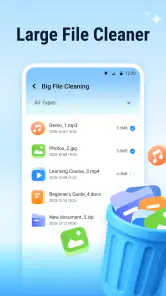
I would approach the cleaning function as a review step rather than an automatic cure. A good maintenance habit is to scan first, inspect what the app identifies, and only then remove items that are clearly unnecessary. Temporary files and forgotten downloads can be easy wins, but personal photos, documents, offline media, and messaging attachments deserve a slower look. The value here is not simply pressing a cleanup button; it is having one place that helps you decide what deserves attention.
That workflow is more useful than repeatedly deleting random files. For example, if a phone is nearly full before a trip, I would run the cleanup scan, review large or disposable material, then use the file-management side to locate items worth moving or deleting. This is a better use of the app than running it every day without checking the results. Storage problems are usually caused by accumulated habits, so the practical benefit comes from identifying those habits.
Where the antivirus role helps
The virus-scanning function gives ViruSweep a second purpose beyond storage maintenance. I see it as a convenient check for someone who installs applications from varied sources, receives files through messaging, or simply wants an extra review of the phone. It can also be reassuring after downloading an unfamiliar file, provided the user treats the result as guidance rather than an absolute guarantee of safety.
That distinction matters. No mobile scanner should encourage careless downloading, and a clean result should not become permission to ignore Android warnings or install from questionable sources. I would still keep the operating system updated, review an app’s requested access before installing it, and avoid files whose origin is unclear. ViruSweep is most sensible as one layer in a cautious routine, not as a substitute for basic security judgment.
The strongest everyday scenario is a shared or heavily used phone. A family device may collect screenshots, forwarded files, duplicate downloads, and old installers without anyone taking responsibility for them. Running a combined cleanup and security check can give the owner a clearer starting point. It is also useful before handing a phone to another person, because the owner can review clutter and suspicious files in the same maintenance session.
File management is more important than it sounds
The file-management element may be the part that determines whether the app stays installed. Cleaning tools often attract attention first, but people usually need help after the scan: finding the file, deciding whether it matters, and organizing what remains. If ViruSweep makes those steps easier, it can be more useful than a one-tap cleaner that only reports a result and leaves the user to finish the job elsewhere.
My advice is to use its file tools with a deliberate order. Start with downloads and large media folders, then review duplicate-looking items, and leave personal folders for last. This reduces the chance of deleting something important while still producing visible storage gains. A second helpful habit is to clean by purpose rather than by file type: old travel documents, abandoned installers, and forgotten exported videos are easier to judge as groups than as isolated filenames.
There is also a privacy angle to this workflow. A file manager can expose how much information has accumulated in places you rarely open. Before removing anything, I would check whether a document contains work details, identification information, or a backup copy that is not stored elsewhere. The app can help surface clutter, but the final responsibility remains with the person holding the phone.
What the free price means for the decision
Because ViruSweep is free, the value question is different from choosing a paid utility. There is no purchase price to recover, so the main cost is your time, attention, and willingness to review what it presents. That makes trying it relatively easy for someone who wants a combined maintenance tool, especially if the built-in Android tools feel scattered or too limited for their habits.
Free access does not automatically make every result valuable. If scans are slow, recommendations are unclear, or the interface makes safe deletion difficult, the app can still be a poor fit despite costing nothing. I would judge it by whether it shortens a real task: finding unnecessary files, checking a questionable download, or understanding why storage is disappearing. If it does not save effort, there is little reason to keep another utility installed.
It is also worth separating free usefulness from paid value. ViruSweep is free, so I would not evaluate it as a premium security subscription or assume that it offers the depth of a specialist product. Its strongest financial advantage is that a user can test its basic workflow without committing money. For someone who needs advanced protection, professional file recovery, or a fully established security ecosystem, the better choice may be a dedicated alternative even if that means considering a paid service.
Small habits that make the app more useful
One non-obvious tip is to run a scan at a meaningful moment instead of on autopilot. Before installing a major application, after returning from a trip, or when storage warnings appear, the results have a clear purpose. That makes it easier to judge whether the app actually helped. Routine scanning without a decision afterward can turn maintenance into background noise.
A second tip is to treat the cleanup result as an inventory. Rather than asking only how much space can be recovered, look for patterns: repeated downloads, oversized videos, abandoned installers, or folders created by apps you no longer use. Once you see the pattern, you can prevent the next buildup by changing where you save files or removing an unnecessary source of duplication.
A third trade-off involves convenience and control. A combined tool reduces the number of apps you need to open, but a specialist file manager may offer a more familiar folder structure, while a dedicated security product may provide more focused protection. ViruSweep makes the most sense when reducing app switching matters more than having the deepest possible controls in each individual area.
Where the experience may disappoint
The 3.8 average rating suggests that the experience is not flawless for everyone, and I would not dismiss that signal. Utility apps are especially sensitive to confusing scan results, overly aggressive cleanup suggestions, or interruptions that make a simple task feel complicated. Even a useful feature can become frustrating if the app does not explain why a file is being flagged or what will happen after removal.
Another limitation is the risk of false confidence. A person may assume that combining antivirus and cleanup functions means the phone is comprehensively protected. It does not remove the need for careful installation choices, system updates, backups, and sensible file handling. Users who want a security-first product with extensive controls should compare ViruSweep with a dedicated antivirus tool instead of assuming that a broader feature list means stronger depth.
It may also be the wrong choice for someone who already has a comfortable routine. Android’s own storage controls, a trusted file browser, and an established security solution may already cover the user’s needs. Adding ViruSweep could create overlapping scans and multiple recommendations for the same files. In that situation, the free price is not enough reason to add another layer if it makes decisions less clear.
Who is most likely to get value?
I would recommend trying ViruSweep to people who want one accessible place for basic phone upkeep. It suits users who regularly download files, share media, manage documents, or feel unsure about what is consuming storage. It is also a reasonable starting point for someone using Android 9 or later who wants a free tool rather than a complicated security package.
It can be particularly helpful for less technical users, but only if they are willing to read before deleting. The best experience is not “scan and remove everything”; it is “scan, understand, then clean.” If you are helping a relative manage a crowded phone, the combined layout may make the conversation easier because you can address storage and suspicious files in one session.
I would skip it if you need advanced security analysis, highly specialized file operations, or a proven replacement for a complete security suite. I would also skip it if your phone is already well organized and your current tools are reliable. Installing a maintenance app should solve a recurring problem, not create another notification source or another place to check.
My verdict on trying ViruSweep
ViruSweep delivers a sensible free package for basic Android maintenance: cleanup, virus scanning, and file handling in one tool. I like the idea most when it is used for specific moments, such as investigating low storage or checking an unfamiliar download, rather than as a magical automatic optimizer. Its support for Android 9 and later also keeps the entry barrier fairly low.
The balanced conclusion is that this is worth trying, not blindly trusting. The free price removes the financial risk, while the 3.8 average rating is a reminder to pay attention to how clear and controlled the workflow feels on your own phone. If it helps you locate clutter and make safer file decisions, it earns its place. If it duplicates tools you already trust or encourages one-tap deletion without enough explanation, uninstalling it is the better choice.
My recommendation is therefore conditional but positive: test it during a real maintenance task, review every cleanup suggestion, and keep it only if it makes that task simpler. The real value is controlled convenience, not a promise that one app can replace every Android security and storage tool. For casual users who want a free all-round utility, that can be enough; for demanding users, a dedicated alternative will likely remain the stronger option.
Pros
- Quick scans help identify suspicious files and unwanted apps.
- The cleaner can remove leftover files and reclaim storage space.
- Simple interface makes core security tools easy to find.
- Useful for checking installed apps before keeping them on your device.
- Lightweight design should work well on many older Android phones.
Cons
- Some features may be restricted behind in-app purchases or subscriptions.
- Cleaning suggestions should be reviewed to avoid deleting useful files.
- Antivirus results can vary and should not replace safe browsing habits.
- Frequent notifications may become distracting for some users.
- Performance and battery impact may increase during deep scans.

- Category
- Tools
- Version
- 1.6.1.0











