Video Downloader All HD player
- 25.00
- 4.1
- Installs
- 1.00M
- Price
- Free

Screenshots
Analysis by Reviewed
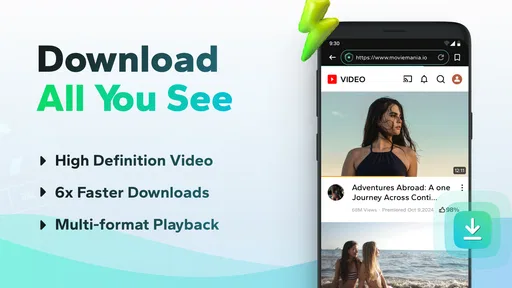
I tend to judge a video tool by what happens when a download does not go smoothly, not just by how quickly it handles an easy link. Video Downloader All HD player is a free Android tools app from June's DEV, and its appeal is simple: it brings video downloading and playback together. That can be handy when I want to keep a permitted clip available offline, but it is worth approaching it as a practical utility rather than a guaranteed way to save every video on the web.
Getting past the common sticking points
The first snag with any downloader is often the source, not the button you tap. A link may open a webpage rather than a video file, or the site may limit downloading. I would start with a video I have permission to save and a direct, ordinary link, then check whether the page itself plays normally. If it does not, repeatedly pasting the same address into a different screen is unlikely to help.
It also helps to separate “can play” from “can download.” The app’s purpose includes handling different video formats, but a format being playable does not mean every website will provide a downloadable copy. Some services restrict saving or use protected playback. For those, the service’s own offline option is the better route; I would not treat a third-party downloader as a workaround for access restrictions.
Small setup checks that save time
Before troubleshooting the app, I check the basics: the device has enough free space, the internet connection is stable, and the pasted address is complete. If a download stops, I first try a short, permitted clip on a reliable connection. That simple test helps distinguish a general connection or storage problem from an issue tied to one particular page.
Video quality is another practical trade-off. A higher-resolution file can look better on a larger screen, but it also takes more storage and can take longer to transfer. When I only need something for a commute or a quick reference, choosing a smaller file where the app offers that choice is more sensible than saving the largest version by habit. Keep in mind that the source itself determines what quality is available.
A calmer way to recover a failed download
If a download does not appear, I would avoid starting several copies at once. Check the app’s saved-video area and the device’s available storage first, then retry the same link once after confirming the connection. For a video that plays in a browser but will not save, try another permitted source rather than assuming the player or the phone is broken. This keeps troubleshooting focused and avoids filling storage with duplicate attempts.
For everyday use, I can see this being useful when I have a video I am allowed to keep for a class, a work reference, or a trip with unreliable reception. I would save it ahead of time, confirm it appears among the downloaded items, and open it in the player before leaving Wi-Fi. That last check matters: it confirms the saved copy is actually usable offline instead of leaving me to discover a problem on the train.
More From Our News Desk

Weather by Xiaomi Review: Clear at a Glance, Less Clear Up Close

X Under Pressure: Can It Recover When Posting Goes Wrong?

Clash of Clans Is Won Between the Battles

Android Auto Makes the Case for Quieter Car Software

MobiOffice: Transforming Mobile Productivity with Seamless Integration

EA SPORTS FC™ Mobile Soccer: Redefining Mobile Sports Gaming
Where it fits among video apps
Compared with a regular video player, this app is more useful when saving a compatible online video is part of the task; a dedicated player may be a better choice if I mainly want extensive playback controls or a carefully organized media library. Compared with a streaming service’s own offline feature, a downloader is less suitable for restricted content and does not replace the service’s permissions or access rules. I would choose the simplest option that supports the source legitimately.
The combined download-and-play approach can reduce app switching, but it does not remove the usual limits of web downloads: the source may block saving, the connection may interrupt a transfer, and large files can consume space quickly. I would also keep a separate copy of anything important rather than relying on one app as the only place a useful video lives. Those are ordinary precautions, not reasons to avoid the app altogether.
On Android, it is listed for devices running version 7.0 or later, and its Everyone age rating makes it broadly suitable from an age-classification standpoint. The app is currently at version 1.3.5. It has an average rating of 4.1 from around 1.1 thousand ratings, with about 25 written reviews, and has passed 1 million installs. Those figures suggest it has found an audience, though I would still judge it by whether it handles the sites and files I actually use.
Seamless Video Downloading
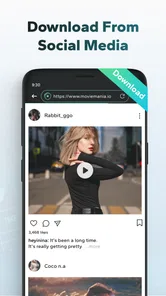
Alright, so the first thing you’ll notice about the Video Downloader All HD player is how straightforward it is to use. You don’t need to be a tech guru to figure it out. Simply pop in the link of the video you’re eyeing, and the app does its magic. Voila! You’ve got yourself a video saved right on your device. The user interface is super friendly too, so you won’t find yourself lost in a sea of buttons and options. Just a few taps, and you’re good to go!
Formats and Resolutions Galore
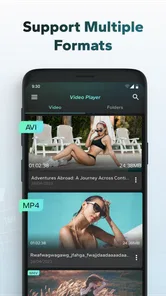
Let’s talk about versatility. This app supports a wide range of formats, so whether it’s MP4, AVI, or any other fancy video format, Video Downloader has got you covered. Plus, if you’re someone who’s picky about video quality, you’ll appreciate the option to download in different resolutions. Whether it’s HD or something more data-friendly, the choice is yours!
Built-in HD Player
Now, here’s where it gets even cooler. Not only does this app let you download videos, but it also comes with its own HD player. This means you don’t have to juggle between different apps to watch your saved content. The built-in player supports all the popular formats and ensures your viewing experience is as smooth as butter. It’s like having a mini home theater in your pocket!
Easy Management and Sharing
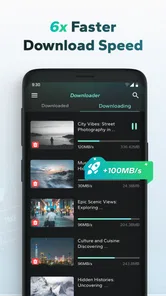
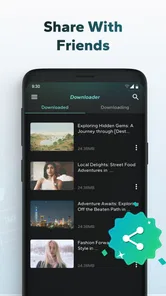
Managing your downloaded videos is a breeze with this app. It organizes your content neatly, so you can easily find what you’re looking for without any fuss. Plus, if you’re the generous type who loves sharing, the app facilitates easy sharing of your saved videos with friends and family. It’s all about spreading the video love!
Choosing a sensible first test
I would not make the first trial a long, high-quality video or a link from a complicated page. Start with a short clip you are permitted to save, and check the result from beginning to end. That small test tells you more than repeatedly trying different links: you can see whether the address is recognized, whether the file appears where expected, and whether playback works without a connection. If that basic workflow is reliable, then it makes sense to use the app for larger or more important files.
One useful habit is to decide in advance what the saved video is for. A clip you want to consult briefly may not need the largest available resolution, while something you plan to watch on a bigger screen may justify the extra space. I would also give saved files recognizable names if the app or device allows it, especially when keeping several clips for a class or trip. A little organization at the point of saving is easier than trying to identify a row of similar thumbnails later.
Who will get the most from it
This is most appealing to someone who occasionally needs an offline copy of an openly available, compatible video and prefers not to move between a downloader and a separate player. A student reviewing a permitted lesson clip, for example, could save it while connected at home, verify playback, and use the local copy during a commute. The same logic works for a personal reference video in a place where reception is unreliable. The key is having a legitimate source and a simple need, not expecting the app to override a site’s rules.
I would be less enthusiastic about recommending it to someone whose viewing is almost entirely inside subscription streaming services. Those services generally provide their own ways to access eligible content offline, and using their official controls is clearer and more dependable than trying to move protected videos elsewhere. It is also not my first pick for someone who wants a full media-center experience, detailed library sorting, or a broad set of playback controls. A dedicated player may serve those needs better, even if it does not combine downloading and viewing.
What to check when a file will not play
A saved item that refuses to open does not automatically mean the whole app has failed. I would first confirm that the download finished rather than leaving a partial file, then try another ordinary video that is known to be compatible. If only one item fails, the source file or its format may be the issue; if several unrelated files fail, checking available storage and restarting the app or device is a reasonable basic step. I would avoid deleting other saved videos until I know whether they are backed up elsewhere.
Playback can also depend on the file itself, not simply the player’s label. “HD” describes a quality level, but it does not guarantee that every encoding or source will behave identically on every device. For a clip that matters, test it before relying on it for a presentation or journey. That is a small precaution, but it prevents a last-minute scramble when the original page is no longer convenient to reach.
Keeping downloads manageable
Offline convenience has a storage cost that is easy to overlook. I would periodically review what I have saved and remove clips I no longer need, while keeping a separate copy of anything important. This is especially worthwhile if I choose higher quality or collect several videos for one trip. A downloader is useful as a temporary bridge between an online source and offline viewing; it should not automatically become the only archive for material I cannot replace.
There is also a practical difference between a download that is merely present and one that is ready to use. Before leaving a dependable connection, I would open the saved video and skip through it briefly to confirm it loads beyond the opening moment. That check can expose an incomplete transfer or a file that does not behave as expected. It is more useful than relying only on a completion message, because the real goal is dependable playback later.
My practical verdict
In conclusion, if you’re someone who values having your favorite videos accessible at all times, Video Downloader All HD player is definitely worth a shot. It’s simple, efficient, and packed with handy features that make video downloading and viewing a delightful experience. So, go ahead and give it a whirl – who knows, it might just become your go-to app for all things video!
I would recommend it to someone who wants a straightforward tool for compatible, permitted downloads and appreciates having a player alongside them. If you mainly watch protected streaming content, need advanced library controls, or want a downloader that succeeds with every site, this is not the right fit. My best advice is to test it with one small video you are allowed to save, check that it plays offline, and then decide whether it earns a place in your routine.
Video Downloader All HD player Frequently Asked Questions
Can I use Video Downloader All HD Player to watch saved videos without an internet connection?
Yes. The app is designed to download videos to your device for offline viewing, so you can play saved content without staying connected to the internet. Its playback feature supports various video formats, making it useful as both a downloader and a player. Make sure a video has finished downloading before you rely on it offline.
What is Video Downloader All HD Player and its primary function?
Video Downloader All HD Player is a versatile application designed for downloading and playing high-definition videos from various online platforms. Its primary function is to allow users to save videos directly to their devices for offline viewing. The app supports a wide range of video formats and provides users with an integrated HD playback experience, ensuring high-quality video reproduction.
How do I download videos using Video Downloader All HD Player?
To download videos using Video Downloader All HD Player, you need to browse your desired video through the app’s built-in browser. Once you find the video, the app will automatically detect its download link. You can then choose the preferred video quality and format before initiating the download process. The downloaded videos are stored in your device’s storage, accessible through the app itself.
Does Video Downloader All HD Player support different video formats?
Yes. Video Downloader All HD Player is intended to play various video formats, so it can serve as a single place to manage downloaded clips and watch them. This can be convenient if you have videos saved in different formats rather than relying on separate playback apps. The app’s main purpose also includes downloading videos from the internet.
Is Video Downloader All HD Player free to use, or does it require a subscription?
Video Downloader All HD Player is available for free with basic features, allowing users to download and play videos without any cost. However, the app may offer optional in-app purchases or a subscription model to unlock premium features such as ad-free experience, faster download speeds, or enhanced video quality options. Users can decide to upgrade based on their needs.
Pros
- Supports multiple video formats.
- Fast download speed.
- User-friendly interface.
- No sign-up required.
- Compatible with most devices.
Cons
- Contains ads.
- Limited editing features.
- Requires internet connection.
- Potential copyright issues.
- No support for 4K videos.