Video Call
- 1.01K
- 4.1
- Installs
- 10.00M
- Price
- Free

Screenshots




Analysis by Reviewed
When I judge a calling app, I look beyond whether it can put two faces on screen. I want to know whether someone can find their way around it, manage a conversation comfortably, and use it in the situations that actually come up in everyday life. Video Call, from Apps by Forbis, is a free communication app for Android, and its appeal is its straightforward focus: making a video conversation feel like a simple thing to start rather than a technical project.
A simple route into a conversation
The name sets a clear expectation, and that focus can help people who do not want to learn a large messaging platform just to make a face-to-face call. In my view, a simple calling tool is most useful when the person on the other end can also find their way around it; a confusing setup for either caller can turn a quick check-in into a support session. I would still suggest trying it together before relying on it for an important appointment, especially if one caller is less comfortable with smartphones.
Video calling can also make communication more inclusive than voice alone in some situations: facial expressions and gestures add context, and seeing someone can make a distant conversation feel more personal. That does not make video the right format for everyone. A person who prefers text, needs to conserve mobile data, or cannot comfortably keep a phone positioned may find a regular message or voice call easier.
Why Everyone’s Buzzing About Video Call Apps
Let me start by saying that Video Call apps are not just about seeing the other person’s face. It’s about the experience – the laughs shared, the moments captured, and the memories created. Whether it’s a quick catch-up with your best pal or a virtual meeting with your team, the convenience is unbeatable.
Simplicity at Its Best
The first thing you’ll notice when using these apps is how incredibly user-friendly they are. Seriously, even my grandma can navigate through them with ease! The interface is typically clean and straightforward, making it easy for anyone to set up a call in seconds.
There is a practical way to check whether that simplicity holds up for your household: ask a relative to start a call without coaching, then notice where they hesitate. If they need someone else to operate the phone every time, a familiar messaging app they already use may be a better fit. For callers with low vision, I would also test the screen in the lighting where calls usually happen and check whether important controls are easy to distinguish before a time-sensitive conversation.
Crystal Clear Quality
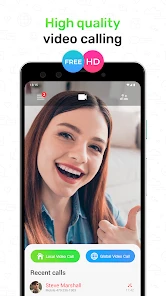
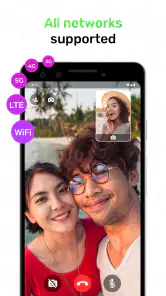
Now, let’s talk about quality. Most apps offer HD video and audio, ensuring that your conversations are as clear as a sunny day. Gone are the days of pixelated images and choppy sound. Plus, many apps automatically adjust to your internet speed, providing a seamless experience even if your Wi-Fi decides to take a nap.
You May Like

Clash of Clans Is Won Between the Battles

Android Auto Makes the Case for Quieter Car Software

MobiOffice: Transforming Mobile Productivity with Seamless Integration

EA SPORTS FC™ Mobile Soccer: Redefining Mobile Sports Gaming

How Microsoft OneDrive Became a Mobile Productivity Giant

How Google Translate Breaks Language Barriers Effortlessly
In real use, a stable connection matters more than a promise of sharp video. If a call becomes difficult to follow, turning off video or moving closer to a reliable Wi-Fi connection can be a sensible fallback; a standard voice call may be kinder to a weak connection or a limited data plan. For someone who relies on lip-reading, I would avoid treating any mobile video call as a guaranteed substitute for an agreed communication method, since picture quality and a steady camera position can change from one moment to the next.
All the Bells and Whistles
These apps come packed with features that make your calls more fun and engaging. From virtual backgrounds and filters that add a touch of whimsy to your calls, to screen sharing options that make presenting a breeze, there’s no shortage of tools to enhance your experience.
Before using any unfamiliar calling app for a private or work conversation, I recommend checking its current settings and deciding what information you are comfortable sharing. I would not assume that a particular effect, sharing tool, or privacy protection is available in this specific app just because other video services offer it. If a call is mainly about showing a document, a service designed for meetings may be more convenient than a basic person-to-person call.
And let’s not forget about the security features. With end-to-end encryption becoming a standard, you can chat away knowing your conversations are private and secure.
Stay Connected, No Matter Where You Are
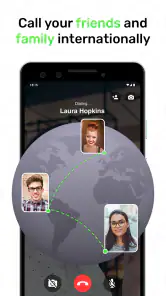
One of the biggest perks of video calling is the ability to connect with anyone, anywhere. Whether you’re catching up with a friend who’s halfway across the world or attending a work meeting from the comfort of your couch, distance is no longer a barrier.
A realistic use is a quick family check-in: one person props up the phone at the kitchen table while another joins from home, so they can show a meal or talk through a small everyday problem face to face. I would set the phone on a stable surface and choose a quieter, well-lit spot before starting. That small bit of preparation reduces the need to hold the device, which can help with hand fatigue, and makes it easier for both people to follow the conversation.
Plus, with the power of mobile apps, you can take your calls on the go. Just imagine chatting with your buddy while hiking up a mountain – now that’s cool!
Who it suits in everyday life
I see the strongest case for Video Call in a simple, one-to-one check-in where both people want a visual conversation and are comfortable trying a separate calling app. It may suit relatives who do not need a shared workspace or a busy messaging inbox, or friends who want to show something in the room rather than describe it over the phone. The best test is practical: install it before the moment you need it, and make a brief call while both people have time to work through any setup friction.
For example, imagine helping a family member decide whether a plant on their windowsill needs attention. A voice call would require a long description; a video conversation lets them point the phone toward the leaves while you ask questions. Yet the call is only useful if the other person can position the device and see the screen comfortably. A stand, shelf, or other stable surface can make the exchange easier than holding the phone throughout.
I would be less inclined to choose it as the only communication tool for a group that needs coordinated meetings, shared documents, or a particular accessibility feature. The category includes all-in-one messaging apps that people may already know, as well as meeting services built for group discussions. A focused calling app can be easier to approach, but it is not automatically the most convenient choice if everyone must first install and learn something new.
Readability, controls, and the room around you
Ease of use is not just a matter of how many buttons appear on screen. It also depends on whether the caller can recognize the controls, reach them without awkward hand movement, and understand what is happening while someone is speaking. I would try the call with the phone in the position the user will actually use, rather than judging it while holding the device close and looking for settings at leisure.
That matters for people with limited dexterity, tremors, or fatigue. A short call can be manageable in the hand but uncomfortable over a longer conversation, so placing the phone on a steady surface is a useful adjustment. If a participant has difficulty tapping small controls, practise ending and answering a call in advance; discovering where those actions are during an urgent conversation adds avoidable stress.
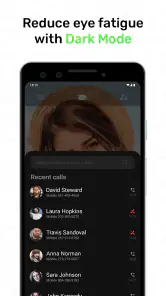
Lighting and background noise can change the experience just as much as the app itself. A window behind the caller may make a face harder to see, while a television or busy room can make speech difficult to follow. I would choose light that falls on the speaker’s face and reduce nearby noise where possible. These simple changes do not guarantee good access, but they help reveal whether the setup is workable for the people on the call.
Where it fits—and where it doesn’t
Video Call has a 4.1 average from around 32,000 ratings and has passed 10 million installs, so it has found a substantial audience. It is rated for Everyone, and its current version is 1.3.8; the app was released in 2016. Those details make it easy to identify, but they do not tell me whether it will suit a particular person’s vision, hearing, dexterity, or preferred way of communicating. I would judge that by trying a short call with the people who will use it most.
Compared with familiar messaging apps that combine chat, contacts, and calls, a focused video-call app may feel less cluttered if all you want is a direct conversation. The trade-off is that people may need to switch between apps for messages or other tasks, and friends or relatives may not want another app on their phone. For team meetings, group coordination, or calls where captions and other specific access tools are essential, I would choose a service whose current features I can verify meet those needs.
Another trade-off is habit. People are more likely to answer a call through a tool they already use than to remember a separate app, particularly when a conversation is spontaneous. If your circle is willing to use Video Call, its narrow purpose can be a plus; if not, the effort of persuading everyone to switch may outweigh the benefit. I would settle that with one low-stakes test call rather than assume that a clean purpose alone makes it the right shared choice.
A practical choice with limits
The app is free to download, though it offers in-app purchases ranging from $3.49 to $18.99 per item. It requires Android 5.0 or later. I would check the purchase details before paying for anything and make sure the version available for your device is compatible. It is developed by Apps by Forbis, and its basic purpose makes it most appealing to people who want a direct mobile video conversation rather than a full work suite.
Before making it part of a regular routine, I would also consider the setting in which calls happen. A quiet room and a stable Wi-Fi connection are often easier than a noisy public place or a patchy mobile connection. If a call needs to happen while travelling, keep the conversation brief and avoid relying on video when attention needs to stay on walking, driving, or another task. In that moment, a message or ordinary voice call is the safer and more practical option.
For accessibility, the most useful test is a short call in the actual conditions you expect: try the controls with one hand, check whether the screen remains readable, and listen from the room where you normally take calls. If you need captions, sign-language relay, dependable group controls, or a particular privacy standard, confirm those needs with the app and the people you plan to call before depending on it. A voice call or text conversation may be a more comfortable alternative on days when video is tiring or impractical.
My inclusive verdict
I would recommend giving Video Call a try if you want a direct Android video conversation and the people you call are willing to use it. Its appeal is its narrow focus, not a promise that it can replace every way of communicating. A brief trial can tell you more than a feature checklist: can each person start and end a call, see and hear comfortably, and keep the phone positioned without strain?
If those basics work for your household, it can be a useful option for familiar, low-pressure conversations. If someone needs a specific accessibility support, prefers text, or finds video tiring, choosing a different format is not a failure; it is simply the better fit. In conclusion, if you haven’t yet explored the world of Video Call apps, you’re seriously missing out. They offer a perfect blend of convenience, quality, and fun, making them a must-have in today’s digital age. So, go ahead, download one, and start connecting like never before!
Video Call Frequently Asked Questions
Can I use Video Call without paying for the download?
Video Call is free to download, so you can try the communication app without paying upfront. Optional in-app purchases are available, however, and you can review their prices before confirming a purchase. If you prefer not to spend money in the app, check the purchase controls on your device and avoid selecting paid options.
Who develops Video Call, and what kind of app is it?
Video Call is a communication app developed by Apps by Forbis. Its simple purpose is to provide video calls for smartphones and tablets, making it an option for people who want to connect through a mobile device. The app’s short description is simply “Video Call,” while its summary highlights straightforward, secure, high-quality calling.
Is Video Call available for both Android phones and tablets?
Video Call is a communication app designed for smartphones and tablets, so it can suit people who want to make video calls on a compatible mobile device. Before downloading, check that your device meets the Android version requirement and that you have a reliable internet connection. The app is free to download, with optional in-app purchases.
Who makes Video Call, and is it suitable for all ages?
Video Call is developed by Apps by Forbis and is rated Everyone, making it suitable for a broad audience. It is a straightforward communication app for people who want to connect through video calls. As with any calling app, younger users should follow their family’s guidance about sharing contact details and communicating with people they know.
What are the system requirements for using the Video Call app?
The Video Call app is available for Android devices running version 5.0 or later. It is designed for smartphones and tablets, and a reliable internet connection is important for making video calls. Check your device’s operating system before downloading so you can confirm that it meets the minimum requirement.
Pros
- High-quality video resolution
- User-friendly interface
- Cross-platform compatibility
- Group video calls available
- Strong security features
Cons
- Requires stable internet connection
- Consumes a lot of data
- Limited free features
- May have occasional glitches
- Notifications can be intrusive

- Category
- Communication
- Version
- 1.3.8











