VeePN - Secure VPN & Antivirus
- 937.00
- 4.3
- Installs
- 5.00M
- Price
- Free

Screenshots
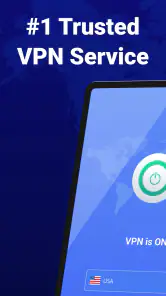
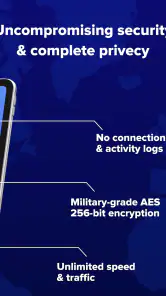
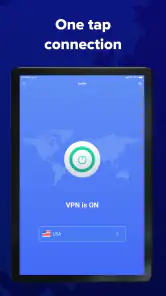

Analysis by Reviewed
When I need a quick privacy layer on an Android phone, I want the process to be simple: open one app, make a connection, use the internet normally, and disconnect when I am done. That is the situation in which I tested VeePN - Secure VPN & Antivirus, a free tools app from VeePN Corp. It is aimed at people who want a more private connection without first learning the details of VPN protocols, server configuration, or network troubleshooting.
My first impression was that it is built for convenience rather than for users who want to tune every technical setting. The app’s store summary focuses on fast private browsing and a large proxy-server network, while the short store description is simply “VeePN.” That makes the product’s main promise easy to understand, but it also means the real question is practical: does it fit the way you actually use your phone?
After spending time with it, I see a useful everyday tool with a clear strength: it reduces the effort involved in starting a VPN session. I also see an important limitation. A VPN can protect the connection between your device and the VPN service, but it does not make every online activity anonymous or automatically safe. VeePN is most helpful when used as one part of a sensible privacy routine, not as a substitute for careful browsing, strong account security, or trustworthy websites.
From an untrusted connection to a usable private session
Starting with the right situation
The most convincing use case is a familiar one. Imagine I am working from a café, using shared Wi-Fi to check messages, review a document, and sign in to a few accounts. I do not want to spend time comparing network names or wondering how much the local connection can reveal. In that moment, I open VeePN, begin a connection, and then carry on with the task.
That workflow is more valuable than it sounds because the app removes a decision that many people postpone. Instead of treating a VPN as something to configure only after a problem appears, I can make it part of the routine whenever I am on a network I do not control. The same approach works in a hotel, at an airport, in a shared office, or when I am using a borrowed connection at someone else’s home.
The app is also a reasonable fit for people who move between mobile data and Wi-Fi during the day. The useful habit is to think in terms of the connection I am about to use, rather than assuming that a familiar phone automatically makes every network trustworthy. VeePN does not remove the need to notice what I am doing, but it gives me a clear privacy step before I begin.
Opening the app and choosing a connection
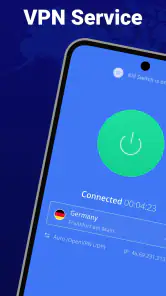
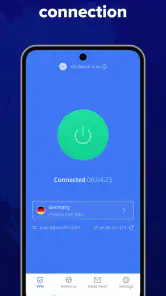
The basic flow is intentionally approachable. I launch the app, review the connection screen, and start the VPN session instead of working through a long manual setup. A new user does not need to understand the difference between a proxy and a VPN before trying the central function. That low entry barrier is one of the strongest reasons to consider it over a more technical alternative.
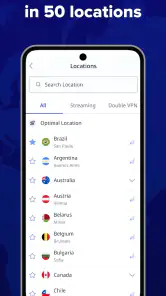
VeePN presents access to a broad collection of secure proxy servers, described in the store material as more than 2,500. I would not treat that figure as a guarantee that every server will feel equally fast or equally suitable at every hour. Server choice is still a trade-off: a nearby option will often be the sensible starting point for ordinary browsing, while a distant location may be useful for a particular regional need but can add delay.
My practical advice is to begin with the app’s simplest connection choice and only change location when there is a clear reason. Constantly jumping between servers can make troubleshooting harder because I no longer know whether a slow page comes from the website, the network, or the selected VPN route. A stable connection is usually more useful than chasing a theoretical best location.
What happens during ordinary use
Once the connection is active, I use the phone much as I normally would. Web pages, account sign-ins, messaging, and general browsing continue through the VPN connection. The benefit is not a dramatic new interface or a visible feature in every app; it is the quieter change in how traffic travels from the device to the internet.
This is where expectations matter. VeePN can be useful for reducing exposure on an untrusted network, but it cannot prevent me from entering a password into a fake website, downloading a harmful file, or sharing too much information with an account I already use. The presence of a VPN indicator should never become a reason to ignore the address of a website or the source of an app.
I also avoid assuming that “unlimited internet speed” means the connection will always be as fast as a direct connection. Encryption, routing, distance, congestion, and the original network all affect the experience. For reading, messaging, and routine work, the difference may be easy to accept. For demanding video calls, large uploads, or latency-sensitive games, I would test the connection before relying on it.
The handoff between the app and other apps
The most important handoff is the one from VeePN to the rest of the phone. I start the session in the VPN app, then return to the browser, mail client, social app, or work tool that I actually need. This separation is convenient because I do not have to change my normal apps, but it can also make the privacy state easy to forget.
For that reason, I check whether the VPN is still connected after switching networks or returning to the phone later. A dropped session can quietly return me to the ordinary connection. I also disconnect when I no longer need the VPN, especially if I am troubleshooting a website or using a service that behaves differently when traffic comes through a VPN. This small habit prevents confusion and keeps the workflow deliberate.
Another useful handoff occurs when a website asks me to verify my identity again. Changing the apparent network location can trigger extra security checks, temporary access restrictions, or a request to sign in again. That is not necessarily a fault in VeePN; it is a normal reaction from services that monitor unusual connection patterns. If an account is especially sensitive, I prefer a consistent server location rather than changing locations repeatedly.
Everyday outcome: privacy without a technical project
For a short session on public Wi-Fi, the outcome is straightforward. I can connect before opening work or personal accounts, complete the task, and disconnect afterward. The app earns its place when that sequence happens often enough that a complicated VPN client would become a burden.
This is also where the free entry point matters. VeePN is listed as free to install, so I can evaluate the basic workflow before deciding whether it belongs in my regular toolkit. The app includes in-app purchases ranging from $2.99 to $199.99 per item, which makes it important to read the purchase screen carefully and decide whether any paid option matches my needs rather than treating an upgrade as automatic.
The product has reached more than five million installs and holds a 4.3 average from roughly 103,000 ratings, with 937 written reviews. Those figures suggest that the simple VPN workflow appeals to a substantial audience, although popularity alone does not tell me whether the connection will suit my location, phone, or preferred services. I still judge it by the reliability of my own sessions.
Where the workflow becomes less comfortable
The first point of friction is performance. A VPN adds another step between the phone and the destination, so a server that is busy or far away may produce slower loading, buffering, or delayed responses. If I need the lowest possible latency, a direct connection or a specialized network tool may be a better choice. VeePN’s broad server selection gives me options, but it does not eliminate the underlying physics of routing traffic.
The second issue is compatibility. Some banking, streaming, shopping, and workplace services may treat VPN traffic differently from ordinary traffic. A page might ask for additional verification, refuse a connection, or show content based on the VPN server rather than my actual location. In those cases, I may need to disconnect temporarily or select a different server. That extra step is manageable, but it is still friction that a user should expect.
The third issue is attention. A one-tap connection is convenient, yet convenience can encourage overconfidence. I would not use VeePN as proof that an unknown download is safe, that a suspicious message is legitimate, or that an account cannot be tracked through its own login history. The app improves one part of the connection path; it does not erase the rest of the internet’s risks.
How it compares with the usual alternatives
Compared with using no VPN at all, VeePN is the obvious step up when I am connected through a network I do not manage. It gives me a dedicated privacy workflow instead of asking me to trust every public hotspot. For casual users, that simplicity is more important than having a screen full of technical controls.
Compared with a browser-only privacy extension, VeePN is more suitable when I want protection to cover activity beyond one browser. A browser tool may be enough for someone who only wants to adjust web browsing, but it does not offer the same whole-device workflow. I would choose the browser option when I want a narrowly focused tool and do not want a VPN affecting other apps.
Compared with a highly configurable VPN client, VeePN feels more accessible but potentially less appealing to an expert who wants detailed control over routing, protocols, or network rules. If I were managing a work environment, testing a specialized connection, or needing fine-grained behavior, I would look for a service designed around those controls. VeePN’s advantage is that it gets an ordinary user connected quickly.
Compared with security software that concentrates on malware detection, VeePN addresses a different part of the problem. Its identity as a tools app and its “Secure VPN & Antivirus” name may attract users looking for broad protection, but I would still evaluate the VPN connection and any security functions separately. A private route does not replace device updates, cautious installation, or a reputable mobile security practice.
Who should use it, and who should skip it
I would recommend trying VeePN to someone who frequently uses public Wi-Fi, wants a simple starting point, and does not want to learn network configuration before getting basic VPN protection. It also makes sense for a traveler who wants one familiar workflow across hotels, cafés, and other shared networks. The free installation makes that trial less intimidating.
I would be more cautious about recommending it to a user whose main priority is maximum speed, consistently low latency, or advanced network control. A gamer, live broadcaster, or remote worker handling demanding calls should test performance under the exact conditions they care about. If a VPN introduces unstable timing, the privacy benefit may not justify the interruption.
I would also tell privacy-focused experts to inspect the app’s current behavior and settings rather than choosing it solely because the server count sounds large. Server quantity is not the same as transparency, speed, or suitability. Someone who wants a very specific technical setup may be happier with a service whose controls and documentation are built for advanced users.
Small habits that make the app more useful
My first tip is to connect before opening sensitive accounts, not after a page has already loaded. Starting the session at the beginning creates a cleaner routine and avoids wondering which connection was active when a task began.
My second tip is to keep a preferred nearby server for normal browsing and use other locations only when necessary. That gives account providers a more consistent pattern and makes it easier to notice when performance changes. If a page suddenly becomes slow, I can compare the current server with the familiar one instead of changing everything at once.
My third tip is to treat disconnection as part of the workflow. When a service stops working, disconnecting briefly can identify whether the VPN route is involved. When the task is finished, disconnecting can restore the direct connection for activities where speed or compatibility matters more than privacy on a trusted network.
My fourth tip is to separate the app’s role from the role of the website or service I am using. I still check for secure-looking addresses, avoid unknown files, use unique passwords, and enable account protections where available. This layered approach is more realistic than expecting one app to solve every privacy and security problem.
Version, age suitability, and the final decision
VeePN is marked for Everyone and supports Android version 9 or later, so its intended audience is broad, while compatibility still depends on the phone’s operating system. The current version is 3.9.7. I would check the app’s behavior after updates, especially if a familiar connection flow changes or a service begins reacting differently to VPN traffic.
My final view is positive but measured. VeePN succeeds when the goal is to turn public-network privacy into a repeatable, low-effort action. The handoff from the VPN screen to the apps I already use is smooth enough for everyday browsing, and the large server selection gives me room to try a better route when one location is inconvenient.
It is not the right answer for every problem. It may slow demanding activities, trigger extra account checks, and cannot protect me from careless browsing or unsafe downloads. Still, for someone who wants a free way to try a straightforward VPN routine on a compatible Android phone, I think it is worth testing. The best result comes from using it intentionally: connect before the risky network activity, keep the server choice stable, watch for compatibility problems, and remember what a VPN can—and cannot—protect.
Pros
- Simple interface makes connecting to a VPN server quick and easy.
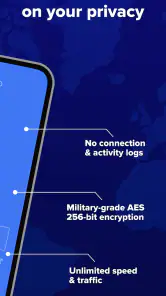
- Offers encryption that helps protect data on public Wi‑Fi networks.
- Includes antivirus features for an added layer of mobile security.
- Supports multiple devices under a single subscription plan.
- Kill switch can help prevent traffic leaks if the VPN connection drops.
Cons
- Some advanced features require a paid subscription.
- Connection speeds may vary depending on server location and network load.
- The free experience may include limits or promotional interruptions.
- VPN use can increase battery consumption during extended sessions.
- Privacy-conscious users may want more detail about data handling practices.

- Category
- Tools
- Version
- 3.9.7











