Ultimate Cleaner Pro
- 9.99K
- 4.5
- Installs
- 10.00M
- Price
- Free

Screenshots
Analysis by Reviewed
I reached for a cleaner after noticing how quickly a phone can feel cluttered: storage warnings appear at inconvenient moments, apps linger in the background, and battery life becomes harder to judge during a busy day. Ultimate Cleaner Pro is a free Android tools app from ChenTech, and its appeal is the promise of handling several routine maintenance jobs in one place. I’d treat it as a convenient way to review and tidy a device, not as a guaranteed fix for every slowdown.
When a quick tidy-up makes sense
I find a cleaner most useful when I can name the immediate problem. Perhaps I need room before saving a set of travel photos, or I want to check which apps might be affecting battery life before a long day away from an outlet. In those moments, an all-in-one tool can save me from hunting through several menus. It is less useful as a vague cure for a phone that “feels off,” because that feeling can have many causes.
A realistic routine might start on the way out the door: I notice the battery is lower than expected, open the battery feature, and review the apps it flags. I would keep essential navigation and messaging available, then use the phone normally and see whether that choice helps. Later, if storage is still tight, I would handle that as a separate task. Splitting the checks makes it easier to understand what changed and avoids removing files or interrupting apps without a clear reason.
A measured first pass, not a magic repair
Ultimate Cleaner Pro makes the most sense as a first pass for everyday maintenance. Its tools bring several familiar chores together, but the result depends on what is actually causing the trouble. Clearing temporary clutter may help when space is tight; it will not create lasting room if large personal videos are the real issue. Managing background apps may suit a short trip, but it can be inconvenient when those apps need to keep working.
That distinction helps set expectations. If the phone is consistently slow, I would check whether one particular app is the culprit and use Android’s own controls to investigate before repeating a general cleanup. If battery life has changed sharply, I would look at the system battery page too. A cleaner can make the first step easier, but a targeted diagnosis is often the better next step.
Starting with a practical cleanup
The first useful step is to decide what is actually bothering you. If the problem is low storage, start with the junk-file tool; if the phone feels unresponsive, try the speed option; if you are away from a charger, look at the battery feature. This order matters: it gives you a clearer sense of which action helped, instead of tapping every tool at once and guessing afterward.
That distinction is also why I would not run a cleaner automatically whenever the phone feels warm or slow. A temporary slowdown can come from ordinary app activity, and closing background apps may interrupt something you meant to keep running. I use these tools deliberately, then check whether the original problem has actually changed.
More From Our News Desk

Weather by Xiaomi Review: Clear at a Glance, Less Clear Up Close

X Under Pressure: Can It Recover When Posting Goes Wrong?

Clash of Clans Is Won Between the Battles

Android Auto Makes the Case for Quieter Car Software

MobiOffice: Transforming Mobile Productivity with Seamless Integration

EA SPORTS FC™ Mobile Soccer: Redefining Mobile Sports Gaming
First Impressions and Features
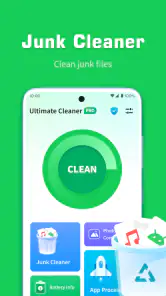
Diving into Ultimate Cleaner Pro, the first thing that struck me was how user-friendly it is. The interface is clean, pun intended, and intuitive. You don’t need to be a tech wizard to navigate through the options. It’s all laid out in a way that just makes sense. The app boasts a plethora of features, but let’s talk about the ones that really caught my eye.
Speed Booster
This feature is like a shot of espresso for your phone. With just a tap, it clears out background apps and optimizes your system’s performance. I noticed an immediate improvement in how snappy my phone responded. It's like having a personal trainer for your device, pushing it to its limits and beyond.
For a more useful before-and-after check, I’d open the same couple of apps before and after using the booster, rather than relying only on the feeling that the phone is faster. There is a trade-off here: closing background apps can mean reopening them or losing their place, and a speed boost is not the same as fixing a weak connection, an aging battery, or an app that is misbehaving. If a problem keeps returning, I would investigate the specific app or use Android’s built-in settings instead of repeatedly clearing everything.
Junk File Cleaner
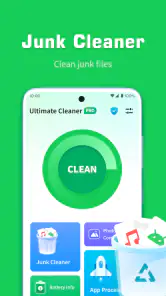
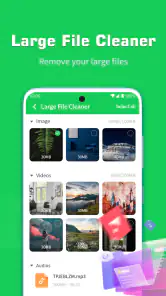
If your phone is anything like mine, it’s probably got a stash of forgotten files and cached data that are just taking up space. The Junk File Cleaner swoops in to save the day, clearing out the cobwebs and making room for more important stuff. After running this feature, I was surprised at the amount of space I reclaimed. It’s like finding a hidden storage room in your house!
My practical advice is to review what is marked for cleanup before confirming a deletion, especially if you are trying to make room for a trip, a system update, or a large batch of photos. Cached material may be recreated later, so a cleanup can free space without being a permanent solution to a phone that is simply full. If your storage is dominated by videos or downloads you recognize, sorting those yourself is usually more precise than expecting a cleaner to solve the whole problem.
Battery Saver
Now, this is a feature I didn’t know I needed until I had it. The Battery Saver analyzes apps that are draining your battery and helps manage them to extend your device's uptime. I tested it on a particularly hectic day, and I noticed my battery lasted noticeably longer. It’s like having an energy drink that keeps your phone going.
For a real-world routine, I’d check this before leaving home for a long day, then decide whether the suggested app management is worth the convenience cost. A navigation, messaging, or work app may need to stay active even if it uses more power. When I need a careful explanation of battery use, Android’s own battery settings are the better second stop; this feature is more useful as a quick prompt to notice potential drains than as a substitute for choosing which apps matter.
How it fits alongside Android’s own tools
Compared with the usual alternatives, this app’s advantage is having cleanup, background-app management, and battery attention together rather than sending me through several settings screens. Android’s built-in storage and battery pages can be more direct when I want to inspect a particular app, while manual photo and download cleanup offers more control over personal files. I see Ultimate Cleaner Pro as the convenient first pass, with those native tools as the more precise follow-up when a problem needs diagnosis.
That makes it a better fit for someone who wants a simple, occasional maintenance routine than for a person who enjoys managing every app and file individually. It is also sensible to avoid treating repeated cleaning as a performance plan: if a phone remains slow after a tidy-up, checking free storage, updating or removing a troublesome app, and reviewing device settings are more useful next steps than tapping the booster again.
Who should try it, and what to expect
ChenTech’s app has an average rating of 4.5 from around 114,000 ratings, with over 10 million installs. It is free, rated for Everyone, and its current version is 1.3.3; Android 6.0 is the minimum requirement. Those details make it accessible to many Android users, but they do not change the main decision: whether you want a bundled set of quick maintenance tools or prefer to handle each task in the system settings.
I’d recommend trying it if storage clutter and background activity are recurring annoyances and you want one place to start. I’d skip it if you are already comfortable using Android’s built-in controls, need a detailed explanation of every file before removing it, or expect an app to repair hardware wear. A helpful way to judge it is to choose one everyday problem, use the matching tool, and see whether the result lasts through your normal routine.
Small habits that make the tools more useful
I would avoid turning a quick cleanup into a daily ritual. Before pressing a broad cleanup option, I’d first note what I need the phone to do that day: keep a work app active, preserve offline maps, or leave room for new pictures. This turns the app from a button I tap out of habit into a set of choices with a clear purpose. If nothing is bothering me, there is little value in interrupting apps or clearing data simply because the tool is available.
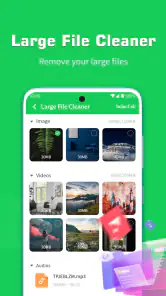
For storage, I’d also separate temporary clutter from files I recognize. A useful sequence is to review the cleaner’s suggestions, remove only what I am comfortable losing, then check Android storage to see whether the biggest space users are still personal media or downloads. That second look prevents a common disappointment: expecting a cleanup to solve a nearly full device when the space is occupied by files I actually want to keep. In that case, organizing or moving those files is the more direct fix.
Who benefits most from the bundled approach
The strongest match is someone who wants a straightforward starting point and does not enjoy navigating settings for every small maintenance task. A less technical family member, for example, may prefer seeing a few clearly separated actions rather than learning where Android places storage and battery controls. I would still show them how to review a cleanup before confirming it, because convenience should not mean deleting without thought.
On the other hand, people who already know how to inspect individual apps may find the native settings more informative. They can see which app is using storage or power and make a narrower change, instead of applying a general action. Ultimate Cleaner Pro is less compelling for someone who wants detailed diagnostics, fine-grained control, or a guarantee that a particular performance problem will disappear. Its value is convenience, not a replacement for understanding the device.
What to do when a cleanup does not stick
If free space returns only briefly, I would treat that as a clue rather than a reason to clean more aggressively. Temporary files can build up again through ordinary use, and large downloads, videos, or app data may be the real source of pressure. I’d look at the storage breakdown in Android and decide whether there is a specific file or app I can manage. This is a more reliable handoff than repeating the same cleanup and hoping for a lasting change.
If the phone still feels sluggish after the speed option, I’d test whether the delay happens in one app or everywhere. A problem limited to one app calls for checking that app, while a broader slowdown may make free space and system settings worth reviewing. Likewise, if a battery concern continues, compare the cleaner’s suggestions with Android’s battery page and keep the apps that are important to your routine. These checks help avoid sacrificing useful background functions for a change that may not address the cause.
My Final Thoughts
After spending some quality time with Ultimate Cleaner Pro, I can confidently say it’s a must-have for anyone looking to breathe new life into their device. Whether you’re trying to squeeze out more battery life, speed up your phone, or just declutter, this app has got your back. It’s like having a Swiss army knife of cleaning tools right in your pocket. So if you’re tired of your phone feeling like it’s stuck in the mud, give Ultimate Cleaner Pro a shot and watch as it transforms your device into a well-oiled machine.
My recommendation after weighing the trade-offs
I’d describe this as a convenient maintenance companion rather than an essential system upgrade. Its appeal is that it gathers several common tasks in one place, and its free price makes it easy to consider if you want a simple first pass. The app was released on August 1, 2023, and its current version is 1.3.3, but what matters more in daily use is whether its quick tools fit your habits and whether you are comfortable reviewing their actions.
If you want a low-effort way to check storage clutter, background activity, and battery concerns, I think it is worth trying. If you want exact explanations, selective file handling, or a diagnosis of persistent lag, Android’s own settings and manual cleanup are better choices. I would start with one clearly defined need, check the outcome, and keep only the habits that genuinely help. That is the most sensible way to get value from Ultimate Cleaner Pro without expecting a cleaner to solve problems it cannot control.
Ultimate Cleaner Pro Frequently Asked Questions
What does Ultimate Cleaner Pro offer, and who might find it useful?
Ultimate Cleaner Pro is a phone-cleaning app in the Tools category, aimed at people who want help managing their device. Its store summary describes it as “Your phone cleaning expert,” and its short description is “Ultimate Cleaner.” If you are looking for a utility focused on cleaning and maintenance, those descriptions give you a quick sense of its intended purpose before you install it.
Who develops Ultimate Cleaner Pro, and is it free to download?
Ultimate Cleaner Pro is a tools app developed by ChenTech, and it is free to download. Its store description calls it “Ultimate Cleaner,” while its summary presents it as “Your phone cleaning expert.” That gives you a quick sense of its purpose before installing: it is aimed at people who want cleaning and maintenance tools on their phone.
What devices can install Ultimate Cleaner Pro?
The listed minimum operating system is Android 6.0, so check your Android version before downloading. The app is rated Everyone, which indicates its content rating is suitable for a general audience. If your device meets the minimum requirement, you can consider trying it and then decide whether its cleaning tools fit the way you manage storage and device performance.
What is Ultimate Cleaner Pro and how does it work?
Ultimate Cleaner Pro is a powerful application designed to optimize and improve the performance of your smartphone. It works by cleaning junk files, managing storage, and boosting RAM, which helps speed up your device. The app scans your phone for unnecessary files and provides options for removal or management, thereby ensuring efficient and smoother operation.
Is Ultimate Cleaner Pro safe to use on my device?
Yes, Ultimate Cleaner Pro is safe to use on both Android and iOS devices. It has been thoroughly tested for compatibility and reliability, ensuring that it doesn't harm your device's software or hardware. The app only removes files that are deemed unnecessary, and it provides options for users to review items before deletion, enhancing its safety features.
Pros
- Intuitive user interface design
- Efficient junk file removal
- Boosts device performance
- Saves battery life
- Supports multiple languages
Cons
- Contains in-app ads
- Requires regular updates
- May drain battery on low-end devices
- Limited free features
- Occasional false positive detections
- Category
- Tools
- Version
- 1.3.3








