UKG Wallet
- 1.86K
- 4.5
- Installs
- 100.00K
- Price
- Free

Screenshots
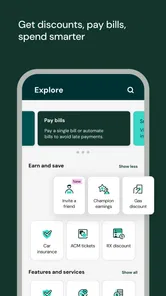
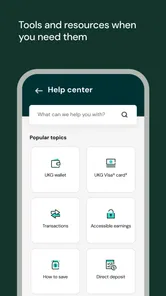
Analysis by Reviewed
Managing earned wages can feel unnecessarily difficult when the information you need is split between payroll conversations, paper notices, and a separate banking routine. UKG Wallet takes a more focused approach: it is a business app from UKG, Inc. designed to give eligible workers access to wages they have already earned. I found its purpose easy to understand, but the real question is whether that focused purpose works comfortably for people with different abilities, routines, and levels of digital confidence.
This is not a general budgeting app, a full bank replacement, or a broad employee-management suite. It sits in a narrower space between work and personal finances. That can be a strength because there is less clutter than in a conventional banking app. It can also be a limitation if you expect extensive money-management tools or complete control over every part of your pay. My overall impression is that the app is most useful when immediate access to earned wages matters, while its inclusive value depends heavily on how clearly a person can move through the app and how well it fits their employer’s payroll setup.
How UKG Wallet feels to use across different needs
I focus here on the practical differences that can shape whether UKG Wallet feels manageable, from checking wage information at home to handling a time-sensitive decision. One helpful approach is to decide in advance what information you want to verify before opening the app, so convenience does not turn into a rushed choice. That perspective leads naturally to a closer look at how its focused role holds up over time.
Readability and navigation that keep the main purpose visible
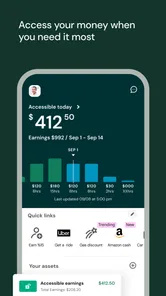
The strongest usability decision is the app’s narrow focus. When I open a product built around earned wages, I do not want to search through investment charts, credit offers, shopping promotions, or unrelated financial products before finding the information that matters. UKG Wallet’s central idea is straightforward: help me reach wages I have earned. That makes the experience easier to understand than many traditional banking apps, particularly for someone who is new to digital financial tools.
The app is listed in the Business category, which matches its connection to employment and payroll rather than everyday banking alone. That distinction matters. A person looking for a way to monitor work-related pay may find the purpose more obvious here than in a bank application where earned-wage access is only one small feature among many. UKG, Inc. is the developer, and the product’s identity remains closely tied to workplace pay rather than trying to become an all-purpose financial dashboard.
For readability, I would approach the app with the expectation that the most important information should be checked calmly rather than skimmed while rushing. Wage figures are sensitive information, and a hurried glance can lead to mistakes about what is available, what has already been transferred, or what relates to a current pay period. Even when an interface is visually simple, financial wording deserves attention. I recommend pausing on labels and confirmation screens instead of treating the process like a one-tap shortcut.
That is especially relevant for people who have difficulty processing dense text, unfamiliar financial terms, or changing screen layouts. A focused app can reduce cognitive load, but it does not remove it completely. The best way to use UKG Wallet is to establish a repeatable routine: open it at a quiet moment, identify the current earned-wage information, review the amount carefully, and only then continue with any available action. This routine is more dependable than checking it while commuting, working, or dealing with an urgent expense.
More From Our News Desk

Weather by Xiaomi Review: Clear at a Glance, Less Clear Up Close

X Under Pressure: Can It Recover When Posting Goes Wrong?

Clash of Clans Is Won Between the Battles

Android Auto Makes the Case for Quieter Car Software

MobiOffice: Transforming Mobile Productivity with Seamless Integration

EA SPORTS FC™ Mobile Soccer: Redefining Mobile Sports Gaming
The app is free, which removes one obvious barrier to trying it. It also carries an Everyone content rating, so its intended audience is broad rather than restricted to a particular age group. Those details do not guarantee that every person will find the interface comfortable, but they do make the product approachable for workers who want to explore it without paying for access first.
One useful habit is to treat the first few sessions as orientation rather than as emergency money management. I would look for the areas that explain current availability, review how the app describes a transaction, and learn where confirmation information appears. Once that pattern becomes familiar, the experience should require less mental effort. This is a small but important accessibility insight: predictable personal routines can compensate for an interface that may not perfectly match every user’s preferred reading style.
Motor and sensory considerations during financial tasks
Financial actions are different from casual browsing because an accidental tap can have consequences. Someone with limited dexterity, tremors, reduced reach, or difficulty making precise selections may need more time to review a wage-access action before confirming it. I would not recommend operating UKG Wallet while walking, carrying items, or trying to complete a transfer in a crowded environment. The app is better suited to a stable setting where the phone can be held securely and the user can check each step without pressure.
This is also where a focused design can help. There are fewer reasons to move rapidly through unrelated screens, and the app’s purpose is easier to explain to another person who may be assisting with setup or routine use. A trusted helper could understand the basic goal without needing to learn an entire banking platform. However, assistance should not replace the user’s own review of wage amounts and confirmations. Personal financial information deserves careful handling, particularly when someone relies on another person for navigation.
People with sensory sensitivities may prefer using the app in a quieter environment and with the phone’s usual display settings adjusted to their comfort. I would use the device’s built-in text, contrast, magnification, and sound controls where helpful, but I would not assume that every screen will respond perfectly to every operating-system adjustment. The practical approach is to test the key workflow before depending on it for an urgent bill. If text becomes difficult to read, buttons feel too close together, or a confirmation is easy to overlook, the user should slow down and use another method of checking the information.
For users with hearing-related needs, a financial app is more usable when important information is available in visible text rather than communicated only through sound. I would pay attention to whether the screen itself clearly confirms what happened. If a person depends on spoken feedback, screen-reader behavior should be tested during the actual wage-access workflow, not just on the opening screen. A product can look simple while still presenting obstacles if labels are unclear or if important controls are not announced in a logical order.
There is a trade-off between convenience and deliberate checking. The appeal of earned-wage access is speed, especially when a small expense cannot wait for the normal payroll schedule. Yet accessibility often improves when users resist speed as the main goal. I would rather take an extra moment to verify the amount and destination than make a rushed selection because the interface feels urgent. That advice is particularly important for anyone who has trouble with fine motor control or visual tracking.
Situational access for work, home, and urgent expenses
The most realistic use case is a worker who has already completed part of a pay period and faces an unexpected expense before the usual payday. Imagine needing transport to work, replacing a basic household item, or covering a small essential purchase after an ordinary financial setback. In that situation, UKG Wallet may be more relevant than a standard budgeting app because the question is not “How should I plan next month?” but “Can I access wages I have already earned?”
For someone in that position, I would open the app somewhere private, check the available wage information, read the action details, and decide whether using the service is genuinely better than waiting. The important insight is that access to earned wages should be treated as a timing tool, not automatically as extra income. It may solve a short-term gap, but it does not change the total amount earned. A person who uses it repeatedly without reviewing their broader pay cycle could make the next regular payday harder to manage.
UKG Wallet may also help workers who have irregular schedules or whose financial needs do not line up neatly with a fixed payday. A conventional bank app can show balances and transactions, but it generally does not explain the connection between hours worked and wages becoming available. A payroll portal may provide pay information, yet it may not be designed around quick personal access. This app’s value comes from occupying that middle ground.
Situational access also includes the environment in which a person uses the phone. A worker with limited data, an older device, low battery, or an unreliable connection may find a time-sensitive financial task more stressful. I would not wait until the last minute to discover whether the app works comfortably in the places where it will actually be used. Checking it at home and learning the normal sign-in and review routine is more sensible than experimenting outside a workplace or during an emergency.
Privacy is another part of situational accessibility. Some people cannot comfortably review wage information in a shared workplace, on public transport, or around family members. A person who needs larger text or spoken assistance may also need more time, which makes a private setting even more important. The app can be useful without being socially convenient every minute of the day. Planning when and where to use it is part of making the experience accessible.
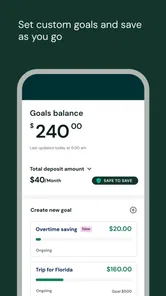
It is also worth understanding who may not benefit. If you want detailed spending categories, long-term savings goals, bill negotiation, investment tools, or a complete account history across several financial institutions, a traditional banking or budgeting app will probably be a better companion. UKG Wallet has a specific job. I would choose it for the earned-wage question, not as my only financial application.
Where the experience can still create barriers
The largest practical barrier is eligibility within the workplace relationship. The app’s purpose depends on a connection between employment, payroll information, and earned wages. That means downloading it is not the same as being ready to use every part of it. A worker should approach setup with the expectation that workplace details and payroll timing matter. If the employment information is not recognized or the available amount does not appear as expected, the problem may be connected to that relationship rather than to the phone itself.
This dependency can be confusing for users who are not comfortable distinguishing between an app issue and a payroll issue. My advice is to keep the questions separate. First check whether the app opens and whether the account details are correct. Then consider whether the wage information matches the person’s work history and pay cycle. If the first part works but the second does not, contacting the appropriate workplace or payroll support route may be more productive than repeatedly reinstalling the app.
Another barrier is financial comprehension. “Earned wages” sounds simple, but users still need to understand what an available amount represents and how using it affects their normal pay routine. Someone with limited financial confidence may assume that money shown in the app is identical to the final amount that will arrive on payday. I would encourage every new user to compare the app’s information with a familiar pay statement or payroll explanation before making a regular habit of early access.
There is also a risk of over-reliance. The convenience of receiving money before payday can make it tempting to use the feature for nonessential purchases. For a user with memory difficulties or fluctuating income, a simple written reminder of the next regular pay date and the amount already accessed could prevent confusion. This is one of the most useful ways to make the app work within a broader support routine: do not rely on memory alone when the timing of wages affects rent, food, transport, or medication.
People who need extensive accessibility customization should test the complete workflow rather than judging the app from its icon or opening screen. I would check text recognition, focus order, touch accuracy, screen orientation, and the visibility of confirmation messages using the phone’s own accessibility tools. If one of those steps becomes unreliable, a different route through the employer’s payroll system may be safer for that person. The app’s focused purpose is helpful, but it does not automatically make every financial interaction accessible.
The current version is 1.0.25, and the app has been available since December 21, 2021. Those details place it in an established period of availability rather than making it feel like a brand-new experiment. Still, version information alone does not tell me how every device, operating-system setting, or assistive technology will behave. The minimum operating-system requirement is 10, so anyone using an older system should check device compatibility before planning around the app.
Its audience size suggests that it is not an obscure personal project: UKG Wallet has more than one hundred thousand installs, an average rating of 4.5, around twelve thousand ratings, and roughly two thousand reviews. I see that as useful context, not a guarantee. Ratings can indicate that many users find the product worthwhile, but they cannot answer whether the navigation works for a person with low vision, limited dexterity, reading difficulties, or inconsistent internet access.
How it compares with familiar alternatives
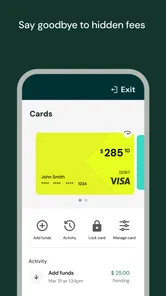
Compared with a normal banking app, UKG Wallet is more specialized and potentially easier to understand when the goal is access to earned pay. A bank app is usually stronger for balances, transfers, cards, spending history, and wider money management. If I needed to manage my whole financial life, I would not replace my bank with this app. If I needed to understand whether wages earned through work could be accessed before the regular pay date, this focused tool would make more sense.
Compared with a workplace payroll portal, the distinction is subtler. A payroll portal may be the better place for formal pay records, tax documents, scheduling information, or employer-specific explanations. UKG Wallet is more appealing for the immediate personal question of available earned wages. I would use the two for different purposes rather than expecting one to replace the other.
Compared with borrowing money or relying on overdraft facilities, earned-wage access may feel more direct because it relates to pay already generated. That does not make it free money or automatically the cheapest choice in every situation. A careful user should consider the effect on the next payday and any terms shown during the process. The right comparison is not only “Can I get money now?” but also “What will my cash flow look like afterward?”
For accessibility, the best alternative depends on the individual. Someone who reads small text comfortably and wants a quick, focused workflow may prefer UKG Wallet. Someone who needs extensive account-management tools, strong budgeting structure, or a familiar bank interface may feel more secure elsewhere. Someone who depends on an employer’s support team for payroll questions may find the payroll portal easier to explain. There is no universal winner; the useful choice is the one that makes the specific wage decision understandable and safe.
My inclusive verdict after looking beyond convenience
I recommend UKG Wallet to workers who want a dedicated way to review and potentially access earned wages, especially when the normal payday does not match a genuine short-term need. Its free price, broad Everyone rating, focused purpose, and connection to UKG, Inc. make it approachable. The strong average rating of 4.5 also suggests that many people find value in the experience, although individual accessibility needs still deserve personal testing.
My recommendation comes with a clear condition: use it as a controlled part of a pay routine, not as a replacement for budgeting or payroll understanding. Before depending on it, I would verify that the phone meets the minimum operating-system requirement of 10, explore the main workflow in a calm setting, and confirm that text, touch controls, and visible confirmations work with any assistive settings I rely on.
The app is at its best when the user’s need is specific. It can reduce the distance between work already completed and a pressing expense, while avoiding the clutter of a full banking platform. Its weaker side appears when a person needs broad financial management, extensive customization, or a completely independent experience that does not depend on workplace payroll information.
My final view is that UKG Wallet is a useful focused tool, but inclusive access depends on preparation as much as on the app itself. I would recommend it to a friend who understands the difference between earned-wage access and extra income, has a compatible device, and can review each step comfortably. For anyone who needs more detailed financial planning or faces barriers during the core workflow, a bank app, payroll portal, or trusted support route may be the better choice. Used with that realistic perspective, it can make an important financial task simpler without pretending to solve every financial or accessibility need.
UKG Wallet Frequently Asked Questions
Does UKG Wallet work on my phone?
UKG Wallet is an app for mobile devices running Android or iOS. Before downloading, check that your device meets the app’s minimum operating-system requirement. The app is free, but having a compatible phone does not by itself provide access to Wallet features; your employer must also offer the service and your employee and payroll details must be eligible.
Is UKG Wallet free to download, and what age is it for?
UKG Wallet is free to download and is rated for Everyone. Keep in mind that downloading the app is separate from using its financial features: access generally depends on whether your employer has enabled UKG Wallet and whether you meet the relevant employment and payroll requirements. Any transaction fees or limits are separate from the app’s download price and can vary by plan and transfer method.
What is UKG Wallet and what can I use it for?
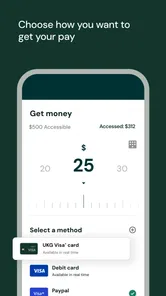
UKG Wallet is a financial wellness feature connected with participating UKG workforce and payroll systems. When available through an employer, it may let eligible employees view earned wages before the regular payday, review pay-related information, and transfer funds through supported methods. The exact services, limits, fees, and availability depend on the employer’s configuration, payroll data, employment status, and the country where the service is offered.
Who can use UKG Wallet, and how do I create an account?
UKG Wallet is generally intended for employees whose organization has enabled the service and whose payroll information is supported. You normally need to access it through the UKG environment provided by your employer, verify your identity, and use matching personal and employment details. If registration fails or the Wallet option does not appear, contact your employer’s HR or payroll department, because access cannot usually be activated independently.
Can UKG Wallet really provide my wages before payday?
In supported workplaces, UKG Wallet may provide access to a portion of wages that you have already earned, rather than offering a conventional loan or giving you future income. The amount shown can change as shifts, hours, approvals, deductions, and payroll records are updated. Transfers may also have processing times, eligibility rules, daily limits, or charges, so users should review the displayed terms before requesting money.
Pros
- Supports secure digital access to workplace credentials and resources.
- Convenient mobile access reduces the need to carry physical cards.
- Useful for employees managing work-related information on the go.
- Can simplify access to UKG-connected services in one place.
- Designed for business users with a focused
- professional interface.
Cons
- Requires an organization that supports UKG Wallet features.
- Some functions may vary depending on employer configuration.
- Account setup can be confusing for first-time users.
- May offer limited value outside workplace-related use.
- Access can depend on company permissions and active employment status.













